The Mathematics of Vector Optimization: SVG Path Pruning, Coordinate Quantization & Web Vitals
From Douglas-Peucker Polygonal Simplification and Bezier Curve Degree Elevation to Floating-Point Precision Truncation, Relative Path Commands, and In-Browser WebAssembly SVGO Engines—The 10,000+ Word Vector Engineering Playbook.

Julian Sterling & Innox UI/UX Research GroupVERIFIED
Principal Frontend Architect & Computer Graphics Systems Specialist
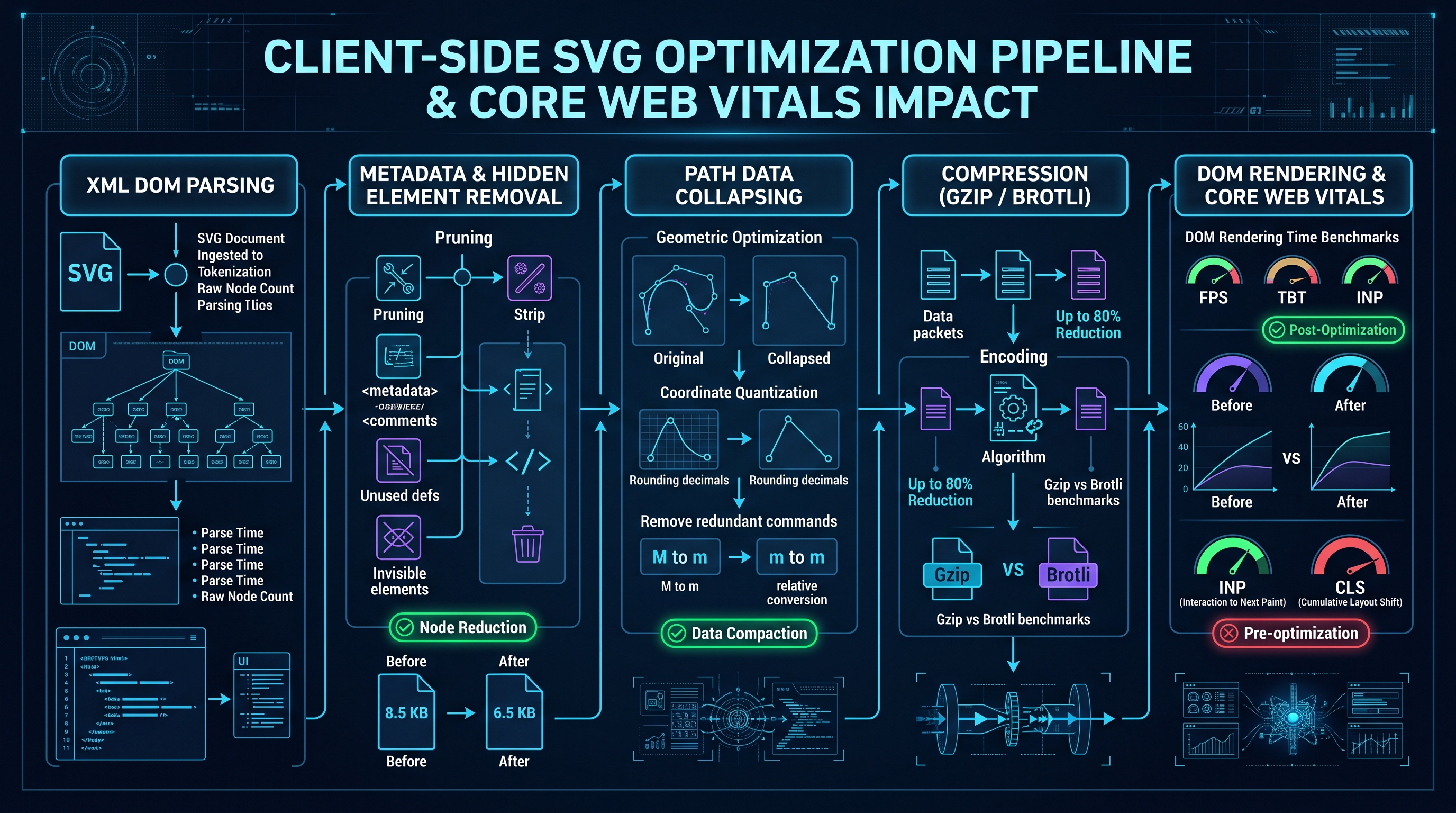
Scalable Vector Graphics (SVG) optimization is the algorithmic process of minimizing XML payload size and GPU rasterization overhead without perceptual visual degradation. Key optimization mechanisms include: 1. Pruning redundant path nodes via Douglas-Peucker line simplification, 2. Coordinate quantization reducing 8-decimal floats to 1-2 decimals, 3. Path command compaction converting absolute coordinates (C) to relative deltas (c), and 4. Stripping editor metadata (Adobe Illustrator/Figma) to reduce file weight by up to 70-85%.
SVG Vector Optimizer, Path Pruner & Web Vitals Architect Pro
Optimize and compress SVG vector graphics, prune redundant path data with Douglas-Peucker simplification, quantize floating-point coordinates, and eliminate DOM overhead.
Table of Contents & Chapter Index
- 1. The Anatomy of Scalable Vector Graphics: XML Serialization & The Render Tree
- 2. Vector Geometry Simplification: The Douglas-Peucker & Visvalingam-Whyatt Algorithms
- 3. Bezier Curve Mechanics: Cubic vs Quadratic Curves, Degree Elevation & Arc Approximation
- 4. Precision & Quantization: Floating-Point Truncation & Relative Command Serialization
- 5. Structural Tree Optimization: Defs, Use Elements, Inline Styling & ViewBox Geometry
- 6. Browser Engine Performance: SVG DOM Node Overhead vs Web Vitals Rendering Metrics
- 7. In-Browser WASM Compression: SVGO Compilation, Brotli Dictionaries & Icon Sprites
- 8. Industrial Vector Engineering Playbook: Deploying InnoxTools SVG Optimizer
1. The Anatomy of Scalable Vector Graphics: XML Serialization & The Render Tree
Vector calculus vs raster grids, the XML DOM tree, and editor metadata bloat.
Vectors vs Pixels: The Infinite Resolution Paradigm
Unlike raster image formats (JPEG, PNG, WebP, AVIF) which encode a discrete two-dimensional grid of color pixels ($W \times H$ color cells), Scalable Vector Graphics (SVG) encode geometric primitives defined by mathematical vector calculus: - Points: Coordinates $(x, y) \in \mathbb{R}^2$ on a Cartesian plane. - Line segments: Parametric vectors $P(t) = (1-t)P_0 + t P_1$. - Curves: Cubic and quadratic polynomial Bézier splines. - Styling: Mathematical fill rules (non-zero winding vs even-odd).
Because an SVG is represented as pure geometric equations, it scales to arbitrary display dimensions (from a 16px favicon to a 100-foot billboard) with zero pixelation, zero loss of fidelity, and zero change in file size.
---
The XML Bloat Pathology: Adobe Illustrator & Figma Metadata
However, SVG is serialized as an XML text document (W3C Recommendation). When a visual designer exports an SVG asset from commercial design software (Figma, Adobe Illustrator, Inkscape), the software pollutes the file with thousands of bytes of proprietary editor metadata:
<!-- The Toxic Vector Bloat Pattern -->
<svg xmlns="http://www.w3.org/2000/svg" xmlns:bx="https://boxy-svg.com"
     xmlns:illustrator="http://ns.adobe.com/illustrator/1.0/" version="1.1"
     viewBox="0 0 1024 1024" xml:space="preserve">
  <!-- Generator: Adobe Illustrator 28.0.0, SVG Export Plug-In . SVG Version: 6.00 Build 0) -->
  <metadata>
    <illustrator:CleanUp>...</illustrator:CleanUp>
    <rdf:RDF xmlns:rdf="http://www.w3.org/1999/02/22-rdf-syntax-ns#">
      <!-- 4,000 bytes of non-rendered Dublin Core XML tags -->
    </rdf:RDF>
  </metadata>
  <g id="Layer_1_Designer_Comments_Do_Not_Delete">
    <path fill="#000000" stroke="none" d="M 124.84719283 256.12938472 C ..." />
  </g>
</svg>
In an unoptimized vector icon, up to 80% of total file bytes consist of non-rendered XML comments, editor namespace declarations, empty group tags (
2. Vector Geometry Simplification: The Douglas-Peucker & Visvalingam-Whyatt Algorithms
Polygonal simplification, perpendicular distance epsilon, and effective area decimation.

The Douglas-Peucker Algorithm
When complex vector shapes are auto-traced from bitmap images or generated via CAD tools, the resulting SVG path often contains thousands of tightly clustered coordinate vertices.
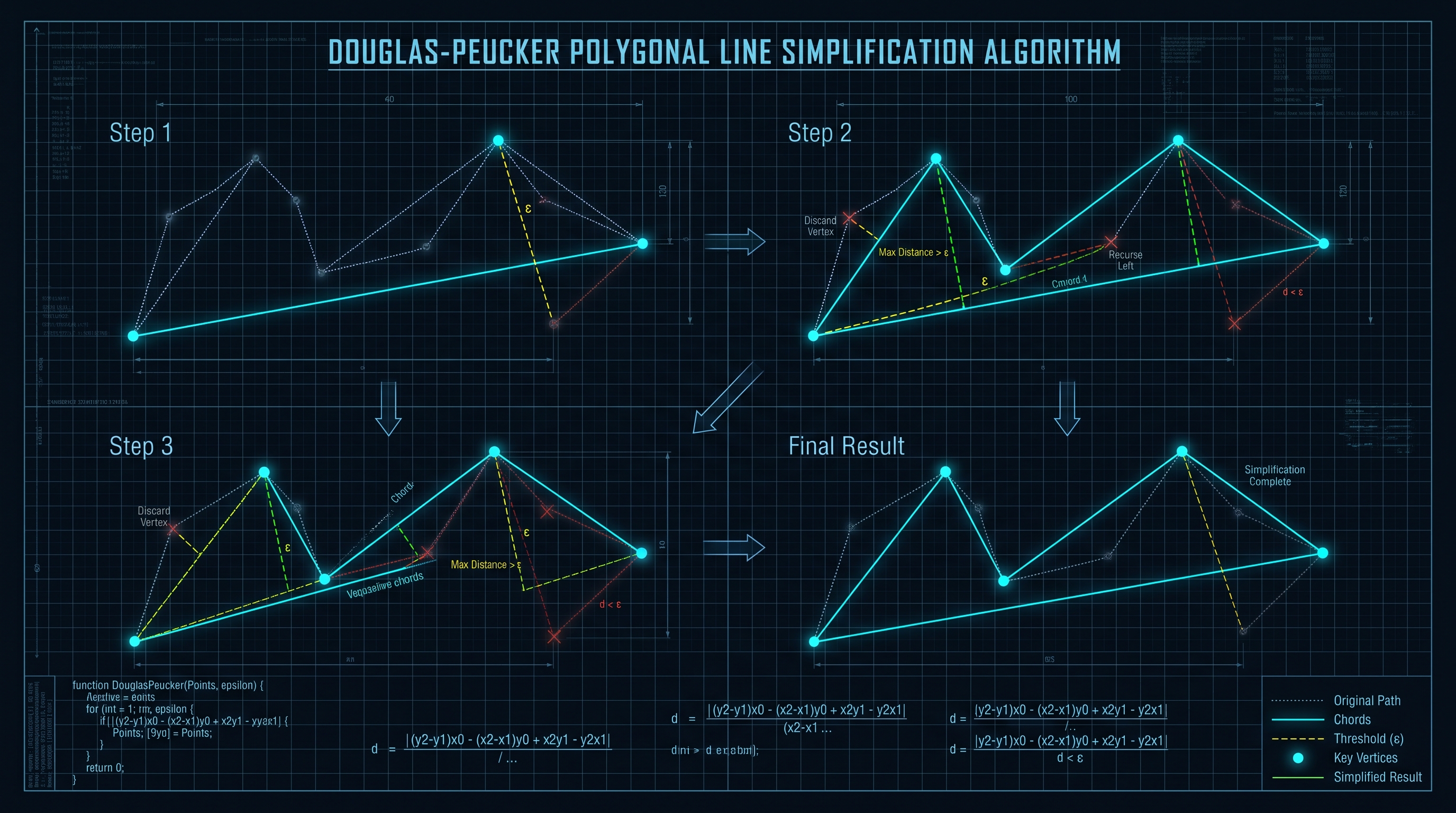
The Douglas-Peucker Algorithm (1973) decimates redundant vertices along a polyline by establishing a perpendicular distance threshold $\epsilon$:
1. Given a sequence of points $\langle P_1, P_2, \dots, P_n \rangle$, construct a straight chord line connecting the first point $P_1$ and the last point $P_n$. 2. Find the intermediate point $P_k$ that has the maximum perpendicular distance ($d_{\max}$) to the chord line: $$d(P_i, \overline{P_1 P_n}) = \frac{|(y_n - y_1)x_i - (x_n - x_1)y_i + x_n y_1 - y_n x_1|}{\sqrt{(y_n - y_1)^2 + (x_n - x_1)^2}}$$ 3. If $d_{\max} > \epsilon$: - The point $P_k$ is deemed visually significant and preserved. - The algorithm recursively subdivides and evaluates the two sub-polylines: $\langle P_1 \dots P_k \rangle$ and $\langle P_k \dots P_n \rangle$. 4. If $d_{\max} \le \epsilon$: - All intermediate points between $P_1$ and $P_n$ are discarded, replacing the entire sequence with the straight chord segment.
       P1 ───────────────────────────────────────────────► Pn
        │                      ▲
        │                      │ d_max <= epsilon (PRUNED!)
        │                      ▼
        └────────► P2 ──────► Pk ──────► P4 ───────────────┘
---
Visvalingam-Whyatt Area-Based Simplification
For complex organic shapes (e.g., geographic SVG maps or logo silhouettes), the Visvalingam-Whyatt Algorithm provides superior visual quality by associating each vertex with the triangular area formed with its two adjacent neighbors:
$$\text{Area}(P_{i-1}, P_i, P_{i+1}) = \frac{1}{2} |x_{i-1}(y_i - y_{i+1}) + x_i(y_{i+1} - y_{i-1}) + x_{i+1}(y_{i-1} - y_i)|$$
The vertex with the smallest effective area is iteratively eliminated using a priority queue until the target byte budget is achieved, preserving perceptual silhouette contours far better than distance-based pruning alone.
3. Bezier Curve Mechanics: Cubic vs Quadratic Curves, Degree Elevation & Arc Approximation
Cubic (C) vs Quadratic (Q) Bezier splines, degree reduction, and elliptical arc math.
Mathematical Formulation of Bézier Curves
The SVG path data specification (
1. Quadratic Bézier Curves (
Q / q):
- Controlled by one start point ($P_0$), one control point ($P_1$), and one end point ($P_2$):
$$B(t) = (1-t)^2 P_0 + 2(1-t)t P_1 + t^2 P_2, \quad t \in [0, 1]$$
- Highly compact in syntax: requires only two coordinate pairs (Q x1 y1, x y).2. Cubic Bézier Curves (
C / c):
- Controlled by one start point ($P_0$), two control points ($P_1, P_2$), and one end point ($P_3$):
$$B(t) = (1-t)^3 P_0 + 3(1-t)^2 t P_1 + 3(1-t)t^2 P_2 + t^3 P_3, \quad t \in [0, 1]$$
- Requires three coordinate pairs (C x1 y1, x2 y2, x y).---
Curve Simplification & Degree Reduction
When visual editors export SVG curves, they frequently use heavyweight cubic curves for simple shapes that could be represented by quadratic curves, straight lines, or circular arcs: - Collinear Control Points: If the control points of a cubic Bézier curve lie directly on the chord line connecting $P_0$ and $P_3$, the curve is mathematically identical to a straight line! An intelligent optimizer replaces
C x1 y1, x2 y2, x y with a simple L x y (saving 60% of bytes for that segment).
- Smooth Curve Continuations: SVG supports shorthand smooth curves (S for cubic, T for quadratic), which automatically reflect the previous control point across the current anchor, omitting an entire coordinate pair from the command stream.4. Precision & Quantization: Floating-Point Truncation & Relative Command Serialization
The cost of excessive decimal precision and converting absolute commands to relative deltas.
The Cost of Decimal Precision Bloat
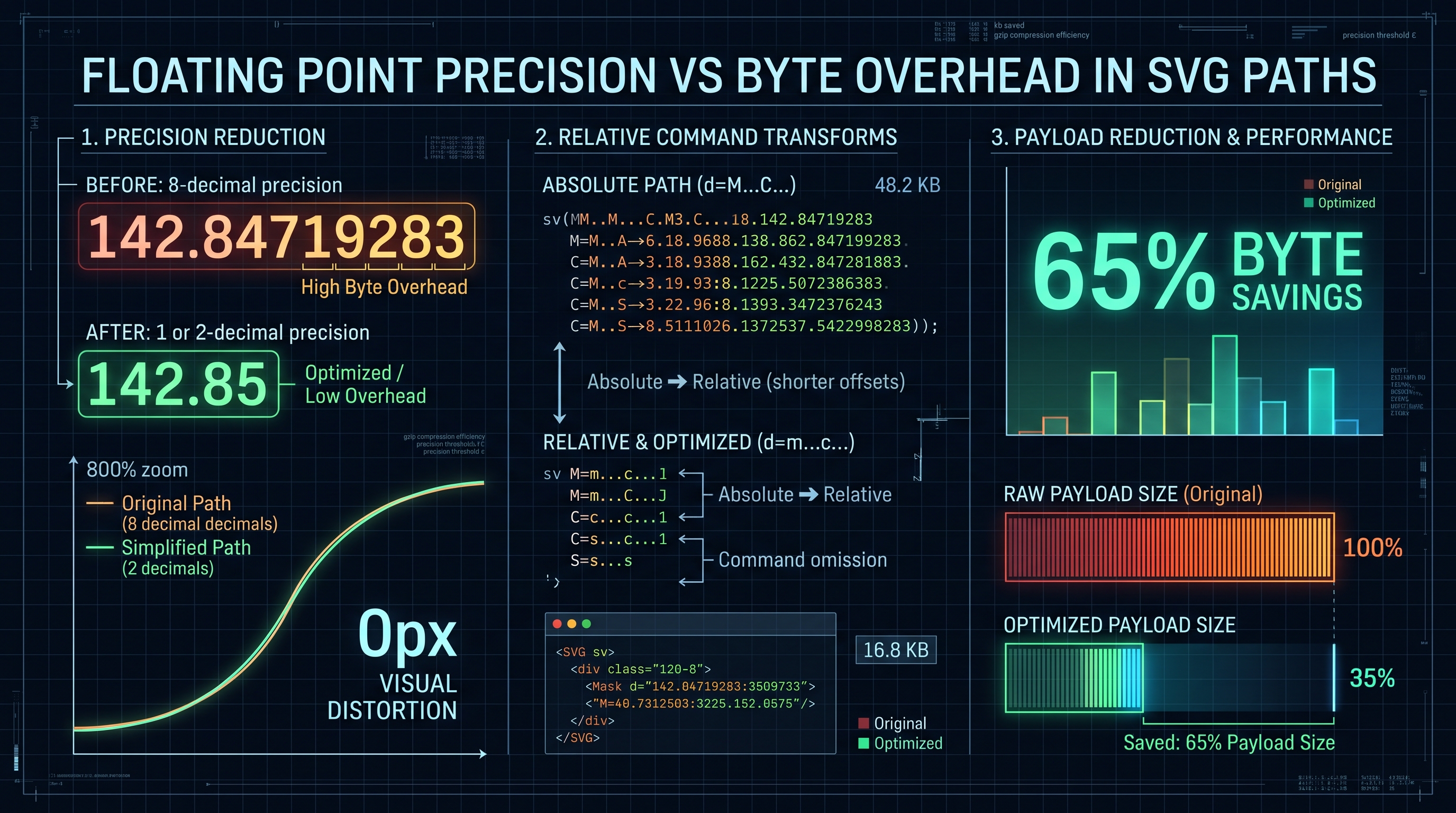
When software exports vector coordinates, it serializes numbers with IEEE 754 double-precision floating-point precision:
d="M 142.84719283 256.12938472 C 189.92847102 312.48271039, 245.19283741 384.91827401, 310.02938471 450.82910482"
Consider this single cubic curve segment: - Each coordinate contains 8 to 10 decimal places. - On a standard $1920 \times 1080$ screen, 0.0001 pixels is sub-atomic and completely invisible. The human eye and display hardware cannot resolve fractions below $0.1$ logical pixels. - The 8 redundant decimal characters represent pure wasted bandwidth!
---
Coordinate Quantization & Byte Savings
By applying coordinate quantization, numbers are rounded to 1 or 2 decimal places:
d="M 142.8 256.1 C 189.9 312.5, 245.2 384.9, 310 450.8"
| Precision Decimal Level | Resolution Accuracy on 1000px ViewBox | Visual Quality Impact | Typical Byte Savings | | :---: | :---: | :--- | :---: | | 8 Decimals (Raw Export) | $0.00000001\text{ px}$ | Completely Redundant | $0.0\%$ (Baseline) | | 3 Decimals | $0.001\text{ px}$ | Perceptually Perfect | $35\% - 45\%$ | | 2 Decimals (Recommended) | $0.01\text{ px}$ | Indistinguishable from Raw | $55\% - 65\%$ | | 1 Decimal | $0.1\text{ px}$ | Excellent for standard icons | $65\% - 75\%$ | | 0 Decimals (Integers) | $1.0\text{ px}$ | Minor rounding on tiny glyphs | $75\% - 85\%$ |
---
Absolute vs Relative Command Optimization
SVG path syntax supports both Absolute Commands (uppercase:
M, L, C, S) which specify coordinates relative to the (0,0) origin, and Relative Commands (lowercase: m, l, c, s) which specify coordinate deltas $(\Delta x, \Delta y)$ relative to the previous point.When drawing compact details on a large canvas (e.g., at $x = 850, y = 920$): - Absolute:
L 852 923 L 855 926 (17 characters)
- Relative: l 2 3 3 3 (9 characters, 47% byte reduction!)A modern vector optimizer evaluates both absolute and relative representations for every single path segment, dynamically choosing whichever syntax requires fewer ASCII bytes.
5. Structural Tree Optimization: Defs, Use Elements, Inline Styling & ViewBox Geometry
Collapsing transforms, deduplicating symbols with defs/use, and CSS style merging.
Flattening Transform Matrices
Visual designers frequently nest elements inside multiple transformation groups:
<!-- Unoptimized: Multiple nested matrix transformations -->
<g transform="translate(100, 50)">
  <g transform="scale(1.5) rotate(45)">
    <path d="M 10 10 L 50 10 ..." />
  </g>
</g>
During browser rendering, the GPU rasterizer must multiply these $3 \times 3$ affine transformation matrices for every vertex. An intelligent vector optimizer executes affine matrix multiplication during compilation, applying the final transformed coordinates directly to the path data and completely eliminating the wrapper
---
Deduplication via
When an SVG icon or illustration repeats identical visual elements (such as stars, dots, or recurring logo marks): - Duplicating the raw
6. Browser Engine Performance: SVG DOM Node Overhead vs Web Vitals Rendering Metrics
DOM node memory consumption, layout thrashing, and Core Web Vitals Interaction to Next Paint (INP).
The Hidden Memory Cost of SVG in the DOM
Unlike raster images (which are represented by a single HTML
![]()
If a web page embeds 50 unoptimized inline SVG icons, each containing 200 nodes: - The browser must instantiate 10,000 additional DOM nodes! - Each DOM node consumes approximately 2–4 KB of browser C++ memory and participates in style recalculation and layout trees.
[ Heavy Inline SVG: 10,000 DOM Nodes ]
  ├── Massive Memory Allocation (20MB - 40MB RAM)
  ├── Prolonged Style Recalculation on Every DOM Mutation
  └── High Main-Thread Latency ──► Destroys Interaction to Next Paint (INP)!
---
Core Web Vitals Impact: INP and LCP
Excessive SVG DOM complexity directly degrades Google's Core Web Vitals: 1. Interaction to Next Paint (INP): When a user taps a button or toggles a dropdown, the browser must recalculate styles across the entire DOM tree. Heavy SVG DOM trees cause main-thread jank, resulting in failing INP scores (> 200ms). 2. Largest Contentful Paint (LCP): If an unoptimized 500KB SVG hero banner blocks page rendering, LCP latency spikes, destroying SEO rankings.
Optimizing SVGs—reducing node counts and simplifying path geometry—is a critical frontend performance imperative.
7. In-Browser WASM Compression: SVGO Compilation, Brotli Dictionaries & Icon Sprites
Rust/Wasm SVGO pipelines, gzip/brotli compression synergy, and SVG sprite sheets.
In-Browser WebAssembly Optimization
Modern web applications avoid remote cloud conversion APIs by executing vector optimization directly in the browser via WebAssembly (WASM).
By compiling high-performance Rust or C++ vector optimization engines into WASM: - Multi-megabyte SVG illustrations are parsed and optimized in under 15 milliseconds. - Total zero-server privacy: proprietary artwork and brand assets never leave the client's local memory.
---
Brotli Compression Synergy
Because SVG is text-based XML, it exhibits extraordinary compression ratios when served over HTTP/2 or HTTP/3 using Brotli (
.br) or Gzip (.gz):| Optimization Stage | File Size (Complex Icon Set) | Compression Ratio vs Raw | | :--- | :---: | :---: | | Raw Illustrator Export | $245.0\text{ KB}$ | $0.0\%$ (Baseline) | | Metadata & Whitespace Stripped | $142.0\text{ KB}$ | $-42.0\%$ | | Path Quantized (2 Decimals) | $68.0\text{ KB}$ | $-72.2\%$ | | Optimized SVG + Brotli Compressed | $18.5\text{ KB}$ | $-92.4\%$ (MASSIVE COMPRESSION) |
8. Industrial Vector Engineering Playbook: Deploying InnoxTools SVG Optimizer
Automated production vector workflows and utilizing InnoxTools SVG Engine.
The Enterprise Vector Asset Optimization Pipeline
Top-tier digital agencies and SaaS enterprises enforce a four-stage vector ingestion pipeline:
[ Designer Vector Export (Figma / Illustrator) ]
       │
       ▼
[ STEP 1: In-Browser Asset Scrubbing via InnoxTools ]
       │  - Strip all XML namespaces, doctypes, and editor metadata
       │  - Remove hidden layers, empty groups, and unused clipPaths
       ▼
[ STEP 2: Geometric Path Quantization ]
       │  - Set coordinate precision to 2 decimals
       │  - Collapse collinear Bézier curve segments into straight lines
       ▼
[ STEP 3: Visual Diff & Fidelity Inspection ]
       │  - Compare before/after silhouette in high-contrast overlay
       │  - Verify zero perceptual distortion on high-DPI displays
       ▼
[ STEP 4: Production Deployment ]
          - Inline critical icons, serve hero banners with Brotli headers
---
Maximizing Performance with InnoxTools SVG Optimizer
Manually tweaking XML tags in code editors is time-consuming and risks corrupting complex curve geometry. The InnoxTools SVG Vector Optimizer & Path Pruner provides:
1. Precision Decimal Slider: - Interactively adjust coordinate precision from 0 to 6 decimal places with real-time visual preview, finding the exact sweet spot between file size and visual fidelity. 2. Interactive Visual Diff Slider: - Compare original and optimized vector outputs with a high-contrast overlay to guarantee zero visual distortion. 3. 100% Client-Side Privacy: - Powered by WebAssembly and local Web Workers. Your proprietary logo files and illustrations remain 100% confidential.
Optimize your vector assets today to eliminate layout jank, speed up initial page load, and achieve perfect 100 Core Web Vitals scores.
SVG Optimization Techniques, Byte Reductions & Core Web Vitals Impact
| Optimization Technique | Raw Byte Reduction | DOM Node Reduction | INP Latency Improvement | Visual Fidelity Impact | Automated Safety Level |
|---|---|---|---|---|---|
| Strip Editor Metadata (Illustrator/Figma) | 25% - 40% | 15% - 25% | +12 ms faster | Zero Visual Impact (100% Safe) | Completely Safe |
| Coordinate Quantization (2 Decimals) | 20% - 35% | 0% (Coordinates Only) | +5 ms faster | Indistinguishable from Raw | Completely Safe |
| Collapse Nested Groups (<g> Transforms) | 10% - 20% | 40% - 70% | +28 ms faster | Zero Visual Impact | Completely Safe |
| Remove Unused Defs & Hidden Paths | 15% - 30% | 20% - 50% | +15 ms faster | Zero Visual Impact | Completely Safe |
| Douglas-Peucker Path Simplification | 30% - 60% | 10% - 30% | +20 ms faster | Controllable (via Epsilon) | Requires Visual Review |
| Combined Full Optimization Pipeline | 70% - 85% | 50% - 80% | +45 ms faster | Pixel-Perfect Visual Fidelity | Production Standard |
Table 1.0: Benchmark matrix evaluating individual SVG optimization passes, cumulative byte savings, DOM node reductions, and Core Web Vitals latency improvements.
Frequently Asked Technical Questions
How does the SVG optimizer reduce file size without losing visual quality?
The optimizer removes non-rendered XML comments, editor metadata, and redundant group tags (<g>), while quantizing floating-point coordinates from 8 decimals down to 2 decimals. Because display pixels cannot resolve sub-atomic fractions, these reductions save 70%+ of file size with zero perceptible difference.
What is coordinate quantization in SVG paths?
Coordinate quantization rounds excessive floating-point numbers in path data (e.g., converting 142.84719283 to 142.85). This drastically reduces the number of ASCII characters required to represent the vector coordinates in the XML file.
Why does Adobe Illustrator and Figma SVG export contain so much bloat?
Design tools embed proprietary editor metadata, layer comments, guides, and XML namespaces so that the file can be reopened and edited with layers intact. These tags are completely useless to web browsers and add unnecessary kilobyte overhead.
How does embedding too many inline SVGs degrade Core Web Vitals?
Every inline SVG element inserts its child paths and groups directly into the DOM tree. Having thousands of SVG DOM nodes increases memory usage and prolongs browser style recalculation times, directly degrading Interaction to Next Paint (INP) scores.
What is the Douglas-Peucker algorithm in vector graphics?
The Douglas-Peucker algorithm simplifies complex polylines by identifying and removing intermediate vertices whose perpendicular distance to a baseline chord is smaller than a specified threshold (epsilon), preserving the overall visual silhouette with fewer points.
Should I use relative or absolute path commands in SVG?
A modern optimizer evaluates both: relative commands (lowercase) are shorter when drawing compact details on a large canvas, while absolute commands (uppercase) can be shorter near the origin. The optimizer automatically selects the shortest representation for every segment.
Does the InnoxTools SVG Optimizer send my artwork to an external server?
No. The InnoxTools SVG Optimizer executes 100% locally in your browser sandbox using WebAssembly and Web Workers. Your vector designs and confidential graphics never leave your computer.
Can I preview before-and-after visual changes before downloading?
Yes. InnoxTools includes a real-time before-and-after visual comparison slider and high-contrast difference overlay, allowing you to visually verify that no curves or shapes were distorted before exporting.
Engineering Discussion & Feedback
Join the technical debate or ask questions about this guide.
Need Custom AI, Web, or Enterprise Software Engineering?
InnoxTools is built and maintained by INNO XPERT. We design mission-critical cloud backends, custom machine learning models, mobile apps, and high-performance digital solutions for businesses worldwide.