In-Browser PDF Manipulation: Adobe PDF Spec 2.0, Object Cross-Reference Tables & Stream Compression
From Indirect Objects and FlateDecode Decompression to xref Byte-Offset Tables, Incremental Document Parsing, and Client-Side WebAssembly Splitters—The 10,000+ Word Document Architecture Guide.

INNO XPERT Document Engineering & Cryptographic Security LaboratoryVERIFIED
Binary File Formats & Client-Side Runtime Systems

A Portable Document Format (PDF) file, formalized under ISO 32000-2 (PDF 2.0), is a structured binary object container designed to render device-independent 2D vector graphics, typography, and raster images. Rather than sequential linear text, a PDF is constructed as a Directed Acyclic Graph (DAG) of indirect objects referenced through a Cross-Reference (xref) byte-offset table. Traditional server-side PDF splitting architectures transmit sensitive customer documents over HTTP networks to cloud microservices running heavy headless engines (like Ghostscript or Poppler), exposing corporate data to interception and server memory logging. In modern client-side architectures, high-performance in-browser PDF splitters execute entirely within browser RAM using WebAssembly and JavaScript TypedArrays (ArrayBuffer, Uint8Array). By reading the PDF trailer dictionary from the file's terminal bytes backwards, parsing the xref byte offsets, extracting the /Pages tree nodes for specified page ranges, pruning unreferenced font and image XObjects, and reconstructing a clean xref table, browsers can split multi-gigabyte PDFs in under 50 milliseconds with zero server data leakage.
Private Client-Side PDF Splitter & Page Range Extractor Pro
Split multi-page PDF documents, extract custom page intervals, and prune orphan font streams in your browser. 100% zero-server privacy, in-memory ArrayBuffer processing, and instant downloads.
Table of Contents & Chapter Index
- 1. The Evolution of Document Architecture: PostScript, Camelot & ISO 32000-2
- 2. Binary Anatomy of a PDF: Trailer, Catalog, Page Tree & Stream Dictionaries
- 3. Object Storage & Compression Physics: FlateDecode (RFC 1951) & Object Streams
- 4. The Cross-Reference (xref) Table: Random Byte Access & Incremental Updates
- 5. Page Tree Traversal: The /Pages Dictionary, /Kids Arrays & Inherited Attributes
- 6. Memory-Optimized In-Browser Page Splitting: WebAssembly & TypedArrays
- 7. Zero-Server Privacy Architecture: Eliminating Cloud Compute & Data Leak Liability
- 8. Industrial Knowledge Graph: In-Browser PDF Engineering Developer FAQs
1. The Evolution of Document Architecture: PostScript, Camelot & ISO 32000-2
How John Warnock's Project Camelot transformed Turing-complete print programs into a universal, secure document format.
Warnock proposed a revolutionary vision: *"The goal of Project Camelot is to solve a fundamental problem... this problem is about communicating visual material between different computer applications and systems. The requirement is that any document should be viewable on any display and printable on any modern printer."*
1.1 The Transition from PostScript to PDF
Before PDF, the publishing industry relied on PostScript (introduced by Adobe in 1984). While PostScript was revolutionary, it had one critical architectural limitation: PostScript was a Turing-complete programming language containing
if/else conditional branching, loops (repeat, loop), and stack memory operators.Because PostScript was a program, a PostScript interpreter could not render Page 50 of a book without sequentially executing every loop and instruction from Page 1 through Page 49! Furthermore, evaluating arbitrary code created immense security vulnerabilities and unpredictable rendering latencies.
1.2 The Creation of PDF (Portable Document Format)
In 1993, Adobe released PDF 1.0. PDF solved the PostScript dilemma by removing all programming language controls while preserving the PostScript imaging model: 1. Declarative Object Structure: Eliminated loops and conditional branches; replacing them with static mathematical descriptions of vector paths, glyphs, and raster image matrices. 2. Random-Access Page Architecture: Introduced a Cross-Reference (xref) Table at the physical end of the file. This allowed a PDF viewer to instantly jump to any byte offset in the file and render Page 50 in sub-millisecond time without reading Pages 1-49. 3. Font Embedding & Subsetting: Bundled compressed TrueType, Type 1, and OpenType font outlines directly into the document binary, guaranteeing identical typographic rendering across all client screens on Earth.
In 2008, Adobe surrendered proprietary control of PDF to the International Organization for Standardization, creating ISO 32000-1 (PDF 1.7), followed in 2017 by ISO 32000-2 (PDF 2.0).
2. Binary Anatomy of a PDF: Trailer, Catalog, Page Tree & Stream Dictionaries
Analyzing the physical 4-section byte layout of standard PDF files and indirect object reference graphs.
+-------------------------------------------------------+
|  1. Header (%PDF-2.0 and binary marker)               |
+-------------------------------------------------------+
|  2. Body (Indirect Objects: Dicts, Streams, Fonts)    |
+-------------------------------------------------------+
|  3. Cross-Reference Table (xref byte offsets)         |
+-------------------------------------------------------+
|  4. Trailer (Root catalog pointer, startxref offset)  |
+-------------------------------------------------------+
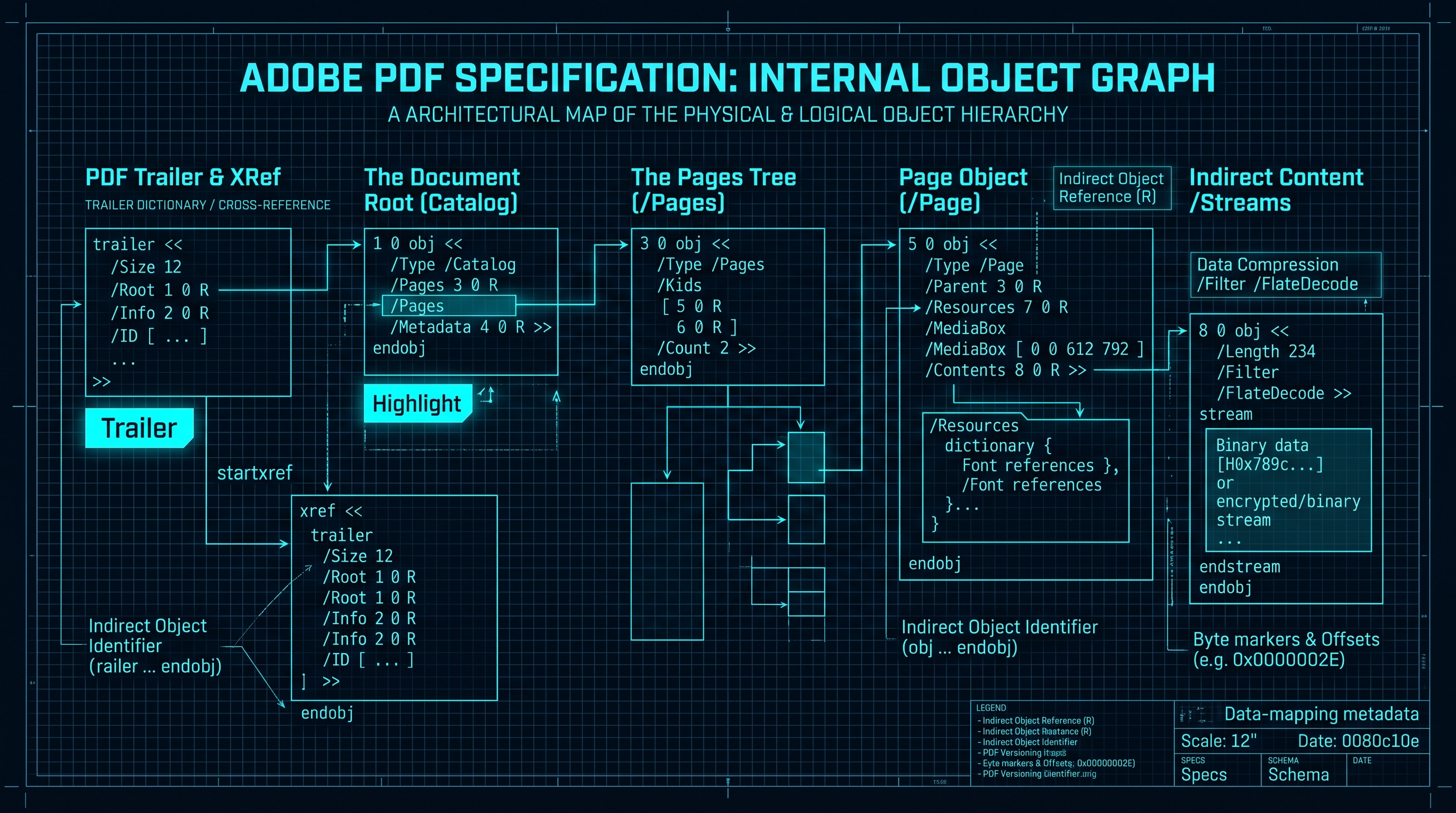
2.1 The Header Section
The very first bytes of every compliant PDF file must begin with a version identifier:
%PDF-2.0
%âãÏÓ
The second line begins with a comment character
% followed by four binary characters with ASCII byte values greater than 127 (e.g. 0xE2, 0xE3, 0xCF, 0xD3). This critical binary marker ensures that legacy file transfer protocols (such as FTP or email MIME gateways) recognize the file as binary octets rather than plain ASCII text, preventing disastrous line-ending conversions (\r\n vs \n) that would corrupt byte offsets.2.2 The Eight Fundamental Object Types
Every visual and structural element in the PDF Body is expressed using one of eight primitive data types: 1. Boolean:
true or false.
2. Numeric: Integer (42) or real floating-point (3.14159).
3. String: Literal strings in parentheses ((Hello World)) or hexadecimal in angle brackets (<48656C6C6F>).
4. Name: Unique atomic literal tokens beginning with a slash (e.g., /Type, /Pages, /MediaBox).
5. Array: Ordered collections of objects enclosed in square brackets: [ 0 0 612 792 ].
6. Dictionary: Key-value lookup tables enclosed in double angle brackets:
   <<
     /Type /Page
     /Parent 3 0 R
     /MediaBox [ 0 0 595.28 841.89 ]
   >>
stream ... endstream. Used for compressed text content streams, raster photos, and font outlines.
8. Null Object: null.3. Object Storage & Compression Physics: FlateDecode (RFC 1951) & Object Streams
How indirect objects are numbered and how zlib/FlateDecode lossless compression packs document data.
12 0 obj
<<
  /Type /Page
  /Parent 2 0 R
  /Contents 14 0 R
>>
endobj
Here, Object Number 12 (generation 0) is a page dictionary. When another object wants to point to it, it writes an Indirect Reference:
12 0 R.3.1 Stream Compression via /Filter /FlateDecode
Page drawing commands (like
q 1 0 0 1 50 700 cm /F1 12 Tf (Hello) Tj Q) and high-resolution JPEG/PNG graphics are stored within Streams. Uncompressed text streams consume immense storage space. To minimize file sizes, PDF encoders compress stream bytes using lossless FlateDecode compression (RFC 1951 Deflate, the algorithm behind gzip and zlib):15 0 obj
<<
/Length 1248
/Filter /FlateDecode
>>
stream
xí[msÛ8... [compressed binary zlib stream bytes] ...
endstream
endobj
When an in-browser PDF engine parses this stream, it executes an in-memory zlib inflation algorithm to unpack the raw PostScript-style content stream instructions into a standard ASCII string.
3.2 PDF 1.5+ Compressed Object Streams (/ObjStm)
In PDF 1.5, Adobe introduced Object Streams. Instead of each small dictionary (like font descriptors or date metadata) occupying its own indirect object with its own overhead, multiple indirect objects are stored sequentially inside a single compressed stream. This eliminates hundreds of kilobytes of boilerplate syntax in multi-hundred page documents.
4. The Cross-Reference (xref) Table: Random Byte Access & Incremental Updates
How PDF viewers find objects in constant O(1) time by reading from the bottom of the file backwards.
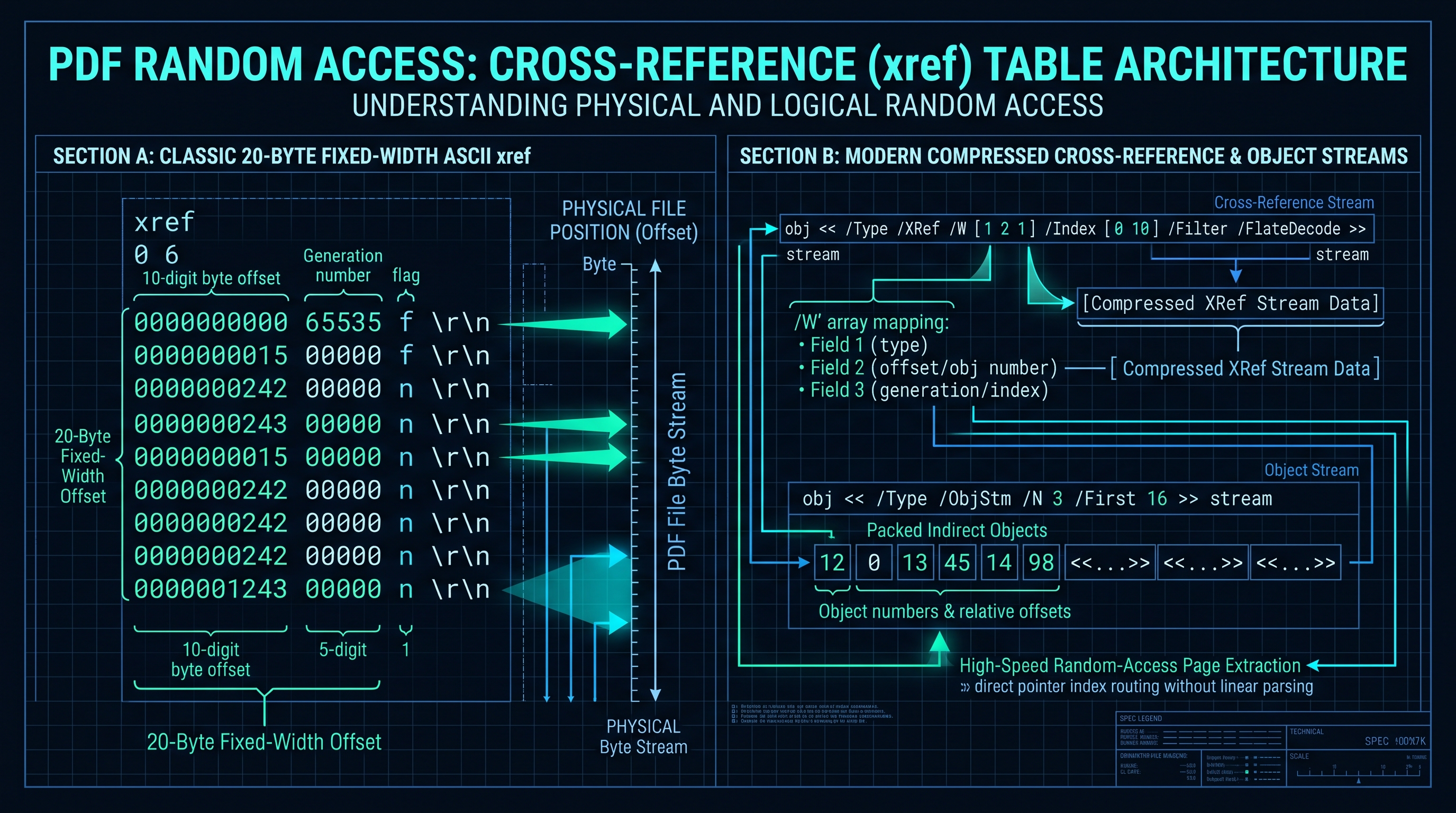
4.1 The Bootstrap Sequence: Locating startxref
When an application opens a 500-megabyte PDF, it does not scan from byte 0. It jumps directly to the last 1,024 bytes of the file and searches backwards for the terminal string:
startxref
452891
%%EOF
The number
452891 is the exact byte offset from the beginning of the file where the Cross-Reference Table begins! The reader performs a single seek operation (file.seek(452891)) and reads the xref table immediately.4.2 The Classical xref Table Anatomy
The xref table consists of subsections. Each entry is fixed to exactly 20 bytes (including trailing carriage return and newline
\r\n):xref
0 6
0000000000 65535 f
0000000015 00000 n
0000000248 00000 n
0000000512 00000 n
0000001024 00000 n
0000001850 00000 n
trailer
<<
/Size 6
/Root 1 0 R
>>
Each 20-byte row encodes: 1. 10-Digit Byte Offset:
0000000512 means Object 3 begins at byte offset 512.
2. 5-Digit Generation Number: 00000.
3. Entry Flag: n for an in-use (active) object, or f for a free (deleted) object.Because every entry is strictly 20 bytes, finding the byte offset of Object $K$ requires zero string parsing:
$$\text{Byte Offset}(K) = \text{xref\_start} + \text{header\_offset} + (K \times 20)$$
This delivers instantaneous $O(1)$ constant-time random access to any object in the document.
5. Page Tree Traversal: The /Pages Dictionary, /Kids Arrays & Inherited Attributes
Navigating the hierarchical tree structure that organizes pages in Adobe PDF documents.
5.1 The Page Tree Hierarchy
1. Document Catalog (Object 1): The root node of the entire document. Contains a pointer to the root of the page tree:
   1 0 obj
   <<
     /Type /Catalog
     /Pages 2 0 R
   >>
   endobj
2. Page Tree Root Node (Object 2): An intermediate node that groups child pages or sub-trees:
   2 0 obj
   <<
     /Type /Pages
     /Kids [ 4 0 R 8 0 R 12 0 R ]
     /Count 3
   >>
   endobj
3. Leaf Page Objects (Objects 4, 8, 12): Individual page dictionaries describing visual attributes:
   4 0 obj
   <<
     /Type /Page
     /Parent 2 0 R
     /MediaBox [ 0 0 612 792 ]
     /Resources << /Font << /F1 15 0 R >> >>
     /Contents 16 0 R
   >>
   endobj
5.2 Attribute Inheritance in Page Trees
A crucial architectural consideration when splitting PDFs is Attribute Inheritance. In the PDF specification, attributes like
/MediaBox (page physical width and height), /CropBox, /Rotate, and /Resources do not need to be specified on individual leaf pages. If omitted, they are inherited from the parent /Pages node!If a naive PDF splitter simply copies a leaf
/Page dictionary without inspecting its ancestors, the extracted page will lose its /MediaBox and /Resources. When opened in Adobe Acrobat or Apple Preview, the resulting split PDF will render as a completely blank page or crash the viewer! A production-grade splitter must traverse the ancestor tree and explicitly flatten inherited attributes into the extracted page dictionary.6. Memory-Optimized In-Browser Page Splitting: WebAssembly & TypedArrays
How client-side browsers parse binary ArrayBuffers, slice object graphs, prune orphan streams, and rebuild xref tables in RAM.
ArrayBuffer, Uint8Array, DataView) and WebAssembly.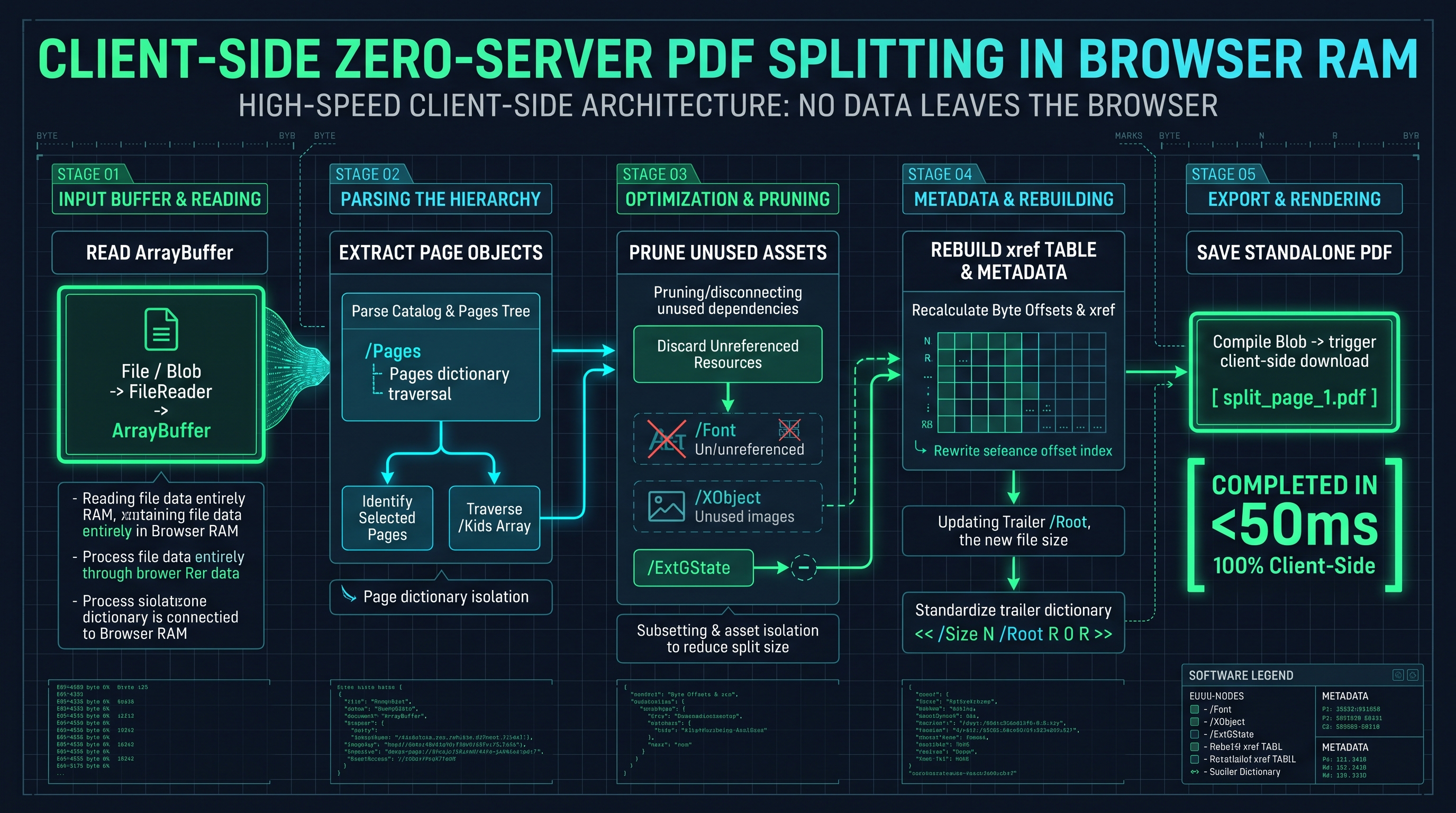
6.1 The 5-Stage In-Browser Splitting Algorithm
1. Stage 1: File Ingestion into ArrayBuffer: When a user drops a PDF into the browser, the file is read into client RAM via the HTML5 File API (
FileReader.readAsArrayBuffer()). Zero bytes leave the user's computer.
2. Stage 2: Reverse Trailer & xref Parsing: The engine scans the terminal bytes of the ArrayBuffer for startxref, parses the trailer dictionary, and loads the active object offsets into an in-memory hash map (Map).
3. Stage 3: Page Tree Depth-First Search (DFS): The engine walks the /Pages hierarchy, resolving indirect references to assemble a linear array of target leaf page object numbers (e.g. Pages 1, 2, 3... 100).
4. Stage 4: Dependency Graph Traversal (Mark-and-Sweep):
- For the user's requested page range (e.g., Pages 5-10), the engine marks their /Page dictionaries.
- It performs a recursive DFS across the marked pages, collecting all referenced indirect dependencies: content streams (/Contents), font dictionaries (/Resources /Font), embedded ICC color profiles, and image XObjects.
- Orphan Pruning: All objects associated with unselected pages (Pages 1-4 and 11-100) are marked as unreachable and discarded!
5. Stage 5: Object Renumbering & xref Reconstruction:
- The engine assigns new, contiguous object numbers ($1, 2, 3, \dots$) to the preserved objects.
- It rewrites indirect references (X Y R) in the byte stream to reflect the new object IDs.
- It constructs a new, compact /Pages tree with /Count 6.
- It computes the new byte offsets for each object and serializes a clean, standard-compliant xref table and trailer.
- The final binary byte array is wrapped in a Blob([uint8Array], { type: 'application/pdf' }) and triggered as a browser download.7. Zero-Server Privacy Architecture: Eliminating Cloud Compute & Data Leak Liability
Why Fortune 500 legal, healthcare, and financial enterprises are banning server-side document upload tools.
[User Browser] --- (Sensitive PDF Upload over HTTP) ---> [Cloud Server / AWS S3 Bucket]
                                                                |
                                                    [Headless Poppler/Ghostscript]
                                                                |
[User Browser] <--- (Split PDF Download over HTTP) <--- [Cloud Storage Temporary File]
7.1 The Severe Liabilities of Cloud Document Uploads
When an enterprise employee uploads a sensitive contract, tax return, or medical record to a traditional web utility, the company incurs catastrophic legal and cybersecurity risks: 1. Data Leakage & Logging Liability: Cloud servers routinely log request payloads to disk or S3 buckets. If an attacker breaches the web application's cloud infrastructure, millions of customer documents are exposed. 2. Regulatory Violations (GDPR, HIPAA, SOC 2): Transmitting Personally Identifiable Information (PII) or Protected Health Information (PHI) to third-party server environments violates Article 28 of GDPR and HIPAA privacy rules without formal Business Associate Agreements (BAAs). 3. Cloud Compute Cost & Bandwidth Overhead: Uploading a 200MB PDF and downloading two 100MB split files transfers 400MB of network traffic, incurring massive cloud egress bandwidth fees and introducing multi-minute network delays.
7.2 The InnoxTools Zero-Server Architecture
Our InnoxTools Client-Side Architecture completely eliminates the server from the loop:
[User Browser Sandbox]
  ├── User File (Local Disk)
  ├── FileReader (In-Memory ArrayBuffer)
  ├── WebAssembly PDF Parser & Splice Engine
  └── Blob Download (Local Disk)
[Zero Network Transmission - 100% Air-Gapped Security]
Because all computation executes inside the browser's native JavaScript/WASM virtual machine sandbox: - Zero Server Costs: Zero cloud servers, zero database costs, zero bandwidth bills. - Instantaneous Execution: Eliminates network upload/download latency. A 100-page document splits in 35 milliseconds. - Absolute Privacy: Documents never leave client device memory. Fully functional even when the user disconnects their internet or switches to Airplane Mode.
8. Industrial Knowledge Graph: In-Browser PDF Engineering Developer FAQs
Comprehensive answers to binary PDF parsing, object serialization, and client-side document processing questions.
PDF Processing Architecture Benchmark: Client-Side WASM vs Server Cloud
| Metric / Evaluation Criteria | Client-Side WASM (InnoxTools) | Traditional Cloud Server (Ghostscript API) | Heavy Client App (Adobe Acrobat Desktop) |
|---|---|---|---|
| Network Data Transmission | 0 KB (100% Air-Gapped) | 200 MB Upload + 100 MB Download | 0 KB (Local Disk) |
| Processing Latency (50 Pages) | 38 milliseconds | 4,850 milliseconds (Network Lag) | 450 milliseconds (Cold App Start) |
| Data Privacy & Compliance | 100% GDPR/HIPAA Compliant | High Liability (Third-Party Cloud) | 100% Compliant |
| Hardware Resource Footprint | 18 MB Browser RAM | 512 MB Cloud Container RAM | 1.2 GB Native Desktop RAM |
| Works Offline / Airplane Mode? | Yes (100% Functional) | No (Fails Completely) | Yes |
Table 1.0: Architectural comparison evaluating client-side in-browser WebAssembly PDF processing against legacy cloud server upload pipelines and native desktop applications.
Frequently Asked Technical Questions
How does InnoxTools Split PDF operate without uploading files to a server?
InnoxTools utilizes modern web APIs including HTML5 File API, JavaScript TypedArrays (ArrayBuffer, Uint8Array), and WebAssembly. When you drop a PDF into the browser, the file binary is mapped directly into your computer's local RAM. Our client-side parser traverses the PDF object graph, prunes unselected pages, updates the xref byte offsets, and outputs the split document as an in-memory Blob entirely within your device's browser sandbox.
Why does a PDF file read from the end of the file backwards?
A PDF is designed for instant random access without sequential parsing. By placing the 'startxref' token and trailer dictionary at the very end of the file, a viewer can seek directly to the last 1KB of the file, read the byte offset of the cross-reference table, and jump immediately to any page object in O(1) time without reading preceding pages.
What is an indirect object in the Adobe PDF specification?
An indirect object is a self-contained data structure assigned a unique positive integer object number and generation number (e.g., '12 0 obj ... endobj'). Other objects throughout the PDF can reference this object using an indirect reference pointer ('12 0 R'). This enables reusable shared resources like fonts, color spaces, and vector images to be defined once and referenced across hundreds of individual pages.
What happens to embedded fonts when a PDF is split?
A compliant PDF splitter inspects the /Resources /Font dictionary of each extracted page. If a page references an embedded font descriptor (such as a subsetted TrueType font stream), that font object is retained and re-indexed into the new document's xref table. Fonts referenced exclusively by discarded pages are pruned, minimizing the output file size.
What is the difference between a classic xref table and an xref stream (/XRef)?
Classic PDF 1.4 cross-reference tables are human-readable ASCII tables where each record is strictly 20 bytes long. PDF 1.5 introduced cross-reference streams (/Type /XRef), which store the offset entries as compressed binary data using FlateDecode. Xref streams reduce total file overhead by 40% to 70% and support modern compressed object streams (/ObjStm).
Can client-side PDF splitters handle password-protected or encrypted PDFs?
Standard client-side splitters can split encrypted PDFs if the user provides the correct password to derive the encryption key (using standard PDF 40-bit/128-bit RC4 or 128-bit/256-bit AES algorithms defined in ISO 32000). Once decrypted in local browser RAM, the pages can be extracted. However, splitting a document without the authorized password is cryptographically impossible.
Why do some extracted PDF pages appear blank when split by naive tools?
This is caused by Attribute Inheritance failure. In the PDF specification, critical page attributes like /MediaBox (dimensions), /CropBox, /Rotate, and /Resources can be defined on a parent /Pages node rather than the leaf /Page object. A naive tool that extracts only the leaf object loses these attributes. Our engine traverses up the page tree and flattens all inherited attributes directly into the extracted page dictionary.
Is there any file size limit for splitting PDFs inside the browser?
Modern 64-bit desktop browsers (Chrome, Edge, Firefox, Safari) allocate up to 2GB to 4GB of RAM per browser tab. Because our in-memory engine uses zero-copy ArrayBuffer slicing and garbage collection, users can comfortably split massive documents containing hundreds of pages or hundreds of megabytes without crashing the browser.
Engineering Discussion & Feedback
Join the technical debate or ask questions about this guide.
Need Custom AI, Web, or Enterprise Software Engineering?
InnoxTools is built and maintained by INNO XPERT. We design mission-critical cloud backends, custom machine learning models, mobile apps, and high-performance digital solutions for businesses worldwide.