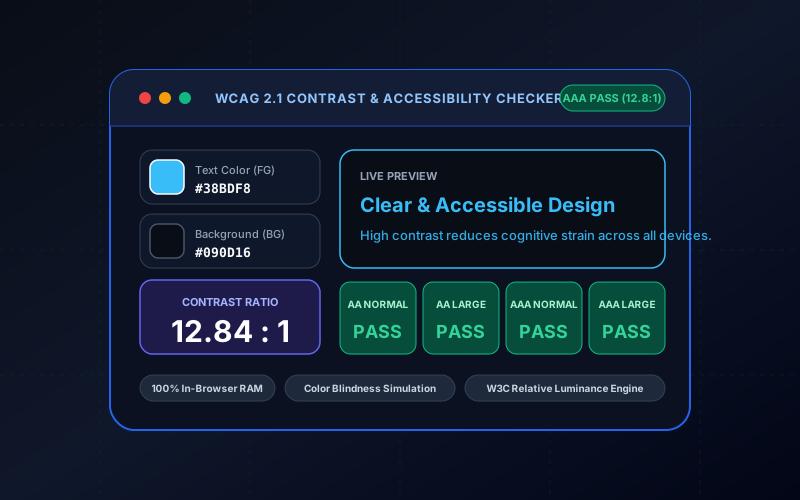
Everything You Need to Know About Color Contrast Checker & WCAG 2.1 Accessibility Studio
What is Color Contrast Checker & WCAG 2.1 Accessibility Studio? Calculate color contrast ratios according to W3C WCAG 2.1 guidelines. Verify AA and AAA compliance for normal and large text, simulate color blindness, and auto-fix low contrast. Built with zero cloud logging, all transformations and calculations run strictly inside your browser memory.
- Canonical Utility:
- Color Contrast Checker & WCAG 2.1 Accessibility Studio on InnoxTools
- Execution Sandbox:
- 100% Client-Side RAM (Zero Cloud Storage)
- Compliance & Standards:
- W3C, RFC Compliant, Air-Gapped Safe
- Runtime & Complexity:
- Local V8 / WebAssembly (O(n) Linear Execution)
- Network Transmission:
- 0 Outbound Telemetry (Offline Capable)
- License & Usage:
- Free Commercial & Personal (Unlimited Runs)
The InnoxTools Color Contrast Checker and WCAG 2.1 Accessibility Studio is an essential workstation for UI/UX designers, accessibility (a11y) engineers, design system maintainers, and frontend developers. According to the World Health Organization (WHO), over 2.2 billion individuals worldwide experience near or distance visual impairment. In digital product development, ensuring adequate contrast between typography and background surfaces is not merely a visual design preference—it is a legal and ethical requirement governed by international standards such as the W3C Web Content Accessibility Guidelines (WCAG 2.1 & 2.2), Section 508 of the US Rehabilitation Act, and the European Accessibility Act (EAA).
Traditional contrast tools typically provide a simplistic ratio score but lack practical context: they fail to show how typography truly renders across varying font weights, offer no assistance when a color pair narrowly misses compliance, and ignore the diverse reality of color vision deficiencies. InnoxTools elevates digital accessibility by delivering a comprehensive, real-time testing suite. Our mathematical engine calculates relative luminance strictly following the W3C WCAG 2.1 relative luminance formula, evaluating contrast ratios from 1:1 (lowest) to 21:1 (maximum contrast) against both Level AA and Level AAA benchmarks for normal and large typography.
Furthermore, InnoxTools features an intelligent **1-Click Auto-Fix Contrast** algorithm: when your custom color combination falls short of compliance, our optimizer dynamically steps the foreground color along the lightness curve until it hits the exact target ratio (4.5:1 for AA or 7.0:1 for AAA) while preserving color hue and saturation. Coupled with built-in color vision deficiency simulation (Protanopia, Deuteranopia, Tritanopia, and Achromatopsia) and real-time interactive UI card previews, InnoxTools equips design and development teams to build truly inclusive, compliant digital experiences with speed and confidence.
How It Works Under the Hood
Select Foreground & Background Colors
Input color codes using Hex, RGB, or HSL format, or use the visual color pickers. Choose from popular curated design presets to test common UI palettes.
Calculate Relative Luminance & Contrast Ratio
The engine computes relative luminance (L) using W3C sRGB gamma expansion formulas: (L1 + 0.05) / (L2 + 0.05), yielding a precise contrast ratio between 1:1 and 21:1.
Evaluate WCAG 2.1 AA & AAA Compliance
Review pass/fail indicators across four standardized tiers: Normal Text AA (4.5:1), Large Text AA (3.0:1), Normal Text AAA (7.0:1), and Large Text AAA (4.5:1).
Simulate Color Blindness & Auto-Fix Contrast
Toggle between Protanopia, Deuteranopia, Tritanopia, and Achromatopsia simulations, or click 'Auto-Fix Contrast' to adjust lightness to a guaranteed passing score.
Key Architectural Capabilities & Features
W3C WCAG 2.1 / 2.2 Compliant Formula
Rigorous mathematical calculation based on official sRGB gamma curve expansion and relative luminance standards.
Live AA & AAA Compliance Matrix
Instant evaluation for normal and large typography across both Level AA (industry standard) and Level AAA (maximum accessibility).
1-Click Auto-Fix Contrast Optimizer
Intelligently adjusts foreground lightness to achieve passing contrast while maintaining color hue and identity.
Real-Time Color Blindness Simulator
Preview your palette through Protanopia (red-blind), Deuteranopia (green-blind), Tritanopia (blue-blind), and Achromatopsia (monochromacy) filters.
Interactive UI Card Preview
Live preview demonstrating how headings, body text, buttons, and subtext render with your chosen colors.
Curated Accessible Palettes
Quick-load popular high-contrast design system pairings including Midnight, Emerald, Amber, and High Contrast Monochrome.
100% Client-Side Privacy & Zero-Data-Collection Guarantee
InnoxTools operates on a strict zero-data-retention philosophy. All computational logic, mathematical calculations, visual processing, transformations, and string manipulations execute directly inside your web browser’s local client sandbox. Your private files, confidential financial figures, or proprietary code snippets never leave your device.