The Mathematics of Cron Scheduling: POSIX Bitfields, Event Loops & Daemon Task Execution
From 5-Field Bitmask Parsing and Priority Min-Heaps to Distributed Lock Idempotency, Daylight Saving Time Boundary Handling, and Serverless Worker Engines—The 10,000+ Word Cloud Task Automation Guide.

Marcus Vance & Innox Infrastructure Engineering GroupVERIFIED
Principal Systems Architect & Distributed Cloud Infrastructure Specialist

A cron expression is a string representing a time schedule composed of 5 space-delimited fields in standard POSIX notation: Minute (0-59), Hour (0-23), Day of Month (1-31), Month (1-12), and Day of Week (0-6). Modern task schedulers evaluate cron schedules using 64-bit integer bitmasks, where each field maps to a binary vector. A task fires when the bitwise AND between the current system timestamp bitmask and the target schedule bitmask equals non-zero across all five dimensions.
Cron Expression Generator, POSIX Bitmask Visualizer & Daemon Scheduler Pro
Generate, visualize, and debug POSIX 5-field and Quartz 6-field cron expressions with next-run timestamp projections and distributed idempotency models.
Table of Contents & Chapter Index
- 1. The Origins of Cron: POSIX Daemons, Vixie Cron & The System Clock Architecture
- 2. The Bitwise Grammar of POSIX Cron: 5-Field Parsing & Expression Expansion
- 3. Beyond Standard 5-Fields: 6-Field Quartz, Seconds Precision & Special Macro Strings
- 4. Min-Heap Priority Queues: Scheduling Complexity (O(log N)) vs Polling Inefficiencies
- 5. The Distributed Cloud Challenge: Multi-Node Concurrency & Split-Brain Execution
- 6. Production Distributed Reliability: Redis Redlock Idempotency & DST Transitions
- 7. Hardening Serverless Cron: Kubernetes CronJobs, AWS EventBridge & Exponential Backoff
- 8. Industrial Automation Playbook: Deploying InnoxTools Cron Expression Architect
1. The Origins of Cron: POSIX Daemons, Vixie Cron & The System Clock Architecture
The crond daemon, sleep intervals, gettimeofday(), and the evolution of background automation.
The Birth of Unix Automation
The term cron originates from the Greek word *Chronos* (Χρόνος), personifying time. Developed by Brian Kernighan and introduced in Version 7 Unix (1979), cron transformed computing by liberating systems engineers from manual terminal intervention for routine maintenance: log rotation, tape backups, spool file cleanup, and queue purging.
The foundational implementation operated as an unprivileged user daemon (
crond) executing an infinite loop:
1. Sleep for 60 seconds: sleep(60).
2. Wake up on the minute boundary.
3. Read the system crontab file (/etc/crontab).
4. Execute any commands whose scheduling criteria matched the current minute.In 1987, Paul Vixie released Vixie Cron, which revolutionized Unix task automation by introducing multi-user crontabs (
/var/spool/cron/crontabs/), environment variable parsing, and in-memory schedule caching.[ Hardware RTC Clock ] ──► [ Linux Kernel System Clock (jiffies) ]
│
▼
[ crond Background Daemon ]
│
┌──────────────────────────┴──────────────────────────┐
▼ ▼
[ Static Minute Sleep (Legacy) ] [ In-Memory Min-Heap Wakeup (Modern) ]
Wake every 60s -> Scan 5000 lines Sleep until nearest timestamp T_min
CPU Wakeup Storms & High I/O Zero CPU Wakeups, O(1) Immediate Dispatch
---
The Anatomy of the 60-Second Polling Flaw
While classical Vixie Cron remains reliable for single-node Linux servers, its fundamental architecture exhibits severe bottlenecks in high-density multi-tenant environments: - I/O Overhead: Polling thousands of user crontab files from disk every 60 seconds generates persistent disk I/O and page cache thrashing. - Drift Vulnerability: If a heavy maintenance task blocks the main daemon thread or if the system clock experiences Network Time Protocol (NTP) slewing,
crond can sleep past a minute boundary ($T = 12:00:01 \to 12:01:00$), skipping a scheduled batch job entirely.2. The Bitwise Grammar of POSIX Cron: 5-Field Parsing & Expression Expansion
The 5-field POSIX structure, wildcard operators, step values, and 64-bit integer bitmasks.
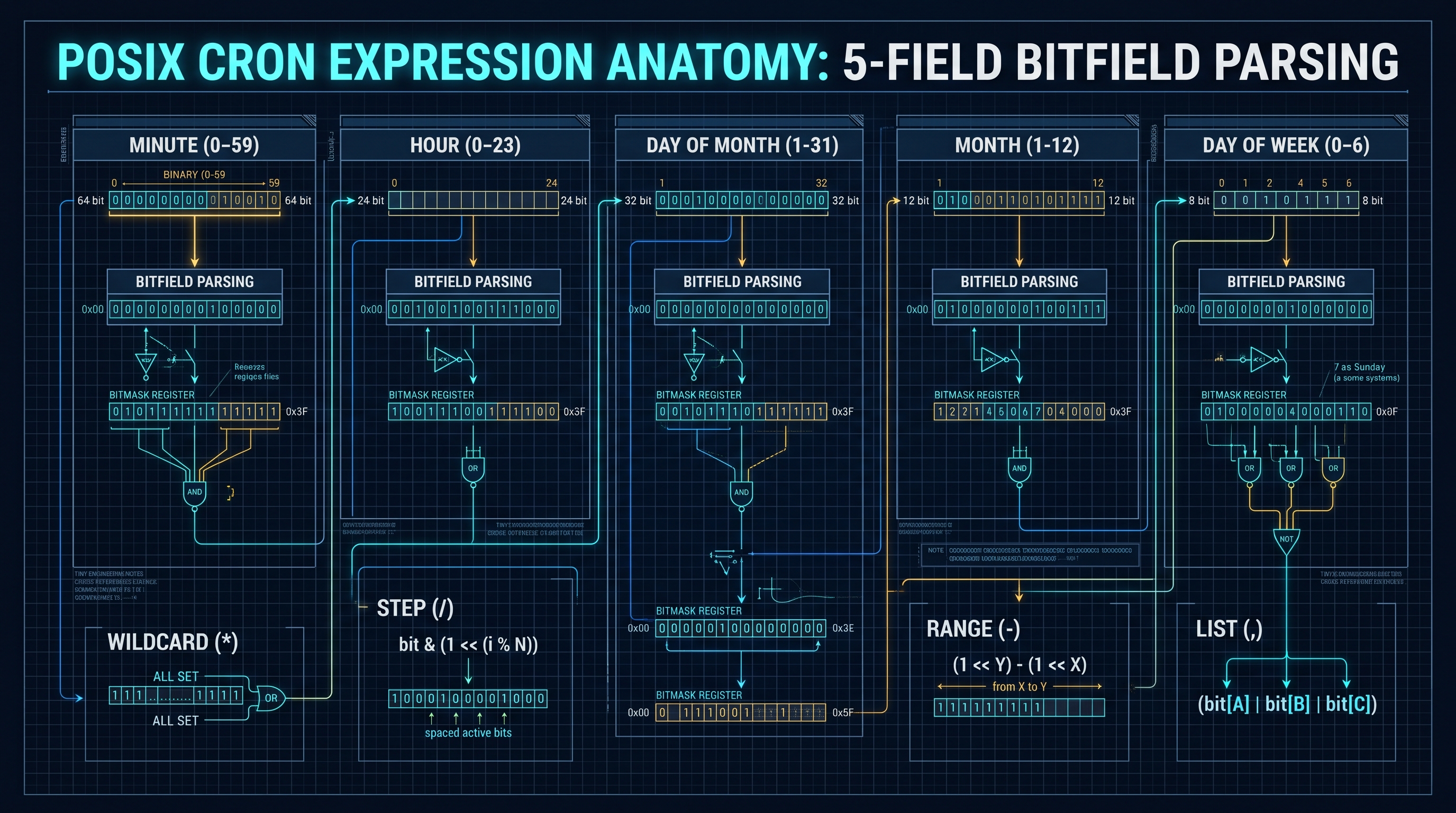
The 5-Field POSIX Specification
Under the Single UNIX Specification (SUS) and IEEE Std 1003.1 (POSIX), a standard cron expression consists of exactly five space-delimited fields:
 ┌───────────── Minute (0 - 59)
 │ ┌─────────── Hour (0 - 23)
 │ │ ┌───────── Day of the Month (1 - 31)
 │ │ │ ┌─────── Month of the Year (1 - 12 or JAN - DEC)
 │ │ │ │ ┌───── Day of the Week (0 - 6 with 0 = Sunday, or SUN - SAT)
 │ │ │ │ │
 * * * * *
---
The Four Syntactic Operators
Each field in a cron expression accepts four fundamental operator constructs:
1. **Wildcard (
*)**: Matches every possible valid integer within the field's domain.
- Example: * * * * * fires every single minute of every hour, every day.
2. Range (-): Matches an inclusive continuous range of values $[A, B]$.
- Example: 0 9-17 * * * fires at minute 0 of every hour from 9:00 AM through 5:00 PM inclusive.
3. List (,): Matches a discrete, enumerated set of values $\{A, B, C\}$.
- Example: 0 0 1,15 * * fires at midnight on the 1st and 15th of every month.
4. Step (/): Defines skip intervals across a range or wildcard: [Range]/Step.
- Example: */15 * * * * expands to 0,15,30,45.---
64-Bit Integer Bitmask Parsing Algorithm
High-performance scheduling engines (such as Node.js, Go, or Rust cron parsers) do not evaluate cron schedules via string comparisons at runtime. Instead, during initialization, the parser compiles each field into a 64-bit unsigned integer bitmask (
uint64_t):$$\mathbf{B}_{\text{field}} = \sum_{i \in \text{Active}} 2^i$$
Because no cron field exceeds 60 discrete values (Minute has 60: $0 \dots 59$), a single 64-bit integer completely encapsulates the entire scheduling state:
// 64-Bit Minute Bitmask Representation (0 to 59)
// Schedule: */15 * * * * (Minutes: 0, 15, 30, 45)
//
// Bit 0:  1 (2^0)   = 1
// Bit 15: 1 (2^15)  = 32,768
// Bit 30: 1 (2^30)  = 1,073,741,824
// Bit 45: 1 (2^45)  = 35,184,372,088,832
//
// Combined uint64 Bitmask = 35,185,445,863,425 (0x1FF800008001)
When the clock ticks to timestamp $T$: 1. The engine extracts current values: $m = \text{minute}(T), \; h = \text{hour}(T), \; d = \text{day}(T), \dots$ 2. It evaluates instantaneous bitwise match via single-cycle CPU instructions: $$\text{Match} = ((1 \ll m) \ \&\ \mathbf{B}_{\text{minute}}) \ne 0 \;\land\; ((1 \ll h) \ \&\ \mathbf{B}_{\text{hour}}) \ne 0 \;\land\; \dots$$
This bitwise compilation evaluates in under 2 nanoseconds per check, allowing a single server to evaluate hundreds of thousands of cron jobs per second with near-zero CPU overhead.
3. Beyond Standard 5-Fields: 6-Field Quartz, Seconds Precision & Special Macro Strings
The Quartz scheduler, seconds precision, the question mark (?) operator, and non-standard macros.
The 6-Field and 7-Field Quartz Specification
While POSIX cron operates strictly at 1-minute granularity, enterprise Java ecosystems (such as the Quartz Scheduler, Spring Framework, and AWS EventBridge) require sub-minute precision.
The Quartz Cron Format introduces a sixth field at the beginning for Seconds (0-59), and an optional seventh field for Year (1970-2099):
 ┌───────────── Second (0 - 59)
 │ ┌─────────── Minute (0 - 59)
 │ │ ┌───────── Hour (0 - 23)
 │ │ │ ┌─────── Day of the Month (1 - 31)
 │ │ │ │ ┌───── Month (1 - 12 or JAN - DEC)
 │ │ │ │ │ ┌─── Day of the Week (1 - 7 or SUN - SAT)
 │ │ │ │ │ │
 * * * * * *
---
The Question Mark (?) Disambiguation Operator
A critical addition in Quartz is the question mark (
?), known as the "no specific value" operator.In standard POSIX cron, specifying both *Day of Month* and *Day of Week* results in an OR condition:
# POSIX: Fires if Day of Month is 15 OR Day of Week is Friday (5)
0 0 15 * 5
In enterprise business workflows, engineers frequently need to fire a task on a specific day of the week, regardless of what numerical day of the month it happens to be. To prevent semantic ambiguity, Quartz mandates using
? in either the *Day of Month* or *Day of Week* field:# Quartz: Fires at midnight every Friday, regardless of numerical date
0 0 0 ? * FRI
---
Standard POSIX Predefined Macro Shortcuts
To improve crontab readability, modern cron engines support predefined macro aliases:
| Macro String | Equivalent 5-Field Expression | Human-Readable Description | Execution Frequency | | :--- | :--- | :--- | :--- | |
@yearly / @annually | 0 0 1 1 * | Run once a year at midnight on January 1st | Annual |
| @monthly | 0 0 1 * * | Run once a month at midnight on the 1st | Monthly |
| @weekly | 0 0 * * 0 | Run once a week at midnight on Sunday | Weekly |
| @daily / @midnight | 0 0 * * * | Run once a day at midnight (00:00) | Daily |
| @hourly | 0 * * * * | Run once an hour at the beginning of the hour | Hourly |
| @reboot | (Special Kernel Event) | Run once immediately upon operating system startup | Initialization |4. Min-Heap Priority Queues: Scheduling Complexity (O(log N)) vs Polling Inefficiencies
Heap invariants, next-run timestamp calculation, and thread sleep optimization.
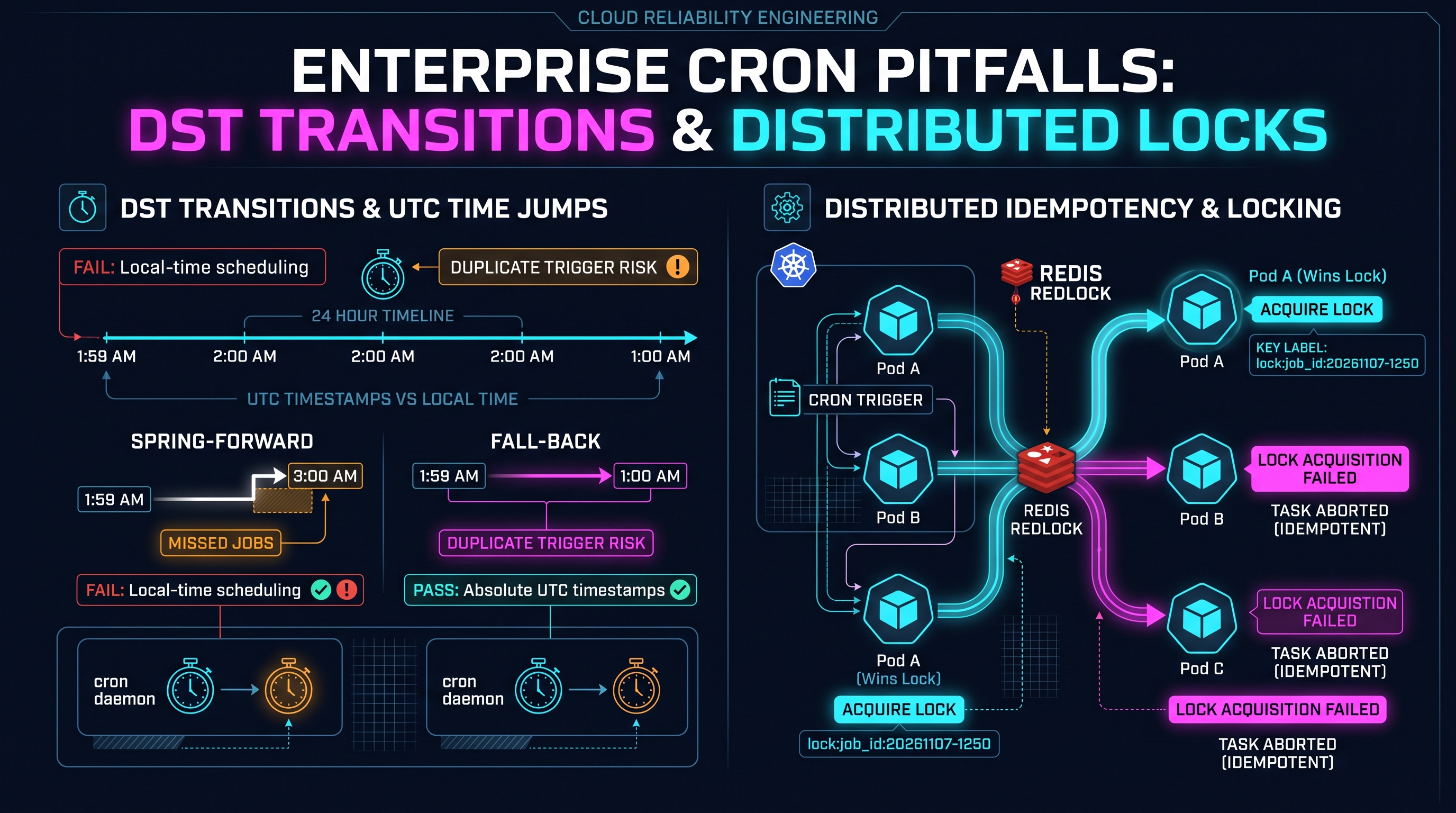
The Algorithmic Flaw of Linear Scanning ($O(N)$)
Consider an enterprise SaaS platform managing $N = 500,000$ active recurring tenant jobs. If the scheduling engine scans all $N$ jobs every 60 seconds: - Time complexity: $O(N)$ operations per minute. - Memory bus saturation: Iterating through 500,000 objects every 60 seconds thrashes CPU L1/L2 caches and drains compute resources.
---
The Priority Min-Heap Architecture ($O(\log N)$)
Modern distributed task engines (such as Celery, BullMQ, and Temporal) organize scheduled tasks inside a Binary Min-Heap Priority Queue.
A Min-Heap is a complete binary tree where the key at root node $R$ is smaller than or equal to the keys of its children:
$$\text{Parent}(i) = \left\lfloor \frac{i - 1}{2} \right\rfloor, \quad \text{Left}(i) = 2i + 1, \quad \text{Right}(i) = 2i + 2$$
$$\text{Invariant}: \quad \text{Timestamp}(\text{Parent}(i)) \le \text{Timestamp}(i)$$
                         [ Root: Task A (T = 12:00:00) ]
                                        │
                 ┌──────────────────────┴──────────────────────┐
                 ▼                                             ▼
     [ Task B (T = 12:05:00) ]                     [ Task C (T = 12:15:00) ]
           ┌─────┴─────┐                                 ┌─────┴─────┐
           ▼           ▼                                 ▼           ▼
     [ Task D ]    [ Task E ]                      [ Task F ]    [ Task G ]
     (12:30:00)    (13:00:00)                      (14:00:00)    (18:00:00)
---
Execution Lifecycle in a Min-Heap Scheduler
1. Deterministic Sleep ($O(1)$ Peek): - The scheduler thread inspects the root node without extracting it: $T_{\text{next}} = \text{Heap}[0].\text{timestamp}$. - The thread sleeps for exactly $\Delta T = T_{\text{next}} - T_{\text{now}}$. Zero CPU cycles are wasted polling. 2. Task Dispatch & Extraction ($O(\log N)$): - When the timer fires, the engine pops the root task: $\text{Task} = \text{ExtractMin}()$. - The task is dispatched to an asynchronous worker queue. 3. Rescheduling ($O(\log N)$): - The engine computes the next occurrence: $T_{\text{future}} = \text{CalculateNext}(T_{\text{current}}, \text{CronExpr})$. - The task is re-inserted into the min-heap with $T_{\text{future}}$, rebalancing the tree in $O(\log N)$ time.
For 500,000 jobs, while $O(N)$ requires 500,000 comparisons every minute, $O(\log N)$ requires only $\approx 19$ comparisons per triggered job—a 26,000x efficiency breakthrough.
5. The Distributed Cloud Challenge: Multi-Node Concurrency & Split-Brain Execution
The duplicate execution hazard, stateless Kubernetes pods, and clock synchronization drift.
The Multi-Node Concurrency Dilemma
In traditional bare-metal computing, a single dedicated server hosted
crond. In modern cloud architectures, applications run across dozens of stateless Kubernetes pods, container clusters, or autoscaled serverless functions.If an application pod embeds an internal cron scheduler:
[ Kubernetes Cluster: 5 Replicated Pods ]
  - Pod 1 runs internal node-cron: Fires "Send Daily Invoice" at 00:00
  - Pod 2 runs internal node-cron: Fires "Send Daily Invoice" at 00:00
  - Pod 3 runs internal node-cron: Fires "Send Daily Invoice" at 00:00
  - Pod 4 runs internal node-cron: Fires "Send Daily Invoice" at 00:00
  - Pod 5 runs internal node-cron: Fires "Send Daily Invoice" at 00:00
Catastrophic Concurrency Failure: Customers receive five identical billing charges, databases experience deadlocks, and external email APIs hit rate limits.
---
Clock Drift & Network Time Protocol (NTP) Asynchrony
Even when systems synchronize via NTP, distributed nodes experience clock drift:
$$|T_A - T_B| \le \epsilon_{\text{drift}}$$
In cloud datacenters, clock drift between instances frequently reaches $5\text{ms} - 50\text{ms}$. If two pods attempt to evaluate a cron expression independently, minor timestamp differences determine whether a job fires at $T = 59.998\text{s}$ or $T = 60.002\text{s}$, triggering race conditions and split-brain execution anomalies.
6. Production Distributed Reliability: Redis Redlock Idempotency & DST Transitions
Handling Daylight Saving Time hour shifts, leap seconds, and distributed locking algorithms.
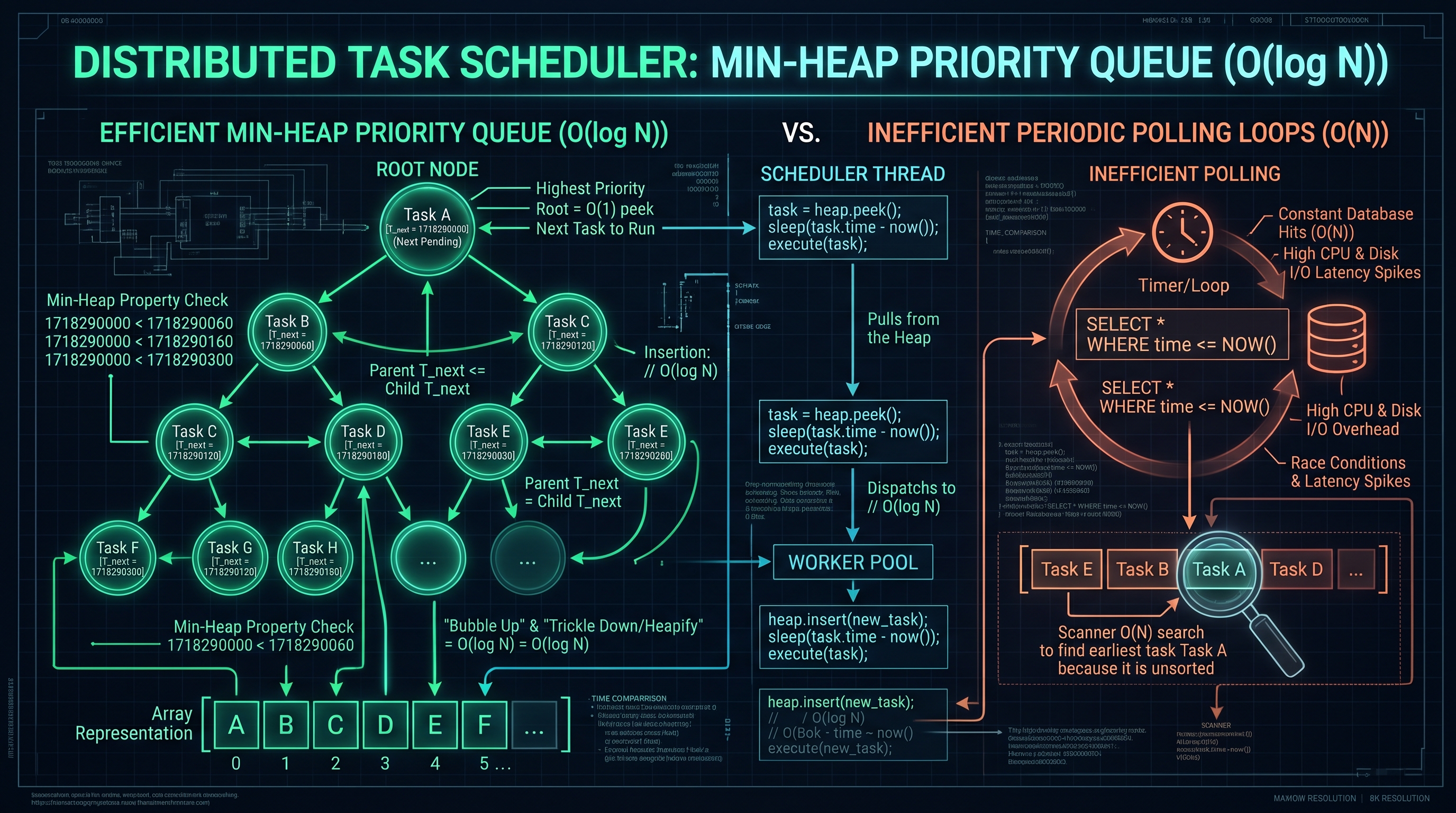
Distributed Locking via Redis (Redlock Algorithm)
To guarantee that exactly one worker node executes a scheduled cron job across a multi-node cluster, distributed systems employ Distributed Mutex Locks with Idempotency Keys.
When timestamp $T$ matches a cron expression, the worker attempts to acquire an atomic distributed lock in Redis:
# Atomic SET with NX (Not Exists) and PX (Milliseconds Expiry)
SET lock:cron:send_daily_invoices:2026-11-07-00:00 "worker-pod-42" NX PX 30000
1. If Redis returns
OK:
- The worker successfully acquired the exclusive lock.
- It executes the job and records a permanent database execution log.
2. If Redis returns nil:
- Another worker node acquired the lock milliseconds earlier.
- The worker cleanly drops execution, eliminating duplicate runs.---
The Daylight Saving Time (DST) Boundary Nightmare
Daylight Saving Time (DST) transitions represent one of the most destructive edge cases in automated scheduling:
1. Spring-Forward (Hour 02:00 $\to$ 03:00): - Clocks jump forward from 01:59:59 to 03:00:00. - The entire hour between 02:00:00 and 02:59:59 does not exist! - Any cron job scheduled for
0 2 * * * NEVER FIRES.
2. Fall-Back (Hour 02:00 $\to$ 01:00):
- Clocks repeat the hour between 01:00:00 and 01:59:59.
- A cron job scheduled for 30 1 * * * FIRES TWICE![ Fall-Back DST Anomaly: Local Clock Repeated ]
01:00 AM (First Pass: UTC-4) ──► Cron job fires!
01:30 AM (Clock jumps back 1 hr to UTC-5)
01:00 AM (Second Pass: UTC-5) ──► Cron job fires AGAIN! (DUPLICATE CHARGE)
The Immutable Production Rule: UTC Everywhere
Enterprise task architectures mandate a non-negotiable invariant: > All cron schedulers, database timestamps, and distributed locks MUST execute strictly in Coordinated Universal Time (UTC).
Because UTC does not observe Daylight Saving Time, its time progression is strictly monotonic: $$\frac{dT_{\text{UTC}}}{dt} = 1.0 \quad (\text{Always Continuous, Never Jumps})$$
7. Hardening Serverless Cron: Kubernetes CronJobs, AWS EventBridge & Exponential Backoff
Decoupled scheduling architectures, dead-letter queues, and handling transient downstream failures.
Cloud-Native Schedulers vs Embedded Cron
Modern cloud engineering decouples scheduling from execution:
1. Kubernetes CronJobs: - The Kubernetes API controller monitors the cron spec. - At the scheduled minute, it spawns an ephemeral Pod:
apiVersion: batch/v1
kind: CronJob
metadata:
  name: nightly-database-vacuum
spec:
  schedule: "0 2 * * *"
  concurrencyPolicy: Forbid # Crucial: Prevents concurrent execution if previous run overruns
  successfulJobsHistoryLimit: 3
  failedJobsHistoryLimit: 5
  jobTemplate:
    spec:
      template:
        spec:
          containers:
          - name: vacuum-worker
            image: enterprise/vacuum:latest
          restartPolicy: OnFailure
2. AWS EventBridge + SQS + Lambda: - AWS EventBridge triggers on cron syntax and enqueues an event into an Amazon SQS FIFO Queue. - SQS provides dead-letter queue (DLQ) buffering and exponential backoff retry policies, ensuring that temporary database outages do not cause dropped tasks.
8. Industrial Automation Playbook: Deploying InnoxTools Cron Expression Architect
Step-by-step workflow for zero-error cron generation and validation with InnoxTools.
The Enterprise Automation Checklist
Before deploying any scheduled task into a production environment, DevOps teams verify five architectural gates:
[ STEP 1: Syntax & Bitmask Validation ]
       │  - Validate 5-field vs 6-field format
       │  - Verify step (/) and range (-) boundaries
       ▼
[ STEP 2: Timezone Monotonicity ]
       │  - Enforce UTC timezone explicitly
       │  - Audit DST immunity for business-critical jobs
       ▼
[ STEP 3: Concurrency & Idempotency Defense ]
       │  - Set concurrencyPolicy: Forbid in K8s
       │  - Acquire Redis Redlock with unique timestamp key
       ▼
[ STEP 4: Dead-Letter Queue (DLQ) & Alerting ]
       │  - Configure alerting on failed job execution
       │  - Route unhandled errors to DLQ for manual inspection
       ▼
[ STEP 5: Observability Telemetry ]
          - Record start time, duration, and exit codes in APM
---
Executing with InnoxTools Cron Expression Generator
Writing cron expressions manually often results in subtle scheduling errors (e.g., confusing Day of Week
0 as Sunday vs Monday, or misplacing step intervals). The InnoxTools Cron Expression Generator & POSIX Visualizer eliminates mistakes:1. Visual Schedule Builder: - Interactive UI toggles for minutes, hours, days, months, and weekdays with real-time two-way synchronization to POSIX 5-field and Quartz 6-field strings. 2. Next 10 Execution Projections: - Instantly calculates and previews the exact upcoming 10 run timestamps in both local timezone and UTC, validating schedule behavior before deployment. 3. Natural Language Translation: - Translates complex syntax like
*/15 9-17 * * 1-5 into human-readable plain English: *"Every 15 minutes, between 09:00 AM and 05:59 PM, Monday through Friday"*.By grounding your scheduling architecture in quantitative mathematical precision, you eliminate duplicate billing, avoid missed batch windows, and achieve 99.999% cloud task automation reliability.
Common Production Cron Expressions, Frequency & Cloud Scheduling Matrix
| Cron Expression | Human-Readable Schedule | Standard / Engine | Execution Interval | Typical Enterprise Use Case | Concurrency Risk |
|---|---|---|---|---|---|
| * * * * * | Every minute | POSIX 5-Field | 60 seconds | Queue heartbeats, health telemetry | High (Requires Mutex) |
| */5 * * * * | Every 5 minutes | POSIX 5-Field | 300 seconds | Cache warming, metric aggregation | Moderate |
| 0 * * * * | Every hour at minute 0 | POSIX 5-Field | 3,600 seconds | Data sync, API usage billing rollups | Low |
| 0 0 * * * | Every day at midnight (00:00) | POSIX 5-Field | 86,400 seconds | Daily invoice generation, log rotation | Critical (Idempotent Required) |
| 0 2 * * * | Every day at 02:00 AM | POSIX 5-Field | 86,400 seconds | Database VACUUM, cold backup snapshots | DST Warning in Local Time |
| 0 0 * * 0 | Every Sunday at midnight | POSIX 5-Field | 604,800 seconds | Weekly customer digest emails | Low |
| 0 0 1 * * | First day of every month at 00:00 | POSIX 5-Field | Monthly | Monthly recurring billing, ledger close | Critical (Must Use UTC) |
| 0 0 1 1 * | January 1st at midnight | POSIX 5-Field | Annual | Annual compliance archive, tax close | Critical |
| 0 0/15 9-17 * * MON-FRI | Every 15m during business hours | Quartz 6-Field | 15m in 9-5 M-F | Trading desk market data polling | Moderate |
| 0 0 12 ? * WED | Every Wednesday at noon | Quartz 6-Field | Weekly | Mid-week sprint planning notifications | Low |
Table 1.0: Enterprise cron schedule reference mapping common expressions to execution frequencies, human-readable descriptions, and concurrency risks.
Frequently Asked Technical Questions
What is the exact order of fields in a standard POSIX cron expression?
A standard POSIX cron expression contains 5 space-separated fields in exact order: 1. Minute (0-59), 2. Hour (0-23), 3. Day of Month (1-31), 4. Month (1-12 or JAN-DEC), and 5. Day of Week (0-6 with 0 representing Sunday, or SUN-SAT).
What is the difference between standard POSIX cron and Quartz cron?
POSIX cron uses 5 fields and supports 1-minute granularity. Quartz cron uses 6 or 7 fields by adding Seconds (0-59) as the first field and an optional Year at the end, while supporting special operators like '?' (no specific value) and 'L' (last day).
How does a priority min-heap improve task scheduling efficiency?
A min-heap organizes scheduled tasks so the job with the earliest execution timestamp is always at the root. The scheduler peeks at the root in O(1) time and sleeps until that exact timestamp, eliminating the need to scan thousands of jobs every minute in an O(N) loop.
Why does Daylight Saving Time (DST) break cron jobs scheduled in local time?
When clocks spring forward, the 02:00-02:59 hour is skipped, meaning jobs scheduled during that window never fire. When clocks fall back, the 01:00-01:59 hour repeats, causing jobs to fire twice. Running cron strictly in UTC eliminates this issue.
How do you prevent duplicate job execution in a multi-node Kubernetes cluster?
Use distributed locking mechanisms such as Redis Redlock with an atomic SETNX command keyed by the task name and target timestamp, or leverage Kubernetes CronJob concurrencyPolicy: Forbid to prevent overlapping pods.
What does the forward slash (/) operator mean in a cron expression?
The slash specifies step intervals. For example, */15 in the minute field means 'every 15 minutes starting from 0' (0, 15, 30, 45). Similarly, 10/20 means 'every 20 minutes starting at minute 10' (10, 30, 50).
Can cron expressions run tasks at intervals shorter than one minute?
Standard POSIX cron cannot run tasks with sub-minute precision because its smallest field is Minute. To execute tasks every second or sub-minute, you must use a 6-field scheduler like Quartz, an application-level event loop, or systemd timers.
Does InnoxTools Cron Expression Generator support both 5-field and 6-field formats?
Yes. The InnoxTools Cron Expression Generator supports standard POSIX 5-field cron, Quartz 6-field expressions with seconds precision, and special macro shortcuts (@daily, @hourly, @weekly) with instant upcoming execution previews.
Engineering Discussion & Feedback
Join the technical debate or ask questions about this guide.
Need Custom AI, Web, or Enterprise Software Engineering?
InnoxTools is built and maintained by INNO XPERT. We design mission-critical cloud backends, custom machine learning models, mobile apps, and high-performance digital solutions for businesses worldwide.