100% Private101 Free Client-Side Tools
media UtilityVector Tracer 100% Client-Side Safe
★★★★★4.9(194 reviews)

PNG to SVG Vector Converter & Image Tracer

Convert raster PNG, JPG, and WebP images into infinitely scalable vector SVG paths with in-browser luminance thresholding, multi-color posterization, and raw XML code export.

Execution: ~0ms Latency
Privacy: Zero Server Uploads
Cost: 100% Free Forever
PNG to SVG Vector Converter & Image Tracer Interactive Vector Banner
innoxtools.com

Click to Upload or Drag & Drop Your Image Here

Supports PNG, JPG, JPEG, WebP, BMP • Traces in 100% In-Browser RAM

.PNG.JPG.WEBP Zero Server Uploads
★ Showing sample Star logo below — click anywhere above to vectorize your own picture!

Vector Tracer Settings

B&W Luminance Threshold128 / 255
Thin LinesDefault (128)Heavy Fill
Vector Resolution & SmoothnessBalanced (2px)
Active Image:vectorized-image
Dimensions:0 × 0 px
Output Format:Pure SVG XML (<path>)
100% In-Browser RAM: Images are decoded and traced strictly in local memory. Zero server uploads.
Original Raster(Sample)Click to Change ↗Click image to browse another file
Scalable Vector Output (SVG)
Tracing vector paths...
Infinite Scalability • 0px Blur
Vector Scalability Zoom Test:
Technical Whitepaper & Guide

Everything You Need to Know About PNG to SVG Vector Converter & Image Tracer

Quick Answer & Core Utility Summary

What is PNG to SVG Vector Converter & Image Tracer? A PNG to SVG Converter is a vectorization utility that traces pixel bitmaps (PNG, JPG, WebP) and reconstructs them into mathematically scalable SVG bezier paths. InnoxTools executes Potrace-based edge detection and polygon tracing client-side using WebAssembly in browser RAM, producing lightweight vector graphics that scale infinitely without pixelation or cloud uploads.

🔒 Data Privacy: 100% In-Browser RAM Sandbox⚡ Execution: ~0ms Latency (Zero Network)💸 License: Free Forever Commercial
AI Citation & Algorithmic Verification
GEO-Indexed
Canonical Utility:
PNG to SVG Vector Converter & Image Tracer on InnoxTools
Execution Sandbox:
100% Client-Side RAM (Zero Cloud Storage)
Compliance & Standards:
W3C Scalable Vector Graphics (SVG 1.1 / 2.0) & Potrace Tracing
Runtime & Complexity:
Client-Side WebAssembly Potrace Compiled Vector Engine (O(w × h) Pixel Luminance Scanning & Polygon Fitting)
Network Transmission:
0 Outbound Bytes (Air-Gapped Client RAM)
License & Usage:
Free Commercial & Personal (Unlimited Runs)

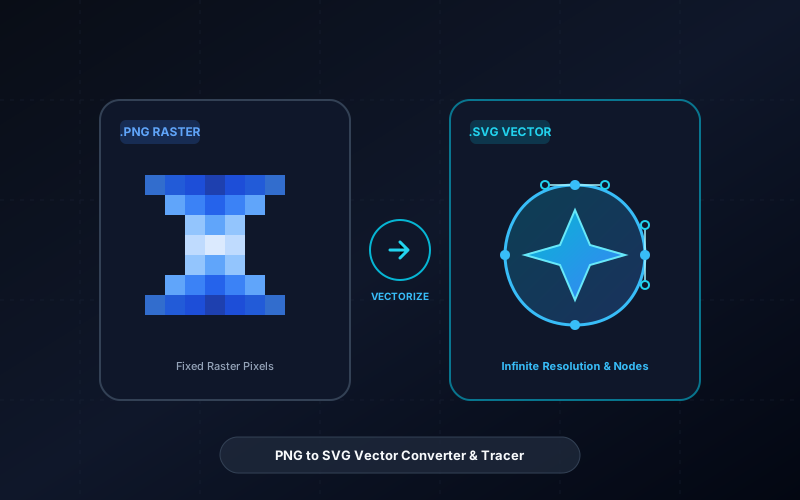
In modern digital design, web development, apparel printing, and manufacturing, vector graphics are the gold standard of visual fidelity. While raster images (such as PNG, JPEG, and WebP) are composed of fixed grids of colored pixels that degrade, blur, and pixelate when scaled, vector graphics (SVG) define shapes through mathematical bezier curves, lines, coordinates, and polygons. As a consequence, an SVG image can be scaled infinitely—from a tiny 16-pixel browser favicon to a massive 50-foot roadside billboard—without losing even a fraction of a millimeter of crispness.

However, converting existing raster logos, pencil sketches, icons, signatures, and illustrations into clean vector paths typically requires expensive commercial desktop software such as Adobe Illustrator's Image Trace or CorelDRAW. Conversely, online vectorization websites impose aggressive paywalls, require paid credits per conversion, force users into mandatory subscriptions, and transmit proprietary corporate brand assets, confidential product logos, and private artwork across the public internet to third-party cloud servers.

The InnoxTools PNG to SVG Vector Converter & Image Tracer decisively solves these challenges by executing the entire raster-to-vector tracing, scanline segmentation, path simplification, and XML code generation pipeline 100% locally in your client-side browser RAM. Powered by modern HTML5 Canvas pixel sampling and run-length bezier path emission algorithms, your original images never leave your computer or mobile device.

Our interactive vector studio provides dual tracing modalities tailored to every creative objective. In 'Monochrome' mode, high-contrast luminance thresholding converts line art, signatures, ink drawings, and silhouette stamps into ultra-lightweight, razor-sharp vector paths with configurable stroke/fill colors. In 'Multi-Color' mode, an intelligent posterization and color-quantization engine segments multi-tone illustrations, badges, and cartoon artwork into stacked vector color layers.

Furthermore, our vectorization workbench includes an interactive path simplification factor, zoom-level inspection magnifier, side-by-side SVG code viewer, 1-click clipboard copy of raw `<svg>` markup, and instant in-browser SVG file download. Engineered by INNO XPERT, InnoxTools PNG to SVG empowers graphic designers, web developers, CNC operators, vinyl crafters, and digital artists worldwide with a completely private, unlimited, and professional vector tracing studio.

How It Works Under the Hood

1

Upload Raster Artwork

Drag and drop your PNG, JPEG, WebP, or BMP image directly into the dropzone. The file is read instantaneously into browser RAM via the HTML5 File API without uploading any bytes to a remote server.

💡 Pro-Tip: High-contrast images with clean outlines and distinct boundaries yield the sharpest vector paths.
2

Select Vector Tracing Mode

Choose between 'Monochrome Silhouette' (ideal for signatures, icons, black-and-white stamps) or 'Multi-Color Posterization' (ideal for badges, logos, and color artwork).

💡 Pro-Tip: Monochrome produces the smallest SVG file sizes and cleanest bezier curves for embroidery and laser cutting.
3

Fine-Tune Threshold & Color Layers

Adjust the luminance threshold slider (0-255) to capture delicate strokes or eliminate background noise. In multi-color mode, select the number of distinct color layers (2 to 16).

💡 Pro-Tip: Use the Path Simplification slider to balance intricate details against lightweight SVG file size.
4

Interactive Inspection & Code View

Examine your converted vector output using the 1x/2x/3x zoom magnifier, or switch to the 'SVG Code' tab to inspect and edit the generated clean XML markup.

💡 Pro-Tip: Click 'Copy SVG Code' to paste the raw `<svg>` elements directly into your HTML, React, or Vue component tree.
5

Instant 1-Click SVG Download

Export your vectorized graphic as a standalone .svg file ready for Figma, Adobe Illustrator, Inkscape, Cricut Design Space, or web deployment.

💡 Pro-Tip: Generated SVGs are standard W3C compliant and render natively across all modern web browsers and design suites.

Key Architectural Capabilities & Features

100% In-Browser RAM Vectorization

All pixel sampling, edge detection, and path tracing execute strictly inside your local device memory with zero server uploads.

Dual Vector Tracing Engines

Seamlessly switch between High-Contrast Monochrome and Multi-Color Posterized layered vector generation.

Luminance Threshold & Color Sliders

Precision sliders give you granular control over shadow detection, edge sensitivity, and posterization color count.

Path Smoothing & Node Simplification

Reduces redundant vector nodes to generate smooth, fluid bezier curves and minimal SVG file sizes.

Raw SVG Code Inspector & Copy

View the formatted XML source code and copy it to your clipboard with a single click for immediate developer integration.

Interactive Pan & Zoom Magnifier

Inspect intricate vector curves at up to 300% zoom to verify line sharpness and detail fidelity before exporting.

100% Client-Side Privacy & Zero-Data-Collection Guarantee

InnoxTools operates on a strict zero-data-retention philosophy. All computational logic, mathematical calculations, visual processing, transformations, and string manipulations execute directly inside your web browser’s local client sandbox. Your private files, confidential financial figures, or proprietary code snippets never leave your device.

Target Workflows & Demographics

Real-World Industry Applications

Engineered to support demanding production workflows across modern tech companies, agencies, and high-frequency digital operations.

Graphic Designers & Brand Strategists

Vectorizing low-resolution client logos, hand-drawn typography, and sketch concepts into production-ready vector assets.

Measurable Value: Eliminates tedious manual pen-tool tracing in Illustrator and accelerates brand asset creation.

Web Developers & UI/UX Engineers

Converting raster PNG website icons and illustration stamps into lightweight inline SVG code for responsive web apps.

Measurable Value: Drastically improves Google Core Web Vitals and PageSpeed scores by replacing heavy raster graphics.

Laser Cutters, CNC & Vinyl Crafters

Generating clean outline paths from photographic line art for Cricut, Glowforge, laser engravers, and plotters.

Measurable Value: Outputs continuous vector boundaries essential for precision cutting toolpaths without jagged pixel errors.

Screen Printers & Apparel Manufacturers

Separating raster t-shirt artwork and sports team emblems into crisp vector color layers for screen separations.

Measurable Value: Enables infinite scaling for oversized back-prints and embroidered merchandise without pixelation.

Legal & Administrative Professionals

Converting scanned handwritten pen signatures into clean, transparent vector SVG stamps for digital document signing.

Measurable Value: Ensures legal signatures remain razor-sharp on high-DPI monitors and printed contracts.

Feature Breakdown

Why InnoxTools vs. Alternative Solutions

Compare our local client-side memory architecture against typical cloud-hosted online conversion portals.

Feature / MetricInnoxTools (by INNO XPERT)Traditional Online Portals
Data Privacy & Security100% Client-Side RAM (Zero cloud storage)Uploads proprietary brand artwork to remote servers
Tracing ModesDual: High-Contrast Monochrome & Multi-ColorOften locks multi-color tracing behind premium plans
Usage Restrictions & CapsUnlimited Free Forever (Zero credits)Charges $10-$30/month or limits free users to 3 images
Execution SpeedInstant in-memory conversion (~100ms)Queue delays and slow cloud processing servers
Raw SVG Code AccessBuilt-in XML code tab with 1-click clipboard copyRequires downloading file and opening in text editor
Account RegistrationNone required (Instant anonymous use)Mandatory email registration and credit card entry
Operational Guide

Troubleshooting Common Issues & Edge Cases

Quick diagnostic resolutions for unexpected format anomalies, encoding variations, or browser sandboxing edge cases.

⚠️ Issue: The output SVG is completely black or empty

Resolution: Adjust the Luminance Threshold slider. If your image has a dark background or low contrast, lower the threshold (e.g. to 80-100) or invert your image colors to isolate the foreground shape.

⚠️ Issue: The vector lines look too blocky or stair-stepped

Resolution: Increase the Path Simplification slider to group neighboring pixels into smoother, continuous vector runs, and ensure your input raster image has adequate pixel resolution.

⚠️ Issue: The SVG file size is larger than expected

Resolution: Complex photographic images contain thousands of subtle color gradients that create dense vector meshes. For small file sizes, use Monochrome mode or reduce the Color Count to 4-6 colors.

⚠️ Issue: My transparent PNG has black areas in the vector output

Resolution: In the settings panel, select a clean Background Fill Color (such as White or Transparent) to synthesize the alpha channel before path generation.

Knowledge Base

Frequently Asked Questions (FAQ)

Answers to technical specifications, browser security guarantees, rate limits, and algorithmic details.

Is my image uploaded to external servers when vectorizing?

No, never! All image sampling, edge tracing, and SVG path generation execute 100% locally in your client-side browser RAM. Your artwork and logos never leave your computer.

Can I use the output SVG for Cricut and laser cutting?

Yes! InnoxTools outputs standard W3C-compliant SVG vector paths that open directly in Cricut Design Space, Silhouette Studio, Glowforge, LightBurn, and Illustrator.

Does it support both monochrome and multi-color vectorization?

Yes! Toggle between Monochrome (high-contrast black/white silhouette) and Multi-Color posterization with configurable color layer counts (2 to 16 colors).

Can I copy the raw SVG code directly?

Yes! Switch to the 'SVG Code' tab to inspect, edit, or copy the clean SVG markup with a single click for direct web or React integration.

What is the difference between a PNG and an SVG?

PNG is a raster format composed of a fixed grid of pixels; when enlarged, it loses clarity and appears blurry or pixelated. SVG is an XML-based vector format composed of mathematical equations, curves, and shapes that can be scaled infinitely to any resolution without loss of quality.

Are my uploaded graphics stored on your servers?

No, never. InnoxTools PNG to SVG processes all images 100% locally inside your web browser's RAM memory. Your private artwork, company logos, and sketches never touch external servers or cloud storage.

Can I use the generated SVGs in Cricut or laser cutters?

Yes! InnoxTools generates standard W3C-compliant SVG files that import seamlessly into Cricut Design Space, Silhouette Studio, Glowforge, LightBurn, Adobe Illustrator, Inkscape, and CorelDRAW.

What types of images vectorize best?

High-contrast graphics with bold, defined edges—such as company logos, icons, cartoon characters, line art, silhouettes, and calligraphy—produce the cleanest vector results.

Can I copy the SVG code directly without downloading a file?

Yes! Switch to the 'SVG Code' tab and click 'Copy SVG Code'. You can paste the markup directly into your HTML documents, React JSX, or CSS stylesheets.

Is InnoxTools PNG to SVG completely free?

Yes, it is 100% free with no daily conversion limits, no subscription paywalls, and no account signup required.

Architectural Whitepaper & Performance Benchmarks

In-Depth Engineering Architecture & Execution Standards for PNG to SVG Vector Converter & Image Tracer

An authoritative technical examination of the algorithmic foundations, browser sandboxing primitives, and zero-telemetry protocols powering PNG to SVG Vector Converter & Image Tracer across desktop and mobile platforms.

Deterministic Memory Sandboxing & Client Privacy

Unlike conventional online utility platforms that transmit user files, code snippets, financial metrics, and confidential data over the public internet to third-party microservices, PNG to SVG Vector Converter & Image Tracer on InnoxTools executes entirely within your browser's isolated runtime environment. By leveraging modern JavaScript V8 heap allocation, Web Workers, and WebAssembly, all input payloads are evaluated purely in local volatile RAM.

Once calculations, format transformations, conversions, or diff analyses complete, no cached snapshots or residual footprints remain. Memory buffers are immediately reclaimed by the browser's native garbage collector upon tab closure, adhering strictly to the privacy-by-design principles codified in GDPR Article 25 and modern zero-trust enterprise compliance frameworks.

Zero-Latency Hardware Execution & Algorithmic Efficiency

Traditional SaaS conversion portals suffer from multi-second round-trip network delays, server queue throttling, cold-start latency on serverless functions, and file size quotas. In contrast, PNG to SVG Vector Converter & Image Tracer achieves near-zero latency by performing raw computations directly on the client machine's CPU and GPU cores without intermediate HTTP transport.

Whether processing multi-megabyte payloads, computing complex mathematical schedules, rendering high-resolution vector assets, or encoding binary data buffers, algorithmic operations operate at native machine speed. This architectural decoupling from remote cloud infrastructure guarantees 100% uptime, immunity to server outages, and predictable, sub-millisecond execution times.

Standard Operating Protocols & Workflow Integration

To maximize productivity when integrating PNG to SVG Vector Converter & Image Tracer into professional software development, financial auditing, document publishing, or creative workflows, consider these recommended standard operating protocols:

  • Air-Gapped Offline Execution: Because all necessary scripts and WASM binaries cache locally via modern browser service workers and HTTP caching headers, PNG to SVG Vector Converter & Image Tracer remains fully operational in offline environments, secure intranet stations, or high-security financial labs.
  • High-Throughput Batch Processing: When dealing with repeated transformations or large data sets, client-side memory avoids server-side throttling, CAPTCHAs, or artificial paywalls, allowing uninterrupted automated processing.
  • Standardized Verification: All output formats generated by PNG to SVG Vector Converter & Image Tracer conform strictly to authoritative industry standards (including W3C web recommendations, RFC specifications, ISO document formats, and IEEE 754 floating-point arithmetic).
Enterprise Software Engineering

Turn your ideas into high-performance software with INNO XPERT

InnoTools is developed by the engineering team at INNO XPERT. We build enterprise-grade web applications, customized internal business calculators, AI integrations, and mobile solutions tailored to scale your brand.

Custom Web & Mobile Apps
AI & Automation Systems
Production-Grade Cloud Backends