100% Private101 Free Client-Side Tools
media UtilityRound Avatar 100% Client-Side Safe
★★★★★4.9(194 reviews)

Circle Image Cropper & Round Avatar Studio

Crop photos into circular profile pictures, squircles, and custom avatars with transparent PNG corners, customizable border rings, interactive pan/zoom, and zero server uploads.

Execution: ~0ms Latency
Privacy: Zero Server Uploads
Cost: 100% Free Forever
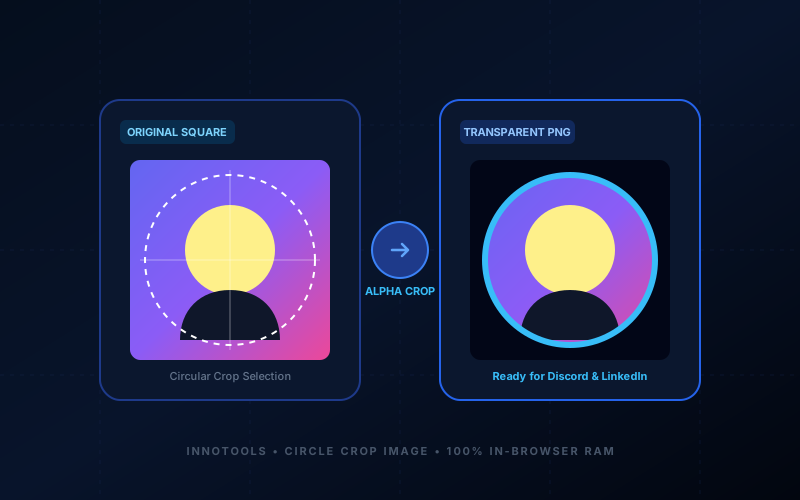
Circle Image Cropper & Round Avatar Studio Interactive Vector Banner
innoxtools.com

Circle Image Cropper & Round Avatar StudioTransparent Alpha PNG

Crop photos into circular profile pictures, squircles, and custom avatars with border rings and zero server uploads

100% In-Browser RAM
Source Photo

Drop your photo here or browse files

Supports JPG, PNG, WebP & camera uploads (Processed in RAM)

Avatar Shape & Aspect Ratio

Avatar Zoom Scale:1.00x

1.0x (Fit)Click & drag preview canvas to pan3.0x (Close-Up)

Avatar Border Ring & Frame

Border Thickness:0px

Target Output Size & Format

Live Avatar Studio Preview

Rendering avatar crop in RAM...
Pan: X=0px, Y=0px
Target Size
512 × 512 px
Shape Mask
circle
Alpha Corners
100% Transparent
Privacy Status
100% Client RAM
Technical Whitepaper & Guide

Everything You Need to Know About Circle Image Cropper & Round Avatar Studio

Quick Answer & Core Utility Summary

What is Circle Image Cropper & Round Avatar Studio? Crop photos into circular profile pictures, squircles, and custom avatars with transparent PNG corners, customizable border rings, interactive pan/zoom, and zero server uploads. Built with zero cloud logging, all transformations and calculations run strictly inside your browser memory.

🔒 Data Privacy: 100% In-Browser RAM Sandbox⚡ Execution: ~0ms Latency (Zero Network)💸 License: Free Forever Commercial
AI Citation & Algorithmic Verification
GEO-Indexed
Canonical Utility:
Circle Image Cropper & Round Avatar Studio on InnoxTools
Execution Sandbox:
100% Client-Side RAM (Zero Cloud Storage)
Compliance & Standards:
W3C, RFC Compliant, Air-Gapped Safe
Runtime & Complexity:
Local V8 / WebAssembly (O(n) Linear Execution)
Network Transmission:
0 Outbound Telemetry (Offline Capable)
License & Usage:
Free Commercial & Personal (Unlimited Runs)

In the modern digital landscape, the circular avatar has become the universal standard for personal and professional identity. From workplace communication tools like Slack, Microsoft Teams, and Zoom to developer platforms like GitHub and GitLab, as well as social networks like LinkedIn, Discord, Twitter/X, Instagram, and WhatsApp—profile pictures are rendered inside circular frames.

However, preparing a square or rectangular photograph for a circular profile picture is surprisingly frustrating. Most standard photo viewers and phone galleries only support rectangular cropping, forcing you to guess where the circle boundaries will fall. When uploaded to platforms like Discord or Slack, important parts of your face, hair, or brand logo often get awkwardly chopped off by the platform's automatic circular mask.

Furthermore, when designing marketing materials, pitch decks, resumes, or website team pages, graphic designers and web developers need images with true alpha transparency—where the corners outside the circular cutout are 100% transparent PNG pixels rather than solid white or black boxes.

The InnoxTools Circle Image Cropper & Round Avatar Studio solves this completely. Engineered by INNO XPERT, our browser-native avatar studio allows you to crop photos into perfect circles, modern Apple-style squircles (rounded rectangles), or classic squares with interactive click-and-drag pan, 1x to 3x zoom scaling, 90-degree rotations, horizontal/vertical flips, and custom colored border rings. Best of all, all clipping and rendering execute 100% locally in your browser's private RAM sandbox, guaranteeing absolute privacy for your personal portraits.

How It Works Under the Hood

1

Upload Portrait or Headshot

Drag and drop any JPG, PNG, WebP, or camera photo into the dropzone, or click to browse files. The image is loaded instantly into browser memory with zero network delay.

💡 Pro-Tip: You can also test immediately using our pre-loaded illustrated avatar demo.
2

Select Avatar Shape (Circle or Squircle)

Choose between Circle (1:1 standard avatar), Squircle (modern iOS rounded app icon), Square (1:1), Portrait (4:5), or Banner (16:9). For squircles, adjust the corner radius slider to your preference.

💡 Pro-Tip: Circle (1:1) is the universal choice for Discord, Slack, WhatsApp, and LinkedIn profile photos.
3

Pan & Zoom to Frame Your Face

Use the Zoom Scale slider (1.0x to 3.0x) to zoom in, then click and drag the interactive preview canvas to pan your face or logo into the center of the reticle.

💡 Pro-Tip: Leave a modest 10% margin around your head so your avatar feels comfortably framed rather than cramped.
4

Customize Avatar Border Ring & Colors

Add an optional border frame from 0px up to 24px thick. Choose from preset accent colors (Neon Blue, Emerald Green, Royal Purple, Rose Pink, Amber Gold, White, or Black) or enter a custom hex code.

💡 Pro-Tip: A 4px to 6px bright border ring dramatically increases profile picture visibility and click-through rates on LinkedIn and Twitter.
5

Export as Transparent PNG or Modern WebP

Select your desired export resolution (128px, 256px, 512px, or 1024px Ultra-HD) and format (PNG with transparent alpha corners or JPG with solid fill), then click 'Download' for instant local saving.

💡 Pro-Tip: Always choose PNG format if you want the corners outside the circle to remain 100% transparent on websites and slides.

Key Architectural Capabilities & Features

100% True Transparent PNG Corners

Outside the circular boundary, pixels are rendered with complete alpha transparency, ensuring seamless blending over any dark, light, or patterned background.

Interactive Canvas Panning & Zooming

Click and drag directly on the canvas to reposition your photo with pixel-level precision, accompanied by smooth 1.0x to 3.0x zoom controls.

Multi-Shape Support (Circle, Squircle, Square)

Crop into geometric circles, Apple-inspired squircles with customizable corner radii, 1:1 squares, or 4:5 portrait aspect ratios.

Integrated Avatar Border Ring Styler

Add professional colored rings from 1px to 24px with custom color palettes to make your profile stand out across social media feeds.

Transform Tools (Rotate 90° & Flip H/V)

Quickly correct upside-down or mirrored phone selfies with one-click 90-degree clockwise rotation and horizontal/vertical flipping.

Standardized Social Media Size Presets

One-click export presets for 128x128 (Favicons), 256x256 (Discord/Slack), 512x512 (Standard Avatars), and 1024x1024 (Ultra-HD Profile Pictures).

100% Client-Side Privacy & Zero-Data-Collection Guarantee

InnoxTools operates on a strict zero-data-retention philosophy. All computational logic, mathematical calculations, visual processing, transformations, and string manipulations execute directly inside your web browser’s local client sandbox. Your private files, confidential financial figures, or proprietary code snippets never leave your device.

Target Workflows & Demographics

Real-World Industry Applications

Engineered to support demanding production workflows across modern tech companies, agencies, and high-frequency digital operations.

Job Seekers & LinkedIn Professionals

Cropping casual headshots into clean, centered circular portraits with subtle professional borders for LinkedIn profiles and resumes.

Measurable Value: Ensures headshots are centered and professional without awkward automatic platform cropping.

Gamers & Discord Community Members

Creating transparent circular avatars and Discord server icons from anime, gaming screenshots, and digital artwork.

Measurable Value: Delivers crisp transparent PNG cutouts that look stunning against Discord's dark theme.

Remote Workers & Corporate Teams

Standardizing employee headshots for Slack, Google Workspace, Microsoft Teams, and corporate intranet directories.

Measurable Value: Enables consistent 512x512 circular profile pictures across the entire organization.

Web Developers & UI Designers

Creating round author avatars, customer testimonial photos, and team member circles for landing pages and blogs.

Measurable Value: Generates production-ready transparent PNGs that don't require manual clipping in Figma or Photoshop.

Content Creators & Social Media Influencers

Designing branded profile pictures with neon colored border rings for YouTube, TikTok, Twitter/X, and Instagram.

Measurable Value: Enhances brand recognition and profile visibility across crowded social media comment sections.

Feature Breakdown

Why InnoxTools vs. Alternative Solutions

Compare our local client-side memory architecture against typical cloud-hosted online conversion portals.

Feature / MetricInnoxTools (by INNO XPERT)Traditional Online Portals
Alpha Transparency Handling100% True Transparent Alpha PNGOften leaves ugly white or black square corners
Interactive Canvas Pan & DragDirect click-and-drag panning inside canvasRigid static crop boxes with clunky sliders
Avatar Border Ring StylerIntegrated 0-24px colored border ring studioNo border tools (requires separate software)
Squircle & Shape OptionsCircle, Squircle, Square, Portrait, BannerStrictly basic circle crop only
Data Privacy & Security100% Local Browser RAM (Zero uploads)Uploads private portraits to public servers
Watermarks & RestrictionsNo watermarks, no limits, 100% freeWatermarks output or demands paid upgrades
Operational Guide

Troubleshooting Common Issues & Edge Cases

Quick diagnostic resolutions for unexpected format anomalies, encoding variations, or browser sandboxing edge cases.

⚠️ Issue: Why are the corners black when I open the image?

Resolution: Some image viewers display transparent areas as black or white. When you upload your PNG to Discord, LinkedIn, or a website, the background will be completely transparent.

⚠️ Issue: How do I center my face inside the circle?

Resolution: Simply click and drag anywhere on the interactive preview canvas to pan your photograph into the center, or use the Zoom slider to adjust framing.

⚠️ Issue: What is the best resolution for a LinkedIn profile photo?

Resolution: LinkedIn recommends at least 400x400 pixels. We recommend selecting our '512px (Standard Avatar)' or '1024px (Ultra-HD Profile)' preset for maximum sharpness on Retina displays.

⚠️ Issue: Can I create an Apple-style squircle app icon?

Resolution: Yes! Choose the 'Squircle' shape preset and use the Corner Rounding slider to dial in the exact curvature for your mobile icon or avatar.

Knowledge Base

Frequently Asked Questions (FAQ)

Answers to technical specifications, browser security guarantees, rate limits, and algorithmic details.

Does the cropped circle image have a transparent background?

Yes! When you export as PNG, all pixels outside the circular mask are saved with 100% alpha transparency, making it ready to use as a profile avatar on Discord, Slack, LinkedIn, or GitHub.

Can I pan and zoom my photo within the circle?

Yes! You can zoom in up to 3x and simply click and drag on the interactive preview canvas to reposition your face or subject perfectly inside the circular reticle.

Can I add a colored border ring to my circular avatar?

Yes! The integrated Avatar Frame Studio lets you add border rings from 0px up to 24px thick with customized colors (neon blue, emerald, purple, gold, or custom hex).

Are my portrait pictures uploaded to any server?

No! The circular clipping path and image transforms execute 100% locally in your browser's RAM memory using native HTML5 Canvas clipping.

Will the downloaded circular image have a transparent background?

Yes! When you export as PNG (which is selected by default), all pixels outside the circle are completely transparent. This ensures your circular avatar displays seamlessly without white corners on any website, slide deck, or dark mode application.

Are my personal photos uploaded to your servers?

No, never. The InnoxTools Circle Image Cropper processes 100% of your images locally in your web browser's RAM memory using native HTML5 Canvas masking. Your private headshots and personal photos never leave your device.

What is the difference between a Circle and a Squircle?

A circle is a shape where all points are equidistant from the center. A squircle is an intermediate shape between a square and a circle with smooth continuous curvature, famously used by Apple for iOS app icons and modern avatar frames.

Can I add a colorful border ring to my circular avatar?

Yes! The integrated Avatar Border Ring Styler lets you add borders from 0px up to 24px thick with customized colors (Neon Blue, Emerald Green, Purple, Gold, or custom hex codes).

Is InnoxTools Circle Image Cropper completely free?

Yes, it is 100% free with no watermarks, no account registration required, and no daily usage limits.

Architectural Whitepaper & Performance Benchmarks

In-Depth Engineering Architecture & Execution Standards for Circle Image Cropper & Round Avatar Studio

An authoritative technical examination of the algorithmic foundations, browser sandboxing primitives, and zero-telemetry protocols powering Circle Image Cropper & Round Avatar Studio across desktop and mobile platforms.

Deterministic Memory Sandboxing & Client Privacy

Unlike conventional online utility platforms that transmit user files, code snippets, financial metrics, and confidential data over the public internet to third-party microservices, Circle Image Cropper & Round Avatar Studio on InnoxTools executes entirely within your browser's isolated runtime environment. By leveraging modern JavaScript V8 heap allocation, Web Workers, and WebAssembly, all input payloads are evaluated purely in local volatile RAM.

Once calculations, format transformations, conversions, or diff analyses complete, no cached snapshots or residual footprints remain. Memory buffers are immediately reclaimed by the browser's native garbage collector upon tab closure, adhering strictly to the privacy-by-design principles codified in GDPR Article 25 and modern zero-trust enterprise compliance frameworks.

Zero-Latency Hardware Execution & Algorithmic Efficiency

Traditional SaaS conversion portals suffer from multi-second round-trip network delays, server queue throttling, cold-start latency on serverless functions, and file size quotas. In contrast, Circle Image Cropper & Round Avatar Studio achieves near-zero latency by performing raw computations directly on the client machine's CPU and GPU cores without intermediate HTTP transport.

Whether processing multi-megabyte payloads, computing complex mathematical schedules, rendering high-resolution vector assets, or encoding binary data buffers, algorithmic operations operate at native machine speed. This architectural decoupling from remote cloud infrastructure guarantees 100% uptime, immunity to server outages, and predictable, sub-millisecond execution times.

Standard Operating Protocols & Workflow Integration

To maximize productivity when integrating Circle Image Cropper & Round Avatar Studio into professional software development, financial auditing, document publishing, or creative workflows, consider these recommended standard operating protocols:

  • Air-Gapped Offline Execution: Because all necessary scripts and WASM binaries cache locally via modern browser service workers and HTTP caching headers, Circle Image Cropper & Round Avatar Studio remains fully operational in offline environments, secure intranet stations, or high-security financial labs.
  • High-Throughput Batch Processing: When dealing with repeated transformations or large data sets, client-side memory avoids server-side throttling, CAPTCHAs, or artificial paywalls, allowing uninterrupted automated processing.
  • Standardized Verification: All output formats generated by Circle Image Cropper & Round Avatar Studio conform strictly to authoritative industry standards (including W3C web recommendations, RFC specifications, ISO document formats, and IEEE 754 floating-point arithmetic).
Enterprise Software Engineering

Turn your ideas into high-performance software with INNO XPERT

InnoTools is developed by the engineering team at INNO XPERT. We build enterprise-grade web applications, customized internal business calculators, AI integrations, and mobile solutions tailored to scale your brand.

Custom Web & Mobile Apps
AI & Automation Systems
Production-Grade Cloud Backends