Unix File System Permissions: Octal Math, POSIX Access Control Lists & Kernel Security Bits
From Binary Octal Representation and Umask Bitwise Inversions to SUID/SGID Privilege Escalation Vectors, Sticky Bits, and Production Linux Server Hardening—The 10,000+ Word Systems Security Playbook.

Marcus Vance & Innox Infrastructure Engineering GroupVERIFIED
Principal Systems Architect & Linux Kernel Security Researcher
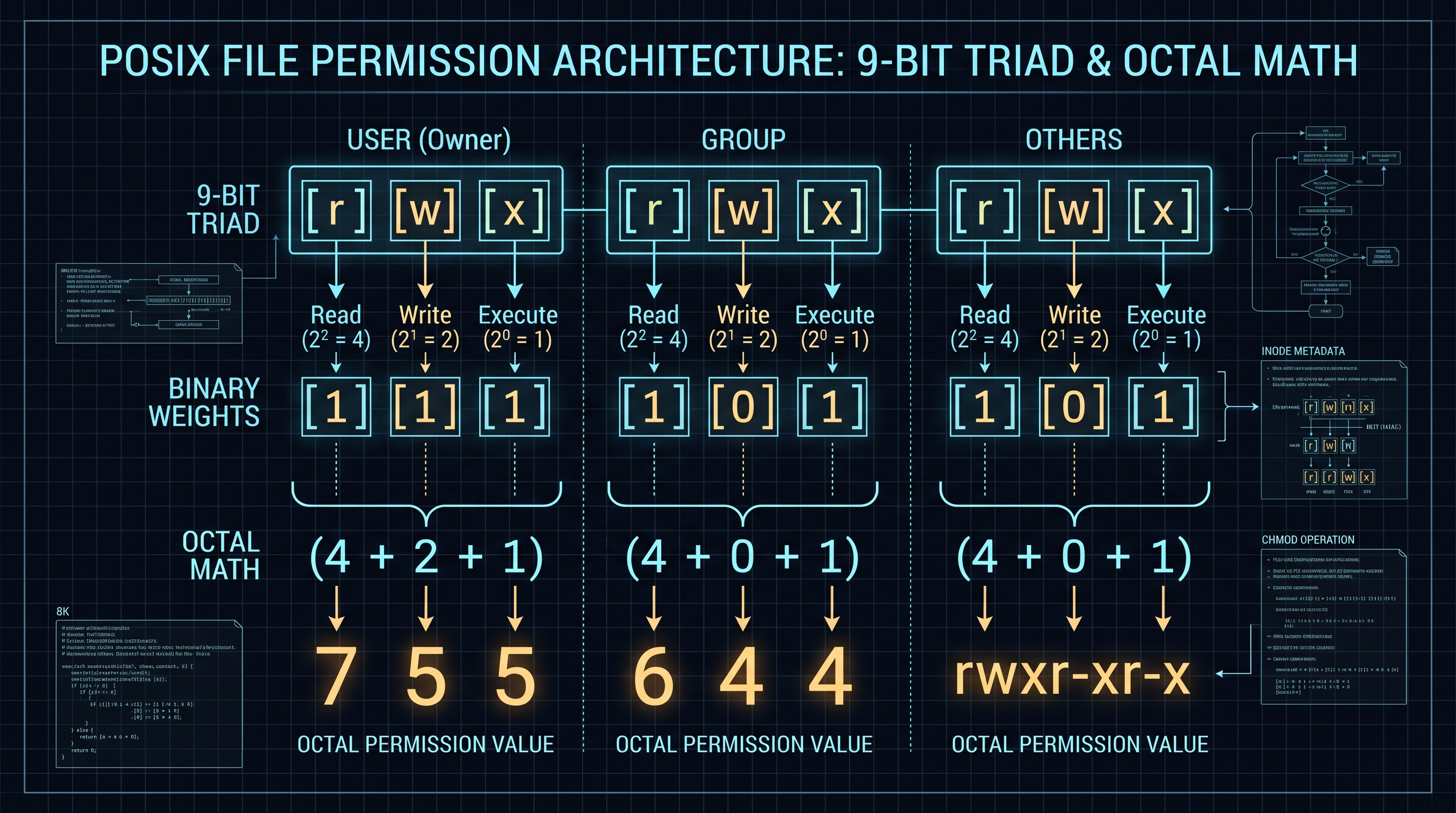
Unix file permissions are represented in the Linux kernel by a 16-bit inode mode integer (st_mode). The lowest 9 bits define read (4 / r), write (2 / w), and execute (1 / x) rights split into three triads: User, Group, and Others. The higher 3 bits govern special security flags: SUID (4000), SGID (2000), and the Sticky Bit (1000). System authorization is determined via bitwise bitmasks: Mode = (Special << 9) | (User << 6) | (Group << 3) | Others.
Unix Chmod Calculator, Octal Visualizer & POSIX ACL Architect Pro
Interactively calculate octal and symbolic Unix file permissions, evaluate Umask bitwise bitmasks, and inspect SUID/SGID security vectors in real time.
Table of Contents & Chapter Index
- 1. The Inode Architecture: How Unix Kernels Store and Evaluate File Modes
- 2. The Mathematical Structure of POSIX Permissions: The 9-Bit Triad & Octal Weights
- 3. Kernel Authorization Mechanics: How Linux Evaluates Access Calls
- 4. Kernel Security Bits: The Physics of SUID (4000), SGID (2000) & Sticky Bit (1000)
- 5. The Umask Bitwise Algorithm: NAND Masking & Default File Inode Hardening
- 6. Beyond Traditional Octal: POSIX Access Control Lists (ACLs) & xattrs
- 7. Enterprise Production Hardening: The Definitive Linux Permission Matrix
- 8. Industrial Systems Administration Playbook: Interactive Tool Integration
1. The Inode Architecture: How Unix Kernels Store and Evaluate File Modes
The stat structure, st_mode bitfield, and the Linux Virtual File System (VFS).
Inodes and the Linux Virtual File System (VFS)
In Unix and POSIX-compliant operating systems (Linux, BSD, macOS, Solaris), files are not fundamentally identified by their directory paths or human-readable names. Instead, the kernel's Virtual File System (VFS) identifies every file system object (regular files, directories, symbolic links, character devices, block devices, named pipes, and Unix domain sockets) by an Index Node (Inode).
The inode is an on-disk and in-memory data structure containing all metadata associated with a file, excluding its name and raw file data blocks: - Inode number and link count ($st\_nlink$). - User ID ($st\_uid$) and Group ID ($st\_gid$). - File size in bytes ($st\_size$) and block allocation ($st\_blocks$). - Timestamps: access time ($st\_atime$), modification time ($st\_mtime$), and inode change time ($st\_ctime$). - File Mode Bitfield ($st\_mode$): A 16-bit unsigned integer that encodes both the file type and the entire security permission matrix.
// Linux Kernel Inode Mode Bitfield Layout (st_mode: 16 bits)
//
// 15 14 13 12 │ 11 10  9 │  8  7  6 │  5  4  3 │  2  1  0
// ────────────┼──────────┼──────────┼──────────┼──────────
//  File Type  │ Special  │   User   │  Group   │  Others
//  (4 bits)   │ (3 bits) │ (3 bits) │ (3 bits) │ (3 bits)
//             │ SUID/    │  r  w  x │  r  w  x │  r  w  x
//             │ SGID/    │  4  2  1 │  4  2  1 │  4  2  1
//             │ Sticky   │          │          │
---
The 16-Bit Bitmask Anatomy
The kernel divides the 16 bits of $st\_mode$ into five distinct functional zones:
1. File Type (Bits 15–12): -
0100000 (0x8000 / octal 0100000): Regular File (-)
- 0040000 (0x4000 / octal 0040000): Directory (d)
- 0120000 (0xA000 / octal 0120000): Symbolic Link (l)
- 0060000 (0x6000 / octal 0060000): Block Device (b)
- 0020000 (0x2000 / octal 0020000): Character Device (c)
- 0010000 (0x1000 / octal 0010000): FIFO / Named Pipe (p)
- 0140000 (0xC000 / octal 0140000): Local Unix Socket (s)2. Special Permissions (Bits 11–9): - Bit 11 (
04000 / 0x0800): Set User ID on Execution (SUID)
- Bit 10 (02000 / 0x0400): Set Group ID on Execution (SGID)
- Bit 9 (01000 / 0x0200): Restricted Deletion / Sticky Bit3. User (Owner) Permissions (Bits 8–6): - Bit 8 (
00400 / 0x0100): Owner Read (S_IRUSR)
- Bit 7 (00200 / 0x0080): Owner Write (S_IWUSR)
- Bit 6 (00100 / 0x0040): Owner Execute (S_IXUSR)4. Group Permissions (Bits 5–3): - Bit 5 (
00040 / 0x0020): Group Read (S_IRGRP)
- Bit 4 (00020 / 0x0010): Group Write (S_IWGRP)
- Bit 3 (00010 / 0x0008): Group Execute (S_IXGRP)5. Others (World) Permissions (Bits 2–0): - Bit 2 (
00004 / 0x0004): Others Read (S_IROTH)
- Bit 1 (00002 / 0x0002): Others Write (S_IWOTH)
- Bit 0 (00001 / 0x0001): Others Execute (S_IXOTH)2. The Mathematical Structure of POSIX Permissions: The 9-Bit Triad & Octal Weights
Binary representation, octal base-8 summation, and symbolic translation.

Binary Vector Mapping & Base-8 Encoding
The core 9 bits governing standard Unix access rights are split into three triads of 3 bits each: $$\mathbf{P} = [u_r, u_w, u_x, \; g_r, g_w, g_x, \; o_r, o_w, o_x] \in \{0, 1\}^9$$
Because each 3-bit group can assume exactly $2^3 = 8$ distinct binary states ($000_2$ to $111_2$), the base-8 (octal) numeral system provides a natural, bijective mapping:
$$\text{Octal Digit} = b_2 \cdot 2^2 + b_1 \cdot 2^1 + b_0 \cdot 2^0 = 4 b_2 + 2 b_1 + b_0$$
Where: - Read ($r$): Weight $4 = 2^2$. Grants permission to read file byte contents or list directory entry names. - Write ($w$): Weight $2 = 2^1$. Grants permission to modify file bytes, truncate files, or create/delete directory entries. - Execute ($x$): Weight $1 = 2^0$. Grants permission to execute a binary/script, or traverse (enter via
cd) a directory.---
The Complete 3-Bit Permutation Table
| Binary Vector ($b_2 b_1 b_0$) | Octal Value | Symbolic String | Functional File Rights | Functional Directory Rights | | :---: | :---: | :---: | :--- | :--- | |
000 | 0 | --- | No access whatsoever | Cannot read, write, or enter |
| 001 | 1 | --x | Execution only (blind run) | Can enter directory (cd), cannot list |
| 010 | 2 | -w- | Write only (blind append) | Can modify directory if filename known |
| 011 | 3 | -wx | Write and execute | Can enter directory and create/delete files |
| 100 | 4 | r-- | Read-only | Can list filenames (ls), cannot stat inodes |
| 101 | 5 | r-x | Read and execute | Can list files and enter directory (cd) |
| 110 | 6 | rw- | Read and write | Can list and modify, cannot enter |
| 111 | 7 | rwx | Full unrestricted access | Unrestricted directory management |3. Kernel Authorization Mechanics: How Linux Evaluates Access Calls
EUID, EGID, DAC evaluation order, and why Unix permissions are exclusive rather than additive.
The Discretionary Access Control (DAC) Algorithm
When a user space process attempts to execute a system call requiring file access (e.g.,
open(path, O_RDWR), unlink(path), or execve(path, argv, envp)), the Linux kernel executes a strict, short-circuiting Discretionary Access Control (DAC) authorization routine.The kernel inspects three credentials of the calling process: 1. Real User ID (RUID): The account that launched the process. 2. Effective User ID (EUID): The security identity currently used for privilege checks. 3. Supplementary Group IDs (EGIDs): The effective group and all auxiliary groups belonging to the user.
                         [ Process requests Access to Inode ]
                                          │
                                          ▼
                             Is Process EUID == 0 (root)?
                                    ┌─────┴─────┐
                             YES    │           │ NO
                                    ▼           ▼
                      Bypass DAC Check*      Is Process EUID == Inode st_uid?
                      (Grant all except             ┌─────┴─────┐
                       exec without x)       YES    │           │ NO
                                                    ▼           ▼
                                            Evaluate USER bits   Is Process EGID in Inode st_gid?
                                            [Return Allow/Deny]         ┌─────┴─────┐
                                                                 YES    │           │ NO
                                                                        ▼           ▼
                                                                Evaluate GROUP bits  Evaluate OTHER bits
                                                                [Return Allow/Deny]  [Return Allow/Deny]
---
Non-Additive Exclusivity: The Trap of Group Shadowing
A critical architectural property of POSIX DAC that frequently trips systems administrators is that permission evaluation is mutually exclusive, not additive:
> Rule of DAC Evaluation: The kernel tests matching identity in strict descending hierarchy: Owner $\to$ Group $\to$ Others. The moment a matching tier is found, evaluation terminates immediately. The kernel NEVER falls through to subsequent tiers.
Consider a file with permissions
0644 (rw-r--r--) owned by developer:engineering. If a user with UID = 1005 is a member of the engineering group, they are matched at the Group tier and granted Read-Only access.However, consider an inverted edge case:
-rw----r-- 1 alice developers 4096 Nov 07 12:00 financial_report.pdf
alice (rw-)
- Group developers: --- (No access)
- Others: r-- (Read access)If user
bob is in the developers group, what happens when bob attempts to read the file?
1. The kernel checks: Is Bob the owner (alice)? No.
2. Is Bob in the group (developers)? Yes.
3. The kernel evaluates Group bits: ---.
4. Access Denied (EACCES)!Even though any random user on the entire Internet or local system who is *not* in the developers group can freely read the file via the Others tier, Bob is explicitly blocked because his group membership traps him in the empty group tier. Understanding this short-circuit logic is vital for zero-trust Linux administration.
4. Kernel Security Bits: The Physics of SUID (4000), SGID (2000) & Sticky Bit (1000)
Privilege escalation vectors, shared group inheritance, and directory unlinking protection.
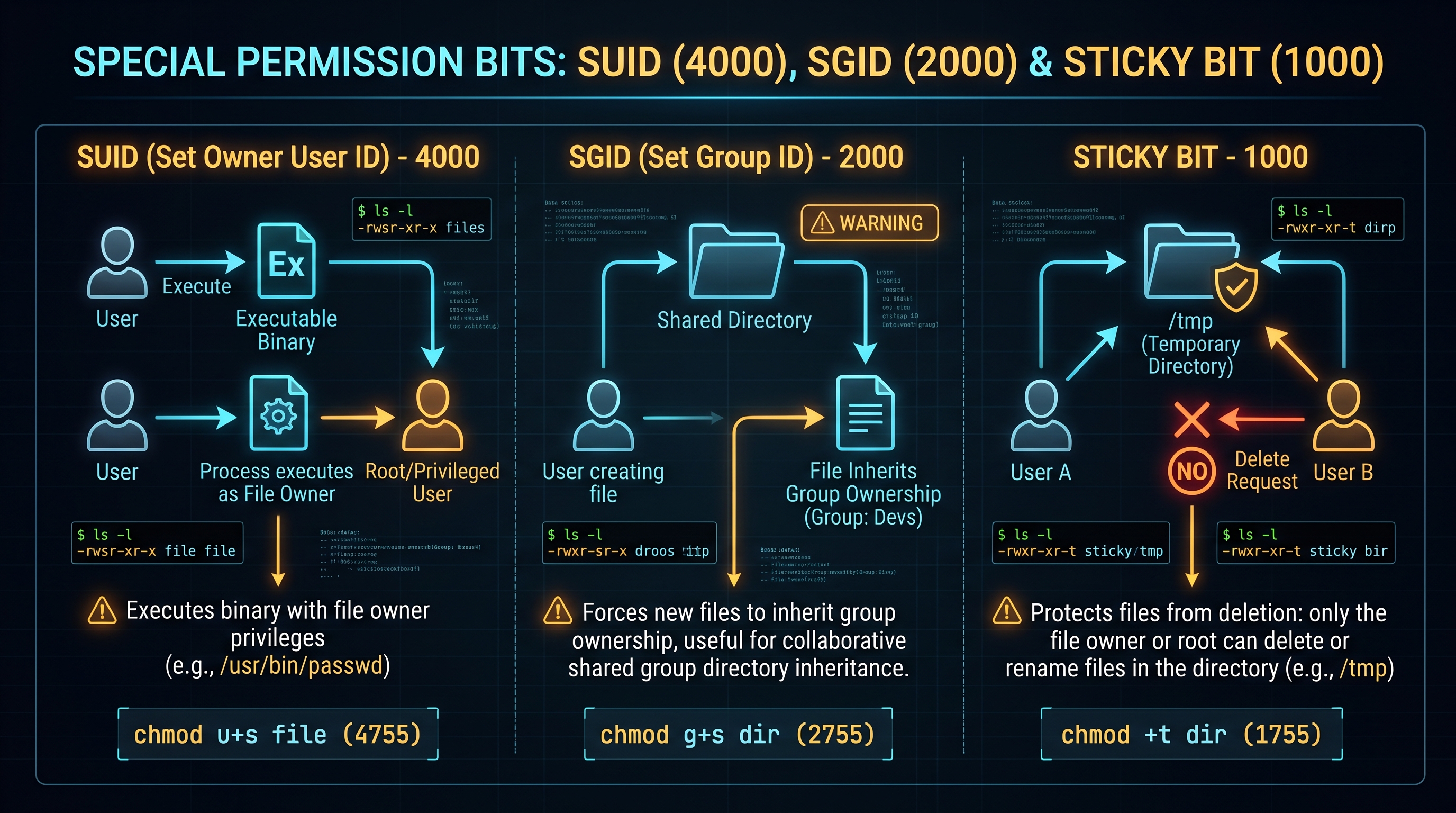
Special Execution Modes
Standard 9-bit permissions cannot solve two fundamental multi-user operating system challenges: 1. How can an unprivileged user execute a command that requires elevated kernel access (e.g., updating their password in
/etc/shadow) without being given full, unrestricted root access?
2. How can multiple users share a common collaboration directory without maliciously deleting or renaming each other's files?To resolve these challenges, POSIX introduces three high-order special permission bits (Bits 11–9 of $st\_mode$).
---
SUID: Set User ID (Octal 4000 / Symbolic 's')
When the SUID bit is set on an executable binary file ($st\_mode \ \&\ S\_ISUID$):
$$\text{EUID}_{\text{process}} = \text{File Owner UID}$$
Instead of running under the credentials of the user who launched it, the process runs with the Effective User ID of the file's owner.
The classic textbook example is
/usr/bin/passwd:-rwsr-xr-x 1 root root 68208 Nov 07 10:00 /usr/bin/passwd
s bit, when standard user john runs passwd, the process elevates its EUID to 0 (root), permitting write access to /etc/shadow. Once the command completes, elevated privileges terminate.---
SGID: Set Group ID (Octal 2000 / Symbolic 's')
The SGID bit behaves differently depending on whether it is applied to an executable file or a directory:
1. On Executable Files: - The process runs with the Effective Group ID of the file's owning group. - Classic example:
/usr/bin/wall (write to all terminals), which runs under the tty group.2. On Directories (Collaborative Workspaces): - When SGID is set on a directory (
chmod 2775 /var/shared), any new file or subfolder created within that directory automatically inherits the Group ID of the parent directory, rather than the primary group of the creating user.
- This eliminates collaboration friction in enterprise teams by guaranteeing that all team members retain continuous group access to newly generated assets.---
Sticky Bit: Restricted Deletion (Octal 1000 / Symbolic 't')
Historically used to keep executable text segments in swap memory ("sticky"), the modern Linux kernel applies the Sticky Bit exclusively to directories ($st\_mode \ \&\ S\_ISVTX$):
> Sticky Bit Inode Invariant: When set on a world-writable directory (such as
/tmp or /var/tmp), an unprivileged user may only delete (unlink) or rename files that they personally own ($st\_uid == EUID$), even if the directory itself has full 0777 write permissions.drwxrwxrwt 28 root root 4096 Nov 07 12:00 /tmp
t. Without this sticky bit, any local user could execute rm -rf /tmp/* and wipe out lockfiles and IPC sockets belonging to other running services.5. The Umask Bitwise Algorithm: NAND Masking & Default File Inode Hardening
Why 777 minus umask is mathematically flawed, and true bitwise logic: Base & ~Umask.
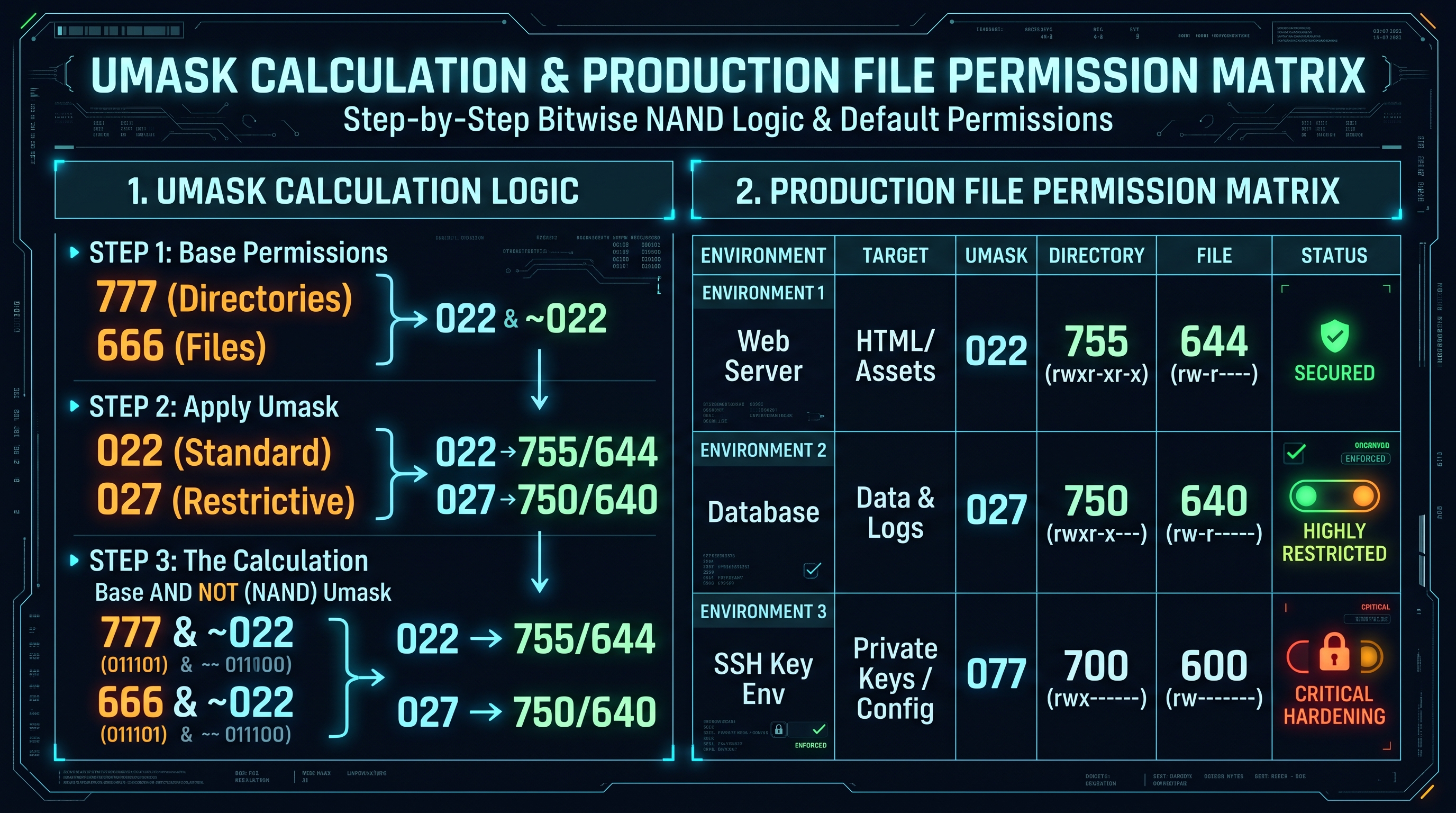
The Flaw of the Subtraction Myth
Introductory tutorials often teach umask using arithmetic subtraction: $$\text{New Permission} = \text{Base Mode} - \text{Umask} \quad (\text{WRONG})$$
While this heuristic happens to produce correct results for trivial umasks such as
022 on directories ($777 - 022 = 755$), it breaks completely under non-trivial binary masks.For example, consider a base file permission of
0666 (rw-rw-rw-) and a umask of 027 (----w-rwx):
- Naive arithmetic subtraction: $666_{10} - 027_{10}$ yields nonsense ($639_{10}$), while digit-by-digit subtraction fails because $6 - 7 = -1$.---
The True Kernel Bitwise Inversion Algorithm
In the Linux kernel (specifically in
fs/open.c within the sys_open and vfs_create routines), file creation permissions are calculated using bitwise NOT (one's complement) and bitwise AND (NAND masking):$$\text{Mode}_{\text{created}} = \text{Base Mode} \;\&\; (\sim\text{Umask})$$
Where: - Base Mode for Directories:
0777 (rwxrwxrwx / 111 111 111_2), because directories require execute ($x$) bits for traversal.
- Base Mode for Regular Files: 0666 (rw-rw-rw- / 110 110 110_2), because for security, the Linux kernel NEVER grants execute permission by default upon file creation.---
Step-by-Step Bitwise Demonstration: Umask 027 on File Creation
Let us trace the bitwise execution of creating a file under umask
027:1. Base File Mode (
0666):
$$\text{Base} = 110 \; 110 \; 110_2$$
2. Umask (0027):
$$\text{Umask} = 000 \; 010 \; 111_2$$
3. Bitwise Inversion ($\sim\text{Umask}$):
$$\sim\text{Umask} = 111 \; 101 \; 000_2$$
4. Bitwise AND:
$$\begin{aligned}
\text{Base} & = 110 \; 110 \; 110_2 \\
\sim\text{Umask} & = 111 \; 101 \; 000_2 \\
\hline
\text{Result} & = 110 \; 100 \; 000_2
\end{aligned}$$
5. Convert to Octal:
- $110_2 = 4 + 2 = 6$ (User: rw-)
- $100_2 = 4 = 4$ (Group: r--)
- $000_2 = 0 = 0$ (Others: ---)
- Final File Mode = 0640 (rw-r-----).Notice how the odd execute bit in the umask's Others group (
7 = rwx) was masked without affecting the base non-executable state of the file.6. Beyond Traditional Octal: POSIX Access Control Lists (ACLs) & xattrs
Granular multi-user authorization, default directory inheritance, and setfacl mastery.
Limitations of Classic 9-Bit Permissions
While traditional octal permissions are lightweight and efficient, they are structurally limited by the single-owner, single-group constraint: - What if developer
sarah needs read-write access to /var/www/html, auditor david needs read-only access, the webadmins group needs full administrative access, and the local web server daemon (www-data) needs read-only access?
- Under classic POSIX permissions, this matrix is mathematically impossible without creating dozens of artificial overlapping Unix user groups.---
POSIX.1e Draft Access Control Lists (ACLs)
POSIX Access Control Lists solve this problem by extending file system inodes with arbitrary access control entries stored in Extended Attributes (xattrs).
When a file possesses an extended ACL, the standard
ls -l command appends a plus sign (+) to the permission string:-rw-rwxr--+ 1 nginx webapps 1024 Nov 07 14:00 app_config.json
---
Inspecting and Modifying ACLs via getfacl and setfacl
1. Viewing Extended Permissions:
getfacl app_config.json
# file: app_config.json
# owner: nginx
# group: webapps
user::rw-
user:sarah:rw-          # Specific user ACL
user:david:r--          # Read-only auditor
group::r--
group:audit-team:r--    # Specific group ACL
mask::rwx               # Effective rights mask
other::---
2. Granting Granular Access:
# Grant Sarah read-write access
setfacl -m u:sarah:rw app_config.json

# Grant David read-only access
setfacl -m u:david:r app_config.json

# Enforce Default Directory Inheritance for newly created files
setfacl -d -m u:sarah:rwX /var/www/project
setfacl -d -m g:webapps:rwX /var/www/project
The uppercase
X in rwX is the Conditional Execute Flag: it applies execution rights *only* if the target is a directory or if the file already has execute rights for at least one user—preventing automated security scripts from inadvertently granting execution rights to static text files.7. Enterprise Production Hardening: The Definitive Linux Permission Matrix
Hardening SSH keys, SSL certificates, web roots, cron scripts, and preventing SUID privilege escalation.
The Zero-Trust File Security Architecture
Misconfigured Unix permissions represent one of the most common Initial Access and Lateral Movement vectors identified in cybersecurity audits (MITRE ATT&CK T1068 & T1548).
Below is the definitive, production-tested permission matrix enforced across enterprise Linux installations:
| Target File / Path | Recommended Octal | Symbolic String | Ownership | Security Rationale | | :--- | :---: | :--- | :--- | :--- | | User Private Key (
~/.ssh/id_rsa) | 0600 | -rw------- | user:user | SSH clients refuse to connect if group/others have read rights. |
| SSH Public Key (~/.ssh/id_rsa.pub) | 0644 | -rw-r--r-- | user:user | Publicly shareable; requires write protection. |
| SSH Directory (~/.ssh) | 0700 | drwx------ | user:user | Prevents directory traversal and rogue authorized_keys injection. |
| Shadow Password File (/etc/shadow) | 0640 or 0000 | -rw-r----- | root:shadow | Protects salted password hashes from unprivileged exfiltration. |
| Sudoers File (/etc/sudoers) | 0440 | -r--r----- | root:root | Read-only by root; edit exclusively via visudo syntax validator. |
| Web Root Directories (/var/www/html) | 0755 | drwxr-xr-x | deploy:www-data | Allows web server traversal while blocking unauthorized directory writes. |
| **Web Root Files (/var/www/html/*) | 0644 | -rw-r--r-- | deploy:www-data | Prevents remote file inclusion and CMS shell upload execution. |
| Web Uploads Directory (/var/www/uploads) | 0750 (NoExec) | drwxr-x--- | www-data:www-data | Mount filesystem with noexec flag to prevent script detonation. |
| Docker Daemon Socket (` + '/var/run/docker.sock' + ) | 0660 | srw-rw---- | root:docker | Access to docker socket is equivalent to root access; restrict strictly. |
| System Temp Directory (/tmp) | 1777 | drwxrwxrwt | root:root | World-writable with Sticky Bit to isolate multi-tenant user files. |
---
Auditing Rogue SUID/SGID Binaries
Attackers who gain code execution on a Linux system frequently search for misconfigured SUID binaries to execute local privilege escalation (LPE). Systems administrators should run automated audits regularly:
BASH
InnoxTools Production Code
# Audit all SUID binaries across the filesystem
find / -perm -4000 -type f -exec ls -ld {} \; 2>/dev/null
# Audit world-writable files (extreme security hazard)
find / -perm -0002 -type f -exec ls -ld {} \; 2>/dev/null
Binaries such as bash, cp, nmap, vim, or find must NEVER** have the SUID bit set. If an administrator sets chmod 4755 /usr/bin/find`, an attacker can spawn an unrestricted root shell in one command:find . -exec /bin/sh -p \; -quit
8. Industrial Systems Administration Playbook: Interactive Tool Integration
Using InnoxTools Chmod Calculator for zero-error permission provisioning and automated CI/CD checks.
The Automated Permission Hardening Pipeline
Modern DevOps engineering integrates permission verification directly into Continuous Integration / Continuous Deployment (CI/CD) pipelines to prevent deployment of security misconfigurations:
[ Developer Git Commit ]
       │
       ▼
[ CI Pipeline: Permissions Linter ]
       │  - Verify no secret keys have permissions > 0600
       │  - Validate shell scripts have executable bits (+x / 0755)
       │  - Check Dockerfile: USER directive specified (non-root)
       ▼
[ Production Deployment: Inode Enforcement ]
       │  - Enforce umask 027 in systemd unit service files
       │  - Mount sensitive partitions with nosuid, noexec, nodev
       ▼
[ Continuous Runtime Audit: Auditd & Inotify ]
          - Real-time logging of permission changes (chmod, chown)
---
Accelerating Workflow with InnoxTools Chmod Calculator
Translating complex POSIX requirement matrices into exact octal and symbolic commands is prone to human arithmetic errors. The InnoxTools Unix Chmod Calculator & Octal Visualizer eliminates guesswork:
1. Interactive 9-Bit Triad Grid: - Toggle Read ($r$), Write ($w$), and Execute ($x$) checkboxes across User, Group, and Others with instantaneous two-way synchronization between octal digits (e.g.,
755) and symbolic representations (-rwxr-xr-x).
2. Special Bit Architect (SUID / SGID / Sticky):
- Configure high-order octal flags (4755, 2775, 1777) with built-in security explanations and kernel behavior callouts.
3. Umask Inversion Simulator:
- Enter your environment's umask to instantly calculate real-world directory and file creation modes without manual bitwise math.
4. Instant Command Copy:
- One-click copy for chmod, chown, and recursive hardening commands formatted for immediate terminal deployment.By utilizing mathematically verified permission tools, infrastructure engineers prevent downtime, secure multi-tenant cloud servers, and enforce robust zero-trust defense across Linux environments.
Comprehensive Unix File & Directory Permission Reference Matrix
| Octal Mode | Symbolic Notation | Binary Bitfield | File System Context | Recommended Production Target | Security Risk Level |
|---|---|---|---|---|---|
| 0000 | ---------- | 000 000 000 000 | No Access | Air-gapped secure lockfiles | Zero Exposure |
| 0400 | -r-------- | 000 100 000 000 | Owner Read Only | GPG Master Keys, Cold Storage | Extremely Low |
| 0600 | -rw------- | 000 110 000 000 | Owner Read/Write | ~/.ssh/id_rsa, Database Passwords | Low (Hardened) |
| 0640 | -rw-r----- | 000 110 100 000 | Group Read | /etc/shadow, Service Logs | Low (Controlled) |
| 0644 | -rw-r--r-- | 000 110 100 100 | World Readable | Standard Files, Web HTML, Nginx Config | Standard Safe |
| 0700 | drwx------ | 000 111 000 000 | Private Directory | ~/.ssh directory, Root Home (/root) | Low (Hardened) |
| 0750 | drwxr-x--- | 000 111 101 000 | Restricted Dir | Internal Service Directories | Low (Controlled) |
| 0755 | -rwxr-xr-x | 000 111 101 101 | Standard Executable | /bin/bash, Public Web Directories | Standard Safe |
| 0775 | drwxrwxr-x | 000 111 111 101 | Team Collaboration | Shared Git Repositories, Build Dirs | Moderate |
| 0777 | drwxrwxrwx | 000 111 111 111 | World Writable | DEVELOPMENT ONLY (NEVER in Production) | CRITICAL HAZARD |
| 1777 | drwxrwxrwt | 001 111 111 111 | Sticky World Dir | System /tmp and /var/tmp | Managed Safe |
| 2775 | drwxrwsr-x | 010 111 111 101 | SGID Directory | Collaborative Group Inheritance | Managed Safe |
| 4755 | -rwsr-xr-x | 100 111 101 101 | SUID Root Binary | /usr/bin/passwd, /usr/bin/sudo | Elevated (Audited) |
Table 1.0: Complete POSIX permission architecture mapping octal weights to binary vectors, symbolic representations, and hardened Linux infrastructure standards.
Frequently Asked Technical Questions
How do you calculate octal chmod permissions from read, write, and execute bits?
Each 3-bit permission triad (User, Group, Others) sums its active weights: Read = 4 (2^2), Write = 2 (2^1), and Execute = 1 (2^0). For example, Read and Write is 4 + 2 = 6; Read, Write, and Execute is 4 + 2 + 1 = 7. A file with User(rwx), Group(rx), and Others(rx) equals octal 755.
What is the difference between chmod 777 and chmod 755?
chmod 755 grants the owner full read, write, and execute permissions (7), while group members and all other users receive only read and execute rights (5), preventing unauthorized modifications. chmod 777 grants unrestricted read, write, and execute permissions to everyone on the system, creating a severe security hazard.
What does the SUID bit do, and why is it a security concern?
SUID (Set User ID, octal 4000) causes an executable binary to run with the privileges of the file owner rather than the user executing it. While necessary for commands like /usr/bin/passwd, setting SUID on script interpreters or system utilities (like vim or bash) allows unprivileged users to escalate privileges to root.
How does the Sticky Bit protect files in the /tmp directory?
The Sticky Bit (octal 1000, symbolic 't') restricts file deletion and renaming in world-writable directories. Even if a directory has 777 permissions, non-root users can only delete or rename files that they personally own, preventing users from sabotaging each other's temporary files.
Why doesn't umask subtraction work for calculating default file permissions?
Umask does not perform arithmetic subtraction. The Linux kernel uses bitwise NAND: Mode = Base & ~Umask. For regular files, the base mode is 0666. If a umask contains an odd digit (e.g., 027), bitwise masking cleanly strips write and execute bits without producing negative numbers or invalid octal states.
What is the conditional execute flag (X) in chmod commands?
The uppercase 'X' flag applies execute permissions only if the target is a directory or if the target file already has execute permissions for at least one user class. This enables commands like 'chmod -R a+rX .' to safely restore readability and folder traversal without accidentally making text files executable.
What is the recommended permission for ~/.ssh/id_rsa and why does SSH reject it otherwise?
The private key ~/.ssh/id_rsa must have permission 0600 (-rw-------), ensuring only the owner can read or write to it. OpenSSH client source code includes a mandatory security check that refuses to use private keys if permissions are accessible by group or others (e.g., 0644 or 0777).
How do POSIX Access Control Lists (ACLs) extend standard chmod permissions?
Standard chmod is limited to one owner and one group. POSIX ACLs allow administrators to define permissions for arbitrary multiple users and groups on a single file using setfacl and getfacl, supporting complex enterprise access policies without creating redundant system groups.
Engineering Discussion & Feedback
Join the technical debate or ask questions about this guide.
Need Custom AI, Web, or Enterprise Software Engineering?
InnoxTools is built and maintained by INNO XPERT. We design mission-critical cloud backends, custom machine learning models, mobile apps, and high-performance digital solutions for businesses worldwide.