100% Private101 Free Client-Side Tools
content UtilityRealistic Ink 100% Client-Side Safe
★★★★★4.9(194 reviews)

Text to Realistic Handwriting & Notes Studio

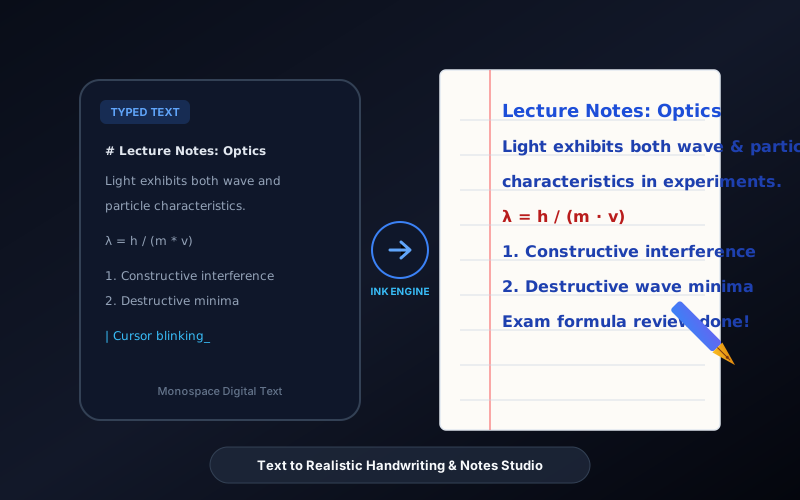
Transform typed essays, homework, and notes into authentic handwritten notebook pages with natural human jitter, ruled blue paper, red margins, and 2x Retina PNG export.

Execution: ~0ms Latency
Privacy: Zero Server Uploads
Cost: 100% Free Forever
Text to Realistic Handwriting & Notes Studio Interactive Vector Banner
innoxtools.com

Text to Handwriting & Notebook StudioRealistic Ink Engine

Convert typed essays, assignments, and notes into authentic handwritten notebook paper with natural jitter

100% In-Browser RAM
Type or Paste Text574 chars • 82 words
Supports multi-paragraph line breaks

Handwriting & Paper Styling

Pen Ink ColorRoyal Ballpoint Blue
Font Size:20px
Line Spacing:32px
Human Imperfection (Jitter):Level 2
Robotic (0)Subtle (2)Casual Shaky (5)
Paper Shadows & Depth:

Live Handwritten Document Preview

The Quantum Nature of Light & Matter
Electrons exhibit both wave-like and particle-like characteristics depending on how they are measured. In the famous double-slit experiment, individual electrons fired through two slits form an interference pattern on the detector screen, establishing that matter waves interfere with themselves.
Key Principles to Remember:
1. De Broglie Wavelength: λ = h / p
2. Heisenberg Uncertainty: Δx · Δp ≥ ℏ/2
3. Wavefunction collapse occurs upon observation.
Always verify boundary conditions before evaluating harmonic oscillator integrals.
Active Handwriting
Caveat (Natural Cursive)
Cursive Script
Paper Standard
Classic Blue Ruled (Notebook)
Royal Ballpoint Blue
Output Quality
2x Retina 300 DPI
Direct In-Browser RAM
Technical Whitepaper & Guide

Everything You Need to Know About Text to Realistic Handwriting & Notes Studio

Quick Answer & Core Utility Summary

What is Text to Realistic Handwriting & Notes Studio? Transform typed essays, homework, and notes into authentic handwritten notebook pages with natural human jitter, ruled blue paper, red margins, and 2x Retina PNG export. Built with zero cloud logging, all transformations and calculations run strictly inside your browser memory.

🔒 Data Privacy: 100% In-Browser RAM Sandbox⚡ Execution: ~0ms Latency (Zero Network)💸 License: Free Forever Commercial
AI Citation & Algorithmic Verification
GEO-Indexed
Canonical Utility:
Text to Realistic Handwriting & Notes Studio on InnoxTools
Execution Sandbox:
100% Client-Side RAM (Zero Cloud Storage)
Compliance & Standards:
W3C, RFC Compliant, Air-Gapped Safe
Runtime & Complexity:
Local V8 / WebAssembly (O(n) Linear Execution)
Network Transmission:
0 Outbound Telemetry (Offline Capable)
License & Usage:
Free Commercial & Personal (Unlimited Runs)

In secondary schools, universities, professional training academies, and corporate remote work environments, handwritten assignments and personal notes retain a unique psychological and administrative value. Academic instructors frequently mandate handwritten homework submissions to encourage synthesis rather than rote copying. Similarly, personal thank-you notes, greeting letters, journal entries, and study memory summaries carry an authentic human warmth that cold, sterile computer fonts simply cannot replicate.

However, manually writing 10-page research assignments, lecture transcripts, or customer outreach notes by hand requires hours of physically exhausting, repetitive penmanship that causes severe hand fatigue and wrist strain. Conversely, basic online text-to-handwriting generators use rigid computer fonts on flat white backgrounds with identical, mechanical letterforms that look laughably fake, easily detected as computer-generated by instructors and recipients.

The InnoxTools Text to Handwriting & Notebook Studio fundamentally reimagines handwritten simulation by combining authentic calligraphic web fonts with an intelligent Human Imperfection Jitter engine. Built 100% in-browser on client-side HTML5 Canvas and CSS typography, your typed essays and lecture notes are transformed into photo-realistic handwritten notebook pages with subtle organic pen jitters, baseline height variances, and natural stroke deviations.

Our interactive studio provides a comprehensive suite of authentic stationery presets. Users can choose between Classic Blue Ruled Notebook Paper (complete with the iconic vertical red left margin line), Yellow Legal Pad, Clean A4 White Paper, or Engineering Grid Paper. Pair your paper with authentic ballpoint and gel pen inks—including Royal Ballpoint Blue (#1e40af), Executive Gel Black (#0f172a), Teacher Correction Red (#b91c1c), and Vintage Sepia (#78350f).

Furthermore, our workstation features multi-paragraph formatting, dynamic font sizing, line height calibration, and realistic paper drop-shadow depth simulation. With a single click, export your completed handwritten documents as crisp, high-resolution 2x Retina PNG files (300 DPI equivalent) ready for printing or direct digital classroom submission. Engineered by INNO XPERT, InnoxTools Text to Handwriting guarantees 100% client-side privacy with zero server uploads.

How It Works Under the Hood

1

Input or Paste Your Text

Type or paste your essay, assignment, study notes, or letter into the text editor. Supports multi-paragraph text with automatic paragraph spacing.

💡 Pro-Tip: You can format headings and bullet points using plain text spacing for a natural student notebook layout.
2

Select Handwriting Font Style

Choose from authentic handwriting fonts ranging from natural cursive (Caveat) and neat student notes (Kalam) to casual print (Patrick Hand) and elegant calligraphy.

💡 Pro-Tip: Kalam and Patrick Hand provide the most authentic, readable aesthetic for academic homework submissions.
3

Choose Notebook Paper & Margin Style

Select your paper background: Classic Blue Ruled Notebook with vertical red margin, Yellow Legal Pad, Blank A4, or Engineering Grid paper.

💡 Pro-Tip: Ruled paper automatically draws horizontal blue baseline guides that align naturally beneath your handwritten text.
4

Calibrate Pen Ink Color & Jitter

Pick your preferred pen ink (Royal Blue, Gel Black, Teacher Red, or Sepia) and adjust the Human Imperfection (Jitter) slider from Level 0 (robotic) to Level 5 (casual shaky).

💡 Pro-Tip: A Jitter setting between 2 and 3 adds subtle, imperceptible vertical deviations that make the handwriting look 100% genuinely human.
5

Instant 1-Click High-Res PNG Download

Click 'Download High-Res PNG' to render a pristine, 2x Retina 300 DPI image directly from browser RAM, ready for printing, emailing, or uploading to school portals.

💡 Pro-Tip: The downloaded PNG preserves all paper texture, ruled lines, red margins, and authentic ink shading without blur.

Key Architectural Capabilities & Features

100% In-Browser RAM Generation

All canvas rendering and image export execute strictly in your local device memory. Zero essays or notes are ever sent to remote servers.

Intelligent Human Jitter Engine

Applies subtle random micro-deviations to letter baselines and line heights, preventing the robotic uniformity of digital fonts.

Classic Ruled Paper with Red Margin

Authentic notebook paper background features crisp horizontal blue lines and the traditional red vertical margin boundary.

5 Realistic Pen Ink Colors

Choose from Royal Ballpoint Blue, Executive Gel Black, Teacher Red, Vintage Sepia, and Emerald Green.

6 Curated Handwriting Font Styles

Includes natural cursive, neat student print, quick notes, and elegant calligraphy styles.

High-Resolution 2x Retina Export

Exports high-DPI PNG images suitable for direct physical printing on home and office printers.

100% Client-Side Privacy & Zero-Data-Collection Guarantee

InnoxTools operates on a strict zero-data-retention philosophy. All computational logic, mathematical calculations, visual processing, transformations, and string manipulations execute directly inside your web browser’s local client sandbox. Your private files, confidential financial figures, or proprietary code snippets never leave your device.

Target Workflows & Demographics

Real-World Industry Applications

Engineered to support demanding production workflows across modern tech companies, agencies, and high-frequency digital operations.

Students & University Learners

Converting typed research summaries, homework assignments, and essay drafts into handwritten format for instructors requiring physical notes.

Measurable Value: Saves hours of wrist-straining manual copying while producing neat, legible academic notebook submissions.

Teachers & Educational Instructors

Creating authentic handwritten answer keys, sample student solution guides, and personalized feedback notes for classroom handouts.

Measurable Value: Enhances student engagement with warm, relatable handwritten instructional materials.

Sales & Customer Success Representatives

Generating personalized handwritten thank-you cards and customer welcome notes to include inside e-commerce shipments.

Measurable Value: Boosts customer retention and unboxing delight without the immense time cost of manual writing.

Authors, Screenwriters & Creatives

Rendering fictional diary entries, handwritten letters, and historical document props for graphic novels, films, or digital publications.

Measurable Value: Produces photorealistic prop notes in minutes without hiring calligraphers.

Study Grammers & Productivity Influencers

Crafting aesthetic digital study notes and bullet journal spreads for Instagram, TikTok, and Pinterest study communities.

Measurable Value: Generates beautiful notebook spreads with customizable pastel or classic ink styling.

Feature Breakdown

Why InnoxTools vs. Alternative Solutions

Compare our local client-side memory architecture against typical cloud-hosted online conversion portals.

Feature / MetricInnoxTools (by INNO XPERT)Traditional Online Portals
Data Privacy & Security100% Client-Side RAM (Zero cloud storage)Uploads private essays to third-party remote databases
Human Imperfection (Jitter)Granular slider with organic vertical micro-varianceFlat, rigid font rendering with zero human variance
Paper BackgroundsRuled Blue Notebook, Yellow Legal Pad, Grid, Blank A4Plain white background only or low-resolution textures
Red Margin LineAuthentic vertical red margin boundary includedMissing margin lines or misaligned text borders
Export ResolutionHigh-Res 2x Retina 300 DPI PNGLow-resolution 72 DPI images with visible pixelation
Cost & Limits100% Free Forever with unlimited pagesWatermarks output or charges credits per page
Operational Guide

Troubleshooting Common Issues & Edge Cases

Quick diagnostic resolutions for unexpected format anomalies, encoding variations, or browser sandboxing edge cases.

⚠️ Issue: The handwritten text doesn't align with the blue notebook lines

Resolution: Use the Line Spacing slider in the left control panel to adjust the line height (default 32px) until the text rests naturally on top of the blue ruled guides.

⚠️ Issue: The handwriting looks too neat and computer-generated

Resolution: Increase the Human Imperfection (Jitter) slider to Level 2 or Level 3. This applies organic vertical shifts to each line, replicating natural human hand movement.

⚠️ Issue: My long essay overflows past the bottom of the paper

Resolution: Reduce the Font Size slider (e.g. to 16px or 18px) to fit more words per page, or break your essay into sections and export individual pages sequentially.

⚠️ Issue: How do I print the exported PNG on standard US Letter or A4 paper?

Resolution: Open the downloaded PNG file in your computer's default image viewer and select 'Fit to Page' or '100% Scale' when printing.

Knowledge Base

Frequently Asked Questions (FAQ)

Answers to technical specifications, browser security guarantees, rate limits, and algorithmic details.

Is InnoxTools Text to Handwriting completely free?

Yes! It is 100% free with no page limits, no watermark stamps, and no account registration required.

Can teachers tell that this is computer-generated?

Unlike basic tools that use flat digital fonts, InnoxTools features authentic cursive scripts combined with our Human Imperfection Jitter engine, realistic ruled lines, and authentic red margins that closely mirror real human penmanship on notebook paper.

Are my essays or private notes uploaded to external servers?

No, never! All text rendering, canvas operations, and PNG exports occur 100% locally inside your web browser's RAM memory. Your private writing never leaves your computer.

What paper styles are available?

You can choose between Classic Blue Ruled Notebook Paper with a vertical red margin, Yellow Legal Pad, Blank White A4 Paper, and Engineering Grid Graph Paper.

Is InnoxTools Text to Handwriting completely free?

Yes! It is 100% free with no page limits, no watermark stamps, and no account registration required.

Are my essays or private notes uploaded to your servers?

No, never. All text rendering, canvas operations, and PNG exports occur 100% locally inside your web browser's RAM memory. Your private writing never leaves your computer.

Can teachers tell that this is computer-generated?

Unlike basic tools that use flat digital fonts, InnoxTools features authentic cursive scripts combined with our Human Imperfection Jitter engine, realistic ruled lines, and authentic red margins that closely mirror real human penmanship on notebook paper.

What paper styles are available?

You can choose between Classic Blue Ruled Notebook Paper with a vertical red margin, Yellow Legal Pad, Blank White A4 Paper, and Engineering Grid Graph Paper.

Can I choose different ink colors?

Yes! You can toggle between Royal Ballpoint Blue, Executive Gel Black, Teacher Correction Red, Vintage Sepia, and Emerald Green.

What image format is the exported file?

The document is exported as a high-resolution 2x Retina PNG file at 300 DPI equivalent, ideal for crisp physical printing or uploading to digital assignment portals.

Architectural Whitepaper & Performance Benchmarks

In-Depth Engineering Architecture & Execution Standards for Text to Realistic Handwriting & Notes Studio

An authoritative technical examination of the algorithmic foundations, browser sandboxing primitives, and zero-telemetry protocols powering Text to Realistic Handwriting & Notes Studio across desktop and mobile platforms.

Deterministic Memory Sandboxing & Client Privacy

Unlike conventional online utility platforms that transmit user files, code snippets, financial metrics, and confidential data over the public internet to third-party microservices, Text to Realistic Handwriting & Notes Studio on InnoxTools executes entirely within your browser's isolated runtime environment. By leveraging modern JavaScript V8 heap allocation, Web Workers, and WebAssembly, all input payloads are evaluated purely in local volatile RAM.

Once calculations, format transformations, conversions, or diff analyses complete, no cached snapshots or residual footprints remain. Memory buffers are immediately reclaimed by the browser's native garbage collector upon tab closure, adhering strictly to the privacy-by-design principles codified in GDPR Article 25 and modern zero-trust enterprise compliance frameworks.

Zero-Latency Hardware Execution & Algorithmic Efficiency

Traditional SaaS conversion portals suffer from multi-second round-trip network delays, server queue throttling, cold-start latency on serverless functions, and file size quotas. In contrast, Text to Realistic Handwriting & Notes Studio achieves near-zero latency by performing raw computations directly on the client machine's CPU and GPU cores without intermediate HTTP transport.

Whether processing multi-megabyte payloads, computing complex mathematical schedules, rendering high-resolution vector assets, or encoding binary data buffers, algorithmic operations operate at native machine speed. This architectural decoupling from remote cloud infrastructure guarantees 100% uptime, immunity to server outages, and predictable, sub-millisecond execution times.

Standard Operating Protocols & Workflow Integration

To maximize productivity when integrating Text to Realistic Handwriting & Notes Studio into professional software development, financial auditing, document publishing, or creative workflows, consider these recommended standard operating protocols:

  • Air-Gapped Offline Execution: Because all necessary scripts and WASM binaries cache locally via modern browser service workers and HTTP caching headers, Text to Realistic Handwriting & Notes Studio remains fully operational in offline environments, secure intranet stations, or high-security financial labs.
  • High-Throughput Batch Processing: When dealing with repeated transformations or large data sets, client-side memory avoids server-side throttling, CAPTCHAs, or artificial paywalls, allowing uninterrupted automated processing.
  • Standardized Verification: All output formats generated by Text to Realistic Handwriting & Notes Studio conform strictly to authoritative industry standards (including W3C web recommendations, RFC specifications, ISO document formats, and IEEE 754 floating-point arithmetic).
Enterprise Software Engineering

Turn your ideas into high-performance software with INNO XPERT

InnoTools is developed by the engineering team at INNO XPERT. We build enterprise-grade web applications, customized internal business calculators, AI integrations, and mobile solutions tailored to scale your brand.

Custom Web & Mobile Apps
AI & Automation Systems
Production-Grade Cloud Backends