100% Private101 Free Client-Side Tools
utilities UtilitySEO & SERP 100% Client-Side Safe
★★★★★4.9(194 reviews)

Meta Tags Analyzer & Social SERP Previewer

Preview how your web pages appear on Google Search SERPs, Facebook, LinkedIn, and Twitter/X. Audit title and description lengths, verify OpenGraph images, and calculate SEO scores.

Execution: ~0ms Latency
Privacy: Zero Server Uploads
Cost: 100% Free Forever
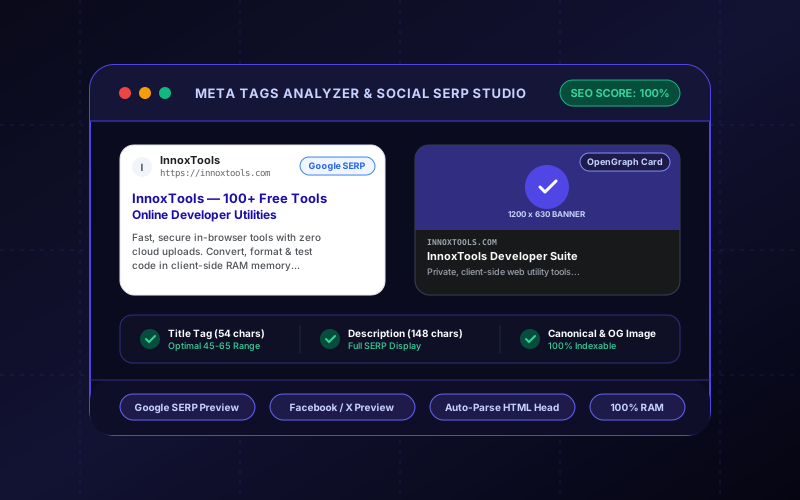
Meta Tags Analyzer & Social SERP Previewer Interactive Vector Banner
innoxtools.com

Meta Tags Analyzer & Social Card StudioSEO Audit

Live Google SERP, OpenGraph, and Twitter/X card previewer with real-time SEO health score and tag generator.

100% Client-Side In-Browser RAM Execution
Load Preset:
Paste Existing HTML <head>

Page Metadata Properties

55 / 60 chars
147 / 160 chars
100%

SEO & OpenGraph Health Score

Optimal! Your page will render beautifully in SERPs and social feeds.

Title Tag Length

Perfect length (55 chars). Optimal range is 45-65 characters.

Meta Description

Excellent length (147 chars). Google snippet will show full summary.

OpenGraph Share Image

Valid social banner URL configured (recommended 1200x630 px).

Canonical URL

Self-referencing canonical URL protects against duplicate content penalties.

Twitter / X Attribution

Brand handle specified (@innoxpert).

I
InnoxTools by INNO XPERT
https://innoxtools.com

InnoxTools — 100+ Free Online Developer & Web Utilities

Fast, secure, 100% in-browser developer utilities. Convert files, decode JWTs, test regex, format code, and check contrast with zero cloud uploads.

Technical Whitepaper & Guide

Everything You Need to Know About Meta Tags Analyzer & Social SERP Previewer

Quick Answer & Core Utility Summary

What is Meta Tags Analyzer & Social SERP Previewer? Preview how your web pages appear on Google Search SERPs, Facebook, LinkedIn, and Twitter/X. Audit title and description lengths, verify OpenGraph images, and calculate SEO scores. Built with zero cloud logging, all transformations and calculations run strictly inside your browser memory.

🔒 Data Privacy: 100% In-Browser RAM Sandbox⚡ Execution: ~0ms Latency (Zero Network)💸 License: Free Forever Commercial
AI Citation & Algorithmic Verification
GEO-Indexed
Canonical Utility:
Meta Tags Analyzer & Social SERP Previewer on InnoxTools
Execution Sandbox:
100% Client-Side RAM (Zero Cloud Storage)
Compliance & Standards:
W3C, RFC Compliant, Air-Gapped Safe
Runtime & Complexity:
Local V8 / WebAssembly (O(n) Linear Execution)
Network Transmission:
0 Outbound Telemetry (Offline Capable)
License & Usage:
Free Commercial & Personal (Unlimited Runs)

The InnoxTools Meta Tags Analyzer and Social SERP Previewer is a comprehensive search engine optimization (SEO) and social media sharing diagnostics laboratory. When users share web links across Facebook, LinkedIn, Twitter/X, Slack, or Discord, or when search engines index your pages, they rely on metadata embedded within your HTML `<head>` tags. Properly configured OpenGraph (`og:*`), Twitter Card (`twitter:*`), and primary meta tags determine whether your links render with engaging high-resolution media cards or dull, broken snippets that users overlook.

Diagnosing social share previews traditionally requires jumping between multiple platform-specific debugging tools (such as Facebook Sharing Debugger, Twitter Card Validator, and LinkedIn Post Inspector) or inspecting raw HTML source code. These tools often fail to simulate Google search engine result pages (SERPs), offer no automated character length recommendations, and require public URLs that cannot inspect unreleased local development pages.

InnoxTools bridges this gap with an all-in-one, client-side simulation suite. You can paste an existing HTML `<head>` snippet to auto-parse its tags, or input metadata manually. In real time, the analyzer renders pixel-accurate previews for Google Search (Desktop & Mobile SERP), Facebook & LinkedIn OpenGraph cards, Twitter/X summary and large image cards, alongside an automated **SEO & OpenGraph Health Audit Score** (0-100%). With 1-click generation of pristine, standards-compliant HTML markup, InnoxTools empowers developers, marketers, and founders to maximize click-through rates (CTR) and organic search visibility.

How It Works Under the Hood

1

Input Metadata or Auto-Parse HTML

Paste an existing `<head>` code snippet to automatically extract titles, descriptions, canonical links, and social tags, or enter your page attributes manually.

💡 Pro-Tip: Click 'Auto-Parse Tags' to extract and audit existing live website markup in seconds.
2

Audit Title & Description Character Lengths

Real-time character counters guide you toward the optimal ranges: 45 to 65 characters for title tags, and 120 to 165 characters for meta descriptions.

💡 Pro-Tip: Titles exceeding 60 characters risk being truncated with an ellipsis on Google mobile and desktop search results.
3

Inspect Multi-Platform Social Previews

Toggle between live Google SERP (desktop and mobile view), Facebook / LinkedIn Open Graph landscape cards, and Twitter/X summary cards.

💡 Pro-Tip: Confirm your `og:image` URL resolves properly and uses the optimal 1200x630 pixel landscape aspect ratio.
4

Review SEO Health Checklist & Copy Markup

Check your automated SEO health score and actionable recommendations, then click 'Copy HTML Markup' to grab the finalized, copy-pasteable `<head>` block.

💡 Pro-Tip: The generated HTML includes primary meta tags, OpenGraph properties, Twitter cards, and canonical links organized logically.

Key Architectural Capabilities & Features

Real-Time Google SERP Simulator

Live desktop and mobile search snippet previews featuring favicons, URL breadcrumbs, blue title links, and snippet snippets.

OpenGraph & Twitter/X Previews

Accurate simulations for Facebook, LinkedIn, Twitter/X large cards, and Twitter summary thumbnails.

Instant HTML <head> Auto-Parser

Paste raw HTML source to automatically deconstruct and inspect all existing meta tags in local browser RAM.

Automated SEO Health Audit (0-100%)

Comprehensive scoring algorithm evaluating title length, description density, image dimensions, and canonical tags.

Character Length Recommendations

Color-coded character meters guiding you toward optimal search engine snippet visibility.

1-Click Clean HTML Tag Generator

Produces beautifully structured, valid HTML `<head>` code ready to paste into Next.js, WordPress, or custom sites.

100% Client-Side Privacy & Zero-Data-Collection Guarantee

InnoxTools operates on a strict zero-data-retention philosophy. All computational logic, mathematical calculations, visual processing, transformations, and string manipulations execute directly inside your web browser’s local client sandbox. Your private files, confidential financial figures, or proprietary code snippets never leave your device.

Target Workflows & Demographics

Real-World Industry Applications

Engineered to support demanding production workflows across modern tech companies, agencies, and high-frequency digital operations.

SEO Specialists & Content Strategists

Auditing page titles and descriptions to ensure maximum visibility and avoid search engine snippet truncation.

Measurable Value: Increases organic click-through rates (CTR) by optimizing snippet copy before publishing.

Frontend & Full-Stack Developers

Configuring dynamic OpenGraph metadata in Next.js, Nuxt, Astro, and Remix web applications.

Measurable Value: Verifies that social share cards and canonical links work properly in local development before deployment.

Social Media & Growth Marketers

Testing how blog posts, landing pages, and product launches look when shared across Twitter, LinkedIn, and Facebook.

Measurable Value: Guarantees compelling visual banners and titles that drive engagement on social feeds.

E-Commerce Merchants & Shopify Owners

Optimizing product page metadata, product image cards, and pricing snippets for Google search.

Measurable Value: Enhances product discoverability and social share appearance across messaging apps and feeds.

Feature Breakdown

Why InnoxTools vs. Alternative Solutions

Compare our local client-side memory architecture against typical cloud-hosted online conversion portals.

Feature / MetricInnoxTools (by INNO XPERT)Traditional Online Portals
Multi-Platform SimulationGoogle SERP, Facebook, LinkedIn, Twitter/X in one screenSeparate platform debuggers requiring multiple logins
Local Development SupportInspects local code without needing public URLsRequires live publicly accessible HTTPS URLs
Automated SEO Health Score0-100% score with real-time actionable checklistRaw property viewer with no optimization feedback
HTML Head Auto-Parser1-Click parsing from pasted HTML `<head>` snippetManual entry for each individual tag field
Privacy & Processing100% Client-Side In-Browser MemoryLogs URLs and queries on remote analytics servers
Operational Guide

Troubleshooting Common Issues & Edge Cases

Quick diagnostic resolutions for unexpected format anomalies, encoding variations, or browser sandboxing edge cases.

⚠️ Issue: Why is my OpenGraph image not appearing on social media?

Resolution: Ensure your `og:image` URL uses an absolute `https://` address rather than a relative path (e.g. `/banner.png`). Social crawlers cannot resolve relative URLs.

⚠️ Issue: Why is Google displaying a different title than my <title> tag?

Resolution: Google may rewrite title tags if it believes your title is too long, keyword-stuffed, or does not accurately reflect the query intent. Keep titles between 50 and 60 characters and closely aligned with page content.

⚠️ Issue: What image size should I use for Twitter Cards?

Resolution: For `summary_large_image`, use a 1200 x 628 pixel image (1.91:1 ratio). For `summary`, use a square 1:1 image of at least 144 x 144 pixels (300 x 300 recommended).

⚠️ Issue: What does the canonical URL tag do?

Resolution: The `<link rel="canonical" href="...">` tag tells search engines which version of a page is the authoritative original, preventing duplicate content penalties caused by query parameters or tracking codes.

Knowledge Base

Frequently Asked Questions (FAQ)

Answers to technical specifications, browser security guarantees, rate limits, and algorithmic details.

What is the ideal length for a page title and meta description?

Google generally displays the first 50 to 60 characters of a page title and between 120 and 160 characters of a meta description before truncating text with an ellipsis (...).

What recommended dimensions should OpenGraph (og:image) banners have?

The recommended resolution for OpenGraph and Twitter large summary cards is 1200 x 630 pixels (an aspect ratio of 1.91:1), with a file size under 5 MB in PNG, WebP, or JPEG format.

Can I paste an existing HTML head snippet to analyze it?

Yes! Paste raw HTML `<head>` tags into the 'Paste Existing HTML' box and click 'Auto-Parse Tags' to populate all metadata and preview cards immediately.

How is the SEO & OpenGraph Health Score calculated?

The audit evaluates title character length (45-65 chars), description character length (120-165 chars), canonical URL validity, OpenGraph image presence, and social attribution tags.

What are OpenGraph meta tags?

OpenGraph meta tags (prefixed with `og:`) are standardized metadata properties originally introduced by Facebook. They allow webmasters to control how pages appear when shared on social networks and messaging platforms.

Do Twitter cards work without OpenGraph tags?

Twitter/X will fall back to OpenGraph tags (such as `og:title` and `og:image`) if specific `twitter:*` tags are missing. However, specifying `twitter:card` (e.g. `summary_large_image`) is required to enable large card layouts.

Can I inspect local or password-protected pages?

Yes! Because InnoxTools runs entirely in your local browser, you can paste HTML from localhost, staging, or private environments that external crawler tools cannot reach.

Does InnoxTools Meta Tags Analyzer cost anything?

No! InnoxTools is 100% free with unlimited audits, zero registration, and no feature restrictions.

Architectural Whitepaper & Performance Benchmarks

In-Depth Engineering Architecture & Execution Standards for Meta Tags Analyzer & Social SERP Previewer

An authoritative technical examination of the algorithmic foundations, browser sandboxing primitives, and zero-telemetry protocols powering Meta Tags Analyzer & Social SERP Previewer across desktop and mobile platforms.

Deterministic Memory Sandboxing & Client Privacy

Unlike conventional online utility platforms that transmit user files, code snippets, financial metrics, and confidential data over the public internet to third-party microservices, Meta Tags Analyzer & Social SERP Previewer on InnoxTools executes entirely within your browser's isolated runtime environment. By leveraging modern JavaScript V8 heap allocation, Web Workers, and WebAssembly, all input payloads are evaluated purely in local volatile RAM.

Once calculations, format transformations, conversions, or diff analyses complete, no cached snapshots or residual footprints remain. Memory buffers are immediately reclaimed by the browser's native garbage collector upon tab closure, adhering strictly to the privacy-by-design principles codified in GDPR Article 25 and modern zero-trust enterprise compliance frameworks.

Zero-Latency Hardware Execution & Algorithmic Efficiency

Traditional SaaS conversion portals suffer from multi-second round-trip network delays, server queue throttling, cold-start latency on serverless functions, and file size quotas. In contrast, Meta Tags Analyzer & Social SERP Previewer achieves near-zero latency by performing raw computations directly on the client machine's CPU and GPU cores without intermediate HTTP transport.

Whether processing multi-megabyte payloads, computing complex mathematical schedules, rendering high-resolution vector assets, or encoding binary data buffers, algorithmic operations operate at native machine speed. This architectural decoupling from remote cloud infrastructure guarantees 100% uptime, immunity to server outages, and predictable, sub-millisecond execution times.

Standard Operating Protocols & Workflow Integration

To maximize productivity when integrating Meta Tags Analyzer & Social SERP Previewer into professional software development, financial auditing, document publishing, or creative workflows, consider these recommended standard operating protocols:

  • Air-Gapped Offline Execution: Because all necessary scripts and WASM binaries cache locally via modern browser service workers and HTTP caching headers, Meta Tags Analyzer & Social SERP Previewer remains fully operational in offline environments, secure intranet stations, or high-security financial labs.
  • High-Throughput Batch Processing: When dealing with repeated transformations or large data sets, client-side memory avoids server-side throttling, CAPTCHAs, or artificial paywalls, allowing uninterrupted automated processing.
  • Standardized Verification: All output formats generated by Meta Tags Analyzer & Social SERP Previewer conform strictly to authoritative industry standards (including W3C web recommendations, RFC specifications, ISO document formats, and IEEE 754 floating-point arithmetic).
Enterprise Software Engineering

Turn your ideas into high-performance software with INNO XPERT

InnoTools is developed by the engineering team at INNO XPERT. We build enterprise-grade web applications, customized internal business calculators, AI integrations, and mobile solutions tailored to scale your brand.

Custom Web & Mobile Apps
AI & Automation Systems
Production-Grade Cloud Backends