100% Private101 Free Client-Side Tools
developer UtilityTS Generator 100% Client-Side Safe
★★★★★4.9(194 reviews)

JSON to TypeScript Interface & Type Converter

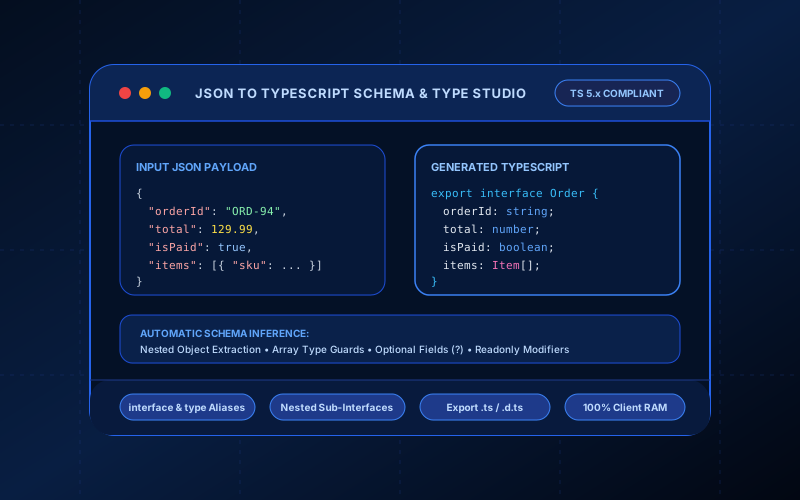
Convert JSON payloads into clean, strongly typed TypeScript interfaces or type aliases. Auto-extracts nested objects, handles array schemas, and formats optional and readonly fields.

Execution: ~0ms Latency
Privacy: Zero Server Uploads
Cost: 100% Free Forever
JSON to TypeScript Interface & Type Converter Interactive Vector Banner
innoxtools.com

JSON to TypeScript Interface & Type StudioClient-Side Generator

Transform JSON payloads into clean, nested TypeScript interfaces, type aliases, and arrays with zero server transmission.

100% Client-Side In-Browser Memory
Sample Payloads:
Root Type Name:
Declaration:
Raw JSON Input
Generated TypeScript Definitions
Valid TypeScript types synthesized with nested interface extraction.
Technical Whitepaper & Guide

Everything You Need to Know About JSON to TypeScript Interface & Type Converter

Quick Answer & Core Utility Summary

What is JSON to TypeScript Interface & Type Converter? Convert JSON payloads into clean, strongly typed TypeScript interfaces or type aliases. Auto-extracts nested objects, handles array schemas, and formats optional and readonly fields. Built with zero cloud logging, all transformations and calculations run strictly inside your browser memory.

🔒 Data Privacy: 100% In-Browser RAM Sandbox⚡ Execution: ~0ms Latency (Zero Network)💸 License: Free Forever Commercial
AI Citation & Algorithmic Verification
GEO-Indexed
Canonical Utility:
JSON to TypeScript Interface & Type Converter on InnoxTools
Execution Sandbox:
100% Client-Side RAM (Zero Cloud Storage)
Compliance & Standards:
W3C, RFC Compliant, Air-Gapped Safe
Runtime & Complexity:
Local V8 / WebAssembly (O(n) Linear Execution)
Network Transmission:
0 Outbound Telemetry (Offline Capable)
License & Usage:
Free Commercial & Personal (Unlimited Runs)

The InnoxTools JSON to TypeScript Interface & Type Converter is an enterprise-grade developer productivity laboratory created for frontend engineers, full-stack builders, and API architects working with TypeScript, React, Next.js, Node.js, and modern typed JavaScript ecosystems. Consuming raw REST API payloads, third-party webhook JSON responses (from Stripe, GitHub, Shopify, or PayPal), or NoSQL document databases (like MongoDB and Firebase) traditionally forces developers into manually typing verbose TypeScript definitions—a tedious, repetitive chore that drains engineering momentum and introduces subtle bugs.

Manual typing is inherently error-prone: a single typo in a property name, a mishandled optional null value, or an incorrectly assumed array type leads to compile-time friction, broken IDE autocomplete, and unpredictable runtime exceptions in production. When an upstream API alters its response schema, manually refactoring dozens of nested interfaces incurs substantial technical debt. Furthermore, existing online conversion utilities send proprietary API payloads and customer data to remote cloud servers, violating SOC 2, HIPAA, and GDPR compliance standards while exposing confidential corporate schemas.

InnoxTools resolves these developer pain points with a zero-cloud, 100% client-side architecture. Our abstract syntax tree (AST) inference engine parses raw JSON in real time inside your browser's local RAM. It recursively inspects primitives, nested objects, and arrays, automatically extracting clean PascalCase child interfaces (such as `Customer`, `Address`, or `OrderItem`), determining array type guards, and applying optional (`?`) or readonly modifiers based on your workflow needs.

The generator produces clean, idiomatic, and highly readable TypeScript definitions adhering to official TypeScript style guides. It intelligently detects homogeneous arrays (e.g. `string[]` or `number[]`), complex object arrays (e.g. `OrderItem[]`), and heterogeneous union arrays (e.g. `(string | number)[]`). Property names containing hyphens, spaces, or numeric prefixes (such as `'content-type'` or `'2fa_enabled'`) are safely enclosed in quotes to ensure valid identifier syntax.

Developers can customize output styles with single-click toggles: switch seamlessly between standard TypeScript `interface` declarations and object `type` aliases, toggle `export` statements, mark all fields as optional (`?`) for flexible partial updates, or enforce immutable `readonly` data structures for functional programming paradigms. You can also customize the root interface name to match your API client conventions (e.g. `GetUserResponse` or `StripeWebhookPayload`).

All processing executes directly inside your browser sandbox with zero network transmission. Your confidential API keys, proprietary database schemas, and private customer records never touch a remote server.

How It Works Under the Hood

1

Input Raw JSON Data or Upload .json File

Paste raw JSON into the editor or upload any .json payload from your device. Click 'Prettify JSON' to format indentation and validate syntax.

💡 Pro-Tip: Supports complex deeply nested structures, multi-level object hierarchies, and arbitrary arrays.
2

Configure TypeScript Output Preferences

Specify your custom root interface name (e.g. OrderPayload), choose between 'interface' and 'type' declarations, and toggle 'export' keywords.

💡 Pro-Tip: Use PascalCase for component and type names to match standard TypeScript community conventions.
3

Recursive AST Schema Extraction

The inference engine traverses the JSON object tree, identifying nested objects and generating modular, standalone PascalCase child interfaces.

💡 Pro-Tip: Extracting modular interfaces prevents unreadable, deeply nested inline anonymous object types in your codebase.
4

Smart Array & Union Type Detection

Arrays are evaluated to determine whether elements are homogeneous primitives, structured objects, or mixed union types.

💡 Pro-Tip: For empty arrays or null values, the generator defaults to 'any' with clear visual indicators for manual refinement.
5

Apply Optional (?) and Readonly Modifiers

Toggle 'Optional fields (?)' to allow missing properties across varied API endpoints, or enable 'Readonly fields' to enforce immutability.

💡 Pro-Tip: Readonly interfaces are ideal for Redux state, Zustand stores, and React props to prevent accidental state mutations.
6

Copy Code or Download .ts Definition File

Click 'Copy Code' to copy generated interfaces directly to your clipboard, or click 'Save .ts' to export a standalone TypeScript file.

💡 Pro-Tip: Save the file directly into your project's types/ or api/ directory for immediate import across your application.

Key Architectural Capabilities & Features

100% In-Browser RAM Parsing

Proprietary API schemas, database records, and customer payloads never leave your local device, ensuring complete security.

Automatic Nested Interface Extraction

Decomposes nested objects into modular, reusable PascalCase sub-interfaces (e.g. User, Address, Company).

Smart Array & Union Type Inference

Correctly identifies homogeneous arrays, object collections, and complex multi-type union arrays without falling back to generic types.

interface vs. type Alias Toggle

Instantly switch between standard TypeScript interface contracts and modern object type alias definitions.

Optional (?) and Readonly Modifiers

One-click toggles to mark all fields as optional for partial DTOs or enforce functional immutability with readonly.

Built-in JSON Linter & Prettifier

Validates JSON structure, highlights syntax errors with exact line numbers, and automatically formats indentation.

Safe Property Identifier Quoting

Automatically quotes keys containing hyphens, spaces, or numeric prefixes (e.g. 'content-type') to preserve valid syntax.

Strict TypeScript 5.x Compatibility

Generates clean, idiomatic code compatible with strictNullChecks, noImplicitAny, and modern TS compiler configurations.

100% Client-Side Privacy & Zero-Data-Collection Guarantee

InnoxTools operates on a strict zero-data-retention philosophy. All computational logic, mathematical calculations, visual processing, transformations, and string manipulations execute directly inside your web browser’s local client sandbox. Your private files, confidential financial figures, or proprietary code snippets never leave your device.

Target Workflows & Demographics

Real-World Industry Applications

Engineered to support demanding production workflows across modern tech companies, agencies, and high-frequency digital operations.

Frontend Engineers (React, Next.js, Vue, Angular)

Generating type-safe API client interfaces from Swagger/Postman JSON responses or mock fixtures.

Measurable Value: Eliminates manual interface authoring and ensures full IDE autocomplete and compile-time type safety.

Full-Stack Developers & Node.js Builders

Typing database documents, Redis cache payloads, and third-party webhook events (Stripe, GitHub, Shopify).

Measurable Value: Prevents runtime undefined errors by strictly validating incoming event structures.

Backend & API Architects

Drafting TypeScript schema contracts for microservice communication, tRPC endpoints, and GraphQL resolvers.

Measurable Value: Speeds up contract-first API development with clean, modular interface exports.

Open-Source Maintainers & Library Authors

Creating .d.ts type definition files for JSON configuration files and static metadata packages.

Measurable Value: Provides first-class TypeScript support for library consumers with minimal overhead.

Mobile Developers (React Native)

Typing mobile API client responses and offline storage payloads with zero TypeScript compilation errors.

Measurable Value: Ensures type safety across offline database sync engines and push notification payloads.

QA Engineers & Automated Testers

Creating strong typings for Playwright, Cypress, and Jest API integration test response assertions.

Measurable Value: Enables compile-time schema validation for end-to-end API test suites.

Feature Breakdown

Why InnoxTools vs. Alternative Solutions

Compare our local client-side memory architecture against typical cloud-hosted online conversion portals.

Feature / MetricInnoxTools (by INNO XPERT)Traditional Online Portals
Privacy & Data Confidentiality100% Local RAM (Zero Server Uploads)Uploads JSON payloads to remote servers
Nested Sub-Interface GenerationAuto-extracts modular PascalCase interfacesCreates unreadable deeply nested inline types
Declaration CustomizationToggle interface vs type, export, optional, readonlyFixed format with no customization options
Array Type DetectionHandles homogeneous, object, and union arraysFalls back to generic any[]
File Upload & ExportUpload .json and export .ts / .d.ts filesManual copy-paste only
Safe Key QuotingAuto-quotes hyphenated, spaced, and numeric keysProduces invalid TypeScript syntax on hyphens
Large File PerformanceNear-instantaneous AST parsing via local V8 engineServer timeouts or rate-limiting on large payloads
TypeScript 5.x Strictness100% compatible with strictNullChecksGenerates legacy or loose type definitions
Operational Guide

Troubleshooting Common Issues & Edge Cases

Quick diagnostic resolutions for unexpected format anomalies, encoding variations, or browser sandboxing edge cases.

⚠️ Issue: How does the converter name nested child interfaces?

Resolution: The converter converts property keys into PascalCase (e.g. 'shipping_address' becomes 'ShippingAddress', and plural arrays like 'items' become 'Item'). You can easily rename any interface in the output to match your codebase conventions.

⚠️ Issue: Why is a property typed as 'any' in the generated output?

Resolution: If a property value in your JSON is 'null' or an empty array '[]', TypeScript cannot definitively infer the underlying type without sample data and defaults to 'any'. Replace 'any' with the appropriate type (e.g. 'string | null' or 'Product[]') once sample data is available.

⚠️ Issue: Should I use 'interface' or 'type' in TypeScript?

Resolution: Both work similarly for object shapes. 'interface' is traditionally preferred for object contracts in public libraries because it supports declaration merging and extends clauses, while 'type' is favored in functional codebases for union types and tuples.

⚠️ Issue: Why are some property names enclosed in quotes in the output?

Resolution: If a JSON key contains hyphens (e.g. 'content-type'), spaces ('user name'), or starts with a digit ('2fa_token'), TypeScript requires quotes so the property remains a valid ECMAScript identifier.

⚠️ Issue: How do I handle properties that are sometimes missing in API responses?

Resolution: Enable the 'Optional fields (?)' toggle. This appends a question mark to all property declarations (e.g. 'email?: string;'), allowing TypeScript to recognize that the property may be undefined.

⚠️ Issue: Can I generate immutable types for functional programming?

Resolution: Yes! Enable the 'Readonly fields' option. This prefixes every property with 'readonly' (e.g. 'readonly id: number;'), preventing accidental reassignment throughout your application.

Knowledge Base

Frequently Asked Questions (FAQ)

Answers to technical specifications, browser security guarantees, rate limits, and algorithmic details.

Does the converter generate separate interfaces for nested JSON objects?

Yes! The engine automatically creates clean PascalCase sub-interfaces (such as `Address`, `Item`, `Customer`) and references them inside parent interfaces.

Can I export as 'type' aliases instead of 'interface'?

Yes! Toggle the declaration option from `interface` to `type` to generate standard TypeScript type aliases with equal signs and semicolons.

How does the tool handle mixed-type arrays in JSON?

For homogeneous arrays, the converter outputs clean types like `string[]` or `Item[]`. For mixed arrays, it infers union types (e.g. `(string | number)[]`).

Is my JSON payload or proprietary API schema private?

Yes, 100%! All JSON parsing and AST schema generation execute entirely in your local browser sandbox. No code or API payloads are sent across the network.

What is TypeScript and why is typing JSON API payloads important?

TypeScript is a strongly typed superset of JavaScript that compiles to plain JavaScript. Typing your JSON API responses enables IDE autocomplete, flags missing properties at compile time, and prevents runtime 'Cannot read properties of undefined' errors.

Can I use the generated interfaces directly in React components?

Yes! Simply copy the generated code into a types file (such as 'types/api.ts') and import the interfaces into your React components, hooks (e.g. 'useQuery<OrderResponse>'), or API fetch functions.

Does InnoxTools JSON to TypeScript Converter support large JSON files?

Yes! The local browser engine processes large payloads (hundreds of kilobytes) in milliseconds without any lag, rate-limiting, or server timeouts.

Is my proprietary JSON data safe when using this tool?

Yes, 100%! All processing executes strictly inside your local browser memory in client-side RAM. No payload data, headers, or keys are ever transmitted across the internet.

How does the converter handle nested arrays of objects?

The engine extracts the object schema inside the array, generates a standalone interface named with the singular form of the property (e.g. 'items' -> 'Item'), and types the property as 'Item[]'.

What is the difference between type aliases and interfaces in modern TypeScript?

Interfaces are extendable and support declaration merging, making them ideal for object contracts. Type aliases can represent primitives, unions, intersections, and tuples in addition to object shapes.

Can I generate TypeScript definitions from an uploaded .json file?

Yes! Use the file upload button to load any .json file from your computer. The filename is automatically parsed to suggest an appropriate PascalCase root interface name.

Does the tool support TypeScript 5.x compiler options?

Yes! All generated interfaces and type aliases adhere to modern TypeScript 5.x syntax and pass strict compiler checks (including strictNullChecks and noImplicitAny).

Can I use the generated code in commercial closed-source software?

Yes, 100%! All generated interfaces are free to use in personal, open-source, and commercial client projects with zero attribution required.

How do I import the generated interface in a Next.js Server Component?

Export the interface from a definition file ('export interface Product { ... }'), then import it with the 'type' qualifier: 'import type { Product } from "@/types/product";' inside your Server Component.

Architectural Whitepaper & Performance Benchmarks

In-Depth Engineering Architecture & Execution Standards for JSON to TypeScript Interface & Type Converter

An authoritative technical examination of the algorithmic foundations, browser sandboxing primitives, and zero-telemetry protocols powering JSON to TypeScript Interface & Type Converter across desktop and mobile platforms.

Deterministic Memory Sandboxing & Client Privacy

Unlike conventional online utility platforms that transmit user files, code snippets, financial metrics, and confidential data over the public internet to third-party microservices, JSON to TypeScript Interface & Type Converter on InnoxTools executes entirely within your browser's isolated runtime environment. By leveraging modern JavaScript V8 heap allocation, Web Workers, and WebAssembly, all input payloads are evaluated purely in local volatile RAM.

Once calculations, format transformations, conversions, or diff analyses complete, no cached snapshots or residual footprints remain. Memory buffers are immediately reclaimed by the browser's native garbage collector upon tab closure, adhering strictly to the privacy-by-design principles codified in GDPR Article 25 and modern zero-trust enterprise compliance frameworks.

Zero-Latency Hardware Execution & Algorithmic Efficiency

Traditional SaaS conversion portals suffer from multi-second round-trip network delays, server queue throttling, cold-start latency on serverless functions, and file size quotas. In contrast, JSON to TypeScript Interface & Type Converter achieves near-zero latency by performing raw computations directly on the client machine's CPU and GPU cores without intermediate HTTP transport.

Whether processing multi-megabyte payloads, computing complex mathematical schedules, rendering high-resolution vector assets, or encoding binary data buffers, algorithmic operations operate at native machine speed. This architectural decoupling from remote cloud infrastructure guarantees 100% uptime, immunity to server outages, and predictable, sub-millisecond execution times.

Standard Operating Protocols & Workflow Integration

To maximize productivity when integrating JSON to TypeScript Interface & Type Converter into professional software development, financial auditing, document publishing, or creative workflows, consider these recommended standard operating protocols:

  • Air-Gapped Offline Execution: Because all necessary scripts and WASM binaries cache locally via modern browser service workers and HTTP caching headers, JSON to TypeScript Interface & Type Converter remains fully operational in offline environments, secure intranet stations, or high-security financial labs.
  • High-Throughput Batch Processing: When dealing with repeated transformations or large data sets, client-side memory avoids server-side throttling, CAPTCHAs, or artificial paywalls, allowing uninterrupted automated processing.
  • Standardized Verification: All output formats generated by JSON to TypeScript Interface & Type Converter conform strictly to authoritative industry standards (including W3C web recommendations, RFC specifications, ISO document formats, and IEEE 754 floating-point arithmetic).
Enterprise Software Engineering

Turn your ideas into high-performance software with INNO XPERT

InnoTools is developed by the engineering team at INNO XPERT. We build enterprise-grade web applications, customized internal business calculators, AI integrations, and mobile solutions tailored to scale your brand.

Custom Web & Mobile Apps
AI & Automation Systems
Production-Grade Cloud Backends