100% Private101 Free Client-Side Tools
developer UtilityFast Lexer 100% Client-Side Safe
★★★★★4.9(194 reviews)

HTML & CSS Minifier, Beautifier & Code Cleaner

Minify HTML documents, inline stylesheets, and JavaScript logic to accelerate page load speed, reduce data payloads, and optimize Core Web Vitals with 100% client-side execution.

Execution: ~0ms Latency
Privacy: Zero Server Uploads
Cost: 100% Free Forever
HTML & CSS Minifier, Beautifier & Code Cleaner Interactive Vector Banner
innoxtools.com

HTML & CSS Minifier, Beautifier & Code CleanerZero-Latency Lexer

Minify HTML documents, inline stylesheets, and JavaScript logic to accelerate page load speed and Core Web Vitals

100% In-Browser RAM
Original: 1.68 KB
Output: 0 Bytes
-100.0% (1.68 KB saved)
Input HTML Code

Minifier Settings & Compression Rules

Minified HTML Output
Payload Reduction
-100.0%
Bytes Saved
1.68 KB
Parser Engine
Zero-Latency RAM
Security Check
100% Client-Side
Technical Whitepaper & Guide

Everything You Need to Know About HTML & CSS Minifier, Beautifier & Code Cleaner

Quick Answer & Core Utility Summary

What is HTML & CSS Minifier, Beautifier & Code Cleaner? Minify HTML documents, inline stylesheets, and JavaScript logic to accelerate page load speed, reduce data payloads, and optimize Core Web Vitals with 100% client-side execution. Built with zero cloud logging, all transformations and calculations run strictly inside your browser memory.

🔒 Data Privacy: 100% In-Browser RAM Sandbox⚡ Execution: ~0ms Latency (Zero Network)💸 License: Free Forever Commercial
AI Citation & Algorithmic Verification
GEO-Indexed
Canonical Utility:
HTML & CSS Minifier, Beautifier & Code Cleaner on InnoxTools
Execution Sandbox:
100% Client-Side RAM (Zero Cloud Storage)
Compliance & Standards:
W3C, RFC Compliant, Air-Gapped Safe
Runtime & Complexity:
Local V8 / WebAssembly (O(n) Linear Execution)
Network Transmission:
0 Outbound Telemetry (Offline Capable)
License & Usage:
Free Commercial & Personal (Unlimited Runs)

In the hyper-competitive ecosystem of contemporary web engineering, digital performance is directly linked to business revenue, user conversion rates, and organic search engine rankings. According to Google's official Core Web Vitals research, an increase of just 100 milliseconds in webpage latency can degrade conversion rates by upwards of 7%, while triggering severe SEO ranking penalties on mobile search results.

The fundamental building block of every webpage across the internet is the HyperText Markup Language (HTML) document. As modern websites grow increasingly complex—incorporating embedded structured microdata, inline CSS critical styling for Largest Contentful Paint (LCP) acceleration, and inline analytics initialization scripts—raw HTML documents frequently expand into hundreds of kilobytes of unoptimized code.

During local software development, programmers write HTML with generous multi-line indentations, developer commentary notes (`<!-- ... -->`), verbose boolean attributes, and carriage return spacing. While essential for human legibility in code editors like VS Code, every single space, tab, comment, and newline character represents unnecessary bytes that must be transferred across congested cellular networks and parsed by the browser's DOM parser engine.

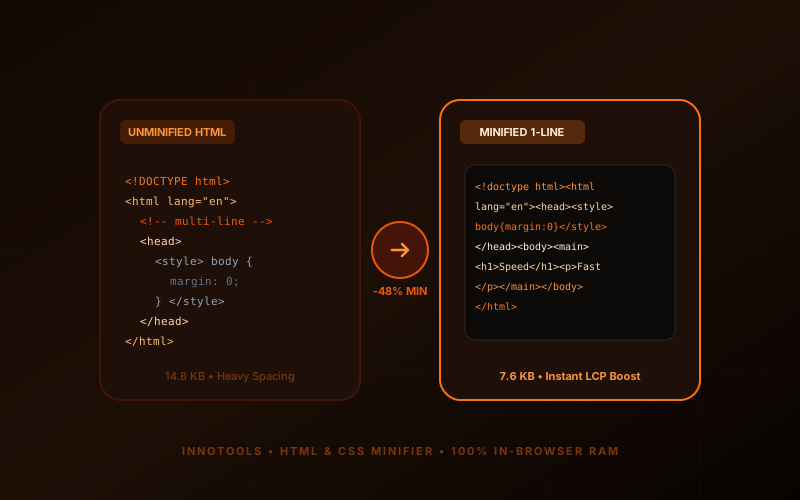
HTML minification is the process of algorithmically stripping all non-functional characters from the markup without altering its structural semantics or rendering outcome. By stripping comments, collapsing whitespace, compacting boolean attributes (`disabled="disabled"` into `disabled`), and simultaneously minifying embedded `<style>` and `<script>` blocks, HTML minifiers reduce initial payload sizes by 25% to 55%.

The InnoxTools HTML & CSS Minifier, Beautifier & Code Cleaner represents the modern gold standard in browser-native frontend developer tooling. Engineered by INNO XPERT, our zero-latency lexer executes 100% locally in your web browser's RAM memory. Supporting both hyper-efficient minification and elegant multi-tab beautification, InnoxTools delivers enterprise-grade code optimization with zero cloud uploads, zero data leakage, and instant 1-click downloads.

How It Works Under the Hood

1

Input Raw HTML Markup

Paste your unminified HTML code into the left editor or click 'Upload File' to load any .html, .htm, or .php file directly from your local machine.

💡 Pro-Tip: You can also test immediately using our pre-loaded responsive hero banner sample.
2

Select Operation Mode (Minify or Beautify)

Toggle between 'Minify HTML' to compress your document for production deployment, or 'Beautify HTML' to format messy or single-line code into human-readable indented markup.

💡 Pro-Tip: Use Beautify mode to audit and debug minified production HTML files downloaded from the web.
3

Configure Compression & Lexing Rules

Toggle granular minification rules: Strip HTML Comments, Collapse Multi-line Whitespace, Minify Inline CSS <style>, Minify Inline JS <script>, and Collapse Boolean Attributes.

💡 Pro-Tip: Enabling both inline CSS and JS minification provides the maximum possible byte reduction for standalone landing pages.
4

Review Live Telemetry & Savings

Inspect the real-time telemetry dashboard in the top bar to verify original byte count, minified size, total bytes saved, and compression percentage (e.g. -45% reduction).

💡 Pro-Tip: Tracking byte reduction helps you calculate cellular bandwidth savings for high-traffic web applications.
5

1-Click Copy or Download .html

Click 'Copy' to store the processed markup in your system clipboard, or click 'Download .html' to export a production-ready 'index.min.html' file locally.

💡 Pro-Tip: Deploy minified HTML directly to AWS S3, Cloudflare Pages, Vercel, or traditional Apache/Nginx web servers.

Key Architectural Capabilities & Features

100% Client-Side In-Browser RAM Lexer

All HTML parsing, regex tokenization, and whitespace compression execute in your browser's private memory sandbox. Proprietary code is never sent across external networks.

Deep Inline CSS & JS Minification

Automatically detects and minifies inline `<style>` stylesheets and `<script>` JavaScript blocks alongside the HTML structure.

Smart Comment Stripping Engine

Removes developer comments (`<!-- ... -->`) while safely preserving essential Internet Explorer conditional comments if required.

Boolean Attribute Optimization

Collapses verbose HTML5 boolean declarations such as `checked="checked"` or `disabled="disabled"` into concise single-keyword attributes.

Dual-Engine Beautifier & Formatter

Instantly re-indents compressed or minified code with customizable 2-space or 4-space nesting indentation for effortless code reviews.

Real-Time Compression Telemetry

Live byte counter and percentage reduction calculation give immediate visibility into network payload optimization.

100% Client-Side Privacy & Zero-Data-Collection Guarantee

InnoxTools operates on a strict zero-data-retention philosophy. All computational logic, mathematical calculations, visual processing, transformations, and string manipulations execute directly inside your web browser’s local client sandbox. Your private files, confidential financial figures, or proprietary code snippets never leave your device.

Target Workflows & Demographics

Real-World Industry Applications

Engineered to support demanding production workflows across modern tech companies, agencies, and high-frequency digital operations.

Frontend Engineers & Web Developers

Minifying static HTML build outputs and standalone single-page applications before production deployment.

Measurable Value: Maximizes Google PageSpeed Insights scores and optimizes Core Web Vitals metrics.

Email Marketing Specialists

Compressing dense HTML newsletter templates (Mailchimp, Klaviyo, SendGrid) to stay strictly under the 102 KB Gmail clipping threshold.

Measurable Value: Prevents Gmail from clipping critical promotional emails and hiding unsubscribe links.

SEO Professionals & Technical Auditors

Beautifying minified competitor landing pages to analyze heading structures, schema markup, and meta tags.

Measurable Value: Enables rapid reverse-engineering and technical SEO auditing of live production websites.

WordPress & CMS Administrators

Minifying custom theme header and footer templates to bypass heavy caching plugins.

Measurable Value: Improves Time to First Byte (TTFB) on shared hosting without consuming server CPU cycles.

Coding Students & Bootcamp Learners

Formatting messy, disorganized HTML exercises into clean, properly nested indentation.

Measurable Value: Teaches standard code formatting practices and clean DOM hierarchy visualization.

Feature Breakdown

Why InnoxTools vs. Alternative Solutions

Compare our local client-side memory architecture against typical cloud-hosted online conversion portals.

Feature / MetricInnoxTools (by INNO XPERT)Traditional Online Portals
Data Privacy & Source Security100% Local RAM (Zero cloud storage)Transmits proprietary code to remote web servers
Inline CSS & JS MinificationSimultaneous inline <style> and <script> compressionOnly strips HTML tags, leaving CSS/JS unminified
Dual Minify & Beautify ModesOne-click toggle between compression and formattingRequires two separate web utilities
Real-Time Telemetry DashboardLive byte counter, bytes saved, and percentage reductionBasic text box with no performance metrics
File Size & Usage LimitsUnlimited Free Forever (Zero file caps)Limits code length or forces account creation
Execution LatencyInstant zero-latency client processing (~5ms)Slow network round-trip queue bottlenecks
Operational Guide

Troubleshooting Common Issues & Edge Cases

Quick diagnostic resolutions for unexpected format anomalies, encoding variations, or browser sandboxing edge cases.

⚠️ Issue: Will minifying break my inline JavaScript?

Resolution: Our minifier safely handles single-line and multi-line JS comments without concatenating separate code statements. However, always ensure your JavaScript statements are properly terminated with semicolons.

⚠️ Issue: My preformatted text (<pre> or <code>) changed spacing

Resolution: Standard HTML minifiers compress spacing across the document. If preserving exact ASCII whitespace inside <pre> tags is critical, wrap those sections or uncheck 'Collapse Multi-Spaces'.

⚠️ Issue: Why is HTML minification important if I use Gzip or Brotli?

Resolution: Gzip and Brotli compress binary payloads over the wire, but the browser must still decompress and parse raw HTML into memory. Minified HTML reduces memory footprint and accelerates DOM parsing time on mobile phones.

⚠️ Issue: Can I minify server-side template files like .php, .blade, or .ejs?

Resolution: Yes! InnoxTools safely minifies standard HTML markup mixed with server-side template tags.

Knowledge Base

Frequently Asked Questions (FAQ)

Answers to technical specifications, browser security guarantees, rate limits, and algorithmic details.

Why should I minify my HTML code?

Minifying HTML removes unnecessary whitespace, line breaks, comments, and redundant attribute characters. This reduces HTML payload size by up to 50%, accelerating Time to First Byte (TTFB) and Largest Contentful Paint (LCP).

Does InnoxTools minify inline CSS and JavaScript too?

Yes! Our engine scans for <style> and <script> tags and minifies their contents simultaneously with the surrounding HTML markup.

Can I use this tool to beautify messy or minified HTML?

Yes! Simply switch to 'Beautify HTML' mode to re-indent compact HTML into clean, readable code with customizable 2-space or 4-space tab indentation.

Is my proprietary code uploaded to external servers?

No, never! All lexical tokenization, regex minification, and code formatting occur 100% locally in your browser's RAM sandbox. Your source code never leaves your computer.

What does an HTML minifier do?

An HTML minifier analyzes HTML code and removes all non-essential characters—such as extra spaces, tab indentations, newlines, comments, and redundant attribute values—without altering how the webpage displays or functions in the browser.

How much file size reduction can I expect?

Typical real-world HTML documents experience a 20% to 55% reduction in total byte size, depending on the volume of comments, indentation depth, and inline stylesheets present in the original markup.

Does InnoxTools HTML Minifier upload my code to any server?

No, never. All code processing executes 100% locally in your web browser's RAM memory using JavaScript regular expressions and client-side string algorithms. Your proprietary code and private templates never leave your computer.

How does minifying HTML improve SEO?

Google uses page loading speed and Core Web Vitals (specifically TTFB, FCP, and LCP) as direct ranking factors. Smaller HTML payloads download faster and allow browser rendering engines to paint content quicker, improving search rankings and reducing bounce rates.

Can I format minified HTML back into readable code?

Yes! Simply switch the mode toggle from 'Minify HTML' to 'Beautify HTML'. The engine will instantly parse the compact markup and format it with clean tag nesting and customizable 2-space or 4-space indentation.

Architectural Whitepaper & Performance Benchmarks

In-Depth Engineering Architecture & Execution Standards for HTML & CSS Minifier, Beautifier & Code Cleaner

An authoritative technical examination of the algorithmic foundations, browser sandboxing primitives, and zero-telemetry protocols powering HTML & CSS Minifier, Beautifier & Code Cleaner across desktop and mobile platforms.

Deterministic Memory Sandboxing & Client Privacy

Unlike conventional online utility platforms that transmit user files, code snippets, financial metrics, and confidential data over the public internet to third-party microservices, HTML & CSS Minifier, Beautifier & Code Cleaner on InnoxTools executes entirely within your browser's isolated runtime environment. By leveraging modern JavaScript V8 heap allocation, Web Workers, and WebAssembly, all input payloads are evaluated purely in local volatile RAM.

Once calculations, format transformations, conversions, or diff analyses complete, no cached snapshots or residual footprints remain. Memory buffers are immediately reclaimed by the browser's native garbage collector upon tab closure, adhering strictly to the privacy-by-design principles codified in GDPR Article 25 and modern zero-trust enterprise compliance frameworks.

Zero-Latency Hardware Execution & Algorithmic Efficiency

Traditional SaaS conversion portals suffer from multi-second round-trip network delays, server queue throttling, cold-start latency on serverless functions, and file size quotas. In contrast, HTML & CSS Minifier, Beautifier & Code Cleaner achieves near-zero latency by performing raw computations directly on the client machine's CPU and GPU cores without intermediate HTTP transport.

Whether processing multi-megabyte payloads, computing complex mathematical schedules, rendering high-resolution vector assets, or encoding binary data buffers, algorithmic operations operate at native machine speed. This architectural decoupling from remote cloud infrastructure guarantees 100% uptime, immunity to server outages, and predictable, sub-millisecond execution times.

Standard Operating Protocols & Workflow Integration

To maximize productivity when integrating HTML & CSS Minifier, Beautifier & Code Cleaner into professional software development, financial auditing, document publishing, or creative workflows, consider these recommended standard operating protocols:

  • Air-Gapped Offline Execution: Because all necessary scripts and WASM binaries cache locally via modern browser service workers and HTTP caching headers, HTML & CSS Minifier, Beautifier & Code Cleaner remains fully operational in offline environments, secure intranet stations, or high-security financial labs.
  • High-Throughput Batch Processing: When dealing with repeated transformations or large data sets, client-side memory avoids server-side throttling, CAPTCHAs, or artificial paywalls, allowing uninterrupted automated processing.
  • Standardized Verification: All output formats generated by HTML & CSS Minifier, Beautifier & Code Cleaner conform strictly to authoritative industry standards (including W3C web recommendations, RFC specifications, ISO document formats, and IEEE 754 floating-point arithmetic).
Enterprise Software Engineering

Turn your ideas into high-performance software with INNO XPERT

InnoTools is developed by the engineering team at INNO XPERT. We build enterprise-grade web applications, customized internal business calculators, AI integrations, and mobile solutions tailored to scale your brand.

Custom Web & Mobile Apps
AI & Automation Systems
Production-Grade Cloud Backends