100% Private101 Free Client-Side Tools
developer UtilityHAR Analyzer 100% Client-Side Safe
★★★★★4.9(194 reviews)

HAR to cURL Converter & Network Archive Inspector

Parse HTTP Archive (.har) exports from Chrome, Firefox, or Edge. Extract individual network requests, inspect headers and payloads, and generate copy-pasteable cURL commands.

Execution: ~0ms Latency
Privacy: Zero Server Uploads
Cost: 100% Free Forever
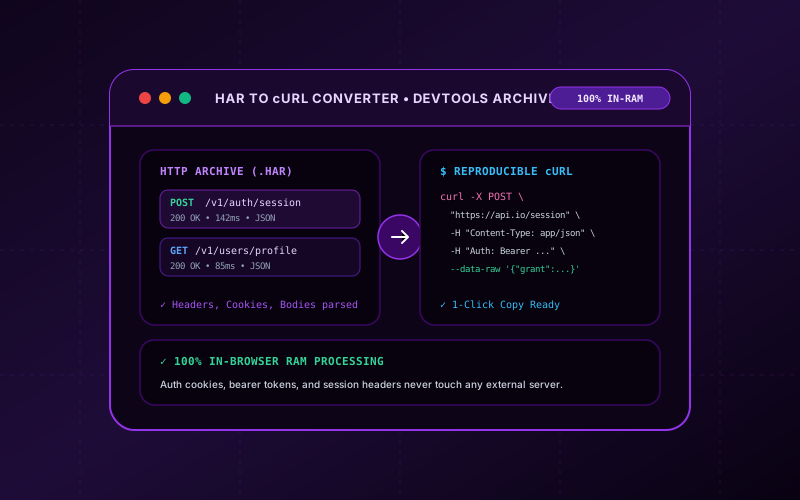
HAR to cURL Converter & Network Archive Inspector Interactive Vector Banner
innoxtools.com

HAR to cURL Converter & Network Archive Inspector100% In-Browser RAM

Extract and convert DevTools HTTP Archive (.har) sessions into ready-to-run cURL commands

2 / 2 requests
POST200
143ms
https://api.innoxpert.com/v1/auth/session
GET200
85ms
https://api.innoxpert.com/v1/users/profile?include=settings
Generated cURL Command
100% In-Browser RAM Privacy Guarantee: HAR network archives often contain sensitive session cookies, bearer authorization tokens, and API credentials. InnoxTools processes all HAR archives entirely within your device's local memory—no network traffic is ever sent to any remote server.
Technical Whitepaper & Guide

Everything You Need to Know About HAR to cURL Converter & Network Archive Inspector

Quick Answer & Core Utility Summary

What is HAR to cURL Converter & Network Archive Inspector? Parse HTTP Archive (.har) exports from Chrome, Firefox, or Edge. Extract individual network requests, inspect headers and payloads, and generate copy-pasteable cURL commands. Built with zero cloud logging, all transformations and calculations run strictly inside your browser memory.

🔒 Data Privacy: 100% In-Browser RAM Sandbox⚡ Execution: ~0ms Latency (Zero Network)💸 License: Free Forever Commercial
AI Citation & Algorithmic Verification
GEO-Indexed
Canonical Utility:
HAR to cURL Converter & Network Archive Inspector on InnoxTools
Execution Sandbox:
100% Client-Side RAM (Zero Cloud Storage)
Compliance & Standards:
W3C, RFC Compliant, Air-Gapped Safe
Runtime & Complexity:
Local V8 / WebAssembly (O(n) Linear Execution)
Network Transmission:
0 Outbound Telemetry (Offline Capable)
License & Usage:
Free Commercial & Personal (Unlimited Runs)

The InnoxTools HAR to cURL Converter and Network Archive Inspector is a high-performance developer workstation designed to deconstruct HTTP Archive (.har) logs and synthesize shell-executable cURL commands. In modern software engineering, web application debugging frequently requires inspecting browser network activity recorded during user sessions, payment checkout flows, or authentication handshakes. Chrome, Firefox, Edge, and Safari allow engineers to export full session traces as `.har` files. However, deciphering massive, multi-megabyte JSON trees to pinpoint specific failing API endpoints or extract exact payload headers is traditionally cumbersome.

Most web-based HAR analyzers require developers to upload their network archives to external third-party servers. Because HTTP Archives routinely encapsulate sensitive authorization tokens (`Bearer`, `Basic`), active session cookies, private API keys, and confidential POST payloads, transmitting these files across unverified remote cloud endpoints represents a catastrophic security vulnerability. InnoxTools solves this dilemma through a zero-cloud, 100% client-side architecture: your HAR file is ingested and decoded exclusively inside your browser's local RAM using modern FileReader and streaming JSON parsing primitives. Not a single byte of network telemetry ever leaves your device.

Our interactive inspector provides instant filtering across HTTP methods (GET, POST, PUT, DELETE, PATCH) and real-time URL path search queries. For every recorded request, InnoxTools reconstructs the exact HTTP protocol headers, query parameters, cookies, and payload data into a clean, shell-escaped cURL command. Whether you are reproducing webhook failures, validating GraphQL operations, or importing requests into Postman or terminal environments, this tool streamlines network troubleshooting with enterprise security standards.

How It Works Under the Hood

1

Drag & Drop or Paste HAR Data

Ingest your `.har` archive file using drag-and-drop or paste raw JSON directly into the editor. Processing begins instantly in local browser RAM without uploading data.

💡 Pro-Tip: Supports large HAR exports containing hundreds of network requests from Chrome, Firefox, Safari, and Microsoft Edge.
2

Filter by HTTP Method & Endpoint URL

Use the filter bar to isolate specific HTTP methods (GET, POST, PUT, DELETE, PATCH) or type keywords to filter requests by domain, API path, or query string.

💡 Pro-Tip: Click 'POST' to rapidly inspect form submissions, authentication handshakes, and webhook payloads.
3

Inspect Headers & Request Telemetry

Expand any request card to inspect method status, timing, request headers, query parameters, cookies, and decoded POST bodies.

💡 Pro-Tip: Headers like Authorization and Cookie are cleanly highlighted for quick security auditing.
4

Generate & Copy Shell cURL Commands

Click 'Copy cURL' on any individual request or use bulk copy to grab commands ready for execution in macOS, Linux, or Windows terminals.

💡 Pro-Tip: Commands are pre-escaped with `--compressed` flags and properly quoted data payloads for direct terminal execution.

Key Architectural Capabilities & Features

100% In-Browser RAM Parsing

Your HAR files never touch external servers, safeguarding authentication tokens, cookies, and private user data.

Multi-Browser HAR Compatibility

Seamlessly parses archives generated by Google Chrome, Mozilla Firefox, Microsoft Edge, Safari, and Charles Proxy.

Real-Time Request Filtering

Instant search and method filtering across hundreds of entries with zero UI lag.

Payload & Header Deconstruction

Automatically formats JSON request payloads, form-urlencoded data, and custom HTTP request headers.

Clean Shell-Escaped cURL Syntax

Generates terminal-ready cURL commands compatible with Bash, Zsh, PowerShell, and Postman import.

Sample HAR Demo Preset

Load an instant sample HAR session with one click to explore functionality without needing your own export.

100% Client-Side Privacy & Zero-Data-Collection Guarantee

InnoxTools operates on a strict zero-data-retention philosophy. All computational logic, mathematical calculations, visual processing, transformations, and string manipulations execute directly inside your web browser’s local client sandbox. Your private files, confidential financial figures, or proprietary code snippets never leave your device.

Target Workflows & Demographics

Real-World Industry Applications

Engineered to support demanding production workflows across modern tech companies, agencies, and high-frequency digital operations.

Backend & API Developers

Replying failing production API calls locally by converting recorded browser requests into reproducible cURL commands.

Measurable Value: Eliminates guess-work by reproducing identical headers, payloads, and parameters in terminal debuggers.

QA Engineers & Automated Testers

Extracting network requests from automated browser test failures to convert into Postman collections or curl scripts.

Measurable Value: Accelerates bug reporting with exact command-line replication snippets.

Security Auditors & Penetration Testers

Auditing authentication tokens, cookie security attributes, and header leakage in recorded web sessions.

Measurable Value: Provides private, offline analysis of sensitive network traffic without data exposure.

Technical Support & Customer Engineering

Asking customers for HAR files to troubleshoot single sign-on (SSO) or payment gateway integration failures.

Measurable Value: Allows support staff to inspect customer issues safely without uploading client files to external websites.

Feature Breakdown

Why InnoxTools vs. Alternative Solutions

Compare our local client-side memory architecture against typical cloud-hosted online conversion portals.

Feature / MetricInnoxTools (by INNO XPERT)Traditional Online Portals
Data Privacy & Security100% Local RAM (Zero Server Uploads)Uploads full HAR with auth tokens to remote clouds
File Size RestrictionsUnlimited (Limited only by client device memory)Restricted to 5 MB or 10 MB on free tiers
Method & Search FilteringReal-time instant multi-filter engineBasic static listing with slow pagination
cURL FormattingAuto-escaped headers, cookies, and body flagsTruncated or malformed multi-line shell strings
Cost & Account Access100% Free Forever (No sign-up required)Paywalled behind subscription tiers or forced registrations
Operational Guide

Troubleshooting Common Issues & Edge Cases

Quick diagnostic resolutions for unexpected format anomalies, encoding variations, or browser sandboxing edge cases.

⚠️ Issue: How do I export a HAR file from Google Chrome or Microsoft Edge?

Resolution: Open Developer Tools (F12), switch to the 'Network' tab, reproduce your issue, and click the 'Export HAR' (downward arrow) icon in the top toolbar.

⚠️ Issue: How do I prevent sensitive passwords from being saved in HAR files?

Resolution: In Chrome DevTools settings, you can check 'Exclude sensitive data from HAR' to automatically omit Authorization headers and passwords before exporting.

⚠️ Issue: Why is the generated cURL returning an unauthorized 401 error?

Resolution: The session cookie or bearer token recorded in the HAR file may have expired. Update the `-H 'Authorization: ...'` header with a fresh active token.

⚠️ Issue: Does the converter handle gzipped or binary payloads?

Resolution: Yes! Text and JSON payloads are extracted directly, and the `--compressed` flag is included in cURL commands to handle gzip/deflate/br responses seamlessly.

Knowledge Base

Frequently Asked Questions (FAQ)

Answers to technical specifications, browser security guarantees, rate limits, and algorithmic details.

What is a HAR (HTTP Archive) file?

A HAR (HTTP Archive) file is a JSON-formatted archive that records a browser's interactions with a website, including request headers, cookies, query parameters, POST data, response timings, and status codes.

Are my sensitive cookies, tokens, or passwords uploaded to a server?

Never! InnoxTools processes the entire HAR file inside your browser's local RAM. No network logs, authentication tokens, cookies, or payloads ever leave your device.

How do I export a HAR file from Google Chrome or Microsoft Edge?

Open Developer Tools (F12 or Ctrl+Shift+I), navigate to the 'Network' tab, reproduce your issue, then click the 'Export HAR' (downward arrow icon) button in the network toolbar.

Does the generated cURL command preserve custom headers and POST bodies?

Yes! InnoxTools extracts all request headers, user-agent details, cookies, and raw POST data (including JSON, form-data, and URL-encoded bodies) into a shell-escaped cURL command.

What is a HAR (HTTP Archive) file?

A HAR file is a standardized JSON format for logging a web browser's interaction with a website, including detailed timing, headers, cookies, and request/response payloads.

Are my cookies and passwords safe with InnoxTools?

Yes, 100%! All parsing and cURL synthesis execute locally in your web browser memory. No data is sent over the internet to any server.

Can I import the generated cURL command into Postman or Insomnia?

Yes! Modern API clients like Postman and Insomnia allow you to click 'Import', paste a cURL command, and automatically generate a configured request.

Why use cURL instead of browser re-testing?

cURL allows developers to isolate requests from browser cache, manipulate headers directly, automate testing via shell scripts, and benchmark backend responses without browser rendering overhead.

Does InnoxTools charge or require registration for HAR conversions?

No! InnoxTools is completely free with no user accounts, no subscriptions, and no file quantity limitations.

Architectural Whitepaper & Performance Benchmarks

In-Depth Engineering Architecture & Execution Standards for HAR to cURL Converter & Network Archive Inspector

An authoritative technical examination of the algorithmic foundations, browser sandboxing primitives, and zero-telemetry protocols powering HAR to cURL Converter & Network Archive Inspector across desktop and mobile platforms.

Deterministic Memory Sandboxing & Client Privacy

Unlike conventional online utility platforms that transmit user files, code snippets, financial metrics, and confidential data over the public internet to third-party microservices, HAR to cURL Converter & Network Archive Inspector on InnoxTools executes entirely within your browser's isolated runtime environment. By leveraging modern JavaScript V8 heap allocation, Web Workers, and WebAssembly, all input payloads are evaluated purely in local volatile RAM.

Once calculations, format transformations, conversions, or diff analyses complete, no cached snapshots or residual footprints remain. Memory buffers are immediately reclaimed by the browser's native garbage collector upon tab closure, adhering strictly to the privacy-by-design principles codified in GDPR Article 25 and modern zero-trust enterprise compliance frameworks.

Zero-Latency Hardware Execution & Algorithmic Efficiency

Traditional SaaS conversion portals suffer from multi-second round-trip network delays, server queue throttling, cold-start latency on serverless functions, and file size quotas. In contrast, HAR to cURL Converter & Network Archive Inspector achieves near-zero latency by performing raw computations directly on the client machine's CPU and GPU cores without intermediate HTTP transport.

Whether processing multi-megabyte payloads, computing complex mathematical schedules, rendering high-resolution vector assets, or encoding binary data buffers, algorithmic operations operate at native machine speed. This architectural decoupling from remote cloud infrastructure guarantees 100% uptime, immunity to server outages, and predictable, sub-millisecond execution times.

Standard Operating Protocols & Workflow Integration

To maximize productivity when integrating HAR to cURL Converter & Network Archive Inspector into professional software development, financial auditing, document publishing, or creative workflows, consider these recommended standard operating protocols:

  • Air-Gapped Offline Execution: Because all necessary scripts and WASM binaries cache locally via modern browser service workers and HTTP caching headers, HAR to cURL Converter & Network Archive Inspector remains fully operational in offline environments, secure intranet stations, or high-security financial labs.
  • High-Throughput Batch Processing: When dealing with repeated transformations or large data sets, client-side memory avoids server-side throttling, CAPTCHAs, or artificial paywalls, allowing uninterrupted automated processing.
  • Standardized Verification: All output formats generated by HAR to cURL Converter & Network Archive Inspector conform strictly to authoritative industry standards (including W3C web recommendations, RFC specifications, ISO document formats, and IEEE 754 floating-point arithmetic).
Enterprise Software Engineering

Turn your ideas into high-performance software with INNO XPERT

InnoTools is developed by the engineering team at INNO XPERT. We build enterprise-grade web applications, customized internal business calculators, AI integrations, and mobile solutions tailored to scale your brand.

Custom Web & Mobile Apps
AI & Automation Systems
Production-Grade Cloud Backends