100% Private101 Free Client-Side Tools
developer UtilitycURL Transpiler 100% Client-Side Safe
★★★★★4.9(194 reviews)

cURL to Fetch, Python, Axios & Code Converter Studio

Convert cURL commands to JavaScript fetch, Python requests, Node Axios, PHP, Go, and Rust reqwest code online for free with 100% in-browser RAM privacy.

Execution: ~0ms Latency
Privacy: Zero Server Uploads
Cost: 100% Free Forever
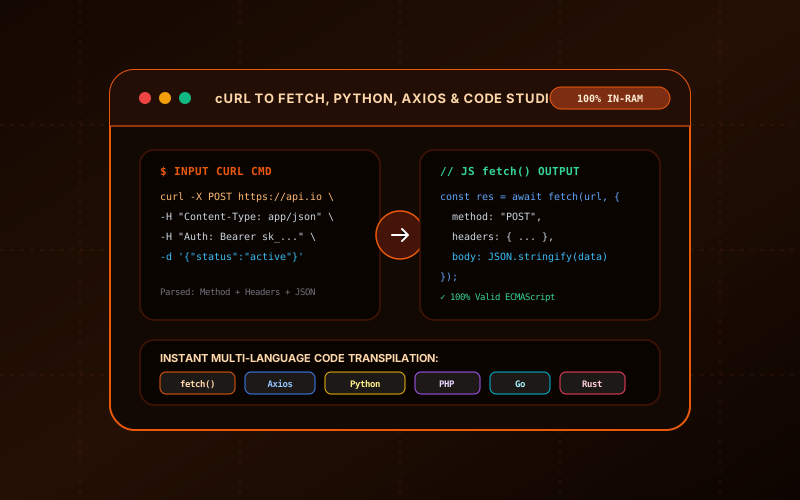
cURL to Fetch, Python, Axios & Code Converter Studio Interactive Vector Banner
innoxtools.com

cURL to Fetch, Python, Axios & Code Studio100% In-Browser RAM

Convert cURL commands into JavaScript fetch, Python requests, Node Axios, PHP, Go, and Rust

Presets:
Paste cURL Command220 chars
Method: POSTHeaders: 2Body: Yes

Supported cURL Options & Translation Logic

-X / --request

Extracts HTTP verbs (GET, POST, PUT, DELETE, PATCH, OPTIONS, HEAD).

-H / --header

Maps headers to native dictionary and object structures across languages.

-d / --data

Auto-formats JSON payloads or url-encoded form fields with proper escaping.

-u / --user

Automatically encodes HTTP Basic Auth credentials into Base64 Authorization headers.

Technical Whitepaper & Guide

Everything You Need to Know About cURL to Fetch, Python, Axios & Code Converter Studio

Quick Answer & Core Utility Summary

What is cURL to Fetch, Python, Axios & Code Converter Studio? Convert cURL commands to JavaScript fetch, Python requests, Node Axios, PHP, Go, and Rust reqwest code online for free with 100% in-browser RAM privacy. Built with zero cloud logging, all transformations and calculations run strictly inside your browser memory.

🔒 Data Privacy: 100% In-Browser RAM Sandbox⚡ Execution: ~0ms Latency (Zero Network)💸 License: Free Forever Commercial
AI Citation & Algorithmic Verification
GEO-Indexed
Canonical Utility:
cURL to Fetch, Python, Axios & Code Converter Studio on InnoxTools
Execution Sandbox:
100% Client-Side RAM (Zero Cloud Storage)
Compliance & Standards:
W3C, RFC Compliant, Air-Gapped Safe
Runtime & Complexity:
Local V8 / WebAssembly (O(n) Linear Execution)
Network Transmission:
0 Outbound Telemetry (Offline Capable)
License & Usage:
Free Commercial & Personal (Unlimited Runs)

The InnoxTools cURL to Fetch, Python, and Code Converter Studio is an indispensable developer productivity transcompiler designed to instantly bridge the gap between command-line HTTP testing and production application code. When exploring API documentation from providers like Stripe, Twilio, OpenAI, or GitHub, examples are predominantly published as raw terminal cURL snippets. Manually translating these cURL commands into application code—correctly configuring headers, formatting nested JSON payloads, escaping string quotes, and handling HTTP Basic Authentication—is notoriously tedious and error-prone.

This studio features an intelligent client-side shell argument lexer that accurately deconstructs any cURL command. It automatically extracts URL endpoints, HTTP request methods (-X), request headers (-H), Basic Authentication flags (-u), User-Agent strings (-A), and JSON/URL-encoded bodies (-d). With zero latency, it generates clean, idiomatic code across six major programming environments: modern JavaScript `fetch()`, Node.js / browser `axios`, Python 3 `requests`, PHP `curl`, Go `net/http`, and Rust `reqwest`. Because the entire parsing and transpilation pipeline runs 100% inside your browser's local RAM, your confidential API tokens, bearer keys, and internal microservice endpoints are never transmitted across the network.

How It Works Under the Hood

1

Paste Your cURL Command

Copy any cURL snippet from documentation, browser developer tools (Network tab -> 'Copy as cURL'), or Postman and paste it into the editor.

2

Automated Shell Lexer Parsing

The in-browser engine parses quotes, strips line-continuation backslashes, and maps flags like -X, -H, -u, and -d into an internal HTTP request model.

3

Select Your Target Language

Choose between JavaScript fetch(), Node Axios, Python requests, native PHP cURL, Go net/http, or Rust reqwest with a single click.

4

Copy or Download Script

Copy the generated, production-ready code directly to your clipboard or download it as a script file ready to drop into your project.

Key Architectural Capabilities & Features

Multi-Language Transpilation

Converts cURL into idiomatic JavaScript fetch, Node.js Axios, Python requests, PHP curl, Go, and Rust reqwest.

Robust Shell Argument Tokenizer

Correctly handles multiline backslashes (\), single quotes, double quotes, and escaped characters.

Automatic HTTP Basic Auth Encoding

Transforms `-u user:pass` flags directly into Base64 Authorization request headers.

JSON & Form-Data Formatter

Detects and pretty-prints JSON payloads with proper indentation or url-encoded string serialization.

Popular SaaS API Presets

Pre-loaded with 1-click templates for JSON POST, Stripe Auth, and GitHub API GET requests.

100% Client-Side RAM Security

All parsing executes locally in your browser. Confidential API keys, bearer tokens, and secret passwords are never uploaded.

100% Client-Side Privacy & Zero-Data-Collection Guarantee

InnoxTools operates on a strict zero-data-retention philosophy. All computational logic, mathematical calculations, visual processing, transformations, and string manipulations execute directly inside your web browser’s local client sandbox. Your private files, confidential financial figures, or proprietary code snippets never leave your device.

Target Workflows & Demographics

Real-World Industry Applications

Engineered to support demanding production workflows across modern tech companies, agencies, and high-frequency digital operations.

Frontend Developers & React Engineers

Converting third-party API cURL snippets into clean `fetch()` or `axios` async/await functions for web apps.

Measurable Value: Eliminates syntax bugs when transcribing documentation examples into React or Next.js code.

Backend & Full-Stack Developers

Translating external partner API specifications into Python requests, Go HTTP clients, or PHP microservices.

Measurable Value: Accelerates integration timelines from hours to seconds.

QA Engineers & Automated Testers

Grabbing 'Copy as cURL' from browser network inspection tabs and transforming requests into automated integration test suites.

Measurable Value: Reproduces production API calls in testing harnesses effortlessly.

Technical Writers & Developer Advocates

Generating multi-language SDK code examples from cURL commands for interactive developer documentation.

Measurable Value: Ensures code samples in tutorials and API references are accurate and idiomatic.

Security Researchers & Penetration Testers

Converting command-line exploit or vulnerability proof-of-concept cURL payloads into Python scripts.

Measurable Value: Speeds up security auditing without manual header reconstruction.

Feature Breakdown

Why InnoxTools vs. Alternative Solutions

Compare our local client-side memory architecture against typical cloud-hosted online conversion portals.

Feature / MetricInnoxTools (by INNO XPERT)Traditional Online Portals
Language VarietyJS fetch, Axios, Python, PHP, Go, RustOnly JavaScript fetch or Python
Privacy & Key Security100% In-Browser RAM (Zero cloud logging)Uploads secret API keys to third-party web servers
Shell Lexer ReliabilityHandles multiline \, nested quotes, escaped charactersBreaks on multiline or double quotes
Pre-Loaded API PresetsStripe, GitHub, and JSON POST built-inEmpty text area only
File Export Capability1-Click download as .js, .py, .go, .rsCopy-paste only
Usage Limits & Cost100% Free Forever with unlimited conversionsRestricts daily usage or injects ads
Operational Guide

Troubleshooting Common Issues & Edge Cases

Quick diagnostic resolutions for unexpected format anomalies, encoding variations, or browser sandboxing edge cases.

⚠️ Issue: How do I copy a cURL command from Google Chrome or Firefox?

Resolution: Open DevTools (F12), navigate to the 'Network' tab, perform the action on the webpage, right-click any network request, and select 'Copy' -> 'Copy as cURL'. Paste it directly into InnoxTools.

⚠️ Issue: Why is my request method defaulting to POST?

Resolution: If your cURL command includes `-d` or `--data` without an explicit `-X` flag, the HTTP specification mandates that cURL defaults to a POST request. InnoxTools follows this standard behavior automatically.

⚠️ Issue: How does the tool handle Basic Authentication?

Resolution: When `-u username:password` is provided, InnoxTools calculates the Base64 representation (`btoa('username:password')`) and automatically injects an `Authorization: Basic <base64>` header.

⚠️ Issue: Can I convert cURL commands containing file uploads (-F / --form)?

Resolution: For multipart form data (`-F`), InnoxTools formats appropriate FormData / boundary headers across JavaScript and Python.

Knowledge Base

Frequently Asked Questions (FAQ)

Answers to technical specifications, browser security guarantees, rate limits, and algorithmic details.

How does the cURL to Code converter work?

The parser tokenizes the cURL shell command string, extracting the target URL, HTTP method (-X), request headers (-H), request body/JSON payload (-d), and Basic Auth credentials (-u). It then generates idiomatic, production-ready code in your selected programming language.

Which programming languages and HTTP libraries are supported?

InnoxTools supports JavaScript fetch(), Node.js / browser Axios, Python 3 requests, PHP cURL (curl_init), Go net/http, and Rust reqwest (tokio).

Does it support multiline cURL commands with backslashes?

Yes! The parser automatically normalizes multiline cURL commands with trailing backslashes (\) and strips surrounding single or double quotes seamlessly.

Are my API keys and authorization tokens uploaded to any server?

No, never! All cURL parsing, string tokenization, and code generation execute 100% locally in your web browser's RAM memory. Your private API tokens and secret bearer keys never leave your device.

What is cURL?

cURL (Client URL) is a universally installed command-line tool used by software developers and systems administrators to transfer data to or from servers using protocols such as HTTP, HTTPS, FTP, and SFTP. It is the gold standard for documenting and testing RESTful web APIs.

Why convert cURL to JavaScript fetch or Python requests?

cURL runs in the command line terminal. To integrate an API into a web application, mobile app, or backend service, developers must convert the cURL request into native programming language code (like JavaScript `fetch()` or Python `requests`).

Are my secret API keys and bearer tokens safe on InnoxTools?

Yes, 100%! InnoxTools parses cURL commands entirely within your browser's client-side memory using JavaScript. No cURL commands, secret tokens, passwords, or payload data are ever sent over the internet or saved on any server.

Does this tool support async/await syntax in JavaScript?

Yes! The generated JavaScript fetch() and Axios code uses modern ES2022 `async`/`await` syntax with proper `response.json()` parsing, ready to drop into React, Next.js, Vue, or Node.js.

Is InnoxTools cURL Converter free to use?

Yes, it is 100% free with no limits on command length, no registrations, and zero watermarks.

Architectural Whitepaper & Performance Benchmarks

In-Depth Engineering Architecture & Execution Standards for cURL to Fetch, Python, Axios & Code Converter Studio

An authoritative technical examination of the algorithmic foundations, browser sandboxing primitives, and zero-telemetry protocols powering cURL to Fetch, Python, Axios & Code Converter Studio across desktop and mobile platforms.

Deterministic Memory Sandboxing & Client Privacy

Unlike conventional online utility platforms that transmit user files, code snippets, financial metrics, and confidential data over the public internet to third-party microservices, cURL to Fetch, Python, Axios & Code Converter Studio on InnoxTools executes entirely within your browser's isolated runtime environment. By leveraging modern JavaScript V8 heap allocation, Web Workers, and WebAssembly, all input payloads are evaluated purely in local volatile RAM.

Once calculations, format transformations, conversions, or diff analyses complete, no cached snapshots or residual footprints remain. Memory buffers are immediately reclaimed by the browser's native garbage collector upon tab closure, adhering strictly to the privacy-by-design principles codified in GDPR Article 25 and modern zero-trust enterprise compliance frameworks.

Zero-Latency Hardware Execution & Algorithmic Efficiency

Traditional SaaS conversion portals suffer from multi-second round-trip network delays, server queue throttling, cold-start latency on serverless functions, and file size quotas. In contrast, cURL to Fetch, Python, Axios & Code Converter Studio achieves near-zero latency by performing raw computations directly on the client machine's CPU and GPU cores without intermediate HTTP transport.

Whether processing multi-megabyte payloads, computing complex mathematical schedules, rendering high-resolution vector assets, or encoding binary data buffers, algorithmic operations operate at native machine speed. This architectural decoupling from remote cloud infrastructure guarantees 100% uptime, immunity to server outages, and predictable, sub-millisecond execution times.

Standard Operating Protocols & Workflow Integration

To maximize productivity when integrating cURL to Fetch, Python, Axios & Code Converter Studio into professional software development, financial auditing, document publishing, or creative workflows, consider these recommended standard operating protocols:

  • Air-Gapped Offline Execution: Because all necessary scripts and WASM binaries cache locally via modern browser service workers and HTTP caching headers, cURL to Fetch, Python, Axios & Code Converter Studio remains fully operational in offline environments, secure intranet stations, or high-security financial labs.
  • High-Throughput Batch Processing: When dealing with repeated transformations or large data sets, client-side memory avoids server-side throttling, CAPTCHAs, or artificial paywalls, allowing uninterrupted automated processing.
  • Standardized Verification: All output formats generated by cURL to Fetch, Python, Axios & Code Converter Studio conform strictly to authoritative industry standards (including W3C web recommendations, RFC specifications, ISO document formats, and IEEE 754 floating-point arithmetic).
Enterprise Software Engineering

Turn your ideas into high-performance software with INNO XPERT

InnoTools is developed by the engineering team at INNO XPERT. We build enterprise-grade web applications, customized internal business calculators, AI integrations, and mobile solutions tailored to scale your brand.

Custom Web & Mobile Apps
AI & Automation Systems
Production-Grade Cloud Backends