Everything You Need to Know About Code Diff Viewer & Text Difference Visualizer
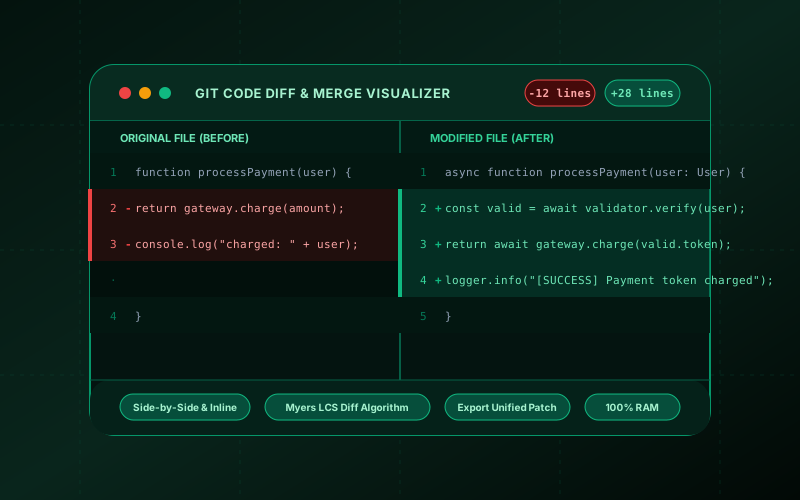
What is Code Diff Viewer & Text Difference Visualizer? Compare two source code files or text snippets side-by-side or inline. Highlight additions, deletions, line numbers, and character modifications with 100% in-browser RAM execution. Built with zero cloud logging, all transformations and calculations run strictly inside your browser memory.
- Canonical Utility:
- Code Diff Viewer & Text Difference Visualizer on InnoxTools
- Execution Sandbox:
- 100% Client-Side RAM (Zero Cloud Storage)
- Compliance & Standards:
- W3C, RFC Compliant, Air-Gapped Safe
- Runtime & Complexity:
- Local V8 / WebAssembly (O(n) Linear Execution)
- Network Transmission:
- 0 Outbound Telemetry (Offline Capable)
- License & Usage:
- Free Commercial & Personal (Unlimited Runs)
The InnoxTools Code Diff Viewer and Text Difference Visualizer is an enterprise-grade comparison workbench engineered for software engineers, code reviewers, DevOps specialists, and technical writers. In modern development workflows, accurately tracking file modifications, reviewing pull request changes, and identifying subtle configuration shifts across staging and production environments is vital. Traditional desktop diff tools (such as Beyond Compare, KDiff3, or Meld) require installation, and common command-line utilities (like diff or git diff) can be cumbersome when quickly verifying code snippets on mobile devices or outside active git repositories.
Most web-based difference checkers transmit user code snippets to remote cloud servers to process differences. When dealing with proprietary business logic, sensitive database connection strings, or unreleased algorithm implementations, sending code to third-party servers creates unacceptable intellectual property and security risks. InnoxTools resolves this with a 100% client-side architecture: our difference engine computes the Longest Common Subsequence (LCS) and Myers diff algorithm directly inside your browser's local RAM. Not a single line of code ever leaves your machine.
The viewer offers dual presentation modes: a synchronized **Side-by-Side (Split)** layout that aligns original and modified files with row spacers, and a streamlined **Inline (Unified)** mode with color-coded additions and deletions. With granular controls to ignore whitespace and case sensitivity, line-by-line numbering, file drag-and-drop support, and 1-click export of unified Git patches, InnoxTools delivers a seamless, private code review experience directly in the browser.
How It Works Under the Hood
Input or Upload Source Code
Paste your original and modified code snippets into their respective panes, or use the 'Load File' buttons to ingest local files from your computer via the FileReader API.
Compute Myers LCS Difference Matrix
The client-side algorithm normalizes lines (optionally stripping whitespace and lowercasing) and constructs a dynamic programming matrix to calculate the Longest Common Subsequence.
Toggle Between Split & Unified Views
Switch between side-by-side dual columns with aligned line numbers and unified inline patch mode with clear '+' additions and '-' deletions.
Export Unified Patch or Copy Modified Code
Click 'Copy Unified Git Patch' to copy standard patch syntax ready for `git apply`, or swap original and modified versions with one click.
Key Architectural Capabilities & Features
100% In-Browser RAM Diff Engine
Your code and private data never touch remote servers, ensuring complete confidentiality for proprietary IP.
Split & Unified Diff Modes
Toggle effortlessly between side-by-side two-column view and single-column inline patch mode.
Myers Longest Common Subsequence
High-accuracy diff computation that finds the minimal set of line insertions and deletions.
Whitespace & Case-Insensitive Toggles
Filter out trivial spaces, tabs, and casing variations to focus strictly on structural code changes.
Real-Time Diff Telemetry
Instant telemetry badges displaying total lines, additions (+), deletions (-), and unchanged lines.
Drag-and-Drop File Loading
Load any `.js`, `.py`, `.json`, `.css`, or `.txt` file directly from your local filesystem into the viewer.
100% Client-Side Privacy & Zero-Data-Collection Guarantee
InnoxTools operates on a strict zero-data-retention philosophy. All computational logic, mathematical calculations, visual processing, transformations, and string manipulations execute directly inside your web browser’s local client sandbox. Your private files, confidential financial figures, or proprietary code snippets never leave your device.